An ergonomic mouse for index finger pain can reduce unnecessary finger movement and improve hand positioning, but the right choice depends on the cause of your discomfort, your grip style, and how you use your computer.
For many computer users in the United States, long hours spent clicking, scrolling, and navigating screens can contribute to hand discomfort. An ergonomic mouse designed with a different shape, button placement, or control method may help reduce repeated stress on the index finger by changing how force and movement are distributed.
Index finger pain while using a mouse can have several causes, including excessive clicking, poor grip technique, awkward wrist angles, or existing hand conditions. An ergonomic mouse is a tool that may improve comfort and reduce aggravating movements, but it does not diagnose or treat medical problems. Persistent pain, numbness, weakness, or swelling should be evaluated by a qualified healthcare professional.
Source: Bing
What Makes an Ergonomic Mouse Helpful for Index Finger Pain?
An ergonomic mouse helps by changing the way your hand interacts with the device. Traditional mice often require repeated index finger clicks, gripping force, and small wrist movements. Ergonomic designs may reduce these demands by changing hand posture or moving cursor control away from constant wrist motion.
The best ergonomic mouse for index finger pain is not the same for every person. A user whose pain comes from frequent clicking may benefit from different features than someone experiencing discomfort from gripping or wrist rotation.
Source: Bing
Reduced clicking strain
Some ergonomic designs place buttons in positions that require less finger stretching or force.
Improved hand posture
Shapes that support a more natural hand position may reduce unnecessary tension during computer use.
Alternative cursor control
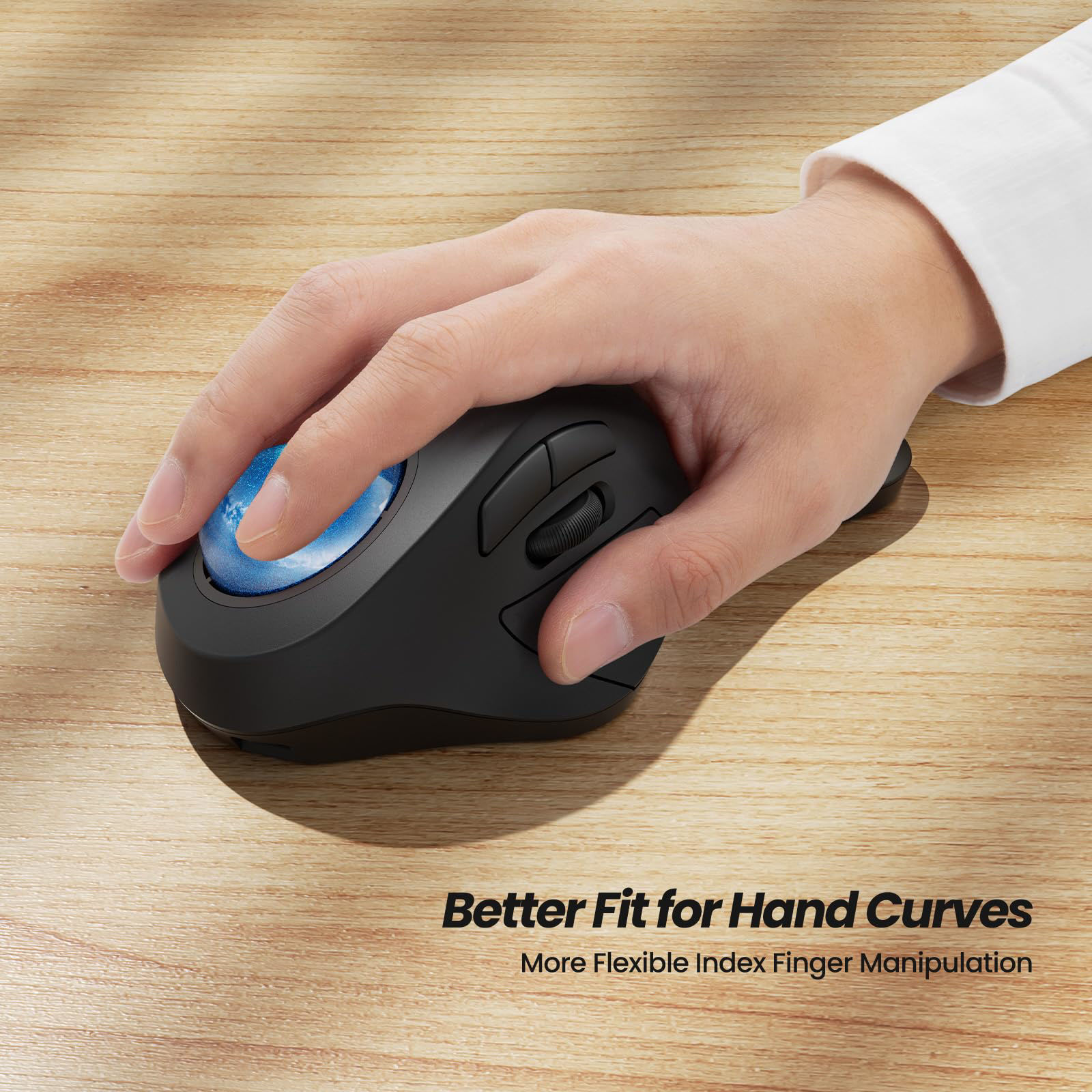
Trackball mice allow cursor movement without moving the entire mouse, which may reduce repeated hand motions.
How Index Finger Trackball Mice Work
Index finger trackball mice replace traditional mouse movement with a stationary device that uses a ball controlled by the finger. The user moves the cursor by rolling the ball rather than sliding the mouse across a desk.
This design can reduce large arm and wrist movements, but some users may need time to adapt because the index finger performs more direct cursor control.
Best suited for
Users who want less wrist movement and prefer controlling the cursor with a stationary device.
Types of Ergonomic Mice for People With Index Finger Discomfort
Different ergonomic mouse designs address different sources of discomfort. Choosing the correct type requires understanding whether your main problem is clicking, gripping, wrist rotation, or repetitive movement.
Source: Bing
Index finger trackball mouse
Uses a finger-controlled ball and keeps the mouse body stationary, which may reduce wrist movement.
Vertical mouse
Keeps the hand in a handshake-like position and may reduce forearm twisting compared with traditional mouse designs.
Large ergonomic mouse
Provides more palm support and may reduce excessive gripping for users with larger hands.
Low-force click mouse
Designed to reduce the effort required for repeated clicking, which may help users sensitive to button pressure.
Choosing Between a Trackball and Vertical Mouse
A trackball mouse may be more useful when moving the entire mouse causes discomfort, while a vertical mouse may be preferable when wrist rotation feels uncomfortable. Neither style is universally better because comfort depends on individual anatomy and habits.
Trackball advantage
Less desk movement and reduced arm travel.
Vertical mouse advantage
A different grip angle that may feel more natural for some users.
How to Set Up an Ergonomic Mouse Correctly
A suitable mouse can still cause discomfort if the workstation setup forces awkward movements. Proper positioning helps the hand operate with less strain.
Source: Bing
Keep the mouse close
Place the mouse near your keyboard so you do not repeatedly reach outward.
Relax your grip
Avoid squeezing the mouse tightly because excessive grip force can increase finger fatigue.
Adjust sensitivity
Higher pointer sensitivity may reduce the amount of physical movement needed to navigate.
Take movement breaks
Short breaks and hand movement can reduce continuous repetitive loading.
Signs Your Mouse Setup Is Improving
A successful setup should feel comfortable during normal computer tasks without requiring constant adjustment. Improvements may include less finger fatigue, easier clicking, and a more relaxed hand position.
Positive signs
Reduced discomfort during regular tasks and less need to reposition your hand.
Common Mistakes When Using a Mouse With Index Finger Pain
Many users focus only on buying a new mouse but continue habits that contribute to discomfort. Changing both the equipment and the way it is used usually produces better results.
Source: Bing
Using too much clicking force
Pressing buttons harder than necessary increases repeated finger loading.
Ignoring hand size
A mouse that is too small may force uncomfortable finger positions.
Expecting immediate adaptation
Some ergonomic designs require several days or weeks for users to adjust.
Replacing medical advice with equipment
A mouse change cannot address every possible cause of finger pain.
When to Seek Professional Advice
Consider professional evaluation if finger pain continues despite changing your setup, or if you experience symptoms such as numbness, loss of strength, swelling, or pain during activities beyond computer use.
Seek help for persistent symptoms
A healthcare professional can evaluate possible causes and recommend appropriate care.
Frequently Asked Questions
Q
Can an ergonomic mouse reduce index finger pain?
An ergonomic mouse may reduce discomfort by changing hand posture, lowering repeated movements, or reducing clicking effort. Results depend on the cause of the pain and the user’s habits.
Q
Is a trackball mouse better for index finger pain?
A trackball mouse may help some users because it reduces the need to move the mouse across a desk. However, it increases direct finger control, so it may not suit everyone with index finger problems.
Q
How long does it take to adjust to an ergonomic mouse?
Adjustment time varies. Users switching from a traditional mouse may need several days or longer to develop comfortable control habits.
Q
Should I stop using a mouse if my index finger hurts?
If using a mouse causes pain, reducing aggravating activities, improving setup, and monitoring symptoms can help. Persistent or worsening symptoms should be discussed with a healthcare professional.
Q
What features should I look for in an ergonomic mouse for finger pain?
Look for a comfortable size, suitable button placement, low clicking effort, appropriate grip style, and features that reduce movements associated with your discomfort.
✦ Wrapping Up
Conclusion
An ergonomic mouse for index finger pain can be a useful adjustment for people who experience discomfort during computer work. The most suitable option depends on whether your main issue involves clicking pressure, wrist position, grip tension, or repeated movement.
Choosing the right mouse is only one part of improving comfort. A proper workstation setup, relaxed grip, and healthy computer habits also play important roles in reducing unnecessary strain.
💡 Key Takeaway
Choose an ergonomic mouse based on your specific discomfort pattern, adjust your workstation, and seek professional advice if pain continues or affects daily activities.
Kimberly ensures every piece of content is clear, helpful, and user-friendly. She focuses on creating guides that are easy to read while maintaining accuracy and trust.
Learn why your SimpliSafe Smart Lock is not responding and how to fix battery, keypad, connection, app, and setup issues with practical troubleshooting steps.
Learn how to enable wireless CarPlay on your iPhone and vehicle. This guide explains compatibility checks, setup steps, troubleshooting, adapters, and common mistakes.