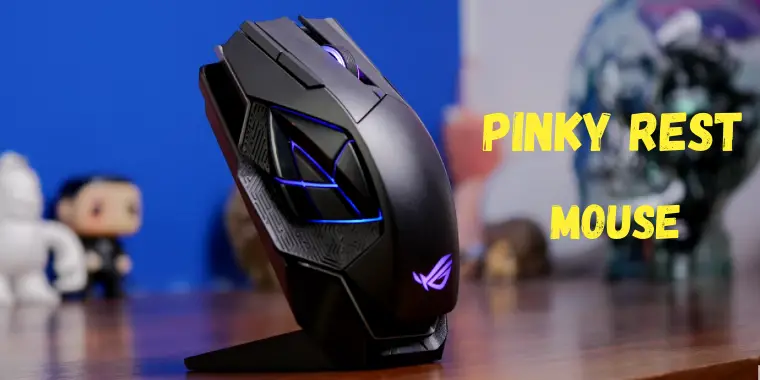
A gaming mouse with pinky rest can improve hand comfort by giving your pinky finger a dedicated support surface, but it is most useful for gamers who experience finger dragging, grip fatigue, or prefer a more relaxed palm grip.
For PC gamers in the United States who spend long sessions playing competitive titles, a comfortable mouse shape can affect control, endurance, and overall gaming experience. A gaming mouse with pinky rest adds an extended area on the right side of the mouse that supports the pinky finger instead of allowing it to rub against the mouse pad.
A pinky rest is not automatically better than every traditional gaming mouse. Its value depends on hand size, grip style, game type, and personal comfort preferences. Players using palm or relaxed claw grips often benefit more than users who rely on fingertip movements and frequent repositioning.
Source: Bing
What Is a Gaming Mouse With Pinky Rest?
A gaming mouse with pinky rest is a computer mouse designed with an extended ledge or support area where the pinky finger can naturally sit. Unlike standard mice, which often leave the pinky touching the mouse pad, these designs keep more of the hand supported during use.
The pinky rest is usually located on the right side of an ergonomic right-handed mouse. Some models have permanent molded rests, while others use attachable accessories that modify an existing mouse shape.
Source: Bing
Built-in pinky support
The mouse body includes a shaped extension that supports the pinky without requiring extra parts.
Add-on pinky rests
Aftermarket attachments can add finger support to compatible gaming mice.
Ergonomic mouse design
Many pinky rest designs are combined with larger shapes intended for palm and relaxed claw grips.
How a Pinky Rest Changes Mouse Grip
A pinky rest changes how the hand contacts the mouse by adding another support point. Instead of gripping the mouse tightly with the thumb and outer fingers, the hand can rest more naturally across the mouse surface.
Reduced finger dragging
The pinky stays elevated from the mouse pad, which may make movements feel smoother.
More relaxed grip
Some users find that additional support reduces the need to squeeze the mouse during long sessions.
Are Gaming Mice With Pinky Rests Better for Gaming?
Gaming mice with pinky rests are better for some players, but they are not universally superior. The added support can improve comfort for users who experience hand fatigue, while competitive players who prefer lightweight fingertip control may find the extra size restrictive.
Performance depends on more than the pinky rest. A quality gaming mouse also needs a reliable sensor, suitable weight, comfortable buttons, and a shape that matches the player’s hand.
Source: Bing
Good fit for palm grip users
Palm grip players often benefit because more of the hand remains supported.
Possible limitation for fingertip grip
Players who frequently lift and reposition the mouse may prefer a smaller design.
A pinky rest mouse is worth considering if your pinky frequently touches the mouse pad, your hand feels tired after gaming, or you prefer a wider ergonomic shape.
Large-hand users
Players with larger hands may find traditional compact mice uncomfortable.
MMO and strategy gamers
Players who spend many hours using a mouse may value comfort-focused designs.
Key Features to Check Before Buying a Gaming Mouse With Pinky Rest
Choosing the right pinky rest mouse requires looking beyond the finger support. The shape, weight, sensor, and customization options determine whether the mouse works well for your gaming style.
Source: Bing
Hand size compatibility
Measure your hand and compare it with the manufacturer’s recommended dimensions when available.
Grip style
Palm, claw, and fingertip grips require different mouse shapes.
Mouse weight
Heavier ergonomic mice can feel stable, while lighter mice are often preferred for quick aiming.
Sensor performance
A reliable gaming sensor helps maintain accurate tracking during fast movements.
Built-In Rest vs Add-On Pinky Rest
Built-in rests usually provide better structural support because they are designed as part of the mouse body. Add-on rests can be useful when you already own a mouse you like but want additional comfort.
Built-in advantage
Better integration with the mouse shape and weight balance.
Accessory advantage
Allows customization without replacing an existing mouse.
Common Problems With Pinky Rest Gaming Mice
Although pinky rests can improve comfort, they can also create problems if the mouse shape does not match your hand or playing style. Testing the grip position before buying is the best way to avoid discomfort.
Source: Bing
Mouse feels too large
A wide ergonomic design may feel difficult to control for users with smaller hands.
Reduced movement flexibility
Some players prefer the freedom of smaller mice for competitive aiming.
Incorrect grip position
A pinky rest only helps when the hand naturally rests on it.
How to Improve Comfort If a Mouse Feels Wrong
Adjust your grip, mouse sensitivity, and wrist position before replacing the mouse. If discomfort continues, the mouse shape may not match your hand.
Try different grips
Small grip adjustments can change pressure points on the hand.
Check desk setup
Mouse height, arm position, and desk space can influence comfort.
Gaming Mouse With Pinky Rest vs Standard Gaming Mouse
The main difference between these mouse types is hand support. A pinky rest adds comfort-focused design, while standard gaming mice often prioritize lower weight and simpler shapes.
Source: Bing
Comfort
Pinky rest models generally provide more support for relaxed grips.
Speed
Traditional lightweight mice may feel faster for rapid competitive movements.
Customization
Some ergonomic mice offer adjustable rests and modular designs.
Which Type Should You Choose?
Choose a gaming mouse with pinky rest if comfort and hand support are priorities. Choose a standard lightweight gaming mouse if you prefer maximum movement freedom and a minimal design.
Choose pinky rest
Best suited for comfort-focused gaming, larger hands, and longer sessions.
Choose standard design
Better suited for players who prefer compact shapes and fast repositioning.
Frequently Asked Questions
Q
Does a pinky rest make a gaming mouse more comfortable?
A pinky rest can make a gaming mouse more comfortable by supporting the outer fingers and reducing contact with the mouse pad. However, comfort depends on hand size, grip style, and mouse shape.
Q
Are pinky rest gaming mice good for FPS games?
They can work well for FPS games if the player prefers an ergonomic grip. Some competitive FPS players prefer smaller lightweight mice because they allow faster movements.
Q
Can I add a pinky rest to my existing gaming mouse?
Yes. Some third-party accessories attach to compatible gaming mice and add support without requiring a new mouse.
Q
What grip style benefits most from a pinky rest?
Palm and relaxed claw grips usually benefit the most because more of the hand remains in contact with the mouse.
Q
Does a pinky rest improve gaming accuracy?
A pinky rest does not directly improve sensor accuracy, but better comfort and a stable grip may help some users maintain consistent control.
✦ Wrapping Up
Conclusion
A gaming mouse with pinky rest can be a useful choice for players who want additional hand support during long gaming sessions. The design helps keep the pinky elevated and may reduce friction compared with traditional mouse shapes.
The right choice depends on your hand size, grip style, and gaming preferences. Before buying, compare the mouse shape, weight, sensor features, and overall ergonomics instead of choosing only because it includes a pinky rest.
💡 Key Takeaway
Choose a pinky rest gaming mouse when comfort and hand support are your priorities, but make sure the shape matches your grip before making a purchase.
Kimberly ensures every piece of content is clear, helpful, and user-friendly. She focuses on creating guides that are easy to read while maintaining accuracy and trust.
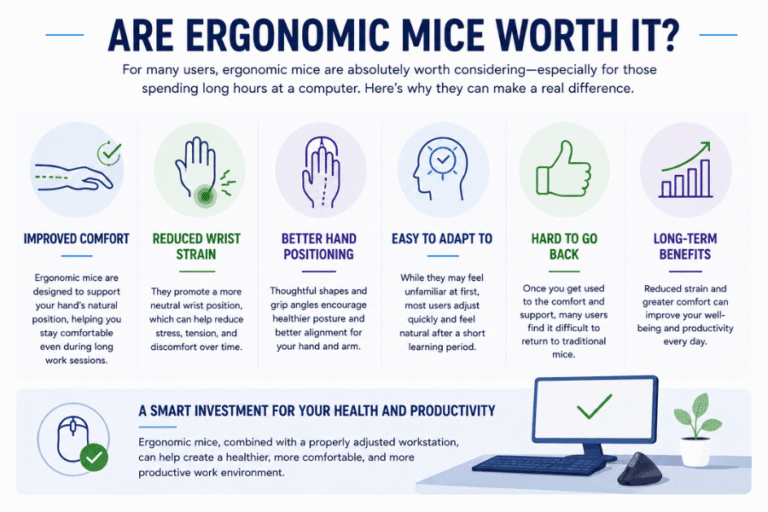
Are ergonomic mouse worth it? Learn how ergonomic mice can improve comfort, reduce wrist strain, and whether they are the right choice for your daily computer use.