Workstation laptops cost more because they combine powerful parts, professional certifications, rugged design, and long-term support.
If you have compared a workstation laptop with a gaming or business laptop, the price gap can feel surprising. This guide explains why workstation laptops are so expensive, what you get for the extra money, and when that premium makes sense. It also covers common mistakes, real-world workloads, and smart ways to choose the right model.

What Is a Workstation Laptop?
A workstation laptop is a portable computer built for demanding professional work. It is designed for tasks such as 3D modeling, computer-aided design, video production, scientific analysis, architecture, engineering, and software development.
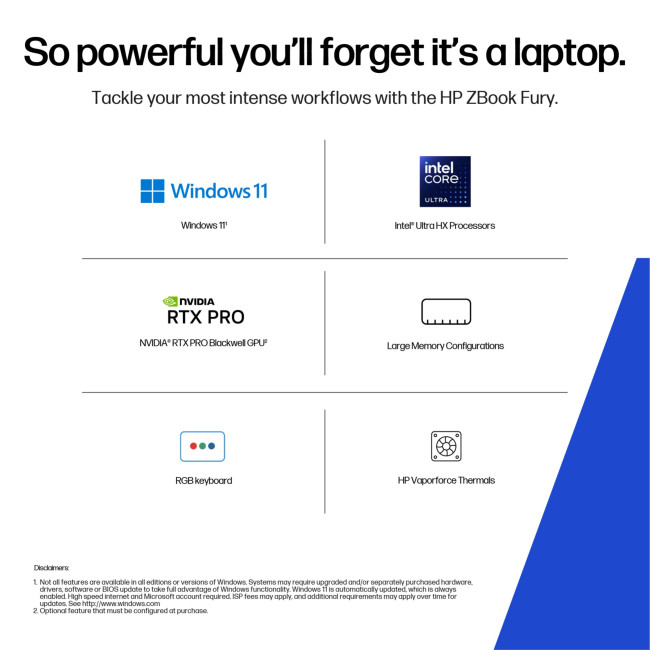
Unlike a typical laptop, a mobile workstation often uses professional-grade graphics, certified drivers, stronger cooling, and higher memory limits. Popular examples include Lenovo ThinkPad P Series, Dell Precision, HP ZBook, and ASUS ProArt or ExpertBook workstation models.
A gaming laptop may have similar raw power. However, a workstation focuses more on accuracy, stability, reliability, and software support. That difference helps explain why workstation laptops are so expensive.
Why Are Workstation Laptops So Expensive?
The short answer is that workstation laptops are built as professional tools, not just consumer electronics. Their price reflects the cost of components, engineering, testing, support, and business features.
Here are the main reasons.
Professional Graphics Cards Cost More
Many workstation laptops use graphics processors from NVIDIA RTX Professional or AMD Radeon Pro families. These GPUs are made for professional applications and often include features that consumer graphics cards do not.
Professional graphics cards can offer:
• Certified drivers for applications such as Autodesk AutoCAD, SolidWorks, CATIA, Siemens NX, and Adobe software
• Better support for large 3D models and complex assemblies
• Features for error checking and professional visualization
• Longer driver support cycles
• Improved stability in approved applications
A gaming GPU may deliver more frames per second for less money. Yet a professional GPU is tested with specific software. For an engineer, one graphics error can damage a design or waste many hours. That level of reliability has a cost.
High-End CPUs Increase the Price
Workstation laptops often use Intel Core Ultra, Intel Xeon, or AMD Ryzen Pro and Threadripper Pro processors. These chips may offer more cores, more cache, stronger security, or support for large amounts of memory.
A high-core-count processor is useful for:
• Rendering
• Simulation
• Code compilation
• Data analysis
• 4K and 8K video production
• Virtual machines
• Complex CAD work
More cores also create more heat. The laptop needs better cooling, stronger power delivery, and a larger chassis. These design changes increase manufacturing costs.
ECC Memory Adds Reliability
Some mobile workstations support ECC memory. ECC stands for error-correcting code. This type of memory can detect and correct certain small data errors before they cause a crash or corrupt a file.
ECC memory is especially useful in scientific computing, engineering, financial modeling, and long rendering jobs. It does not make every task faster, but it can reduce the risk of silent errors.
Not every workstation laptop supports ECC RAM. Some models use standard memory because it is cheaper and easier to source. Still, when ECC support is available, it is one reason why workstation laptops are so expensive.
Better Cooling Is Hard to Build
A powerful processor and professional GPU create a great deal of heat. A workstation laptop needs heat pipes, vapor chambers, larger fans, better vents, and carefully tuned firmware.
Cooling is not only about speed. It also helps the laptop maintain steady performance for long periods. A thin consumer laptop may run a quick benchmark well but slow down during a six-hour render.
This is similar to the difference between a sports car and a work truck. The sports car may be fast for a short burst, while the work truck is built to carry a heavy load all day.

Workstation Laptops Use More Durable Materials
Professional laptops are often made with stronger materials and stricter design standards. Their frames may use aluminum, magnesium alloy, carbon fiber, or reinforced plastic.
Manufacturers may test these laptops for:
• Drops and vibration
• Temperature changes
• Dust and humidity
• Hinge stress
• Keyboard wear
• Port insertion cycles
• Long daily use
These tests do not make a laptop indestructible. They do show that the device was built for a demanding work setting.
A designer who travels to job sites may value a reinforced chassis. A film editor may need a laptop that runs under heavy load every day. A consultant may depend on a machine that survives years of commuting.
Durability is difficult to see on a store shelf. It becomes more valuable after the laptop has faced real use.
Professional Certifications Raise the Cost
One major difference between consumer and workstation laptops is application certification. Workstation makers work with software companies to test specific hardware and drivers.
For example, a workstation may be certified for a certain version of:
• SolidWorks
• AutoCAD
• Revit
• Maya
• Creo
• Siemens NX
• ArcGIS Pro
• DaVinci Resolve
Certification does not mean that the laptop can never fail. It means the hardware and driver combination has been tested for expected professional use.
This matters when a company must meet deadlines or follow strict design rules. A certified system can also make technical support easier. If a problem occurs, the hardware and software vendors have a known configuration to investigate.
That testing helps explain why workstation laptops are so expensive compared with laptops that only advertise gaming performance.

Workstation Laptops Offer More Upgrade Options
Many workstation laptops support more memory and storage than ordinary thin laptops. Some models include two or more SSD slots, replaceable memory, or support for 64GB, 128GB, or even more RAM.
Extra capacity helps professionals work with large files. A video editor may store high-resolution footage. An architect may open a large building model. A developer may run several virtual machines at once.
A workstation may also offer a wider selection of ports, such as:
• Thunderbolt
• USB-C
• HDMI
• Mini DisplayPort
• Ethernet
• SD card readers
• Smart card readers
• Docking connectors
A thin laptop often sacrifices ports and upgrade access to reduce size. Workstations usually give up some thinness to provide greater flexibility.
Better Displays and Color Accuracy Add Value
A workstation laptop may include a high-resolution display with strong brightness, wide color coverage, and factory calibration. These features matter to photographers, video editors, designers, and engineers.
Some displays support:
• 4K resolution
• DCI-P3 or Adobe RGB color coverage
• High brightness for bright studios
• Touch or pen input
• Hardware color calibration
• Better viewing angles
A basic laptop screen may look fine for web browsing. It may not show accurate colors or enough detail for professional work.
Display quality is not always the largest cost in a workstation laptop. Still, it can be a major reason to choose one over a cheaper model.

Business Support and Security Increase the Price
Workstation laptops are often sold to businesses, universities, hospitals, studios, and government agencies. These buyers need more than a fast computer. They need predictable service and security.
Business-focused features may include:
• Longer warranties
• On-site repair options
• Dedicated technical support
• Trusted Platform Module security
• Fingerprint readers
• Smart card support
• Privacy screens
• Remote management tools
• Self-encrypting drive options
A business may lose more money from one day of downtime than it saves by buying a cheaper laptop. For that reason, a company may pay extra for service contracts and replacement parts.
This is another key reason why workstation laptops are so expensive. The price may include a support system that is not visible in the hardware specifications.
Workstation Laptops Are Built for Long Product Lifecycles
Consumer laptops often change quickly. A new model may replace the old one within a few months. Professional systems usually have a more stable product cycle.
Companies prefer stable models because they can:
• Order the same configuration in large numbers
• Create one software image for many employees
• Train workers on the same hardware
• Keep spare parts in stock
• Reduce compatibility problems
• Plan equipment upgrades more easily
This stability adds value for organizations. It may seem less important to an individual buyer, but it can matter greatly to a company with hundreds of employees.
A workstation is often purchased as part of a business process. Its price reflects that wider role.
Workstation Laptops Versus Gaming Laptops
Gaming laptops and workstation laptops can share similar processors, screens, and storage. The key differences are often in graphics drivers, certification, reliability, warranty options, and design goals.
| Feature | Workstation laptop | Gaming laptop |
|---|---|---|
| Main goal | Professional accuracy and stability | High gaming performance |
| Graphics | Professional GPU options | Consumer gaming GPU options |
| Drivers | Certified for professional software | Optimized for games |
| Design | Business-focused and often restrained | Gaming-focused with bold styling |
| Memory | Often higher capacity | Usually moderate to high capacity |
| Support | Business service options | Standard consumer support |
| Price | Usually higher | Often lower for similar raw speed |
A gaming laptop may be the better choice for Blender, casual video editing, or general 3D work. A workstation may be better when your software requires certified drivers or when system crashes are expensive.
Do not assume that the more expensive laptop is always faster. Compare the exact software, workload, and support needs before buying.
Are Workstation Laptops Worth the Money?
Workstation laptops can be worth the money when they directly support your work. They are less attractive when you only need basic computing, gaming, or school tasks.
A workstation may be a good investment if you:
• Use professional CAD or engineering software
• Work with large 3D scenes
• Run long CPU or GPU renders
• Edit high-resolution video
• Use several virtual machines
• Need certified hardware
• Require strong business support
• Work in places where repairs are difficult
A cheaper laptop may be better if you mainly browse the web, write documents, stream media, or play games. In those cases, you may pay for features that you never use.
One practical lesson from comparing professional laptops is simple: do not buy a workstation because the name sounds powerful. Buy one because its features solve a problem you actually have.
What Makes a Workstation Laptop Expensive in Real Life?
The advertised price is only one part of the cost. Accessories, warranties, repairs, and software can also affect the total ownership cost.
Consider a freelance architect who buys a mobile workstation. The laptop may cost more at first, but it could reduce delays during client presentations and large model reviews. If it lasts five years and avoids one major project delay, its value may be higher than a cheaper laptop.
However, a workstation can also be excessive. A student who needs basic CAD training may not need a top-tier GPU, ECC memory, or a premium support plan.
Think of the laptop as a tool. A professional camera is expensive because it serves a professional purpose. The same idea applies to workstation computers.
How to Choose a Workstation Laptop Without Overspending
You can reduce the cost by matching the configuration to your software.
Start With the Software Requirements
Check the official requirements for the applications you use. Look at the recommended CPU, GPU, RAM, storage, and display features.
Do not focus only on the brand. A midrange certified GPU may be better for your software than a much faster gaming GPU with no certification.
Choose the Right Processor
A high-core-count CPU is helpful for rendering, simulation, and compiling. A faster single-core CPU may feel better for office work and some CAD tasks.
For mixed use, a modern Intel Core Ultra or AMD Ryzen processor may provide a good balance. For heavy professional workloads, higher-end workstation processors may be justified.
Buy Enough RAM, But Not Too Much
For basic design work, 16GB may be enough. For larger models, video editing, and virtual machines, 32GB or 64GB can offer more comfort.
Avoid paying for 128GB of memory if your software never uses it. You can often save money by buying a model with upgradeable RAM.
Prioritize the SSD
A fast NVMe SSD improves boot times, application loading, and file transfers. A 1TB drive is a useful starting point for many professionals.
If you work with large media files, check whether the laptop has a second SSD slot. Adding storage later may cost less than buying a larger drive from the manufacturer.
Consider Refurbished Business Models
A refurbished workstation from a trusted seller can offer strong value. Look for a clear warranty, battery health information, return rights, and an honest condition report.
Older models may still provide excellent performance. However, check driver support, operating system compatibility, port condition, and replacement battery prices before buying.
Common Mistakes to Avoid
Understanding why workstation laptops are so expensive can help you avoid poor buying decisions.
• Buying the most powerful GPU without checking software certification
• Choosing a 4K display when battery life matters more
• Ignoring fan noise and heat during sustained workloads
• Paying for ECC memory without needing error correction
• Forgetting the cost of a dock, charger, or extended warranty
• Assuming a workstation will provide long battery life
• Buying a thin model that cannot sustain full performance
• Failing to check upgrade options
• Comparing only processor names instead of full configurations
A common mistake is comparing a workstation laptop with a gaming laptop using only benchmark scores. Benchmarks can show speed, but they do not fully measure certification, stability, repair support, or long-term reliability.
Battery Life and Portability Trade-Offs
Powerful workstation laptops often have shorter battery life than lightweight business laptops. Their processors and GPUs use more energy, and their cooling systems add weight.
A mobile workstation may weigh four to seven pounds or more. Its large power adapter can add another pound to your bag.
Manufacturers must balance:
• Performance
• Battery capacity
• Cooling
• Weight
• Screen brightness
• Port selection
You cannot maximize all six at once. A thin workstation may be easier to carry but may run slower under long workloads. A larger model may deliver better performance but feel heavy during travel.
Choose based on where you work. If the laptop stays on a desk, prioritize cooling and upgradeability. If you travel every day, consider a lighter model with moderate professional graphics.
How to Get Better Value From a Workstation Laptop
The best value does not always come from the lowest price. It comes from buying the right level of performance and keeping the system useful for years.
Try these steps:
-
Write down your three most demanding applications.
-
Check their recommended hardware requirements.
-
Decide whether certification is required.
-
Choose 32GB of RAM if your work is growing.
-
Select a quality SSD with enough space.
-
Compare warranty and repair terms.
-
Check independent reviews for fan noise and sustained performance.
-
Consider last-generation models during sales.
-
Confirm that the charger is included.
-
Keep the laptop vents clean and use it on a hard surface.
A slightly older workstation with a good professional GPU can be a smarter purchase than a new entry-level model. The right choice depends on your workload, not the release date.
Frequently Asked Questions About Why Are Workstation Laptops So Expensive
Why are workstation laptops more expensive than regular laptops?
Workstation laptops use stronger components, professional graphics, better cooling, certified drivers, and business support. These features raise the manufacturing and ownership cost.
Are workstation laptops better than gaming laptops?
They are better for professional software that needs certified drivers, high stability, or advanced support. Gaming laptops may offer more graphics performance per dollar for games and general creative work.
Can I use a workstation laptop for gaming?
Yes, most workstation laptops can run games. However, they may cost more than a gaming laptop with similar gaming performance, and some professional GPUs are not optimized for every game.
Do workstation laptops last longer?
They are often designed and tested for heavier daily use, but lifespan still depends on cooling, maintenance, battery wear, and repair access. A well-maintained workstation can remain useful for many years.
Is ECC memory necessary in a workstation laptop?
ECC memory is useful when data accuracy and system stability are critical. Many users do not need it, so check your software and professional requirements before paying extra.
Why do workstation laptops have poor battery life?
High-performance CPUs and GPUs consume more power than parts in thin business laptops. Larger cooling systems and brighter high-resolution displays can also reduce battery life.
Can a refurbished workstation laptop be a good deal?
Yes, a refurbished model can provide strong professional performance at a lower price. Buy from a trusted seller and check the warranty, battery condition, SSD health, and driver support.
Conclusion
Workstation laptops are expensive because they combine professional graphics, powerful processors, advanced cooling, durable materials, certified drivers, upgrade options, security, and long-term support. Their higher price is not always about raw speed. Much of the cost pays for reliability and predictable performance during demanding work.
The best choice depends on your real needs. Compare software requirements, sustained performance, warranty terms, upgrade paths, and total ownership cost before you buy. If you found this guide useful, explore more laptop buying advice and share your experience with workstation computers in the comments.