A Cadillac tire pressure monitoring system reset usually requires correcting tire pressure first and then performing a TPMS relearn procedure so the vehicle can recognize each tire pressure sensor.
In the United States, Cadillac vehicles use a tire pressure monitoring system (TPMS) to alert drivers when one or more tires fall below the recommended inflation level. If the TPMS warning light stays on after adjusting tire pressure, rotating tires, replacing a sensor, or installing new tires, the system may need to be reset or relearned.
The exact Cadillac tire pressure monitoring system reset process depends on the model year and vehicle type, including models such as the Cadillac XT5, Escalade, CT5, CT4, XT6, and other Cadillac vehicles. Some models can complete the relearn process through the vehicle menu, while others require a TPMS activation tool or specific relearn sequence.
Source: i.ytimg.com
What Is a Cadillac Tire Pressure Monitoring System Reset?
A Cadillac tire pressure monitoring system reset is the process of restoring communication between the vehicle’s TPMS module and the tire pressure sensors. The reset does not usually repair a damaged sensor; instead, it allows the vehicle to identify sensor locations and confirm accurate tire pressure readings.
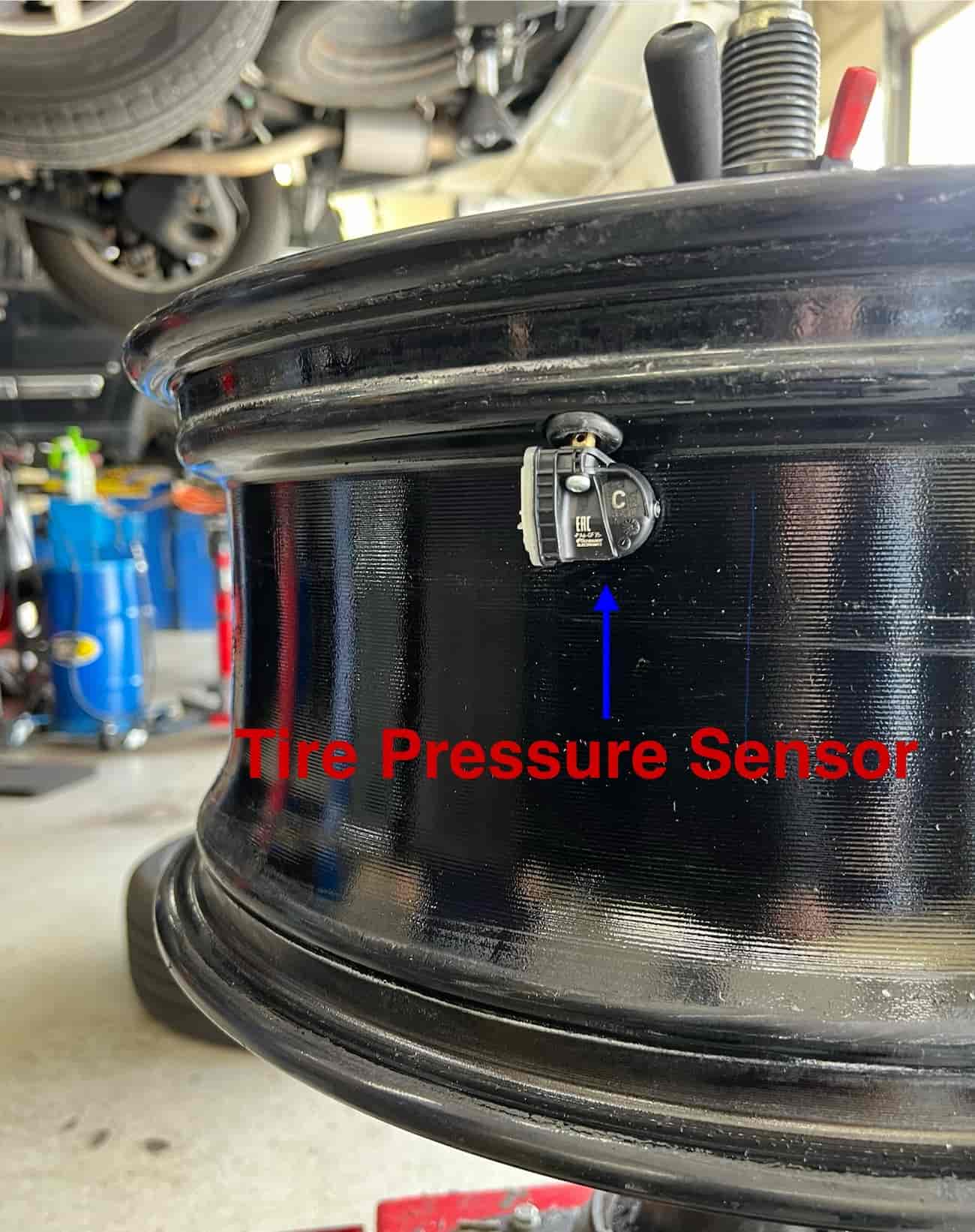
Cadillac TPMS sensors are installed inside each wheel and transmit tire pressure information to the vehicle. When tires are rotated, replaced, or a sensor is changed, the vehicle may need a relearn procedure to match each sensor with its new wheel position.
Source: tpmsreset.com
TPMS sensor function
Sensors measure tire pressure and send wireless information to the Cadillac vehicle control system.
Reset purpose
A reset helps the vehicle recognize sensor positions and clear certain TPMS warning conditions after proper repairs.
When Does a Cadillac TPMS Reset Become Necessary?
A Cadillac may require a TPMS reset or relearn after common maintenance events. The need depends on the vehicle model, year, and type of service performed.
Tire rotation
Moving wheels to different positions can require sensor position relearning.
New tires or wheels
Replacement wheels may contain sensors that must be programmed or recognized.
Sensor replacement
A new TPMS sensor may need activation and registration with the vehicle.
How to Reset the Tire Pressure Monitoring System on a Cadillac
The general Cadillac TPMS reset process starts with confirming correct tire inflation, then using the vehicle’s relearn function or a compatible TPMS tool. Always follow the procedure listed for the specific Cadillac model year because button locations and menu options differ.
Before beginning, park the vehicle safely, make sure the tires are cold if checking pressure, and verify that each tire is inflated to the recommended pressure listed on the driver’s door information label.
Source: cdn.myshopage.com
Step 1: Check tire pressure
Adjust all tires to the recommended PSI before starting the relearn process.
Step 2: Turn on the ignition
Switch the vehicle into the required ignition mode without starting the engine if the procedure requires it.
Step 3: Start TPMS relearn
Use the vehicle settings menu or TPMS relearn option when available.
Step 4: Activate sensors
Follow the vehicle sequence to trigger each tire sensor until the system confirms completion.
How to Know the Cadillac TPMS Reset Worked
A successful reset usually results in the TPMS warning light turning off after the vehicle completes the relearn process. Some Cadillac models may require a short drive for the system to update completely.
Warning light turns off
The TPMS indicator disappears when the system receives valid sensor information.
Correct tire readings appear
The vehicle display shows updated pressure information when equipped with individual tire monitoring.
Cadillac TPMS Reset Methods by Situation
The correct reset method depends on why the TPMS warning appeared. A simple low-pressure warning may only require inflation correction, while sensor replacement usually requires a complete relearn process.
Source: i2.wp.com
After adding air to tires
Drive the vehicle after correcting pressure if the warning light does not immediately clear.
After rotating tires
Perform a sensor relearn if the Cadillac does not automatically update positions.
After replacing a TPMS sensor
A new sensor may require programming before the vehicle can recognize it.
Do Cadillac Vehicles Need a TPMS Reset Tool?
Some Cadillac models can relearn sensors through the vehicle controls, while others may require a TPMS activation tool. Tools such as GM-compatible relearn devices can trigger sensor communication during the reset procedure.
A TPMS tool is not a replacement for correct diagnosis. If a sensor battery is dead or the module has a fault, relearning may not solve the issue.
Tool-required situations
Often related to certain GM vehicles, sensor replacements, or manual relearn procedures.
Tool-free situations
Some Cadillac models allow relearning through built-in vehicle controls.
Common Cadillac TPMS Problems and Troubleshooting Steps
If the Cadillac TPMS warning light remains on after a reset attempt, the problem may not be the reset procedure itself. Checking the most common causes in order can prevent unnecessary parts replacement.
Source: i.ytimg.com
Low tire pressure
The most common cause is a tire below the recommended inflation level.
Weak sensor battery
TPMS sensors use internal batteries that eventually lose power.
Incorrect sensor programming
A replacement sensor may not communicate correctly until programmed.
Damaged sensor or module
Physical damage or communication problems can prevent proper operation.
Mistakes to Avoid During a Cadillac TPMS Reset
Many unsuccessful TPMS resets happen because the tires are not adjusted first or the wrong procedure is used for the vehicle model.
Skipping pressure checks
Resetting sensors does not correct an underinflated tire.
Using an incorrect relearn method
Different Cadillac model years may use different reset procedures.
Ignoring repeated warnings
A recurring TPMS warning may indicate a mechanical or electrical problem.
Frequently Asked Questions
Q
How do I reset the TPMS light on my Cadillac?
First check and adjust tire pressure to the recommended level. Then perform the Cadillac TPMS relearn procedure specified for your model year. Some vehicles require menu-based relearning, while others require a TPMS activation tool.
Q
Why is my Cadillac TPMS light still on after filling tires?
The warning light may remain on because the vehicle has not updated the sensor readings, a sensor battery is weak, a sensor is damaged, or the tire pressure is still incorrect.
Q
Do I need to reset Cadillac TPMS after tire rotation?
Many Cadillac vehicles require a sensor relearn after tire rotation because the vehicle may need to identify the new location of each tire pressure sensor.
Q
Can I reset Cadillac TPMS without a tool?
Some Cadillac models allow a manual reset or relearn through the vehicle controls, but others require a compatible TPMS tool. The owner’s manual provides the correct method for the specific vehicle.
Q
How long does a Cadillac TPMS reset take?
The process can take a few minutes when all sensors work correctly. Additional diagnosis may be required if a sensor fails to communicate.
✦ Wrapping Up
Conclusion
A Cadillac tire pressure monitoring system reset is usually a straightforward process when tire pressure is correct and all sensors are functioning properly. The main goal is to help the vehicle recognize tire sensors and confirm accurate pressure information.
When a TPMS warning remains after a reset attempt, check for sensor failures, programming issues, or damaged components instead of repeatedly resetting the system. Using the correct Cadillac-specific procedure helps avoid unnecessary repairs.
💡 Key Takeaway
Start by checking tire pressure, then follow the exact TPMS relearn steps for your Cadillac model year. If the warning remains, diagnose the sensors and system before replacing parts.
Why buy a Microsoft Surface? Explore its sleek design, powerful performance, flexible features, and productivity benefits before you choose your next device.