Gaming with a vertical mouse can improve hand posture and comfort for some players, but it usually requires an adjustment period and may not match the speed and precision needs of competitive gamers.
For gamers in the United States who spend long sessions playing PC games, a vertical mouse offers a different approach to hand positioning. Instead of placing the palm flat on the desk like a traditional mouse, a vertical mouse keeps the hand in a more upright handshake-style position that may reduce forearm twisting.
A vertical mouse can be useful for casual gaming, strategy games, MMO titles, and players who prioritize comfort. However, competitive FPS gamers may find the taller shape, different grip angle, and reduced familiarity challenging compared with traditional gaming mice designed for rapid aiming movements.
Source: Bing
What Is a Vertical Mouse for Gaming?
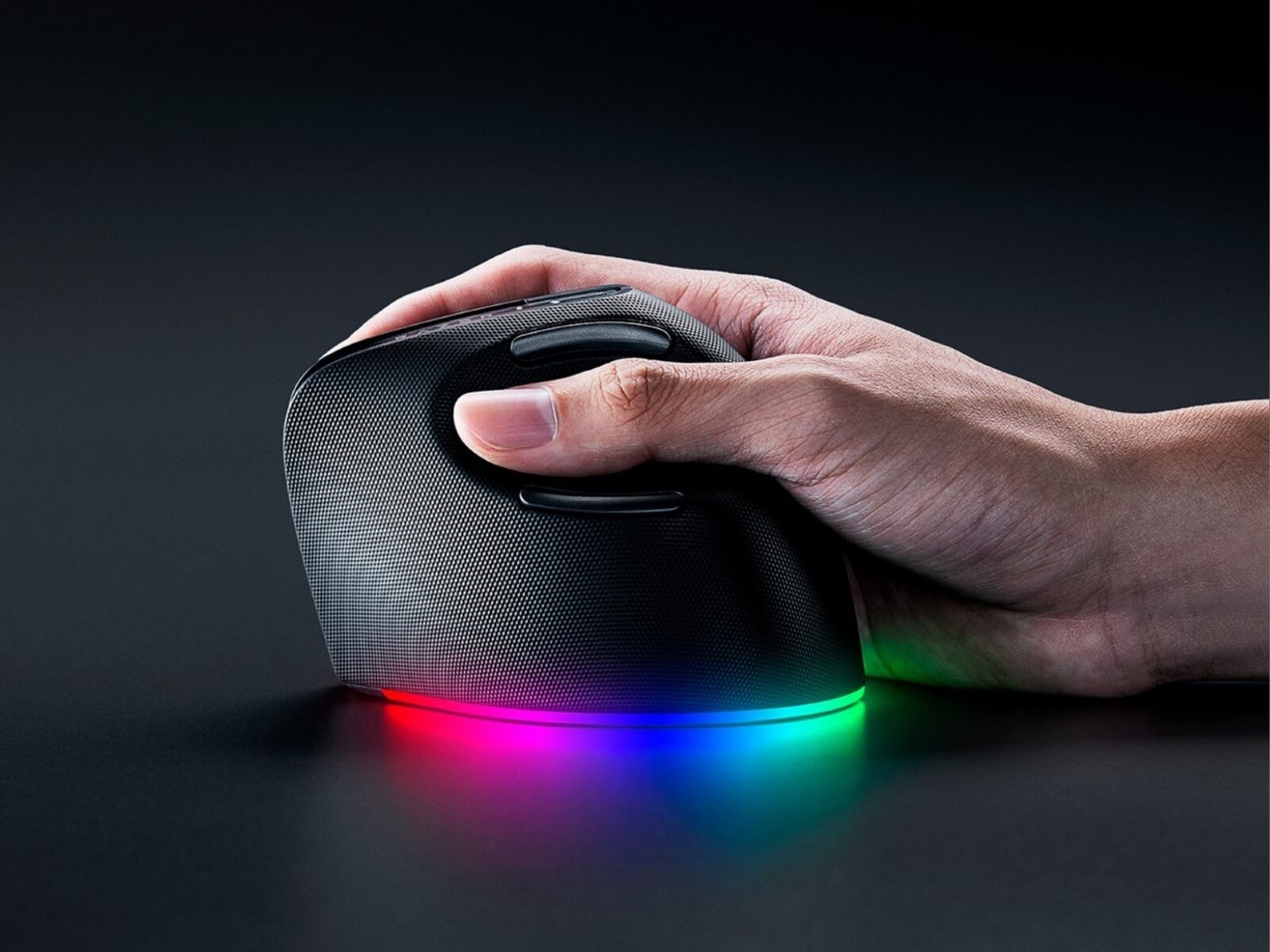
A vertical mouse is an ergonomic pointing device designed with a raised body that keeps the hand in a neutral handshake position. This design changes how the wrist and forearm interact with the mouse compared with a standard horizontal mouse.
When used for gaming, a vertical mouse performs the same basic functions as a traditional mouse, including cursor movement, clicking, scrolling, and programmable buttons. The main difference is the physical shape and grip style rather than the basic technology.
Source: Bing
Traditional mouse position
A conventional mouse often places the palm downward, which involves more forearm rotation.
Vertical mouse position
A vertical mouse positions the hand more upright, which some users find more comfortable during extended use.
How a Vertical Mouse Changes Gaming Movement
The different grip angle changes the muscles used during mouse movement. Some players adapt quickly, while others need time because aiming feels different from years of using a traditional gaming mouse.
Movement adjustment
Players may need to relearn small movements, aiming habits, and button placement.
Comfort adjustment
Users who experience discomfort from long sessions may appreciate the reduced rotational position.
Is Gaming With a Vertical Mouse Good?
Gaming with a vertical mouse can be good for players who value comfort and ergonomic positioning, but it is not universally better than a standard gaming mouse. The right choice depends on the type of games played, personal preference, and how the hand feels after extended use.
Games that require less rapid aiming often work better with a vertical mouse. Players who spend most of their time in competitive shooters may prefer traditional gaming mice because they are commonly optimized for fast tracking, low weight, and precise aim control.
Source: Bing
Good fit for
Strategy games, simulation games, MMO games, productivity gaming setups, and long casual sessions.
Possible challenge
Fast-paced FPS games may require more adaptation because quick flick movements can feel unfamiliar.
Benefits of Using a Vertical Mouse for Gaming
The main advantage of a vertical mouse is its ergonomic design. By changing hand orientation, it may help some users maintain a more comfortable position during long gaming and computer sessions.
Reduced forearm rotation
The handshake grip may reduce the amount of twisting required to hold the mouse.
Long-session comfort
Some users experience improved comfort when using an ergonomic shape for extended periods.
Alternative grip style
Players with discomfort from traditional mice may find a vertical design easier to use.
How to Start Gaming With a Vertical Mouse
Switching to a vertical mouse requires gradual adjustment. Players should avoid immediately using the device for important competitive matches because hand position, sensitivity, and muscle memory may feel different.
A short practice period allows users to customize settings and determine whether the design improves comfort without negatively affecting control.
Source: Bing
Adjust sensitivity
Start with comfortable DPI and pointer settings before making small changes.
Practice regularly
Use the mouse for everyday tasks and low-pressure games before competitive play.
Position the desk correctly
Keep the mouse close enough to avoid excessive reaching or shoulder strain.
Signs That Your Setup Is Working
A successful vertical mouse setup should feel natural after adaptation. The player should be able to control movement without excessive gripping force or awkward wrist positioning.
Comfortable grip
Your hand should rest naturally without squeezing the mouse.
Stable control
Cursor movement should remain predictable during gaming.
Vertical Mouse vs Traditional Gaming Mouse
The choice between a vertical mouse and a traditional gaming mouse depends on whether comfort or competitive performance is the priority. Both designs have strengths and limitations.
Source: Bing
Vertical mouse
Better suited for users seeking ergonomic positioning and comfort during long sessions.
Traditional gaming mouse
Usually preferred for esports-style games because of familiar shapes, lightweight designs, and established aiming techniques.
Which Games Work Best With a Vertical Mouse?
Game genre affects whether a vertical mouse feels natural. Slower-paced games often benefit more from comfort-focused designs than games requiring constant rapid aiming.
Strategy and simulation
These games often involve clicking, menus, and longer sessions where comfort can matter.
MMO games
Extra buttons and comfortable grips can be useful for ability-heavy gameplay.
Competitive shooters
Players may prefer standard gaming mice because precision aiming depends heavily on familiarity.
Frequently Asked Questions
Q
Can you play FPS games with a vertical mouse?
Yes, you can play FPS games with a vertical mouse, but the experience depends on your ability to adapt. Competitive players may need more practice because the grip angle changes aiming mechanics.
Q
Are vertical mice better for wrist comfort?
A vertical mouse may improve comfort for some users by encouraging a more neutral hand position. Individual results vary depending on grip style, desk setup, and usage habits.
Q
How long does it take to get used to a vertical gaming mouse?
The adjustment period varies. Some users adapt within days, while others may need several weeks before the movement feels natural.
Q
Do professional gamers use vertical mice?
Most competitive esports players continue using traditional gaming mice because they are familiar with high-speed aiming requirements. Vertical mice are more common among users prioritizing comfort.
Q
Should I buy a vertical mouse for gaming?
A vertical mouse may be worth considering if you experience discomfort with traditional mice or play games where comfort is more important than maximum aiming speed. Competitive FPS players should test one before switching permanently.
✦ Wrapping Up
Conclusion
Gaming with a vertical mouse can provide a more ergonomic alternative to traditional mice, especially for players who spend many hours at their computer and want a different hand position. However, comfort improvements do not automatically translate into better gaming performance.
The best choice depends on your games, grip preference, and willingness to adapt. Testing a vertical mouse during normal gaming sessions is the most practical way to determine whether it fits your setup.
💡 Key Takeaway
Choose a vertical mouse if comfort and ergonomic positioning are your priorities, but keep a traditional gaming mouse in consideration if competitive speed and precision are your main goals.
Kimberly ensures every piece of content is clear, helpful, and user-friendly. She focuses on creating guides that are easy to read while maintaining accuracy and trust.
Learn what bypassing a tire pressure monitoring system means, why drivers consider it, possible methods, risks, legal concerns, and safer solutions for TPMS problems.
Why are workstation laptops so expensive? Explore their premium components, professional features, durability, and performance to see if they’re worth it.
Learn how to turn off wireless CarPlay on your iPhone or vehicle system. Follow simple steps to disable automatic connections, remove cars, and fix unwanted CarPlay behavior.