For most players, the Logitech G502 HERO is the best gaming mouse for console when a game supports mouse input.
A mouse can make aiming feel more direct, and extra buttons can help with quick actions. But console support depends on your system and the game. A mouse that works on a PC may not work in every console game. I compared nine wired and wireless options for comfort, controls, setup, and value. Check your game’s input settings before you buy.
See the differences between my top picks at a glance.
| Mouse | Connection | Best for | Button style | Console note | Check price |
|---|---|---|---|---|---|
| Logitech G502 HERO | Wired USB | Feature-rich control | Many programmable buttons | Game support is required | View on Amazon |
| Logitech G305 Lightspeed | Wireless USB receiver | Wireless play | Six buttons | Receiver uses USB-A | View on Amazon |
| Razer Basilisk V3 | Wired USB | Comfort and scroll control | Programmable controls | Some features need PC setup | View on Amazon |
| Redragon M612 | Wired USB | Low-cost extra controls | Remappable buttons | Check game and console support | View on Amazon |
| Razer DeathAdder Essential | Wired USB | Simple, ergonomic shape | Basic side controls | Straightforward wired setup | View on Amazon |
| Corsair Scimitar RGB Elite | Wired USB | Many side-button commands | 12-button side panel | Best suited to supported games | View on Amazon |
| BENGOO Wired RGB Mouse | Wired USB | Basic gaming use | Extra buttons | Features can vary by setup | View on Amazon |
| Logitech G305 Lightspeed White | Wireless USB receiver | Wireless play, white setup | Six buttons | Receiver uses USB-A | View on Amazon |
| Redragon M602 | Wired USB | Button-rich budget control | Multiple side buttons | Extra functions may need setup | View on Amazon |
1. Logitech G502 HERO

The Logitech G502 HERO is my leading pick for players who want a wired mouse with many controls. Its familiar shape fills the hand, and its thumb rest can make long sessions feel more relaxed. The mouse has several programmable buttons, so you can set up extra actions on a computer. It also has a scroll wheel with a free-spin mode.
That feature set is useful only when the game and console accept mouse input. Console support does not come from the mouse alone. The G502 HERO connects by USB, so it avoids battery changes and wireless pairing. I like it most for a desk setup where a cable is not a problem and you want easy access to more controls.
Pros:
- Many buttons give supported games more control options.
- Wired USB connection means no battery to charge.
- Thumb rest supports a relaxed palm grip.
- Scroll wheel can switch between ratchet and free-spin modes.
- Weight tuning lets PC users adjust its feel.
Cons:
- Large shape may not suit small hands.
- Cable can drag if your desk has little space.
- Some button settings may require PC software.
What Amazon Buyers Are Saying
Buyer feedback often points to the solid feel, button count, and comfort as key strengths. Some owners also value the scroll wheel and the ability to tune the mouse on a PC. Common drawbacks in user discussions include its size and weight, plus the cable for players who prefer a wireless desk. Check recent reviews for reports tied to the listing and your hand size.
My Recommendation
I recommend the G502 HERO if you want a dependable wired mouse with a broad control set. It is not the best fit for every hand, and console game support remains the deciding factor. As an all-around choice for compatible console games, it earns a strong score.
| Category | Rating |
|---|---|
| Console-friendly setup | 4/5 |
| Comfort and control | 4.5/5 |
| Useful features | 4.5/5 |
| Value | 4/5 |
| Overall rating | 4.5/5 |
2. Logitech G305 Lightspeed Wireless

The G305 is a compact wireless mouse for players who want to remove a cable from the desk. It uses Logitech’s USB wireless receiver, so it does not pair like a Bluetooth mouse. That difference matters on a console: you need a free USB-A port or a suitable adapter, and the game must support mouse input. The simple shape and six-button layout keep it easy to learn.
This model runs on a replaceable AA battery. That makes it easy to keep going with a spare, though it does add battery upkeep. The smaller body can feel nimble, but it may not fill a large hand as well as an ergonomic full-size mouse. I would choose it for a tidy setup and everyday gaming, not for a large side-button grid.
Pros:
- Wireless design keeps the desk clear of a mouse cable.
- USB receiver offers a familiar plug-in setup.
- Compact body is easy to move and store.
- Six buttons provide more than basic left and right clicks.
- Replaceable AA battery is simple to swap.
Cons:
- Requires a USB-A port or compatible adapter.
- AA battery needs replacement over time.
- Small shape may not suit large hands or a broad palm grip.
What Amazon Buyers Are Saying
Buyers commonly discuss the freedom of a wireless mouse, its compact size, and its easy setup. Some praise its battery life, though actual use and settings can affect how long a battery lasts. Other owners prefer a larger mouse or dislike having to replace a battery. Read current reviews if size and hand comfort are major concerns for you.
My Recommendation
The G305 is a good wireless pick if your console and game recognize its USB receiver. Its clean shape makes it less complex than many gaming mice. I would choose it over a wired option when cable drag bothers you, but I would confirm port access first.
| Category | Rating |
|---|---|
| Console-friendly setup | 3.5/5 |
| Comfort and control | 4/5 |
| Wireless convenience | 4.5/5 |
| Value | 4/5 |
| Overall rating | 4/5 |
3. Razer Basilisk V3

The Basilisk V3 is a wired mouse with a pronounced right-hand shape and a thumb rest. It includes a scroll wheel with modes for controlled steps or faster free scrolling. Its extra buttons can help in games that let you bind more actions to a mouse. The design also includes customizable lighting, though lighting has little value when you play from across the room.
Think of this as a comfort-and-controls option, not a guarantee of console compatibility. Razer’s PC software can help set up features, but consoles may not offer the same editing tools. A wired USB link keeps the connection simple and avoids charging. The body is best for right-handed players who like a larger, sculpted mouse.
Pros:
- Shaped body and thumb rest suit many right-handed grips.
- Scroll wheel supports more than one scroll feel.
- Extra buttons can help with supported game commands.
- Wired connection avoids battery management.
- RGB lighting can match a desktop setup.
Cons:
- Large body may feel awkward for small hands.
- Wired design can limit movement on some desks.
- Advanced setup may need a PC and Razer software.
What Amazon Buyers Are Saying
Customer comments often highlight the comfortable shape, wheel options, and customization. Some buyers find the mouse too large or need time to learn its scroll modes. Others note that advanced settings are easier to change on a computer than on a console. Check the latest listing feedback for fit, since hand size and grip style shape comfort.
My Recommendation
I like the Basilisk V3 for a right-handed player who wants more comfort features than a basic mouse offers. It is a strong option if the target game accepts its input. For console buyers, I would place game compatibility above lighting or software features.
| Category | Rating |
|---|---|
| Console-friendly setup | 4/5 |
| Comfort and control | 4.5/5 |
| Useful features | 4.5/5 |
| Value | 4/5 |
| Overall rating | 4.5/5 |
4. Redragon M612

The Redragon M612 offers a wired connection, RGB lighting, and remappable buttons at a budget-minded level. Its extra controls may suit games that support custom mouse commands. It also gives players room to change sensitivity settings on a PC. For console play, do not assume every button or setting will transfer without checking the console and game.
The wired connection avoids batteries and makes setup direct when a console accepts a USB mouse. The M612 is a practical choice if you want more controls than a simple office mouse without moving to a premium model. Its software-led features are more useful if you also use a PC. I would keep expectations focused on basic mouse input when using it with a console.
Pros:
- Wired design needs no battery or charging.
- Extra buttons offer more control options.
- RGB lighting adds a gaming look.
- Remapping gives PC users more setup choices.
- Budget-friendly feature set for a first gaming mouse.
Cons:
- Some custom settings may need PC software.
- Console support varies by game and system.
- Lighting and extra controls may not matter in every setup.
What Amazon Buyers Are Saying
Buyers often focus on the low cost, button options, and lighting when discussing the M612. Some appreciate having several controls without paying for a high-end mouse. Common points to check include software setup, fit, and whether the mouse works as expected with a given device. Console buyers should look for comments about their exact console and game rather than general PC use.
My Recommendation
The M612 makes sense if you want a low-cost wired mouse and will use its extra features on a PC as well. It can be a reasonable console pick only after you confirm input support. I would not buy it for remapping alone if you do not have access to a computer.
| Category | Rating |
|---|---|
| Console-friendly setup | 3.5/5 |
| Button flexibility | 4/5 |
| Ease of setup | 3.5/5 |
| Value | 4.5/5 |
| Overall rating | 4/5 |
5. Razer DeathAdder Essential

The DeathAdder Essential keeps the design simple. It has a familiar ergonomic shape for right-handed use, a USB cable, and side buttons for extra actions. It does not try to offer a large grid of MMO controls or a wireless mode. That simple layout can be a benefit if you want to plug in and focus on the game.
Comfort still depends on your hand size and grip. The body is not a small travel mouse, so try to compare its shape with the mouse you already use. Its wired link avoids pairing steps and battery changes, but the game must still allow mouse input. I see it as a sensible basic pick for console players who value a straightforward shape over advanced features.
Pros:
- Simple wired setup is easy to understand.
- Ergonomic shape supports a relaxed right-hand grip.
- Side buttons add useful shortcuts in supported games.
- No battery or charging needs.
- Less complex than mice with many extra controls.
Cons:
- Right-hand shape will not suit every player.
- Fewer extra controls than MMO-style mice.
- USB connection can leave cable clutter.
What Amazon Buyers Are Saying
Buyer discussions often praise the familiar shape and basic ease of use. Some owners choose it as a simple gaming mouse rather than a feature-heavy model. Common concerns include fit, cable feel, and the limits of a basic button layout. Check the latest reviews if you have small hands or need a mouse for left-handed use.
My Recommendation
I would pick the DeathAdder Essential for a player who wants an uncomplicated wired mouse with a comfortable right-hand shape. It offers a sensible balance of controls and simplicity. It is not the right buy if you need wireless play or a large number of programmable side buttons.
| Category | Rating |
|---|---|
| Console-friendly setup | 4/5 |
| Comfort and control | 4/5 |
| Ease of use | 4.5/5 |
| Value | 4/5 |
| Overall rating | 4/5 |
6. Corsair Scimitar RGB Elite
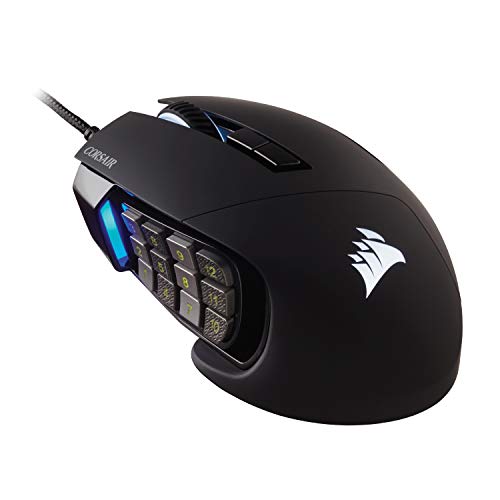
The Scimitar RGB Elite stands out for its side panel with 12 buttons. That layout can put many commands under your thumb in games that support them. Its shape is built around a fuller MMO-style control setup, not a minimal travel design. The mouse connects by USB and includes lighting for a desktop setup.
For console use, the button grid is both its strength and its main question mark. A console game may recognize basic mouse movement and clicks but ignore extra button assignments. Corsair’s PC software can help with setup, yet console access to those tools is limited. I would choose this mouse only if the games you play can use its side controls or if you also game on PC.
Pros:
- 12 side buttons provide many potential shortcuts.
- Side panel can be adjusted to suit thumb reach.
- Wired connection avoids battery upkeep.
- Useful for games with many mapped commands.
- Lighting can coordinate with a PC setup.
Cons:
- Many side buttons may feel excessive for console shooters.
- Custom assignments may require PC software.
- Larger design may not suit small hands.
What Amazon Buyers Are Saying
Buyers often value the number of side buttons and the ability to move the panel to a comfortable position. Some comments note a learning curve before the buttons feel natural. Others may find the mouse bulky or do not need so many controls. Read reviews with your game type in mind, since this mouse suits command-heavy play more than simple aiming.
My Recommendation
The Scimitar is a niche choice, not my default recommendation for console. It is worth considering if your game supports extra mouse buttons or you split time between console and PC. If you only need aim and click, a simpler mouse is easier to use.
| Category | Rating |
|---|---|
| Console-friendly setup | 3/5 |
| Button flexibility | 5/5 |
| Comfort and control | 4/5 |
| Value for the right player | 4/5 |
| Overall rating | 4/5 |
7. BENGOO Wired RGB Gaming Mouse

The BENGOO wired mouse is a basic option for players who want a gaming look and extra controls without a wireless setup. It uses a USB cable and has RGB backlighting. The shape aims to support everyday computer use and casual play. As with every mouse here, console use depends on the system and the game.
This is the kind of mouse I would consider for a spare setup or a first try with mouse input. It does not have the brand ecosystem or refined software options of higher-end models. A wired connection can be handy if you want to avoid batteries, but the cord may get in the way. Check the listing and current buyer feedback for the exact feature details before ordering.
Pros:
- Wired USB connection needs no battery.
- RGB lighting adds a bright gaming style.
- Extra buttons offer more than a basic office mouse.
- Can suit casual play and everyday computer tasks.
- Simple design is easy to get started with.
Cons:
- Console recognition varies by game and system.
- Advanced setup details may be limited.
- Wired cable can add clutter to a living-room setup.
What Amazon Buyers Are Saying
Buyer comments tend to focus on the price, lighting, and basic use. Some shoppers like getting a mouse with a gaming look for a simple setup. Others may expect more detailed control or software options than a basic model provides. I recommend checking recent verified reviews and confirming the included features on the current product listing.
My Recommendation
The BENGOO is a low-cost option if your needs are basic and the game supports mouse input. I would not choose it for advanced button programming or a carefully tuned competitive setup. It can work as an entry-level pick, but verify compatibility before you buy.
| Category | Rating |
|---|---|
| Console-friendly setup | 3/5 |
| Basic control | 3.5/5 |
| Ease of use | 3.5/5 |
| Budget value | 4/5 |
| Overall rating | 3.5/5 |
8. Logitech G305 Lightspeed Wireless, White

This white G305 offers the same core idea as the black version: a compact wireless mouse with a USB receiver and a simple button layout. The white finish can suit a bright desk or a matching console setup. Since the two color options share the same basic use, choose by finish and current price rather than expecting a different feature set. It still needs a USB-A connection and compatible game support.
The G305 works on a replaceable AA battery, so you do not need to charge it by cable. That is convenient for some players and an extra task for others. Its compact form takes up little space, but comfort depends on how it fits your hand. I would pick this version when you want wireless use and prefer a white mouse.
Pros:
- Wireless form keeps the desk clear.
- White finish matches light-colored setups.
- Compact size is easy to carry or store.
- USB receiver provides a direct connection method.
- Six-button layout stays familiar for new users.
Cons:
- Needs a USB-A port or suitable adapter.
- AA battery must be replaced over time.
- Small shape may not feel right in a large hand.
What Amazon Buyers Are Saying
Reviews for the G305 line commonly discuss its wireless convenience, small form, and battery use. White color buyers may also care about how the finish looks beside other gear. As with the black version, some players prefer a larger shape or a rechargeable battery. Check the listing reviews for recent notes about the exact color and product condition.
My Recommendation
This white G305 is a good match for a player who wants the G305’s wireless design in a lighter color. Its value depends on your comfort with a receiver and AA battery. I would buy it only after checking that the console has a free port and the game supports mouse input.
| Category | Rating |
|---|---|
| Console-friendly setup | 3.5/5 |
| Comfort and control | 4/5 |
| Wireless convenience | 4.5/5 |
| Value | 4/5 |
| Overall rating | 4/5 |
9. Redragon M602

The Redragon M602 is a wired gaming mouse with an ergonomic shape, RGB lighting, and several buttons. Its advertised adjustable sensitivity and extra controls give PC users options to tune the feel. A console may not expose those settings or accept every side button, so treat its extra features as a bonus rather than a promise. Its USB cable keeps setup simple when the system supports a mouse.
This model is best for a player who wants a low-cost mouse that can also serve for computer use. Its larger shape may suit a palm grip better than a small travel mouse, though personal fit matters. The M602 avoids wireless pairing and battery changes. I would compare it with the M612 and choose the one that fits your hand and current budget.
Pros:
- Wired connection does not need charging.
- Ergonomic body can suit a palm-style grip.
- Extra buttons offer more actions on compatible games.
- Adjustable sensitivity gives PC users setup choices.
- RGB lighting adds a gaming look.
Cons:
- Some settings may need software on a PC.
- Console games may not use all of its buttons.
- Larger shape may not suit smaller hands.
What Amazon Buyers Are Saying
Buyer comments often mention the low price, comfortable shape, and number of controls. Some users like the ability to adjust settings on a computer. Others focus on software setup or say that the mouse feels too large for their hand. Since reviews can change over time, check recent feedback and the current listing before ordering.
My Recommendation
The M602 is a practical budget choice if you want an ergonomic wired mouse for both PC and supported console games. Its extra buttons matter most when the game can use them. I would choose it for value, but not if you need a small, light, or wireless mouse.
| Category | Rating |
|---|---|
| Console-friendly setup | 3.5/5 |
| Comfort and control | 4/5 |
| Button flexibility | 4/5 |
| Budget value | 4.5/5 |
| Overall rating | 4/5 |
How to Choose the Best Gaming Mouse for Console
The best gaming mouse for console is the one your system and game can use well. Do not shop by sensor numbers or lights alone. First check support, then choose the shape and connection that fit your setup.
1. Confirm mouse support for your console game
This is the first step, not a small detail. Console mouse and keyboard support varies by game, and some titles accept a mouse only in certain modes. A console may also recognize basic clicks but ignore extra buttons or custom settings. Check the game maker’s current support notes and in-game input menu before you order. If a title does not support mouse input, a premium mouse will not add that feature.
Also check the console’s available USB ports. A wired mouse needs a free port. A wireless model with a USB receiver needs a port too, and it may need an adapter if the connector does not match. Do not assume a Bluetooth mouse will work just because the console has Bluetooth; the game and system must support that input path.
2. Pick a connection and shape that suit your setup
A wired mouse is easy to plug in and does not need a battery. It can be a smart choice if you play close to the console or have room to route the cable. A wireless model can keep a living-room setup tidy, but it adds a receiver and battery care. Measure the space near the console and think about where the mouse will sit before choosing.
Hand fit matters as much as features. A large, sculpted mouse may feel secure in a broad hand, while a small mouse can be easier to move and store. If possible, compare the mouse’s shape with one you already like. Consider left- or right-handed use, your grip, and whether the thumb buttons sit where your thumb can reach them without strain.
3. Pay for controls you can actually use
DPI is a measure of mouse sensitivity. A very high number does not automatically make aiming better. Start with a comfortable setting and adjust it in the game if the game offers a mouse sensitivity control. For console play, steady movement and a good fit often matter more than a large maximum DPI figure.
Extra buttons can help if the game lets you assign useful actions to them. If the game ignores those buttons, a large button grid adds little value. Also ask whether setup needs PC software. Some mice let you change settings only through a computer program, which can be inconvenient if you only own a console. Compare the mouse’s basic USB use, comfort, and price before paying more for features you may not use.
Final Verdict: Which Should You Buy?
The Logitech G502 HERO is my best overall pick for a wired console setup because it balances comfort, extra controls, and a direct USB connection. Choose the G305 if you want wireless play and your console has a free USB-A port.
The best gaming mouse for console still depends on game support. Confirm compatibility, choose a shape that fits your hand, and buy only the features you will use.
FAQs Of best gaming mouse for console
Can I use any gaming mouse on a console?
No. Console and game support varies. Check the game’s input settings and support notes before buying.
Do wired gaming mice work better than wireless mice on console?
Neither type is always better. Wired models avoid batteries, while wireless models reduce cable clutter. Both still need console and game support.
Can I use the Logitech G305 on a console?
It may work when the console accepts its USB receiver and the game supports mouse input. Check your console’s ports and the game’s rules first.
Will a console use all the extra buttons on a gaming mouse?
Not always. A game may accept basic mouse movement and clicks but ignore extra buttons or PC software settings.
What should I check before buying a gaming mouse for console?
Check game support, USB port needs, hand fit, wired or wireless use, and whether the mouse needs PC software for key settings.