For most budget PC gamers, the MSI Forge GK110 offers a strong balance of useful gaming features, simple setup, and everyday value.
A new gaming setup can get expensive fast, especially when you still need a keyboard and mouse. A combo can make shopping simpler and keep both devices within one budget. But bundles vary: some add wireless play, a wrist rest, or a headset, while others focus on basic controls and lighting. I compared the options below by their listed features and likely use. These are not lab-test results, and prices, availability, and Amazon feedback can change, so check the current listing before you buy.
See the differences between my top picks at a glance.
| Combo | Connection | Standout listed feature | Best fit | Check price |
|---|---|---|---|---|
| MSI Forge GK110 | Wired | 26-key anti-ghosting; mouse listed at 12,800 DPI | Feature-focused budget setup | View on Amazon |
| Redragon S107 | Wired | 25-key anti-ghosting; 10,000-DPI mouse listed | Programmable controls | View on Amazon |
| Redragon S101-3 PRO | Wired | Software and independent macro record keys | Entry-level customization | View on Amazon |
| RedThunder K10 Wired | Wired | Wrist rest; mouse listed at 7,200 DPI | Comfort on a tight budget | View on Amazon |
| Redragon S101M-KS Wireless | Tri-mode wireless | 4800-DPI mouse; 10 media keys | A less cluttered desk | View on Amazon |
| RedThunder K10 Wireless | Wireless | 3800mAh battery; 3200-DPI mouse listed | Wireless play with wrist rest | View on Amazon |
| Hornet RX-250 4-in-1 | Wired | Keyboard, mouse, pad, and headset bundle | A starter set of accessories | View on Amazon |
| BlueFinger RGB Combo | Wired | Backlit keyboard and mouse | Basic gaming and work | View on Amazon |
| Redragon 60% Wireless | Wireless | Compact 60% keyboard format | Small desks and portability | View on Amazon |
MSI Forge GK110 Combo

The MSI Forge GK110 is a wired gaming keyboard and mouse set with RGB lighting. Its listing calls out 26-key anti-ghosting, a feature that helps the keyboard register several pressed keys at once. The mouse is listed with an optical sensor and a maximum 12,800 DPI setting. That number describes sensitivity options, not a promise of better aim.
I like this set for a first gaming desk where a buyer wants clear feature details without buying each device on its own. A wired connection also means no batteries to charge or replace. The set may suit a range of games, but the best fit depends on hand size, key feel, and desk space. Check the current product page for layout, software support, and compatibility details before ordering.
Pros:
- Keyboard and mouse come in one purchase.
- Wired devices do not need battery charging.
- RGB lighting adds a gaming look.
- 26-key anti-ghosting is useful for multi-key play.
- The listed high DPI range gives users sensitivity options.
Cons:
- Cables can add clutter to a small desk.
- A high DPI figure alone does not show tracking quality.
- Buyers who want wireless play should look elsewhere.
What Amazon Buyers Are Saying
I cannot confirm current Amazon review themes from the product details alone. Read recent verified-purchase feedback for notes on key feel, mouse comfort, lighting controls, and long-term reliability. Those details matter more than a headline DPI number when you use the set every day.
My Recommendation
The Forge GK110 looks like a sensible wired choice if its current price fits your budget and you want anti-ghosting plus RGB in one package. I rate it well for its stated feature mix, while keeping in mind that I have not independently tested its feel or tracking.
| Category | Rating |
|---|---|
| Listed gaming features | 4.5/5 |
| Setup simplicity | 4/5 |
| Flexibility | 3.5/5 |
| Value potential | 4/5 |
| Overall rating | 4/5 |
Redragon Updated S107 Combo

The updated Redragon S107 pairs a backlit gaming keyboard with a wired mouse. Its listing names 25-key anti-ghosting and a mouse rated up to 10,000 DPI. It also describes the mouse as programmable, with software and a 1K Hz polling rate. Those options may appeal to players who want more control than a basic office set provides.
This is a practical pick for someone who wants a wired combo and is willing to use software to adjust settings. The listed polling rate is a technical feature, but it does not by itself prove that the mouse will feel right to you. I would check whether the software supports your computer and whether the keyboard layout matches your needs. Also confirm the latest listing details, since product versions can change.
Pros:
- Keyboard and mouse are sold together.
- 25-key anti-ghosting suits games that use several keys at once.
- Programmable mouse controls offer room to customize.
- Software is listed for mouse setup.
- Wired use avoids charging concerns.
Cons:
- Software setup may take time.
- The set needs available USB ports.
- High DPI and polling-rate figures do not replace a comfort check.
What Amazon Buyers Are Saying
I cannot verify the current review record for this listing. Before buying, look for recent buyer comments about software setup, key response, and whether the mouse buttons hold up to regular use. Focus on repeated, specific comments rather than one-off praise or complaints.
My Recommendation
The S107 is worth considering if you want a programmable wired mouse and a keyboard with anti-ghosting. I would compare its live price with the MSI option and choose based on layout, software needs, and comfort rather than DPI alone.
| Category | Rating |
|---|---|
| Listed gaming features | 4.5/5 |
| Customization | 4/5 |
| Ease of setup | 3.5/5 |
| Value potential | 4/5 |
| Overall rating | 4/5 |
Redragon S101-3 PRO Combo

The Redragon S101-3 PRO is a wired set with an RGB-backlit keyboard and mouse. Its listing highlights software and independent macro record keys. A macro can save a set of actions to one control, which may help with repeated tasks in games or apps that support it. The bundle also aims at buyers who want a matched keyboard and mouse at an entry-level price.
I see the main appeal here as the included customization tools, not a claim that it will outperform a higher-end mouse. Software can take some trial and error, so it helps to know whether you will use macros before paying extra for them. The wired setup is simple, but it leaves cables on the desk. Check the current listing for exact layout and software support before you order.
Pros:
- Includes both core desk controls in one box.
- RGB backlighting gives the setup a coordinated look.
- Macro recording can reduce repeated key presses.
- Software gives users settings to explore.
- Wired devices need no battery charging.
Cons:
- Macro tools may be unnecessary for casual play.
- Cables may be inconvenient for clean or compact desks.
- The listing details do not establish switch type or sensor performance.
What Amazon Buyers Are Saying
I cannot confirm live Amazon review patterns for this item. Check current comments for reports on software use, backlight control, and how the keyboard and mouse feel after longer sessions. If buyers mention a specific issue more than once, weigh that against the set’s price and features.
My Recommendation
Choose the S101-3 PRO if you want a basic RGB combo with macro tools and expect to use them. It is a reasonable budget candidate, but I would not buy it for advanced performance claims that the listed information does not prove.
| Category | Rating |
|---|---|
| Macro features | 4/5 |
| Everyday usability | 4/5 |
| Setup simplicity | 3.5/5 |
| Value potential | 4/5 |
| Overall rating | 4/5 |
RedThunder K10 Wired Combo

This RedThunder K10 set includes a wired keyboard, mouse, and wrist rest. The listing describes the keyboard as having a mechanical feel and anti-ghosting, but that wording does not mean it uses mechanical switches. The mouse is described as a 7D model with up to 7,200 DPI. RGB backlighting completes the gaming-style package.
The included wrist rest may be useful if you prefer support in front of the keyboard, though comfort depends on your desk height and hand position. The three-piece bundle can save a separate accessory purchase. On the other hand, the wired design is less tidy than wireless gear. I would check the product images and current listing carefully to confirm dimensions and included parts.
Pros:
- Includes keyboard, mouse, and wrist rest.
- Anti-ghosting is listed for the keyboard.
- Backlighting adds visibility and style.
- Wired devices do not require battery care.
- Mouse DPI settings provide sensitivity choices.
Cons:
- “Mechanical feel” does not confirm mechanical switches.
- The wrist rest may not suit every desk height or posture.
- Three wired items can add cable clutter.
What Amazon Buyers Are Saying
I cannot verify current buyer feedback for this listing. Look for recent comments about wrist-rest comfort, keyboard noise, and how well the lighting and mouse controls work. Reviews that describe a full week or month of use can offer more context than brief first impressions.
My Recommendation
The wired K10 is a good option to compare if you want a wrist rest included and prefer a wired setup. I would buy it only after checking that the keyboard feel and wrist-rest shape suit your habits.
| Category | Rating |
|---|---|
| Included accessories | 4.5/5 |
| Listed gaming features | 4/5 |
| Desk neatness | 3/5 |
| Value potential | 4/5 |
| Overall rating | 4/5 |
Redragon S101M-KS Wireless Combo

The S101M-KS combines a wireless keyboard and mouse. Its listing describes tri-mode wireless, a mouse rated up to 4,800 DPI, and 10 independent multimedia keys. Those extra keys can make common media tasks easier without opening menus. Wireless play can also reduce cable clutter around a PC.
Before buying, confirm which connection modes the current version supports and whether the required receiver or cable comes in the box. Wireless devices need power, so check the listing for battery details and charging needs. This combo may suit a desk where fewer cables matter more than a simple plug-in setup. For competitive play, also read recent feedback on connection stability and response.
Pros:
- Wireless design keeps the desk less cluttered.
- Tri-mode connectivity is listed.
- 10 media keys add quick access to common controls.
- Keyboard and mouse arrive as a matched set.
- Mouse sensitivity has multiple listed settings up to 4,800 DPI.
Cons:
- Wireless devices need power management.
- Connection details and included accessories need confirmation.
- Buyers who want a cable-only setup may prefer a wired set.
What Amazon Buyers Are Saying
I cannot confirm the current Amazon review themes for this product. Check recent reviews for battery life, connection behavior, and how easy it is to switch between modes. Also look for clear buyer notes on which devices they connected it to.
My Recommendation
This is a strong option to consider if you want a wireless gaming mouse and keyboard combo with media keys. I would verify the exact connection modes and charging details first, then compare the price with the wired S101 models.
| Category | Rating |
|---|---|
| Wireless convenience | 4.5/5 |
| Listed controls | 4/5 |
| Power simplicity | 3.5/5 |
| Value potential | 4/5 |
| Overall rating | 4/5 |
RedThunder K10 Wireless Combo

This RedThunder K10 is a wireless keyboard and mouse combo with LED backlighting. The listing names a 3,800mAh battery, a mechanical-feel anti-ghosting keyboard, and a 7D mouse rated up to 3,200 DPI. The battery capacity is a listed detail, not a guarantee of a set number of hours between charges. The “mechanical feel” label also does not confirm mechanical switches.
The K10 may suit someone who wants fewer cables and a wrist rest-style keyboard setup in one purchase. The mouse’s listed DPI ceiling is lower than several wired options here, but many players use settings below the maximum. Check current product details for charging method, battery care, and what accessories come in the box. A wireless model is most appealing when convenience matters more than avoiding charging.
Pros:
- Wireless design can make a desk look cleaner.
- Keyboard and mouse come as a set.
- Anti-ghosting is listed for the keyboard.
- Backlighting adds a gaming look.
- The listing provides battery capacity and mouse DPI details.
Cons:
- Needs charging or other battery care.
- “Mechanical feel” does not mean mechanical switches.
- Listed mouse DPI tops out below some competing bundles.
What Amazon Buyers Are Saying
I cannot verify current Amazon buyer feedback for this listing. Review recent comments for charging life, wireless response, and whether the keyboard feels comfortable over long sessions. Confirm that any feedback refers to this exact wireless version.
My Recommendation
I would shortlist the wireless K10 if you want a cable-free setup and value its included feature mix. It is less compelling if you want a mouse with a higher listed DPI range or prefer not to manage charging.
| Category | Rating |
|---|---|
| Wireless convenience | 4/5 |
| Included features | 4/5 |
| Charging convenience | 3.5/5 |
| Value potential | 4/5 |
| Overall rating | 4/5 |
Hornet RX-250 4-in-1 Bundle
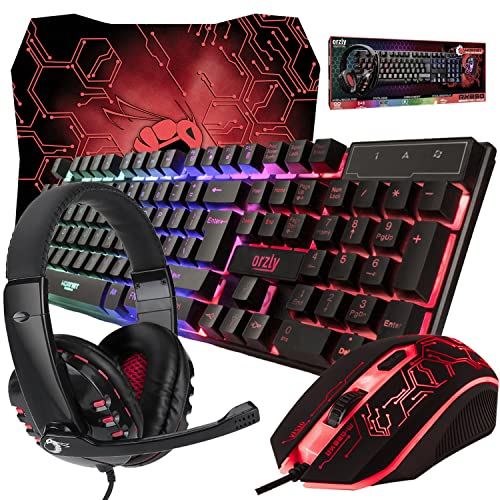
The Hornet RX-250 is a wired four-item bundle with a keyboard, mouse, mouse pad, and headset. Its listing highlights LED RGB backlighting and names PC, Xbox, and PS4 users as potential buyers. That does not guarantee that every feature works on every console, so check the product page and console requirements first. The chief draw is getting several starter accessories together.
This set could help someone build a basic gaming station without shopping for each item separately. A bundled headset and mouse pad can be convenient, but they may not match the comfort or quality of separate gear chosen to fit you. Check cable connections, console compatibility, and headset features before ordering. If you already own some accessories, a keyboard-and-mouse-only combo may offer better value.
Pros:
- Includes four kinds of gaming accessories.
- Wired parts avoid battery charging.
- Backlighting adds a coordinated appearance.
- Can cover several basic setup needs in one order.
- Listing names PC and select console users as audiences.
Cons:
- Console compatibility should be checked feature by feature.
- Some included parts may be redundant for existing setups.
- Bundle details do not establish headset comfort or sound quality.
What Amazon Buyers Are Saying
I cannot confirm current Amazon review patterns for this bundle. Look for recent notes about headset comfort, cable connections, and whether the mouse pad and keyboard meet buyers’ needs. Pay close attention to feedback from users with the same computer or console you plan to use.
My Recommendation
The Hornet RX-250 makes sense as a starter bundle when you need all four listed items. I would not choose it just because it has more pieces; compare the current price and compatibility with your setup first.
| Category | Rating |
|---|---|
| Accessory count | 4.5/5 |
| Setup convenience | 4/5 |
| Compatibility clarity | 3/5 |
| Value potential | 4/5 |
| Overall rating | 3.5/5 |
BlueFinger RGB Gaming Combo
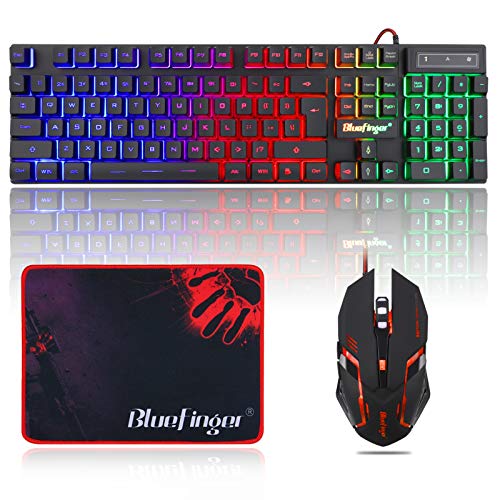
The BlueFinger combo pairs a USB-wired keyboard with a backlit mouse. Its listing presents the set for both gaming and work on a laptop or desktop computer. This makes it a simple option for someone who wants one keyboard and mouse for daily tasks and casual play. The supplied details do not list advanced mouse software or a specific DPI range.
I would view this as a basic, appearance-focused set rather than a high-spec competitive package. USB wired gear is easy to understand, but check your computer’s available ports and the product page for operating-system support. Lighting can make a desk feel more personal, though it does not improve performance by itself. Compare its price with feature-rich choices if you play games that rely on fast, precise input.
Pros:
- Keyboard and mouse are included together.
- USB connection offers a straightforward setup.
- Backlighting gives both pieces a matching look.
- Listing targets gaming and general computer use.
- Wired operation does not call for battery charging.
Cons:
- Listing details do not state a mouse DPI range.
- Advanced programming features are not highlighted.
- Cables may limit desk placement.
What Amazon Buyers Are Saying
I cannot check current Amazon feedback for this product. Read recent reviews for practical details on key feel, lighting controls, and mouse comfort. If you plan to use the set for work as well as gaming, look for comments about typing over a full day.
My Recommendation
The BlueFinger set is worth comparing if you need an affordable-looking wired keyboard and mouse for everyday use. For gaming that needs advanced settings, I would favor a combo with more clearly listed controls.
| Category | Rating |
|---|---|
| Everyday simplicity | 4/5 |
| Listed gaming features | 3/5 |
| Desk setup | 3.5/5 |
| Value potential | 3.5/5 |
| Overall rating | 3.5/5 |
Redragon 60% Wireless Combo

This Redragon set combines a wireless mouse with a portable 60% keyboard. A 60% layout uses less desk space than a full-size keyboard because it leaves out many dedicated keys. That compact shape can help players who want more room for mouse movement. The supplied title does not list DPI, battery life, or connection modes, so check those details before buying.
Compact boards often rely on key combinations for functions that larger keyboards place on separate keys. That can take time to learn, especially if you use a number pad or function row often. I would choose this combo for its small footprint, not for unlisted performance claims. Confirm the exact layout, wireless setup, and included accessories on the live product page.
Pros:
- Compact keyboard can free up desk space.
- Wireless format reduces cable clutter.
- Portable design may suit travel or shared desks.
- Keyboard and mouse are sold as a matched set.
- Small boards can leave more room for mouse movement.
Cons:
- 60% layouts omit many dedicated keys.
- Listed details do not state mouse DPI or battery life.
- Wireless connection type should be confirmed before purchase.
What Amazon Buyers Are Saying
I cannot verify current reviews for this listing. Check recent buyer comments for layout learning time, battery performance, and connection reliability. Look for a clear description of whether the mouse and keyboard use the same receiver or separate connections.
My Recommendation
This is a good candidate if desk space and portability matter most. It is not my first pick for buyers who need a full keyboard layout or want detailed specs before choosing.
| Category | Rating |
|---|---|
| Space saving | 4.5/5 |
| Portability | 4/5 |
| Layout flexibility | 3/5 |
| Specification clarity | 3/5 |
| Overall rating | 3.5/5 |
How to Choose the Best Gaming Mouse and Keyboard Combo
The best gaming mouse and keyboard combo depends on how you play, how much desk space you have, and which features you will use. Start with comfort and connection type. Then compare the listed controls and check real buyer feedback for the details a product page may leave out.
1. Match the Connection to Your Desk and Play Style
A wired combo can be simple: plug it in, skip battery charging, and use it at a fixed desk. The trade-off is cable clutter and less freedom to move devices around. Wireless sets keep the surface cleaner, but you should check their connection modes, power needs, and included receiver or cable. For a small desk or frequent travel, a compact wireless set may suit you; for a permanent PC setup, a wired combo can be easier to manage.
2. Read Keyboard and Mouse Features in Context
Anti-ghosting can help a keyboard register several keys pressed together. Macro controls can store repeated actions, but only help if your games or work use them. DPI means mouse sensitivity; a higher maximum gives more adjustment range but does not prove better tracking or comfort. Look at the mouse shape, button layout, keyboard size, and software support. If you need number keys or separate function keys, avoid a compact 60% layout unless you are ready to learn key shortcuts.
3. Compare Comfort, Compatibility, and Total Value
A low price does not make a combo a good deal if the mouse feels too small or the keyboard layout frustrates you. Check the dimensions, key layout, included parts, and return terms. If you are considering a headset bundle, confirm that its connections work with your device. Read recent reviews for repeated comments about comfort, setup, and reliability. Compare the price of the whole package with the cost of buying only the parts you need.
Final Verdict: Which Should You Buy?
For a wired all-around pick, I would start with the MSI Forge GK110, which lists anti-ghosting and a 12,800-DPI mouse. The Redragon S101M-KS is a better fit if wireless use and media keys matter more.
The best gaming mouse and keyboard combo is the one that fits your desk, hands, and play style. Check current specs, price, and buyer feedback before you order.
FAQs Of best gaming mouse and keyboard combo
What is the best gaming mouse and keyboard combo for beginners?
The MSI Forge GK110 is a strong starting point in this group because its listing gives clear gaming features and includes both devices. Check the current price and layout before buying.
Is a wired or wireless gaming combo better?
Wired combos avoid battery charging and keep the connection simple. Wireless combos reduce cable clutter but need power and may need setup. Choose based on your desk and habits.
Does a higher DPI mouse make you a better gamer?
No. DPI sets how sensitive the mouse feels. Comfort, control, and practice matter more than the highest number on the box.
What does anti-ghosting mean on a gaming keyboard?
Anti-ghosting helps a keyboard register several keys pressed at once. The number of keys supported can differ, so check the listing for the stated limit.
Should I buy a 60% gaming keyboard?
A 60% keyboard can save desk space, but it lacks many dedicated keys. It suits compact setups if you are comfortable using key combinations for extra functions.