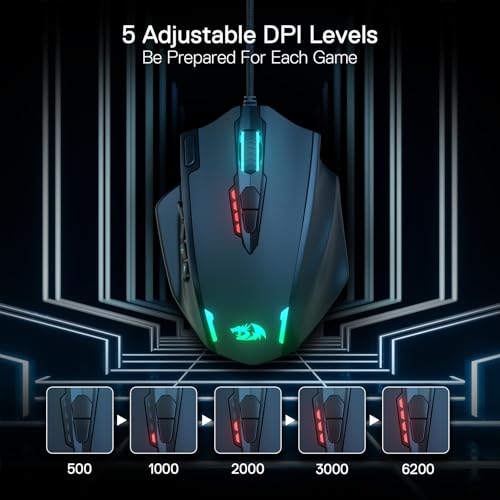
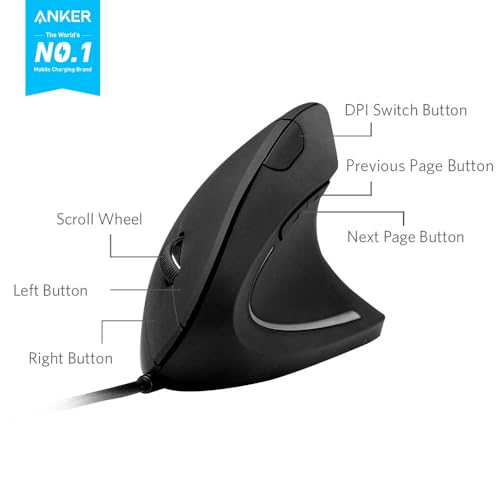
The Razer Basilisk V3 is my top palm-grip pick for its shaped shell, useful controls, and wired simplicity.
If your hand rests across the mouse, a small, flat shell can make long gaming sessions feel awkward. A palm-grip mouse should support your hand without forcing your fingers into a tight curl. I compared full-size gaming mice with a few grip-tape options for shoppers who already own a mouse. My picks cover wired and wireless use, large hands, and extra control buttons. The best gaming mouse for palm grip is the one that feels steady in your hand, not just impressive on a spec sheet.
See the differences between my top picks at a glance.
| Product | Type | Best fit | Connection / use | Quick take | Link |
|---|---|---|---|---|---|
| Razer Basilisk V3 | Gaming mouse | Palm grip, right hand | Wired | Strong all-around pick | View on Amazon |
| Logitech G703 LIGHTSPEED | Gaming mouse | Palm grip, wireless use | Wireless | Comfort-focused wireless option | View on Amazon |
| Corsair IRONCLAW Wireless SE | Gaming mouse | Larger-hand comfort | Wireless | Consider for a fuller shell | View on Amazon |
| Razer Basilisk V3 X HyperSpeed | Gaming mouse | Wireless palm grip | Wireless | Flexible wireless choice | View on Amazon |
| TALONGAMES grip tape for G PRO | Grip accessory | Compatible Logitech models | Adds surface grip | Not a mouse | View on Amazon |
| TALONGAMES grip tape for Basilisk V3 | Grip accessory | Basilisk V3 / V3 Pro | Adds surface grip | Model-specific fit | View on Amazon |
| TALONGAMES universal grip tape | Grip accessory | Many mouse shapes | Cut or fit to device | Check fit before buying | View on Amazon |
| TALONGAMES grip tape for G502 X | Grip accessory | G502 X wired / wireless | Adds surface grip | For existing G502 X owners | View on Amazon |
| TALONGAMES grip tape for G PRO X Superlight 2 DEX | Grip accessory | Superlight 2 DEX | Adds surface grip | Only for named model | View on Amazon |
| TALONGAMES grip tape for Logitech G102/G203/G304/G305 | Grip accessory | Named Logitech models | Adds surface grip | Check exact mouse version | View on Amazon |
Razer Basilisk V3: Best Overall for Palm Grip

The Razer Basilisk V3 is a strong starting point if you want a full-size gaming mouse with a right-hand shape. Its raised back gives your palm a place to rest, while the thumb area gives your hand a more guided position. It also has a customizable scroll wheel and several controls, so it can suit games and everyday tasks. The wired design avoids charging breaks, though it does leave a cable on the desk.
I like this model for palm grip because the shape does more of the comfort work than a flat, simple shell. Its controls can help in games that use many commands, but extra buttons only help when they sit within easy reach. Before you buy, check the fit against your hand size and desk setup. A comfortable shape matters more than a long feature list.
Pros:
- Right-hand shape gives the palm a clear support point.
- Multiple controls suit games with extra commands.
- Customizable scroll wheel adds flexibility.
- Wired connection means no battery charging routine.
- Works well as a gaming and general-use mouse.
Cons:
- The cable may feel restrictive to some players.
- Its right-hand shape is not ideal for left-handed use.
- Extra controls may take time to set up and learn.
What Amazon Buyers Are Saying
Amazon reviews can change over time, and I cannot verify the current review mix here. Buyers comparing this mouse should look for recent comments about comfort, scroll-wheel feel, software setup, and long-term use. Pay close attention to reviews from people with a similar hand size and grip. Those details matter more than a broad star score.
My Recommendation
I recommend the Basilisk V3 for right-handed palm-grip players who want a shaped shell and a wired connection. It offers a practical mix of comfort and controls without asking you to manage a battery. The best gaming mouse for palm grip still depends on your hand and reach, so buy from a seller with a clear return policy. My overall rating is 4.5 out of 5.
| Category | Rating |
|---|---|
| Palm support and shape | 4.5/5 |
| Control options | 4.5/5 |
| Ease of use | 4/5 |
| Value | 4/5 |
| Overall Rating | 4.5/5 |
Logitech G703 LIGHTSPEED: Best Wireless Pick

The Logitech G703 LIGHTSPEED suits players who want a wireless setup and a shape built for right-handed use. Its curved shell gives the palm a fuller feel than many small, low-profile mice. A wireless mouse can also make it easier to move around a clear desk without dragging a cable. Check the current package details before purchase if you need a certain charging feature or accessory.
For palm grip, the main question is whether the hump and side shape match your hand. If the mouse fills your palm without pushing your fingers forward, it may feel more natural during long sessions. Wireless convenience comes with a need to keep an eye on battery status. I would compare its shape with a wired mouse in person when possible, since comfort is personal.
Pros:
- Wireless design keeps the desk free of a mouse cable.
- Right-hand shape can suit a relaxed palm grip.
- Useful for both gaming and normal computer work.
- Brand support and setup tools are widely available.
- Good option for players who value freedom of movement.
Cons:
- Wireless use requires battery care.
- It may not suit left-handed players.
- Fit depends on hand size and how far forward you hold the mouse.
What Amazon Buyers Are Saying
Current Amazon buyer comments may vary, and I cannot confirm a live review sample. When reading recent reviews, look for repeated notes on wireless reliability, battery life, button feel, and comfort during longer play. A few comments about hand size can help you judge fit. Treat isolated complaints as personal experience, not proof of a common fault.
My Recommendation
The G703 is worth considering if you want wireless convenience in a fuller, right-hand shape. It may be a better fit than a compact mouse for players who like their palm to rest on the shell. Check the version and included features on the current listing before ordering. I rate it 4.3 out of 5 for palm-grip use.
| Category | Rating |
|---|---|
| Palm support and shape | 4.5/5 |
| Wireless convenience | 4.5/5 |
| Setup simplicity | 4/5 |
| Value | 4/5 |
| Overall Rating | 4.3/5 |
Corsair IRONCLAW Wireless SE: For Larger Hands

The Corsair IRONCLAW Wireless SE is a wireless gaming mouse worth a look if smaller mice leave your hand cramped. The product name and design place it in Corsair’s larger-hand mouse family, but your own fit still matters. A broad, supportive shape can make a palm grip feel more relaxed when your fingers do not need to curl tightly. Confirm the exact model and included features on the listing before you buy.
This mouse is best approached as a comfort-first choice, not an automatic match for every large hand. Check how far your thumb reaches and whether your ring and little fingers rest without strain. Its wireless design can also help keep a clean setup. I would avoid buying it only because the name suggests a large fit; hand length and palm width can change the feel.
Pros:
- Wireless use helps keep the desk clear.
- Made for shoppers looking beyond compact mouse shapes.
- May offer a more relaxed fit for larger hands.
- Suitable for gaming and daily PC tasks.
- Part of a well-known gaming accessory line.
Cons:
- The fuller shape may feel too large for smaller hands.
- Wireless models need charging or battery planning.
- Check the exact SE feature set before purchase.
What Amazon Buyers Are Saying
I cannot verify the live Amazon review page or its current buyer feedback. Look for recent reviews that name hand size and grip style, then compare comments about comfort, connection, and button placement. Those points are more useful than a vague claim that a mouse feels large. Check the listing for the precise model name, as product variants can differ.
My Recommendation
I would shortlist the IRONCLAW Wireless SE if you have larger hands and prefer a wireless palm-grip mouse. It is less compelling if you want a compact shell or a simple wired setup. Check seller details and return terms, then compare the dimensions and shape with a mouse you already find comfortable. My rating is 4.1 out of 5.
| Category | Rating |
|---|---|
| Palm support potential | 4.3/5 |
| Wireless convenience | 4/5 |
| Fit flexibility | 3.8/5 |
| Value | 4/5 |
| Overall Rating | 4.1/5 |
Razer Basilisk V3 X HyperSpeed: Wireless Alternative

The Basilisk V3 X HyperSpeed brings the familiar Basilisk-style right-hand shape to a wireless model. That makes it a sensible choice if you like the idea of a thumb rest and want to avoid a cable. Its customizable design can suit players who want to set up buttons for different games. Check the product page for supported connection modes and the current in-box details.
For palm grip, the main benefit is the shaped body, which can help your hand settle into a consistent position. The wireless setup gives you more freedom around the desk, but you should also consider battery needs and how often you want to recharge or replace power. This is not a neutral, ambidextrous shape. I would pick it for a right-handed player who wants comfort and wireless use over a bare-bones design.
Pros:
- Wireless design reduces cable drag.
- Right-hand shell suits a relaxed hand position.
- Customizable controls support different game setups.
- Useful for a gaming PC and general desktop use.
- Good alternative to the wired Basilisk V3.
Cons:
- Requires attention to battery power.
- Not designed for left-handed use.
- Feature set may differ from the wired Basilisk V3.
What Amazon Buyers Are Saying
I cannot confirm current buyer review trends for this listing. Before ordering, scan recent comments for connection stability, battery experience, button setup, and how the shell fits different hands. Check the product details closely, since the V3 X HyperSpeed is not the same model as the wired Basilisk V3. Reviews for one should not stand in for the other.
My Recommendation
Choose the Basilisk V3 X HyperSpeed if you want the Basilisk-style shape without a wired connection. It makes sense for a right-handed palm-grip player who values a clean desk and customizable controls. If you do not need wireless use, compare it with the wired V3 before paying more. My rating is 4.2 out of 5.
| Category | Rating |
|---|---|
| Palm support and shape | 4.4/5 |
| Wireless use | 4.3/5 |
| Customization | 4.2/5 |
| Value | 4/5 |
| Overall Rating | 4.2/5 |
TALONGAMES Grip Tape for Logitech G PRO Models

This TALONGAMES set is a grip accessory, not a gaming mouse. The listing names Logitech G PRO X2 SUPERSTRIKE, PRO X Superlight, and Superlight 2 as compatible models. It uses thin, sweat-absorbing tape to add a different feel to the mouse surface. If your mouse slips in your hand, this may help you hold it with less effort.
Grip tape does not change a mouse’s size or shape, so it cannot fix a shell that does not fit your palm. It can add friction where your fingers touch and may feel useful during warm or long sessions. Take care when applying it, since careful placement can affect the finish and feel. Confirm your exact mouse version against the compatibility list before ordering.
Pros:
- Made for several named Logitech G PRO models.
- Thin 0.5 mm material adds grip without a major shape change.
- Sweat-absorbing surface may help with slippery hands.
- Can refresh the feel of an existing mouse.
- Cheaper than replacing a mouse that already fits well.
Cons:
- It is an accessory, not a mouse.
- Only fits the listed mouse models.
- Application takes care and may not be easy to reverse cleanly.
What Amazon Buyers Are Saying
I cannot verify current Amazon reviews for this tape. Look for recent buyer comments about fit on your exact mouse, ease of application, edge lift, and surface feel. A review for a different mouse model may not tell you much about compatibility. Check the product images and listed models before purchase.
My Recommendation
Buy this tape only if you already own one of the named compatible Logitech mice and want more surface grip. It may improve handling, but it will not turn a small or flat mouse into a palm-grip shape. I rate it 3.8 out of 5 as a targeted add-on.
| Category | Rating |
|---|---|
| Grip improvement potential | 4/5 |
| Model fit clarity | 4/5 |
| Application ease | 3.5/5 |
| Value as an add-on | 3.8/5 |
| Overall Rating | 3.8/5 |
TALONGAMES Grip Tape for Razer Basilisk V3

This TALONGAMES grip tape is made for the Razer Basilisk V3 and Basilisk V3 Pro. The product listing describes a 0.5 mm, sweat-absorbing surface that can add a firmer touch to the mouse. It is a small upgrade for someone who likes the Basilisk shape but wants more grip. It does not replace the mouse or alter its core features.
That distinction matters for palm-grip users. If the Basilisk fits your hand but feels slick, tape may help you hold it with more confidence. If your hand hurts because the shell is too large, too small, or poorly shaped for you, tape will not solve that issue. Follow the application instructions and make sure the model name on your mouse matches the listing.
Pros:
- Designed for the Basilisk V3 and V3 Pro models.
- Thin material can add grip without a large change in feel.
- Sweat-absorbing surface may help during longer play.
- Lets you keep a mouse shape you already like.
- Simple way to customize touch points.
Cons:
- Does not include a mouse.
- Not listed for every Razer mouse.
- Careful placement is needed for a clean fit.
What Amazon Buyers Are Saying
I cannot check the current Amazon review page, so I will not assign a buyer consensus. For a useful read, search reviews for your exact Basilisk version and note comments about coverage, adhesive, and comfort. A buyer’s preferred grip can affect how the tape feels. Use the listing’s compatibility details as the main fit check.
My Recommendation
This is a sensible add-on if your Basilisk V3 or V3 Pro already fits your palm and you want a more secure surface. It is not a cure for poor mouse shape or hand fatigue. I rate it 3.9 out of 5 as a model-specific accessory.
| Category | Rating |
|---|---|
| Grip improvement potential | 4/5 |
| Model fit | 4.2/5 |
| Application ease | 3.5/5 |
| Value as an add-on | 3.8/5 |
| Overall Rating | 3.9/5 |
TALONGAMES Universal Mouse Grip Tape

This universal TALONGAMES tape is an accessory for a mouse, controller, or keyboard. The listing calls out an ultra-thin 0.3 mm design and a sweat-absorbing, anti-slip surface. Since it is not made for one specific mouse shape, it may suit people who want to add grip to a device they already own. Check the listing to see how the pieces are cut and what devices the seller says they fit.
Universal tape can be helpful, but it asks you to do more fit work. Measure the areas you want to cover and avoid placing tape over seams, sensors, buttons, or moving parts. This is a surface upgrade, not a way to make a compact mouse support your palm. If you want a new mouse, put your budget toward a shape that fits first.
Pros:
- 0.3 mm thickness keeps the surface change small.
- Can be used with more than one type of device.
- Anti-slip surface may help with control.
- Sweat-absorbing material may suit warm hands.
- Flexible choice for users who do not own a listed model.
Cons:
- Universal fit may require trimming or careful placement.
- Not a gaming mouse or a palm-grip shape solution.
- Coverage and finish depend on how you apply it.
What Amazon Buyers Are Saying
I cannot verify the current Amazon buyer feedback for this item. Check recent reviews for notes on sheet size, how easy it is to cut, and whether the tape stays in place. Look for photos from buyers using a device like yours. Fit reports for a controller may not predict how it works on a mouse.
My Recommendation
Choose the universal tape if you already have a mouse that fits your palm and want to improve surface grip. It offers more flexibility than model-specific tape but may need more careful fitting. I would not buy it as a replacement for a comfortable mouse. My rating is 3.7 out of 5.
| Category | Rating |
|---|---|
| Grip potential | 3.8/5 |
| Device flexibility | 4.2/5 |
| Fit simplicity | 3.3/5 |
| Value | 3.8/5 |
| Overall Rating | 3.7/5 |
TALONGAMES Grip Tape for Logitech G502 X

This 0.5 mm TALONGAMES grip tape is listed for Logitech G502 X wired and wireless mice. It aims to add surface grip and absorb palm sweat, which can help if your current mouse feels slick. This accessory lets you keep the G502 X shape while changing how the outer shell feels. It does not include a G502 X mouse.
A palm grip needs a mouse shape that supports the hand, so think of this tape as a small comfort tweak. It may help your fingers hold the mouse in place, but it cannot change the mouse’s size or hand fit. Check the exact G502 X model before you order, and apply the pieces with care. Avoid covering buttons or any part that needs to move.
Pros:
- Listed for G502 X wired and wireless versions.
- Thin 0.5 mm material adds grip without a thick layer.
- Sweat-absorbing surface may help with a slick feel.
- Lets you personalize an existing mouse.
- May cost less than replacing a mouse that already fits.
Cons:
- Only useful if you own a compatible G502 X model.
- Does not improve the mouse’s shape or palm support.
- Application can take patience.
What Amazon Buyers Are Saying
I cannot confirm live reviews for this specific listing. Read recent feedback for comments on model fit, adhesive, and how the material feels after regular use. Check whether buyers identify their mouse as G502 X wired or wireless. This helps separate useful fit reports from reviews about other products.
My Recommendation
If the G502 X fits your hand but feels slippery, this tape is a practical add-on to consider. If your goal is a more supportive palm-grip shape, buy a different mouse instead. Confirm the model on your mouse and the package details before ordering. I rate it 3.8 out of 5.
| Category | Rating |
|---|---|
| Grip improvement potential | 4/5 |
| G502 X compatibility | 4/5 |
| Application ease | 3.5/5 |
| Value | 3.8/5 |
| Overall Rating | 3.8/5 |
TALONGAMES Grip Tape for Logitech G PRO X Superlight 2 DEX

This TALONGAMES grip tape is listed for the Logitech G PRO X Superlight 2 DEX wireless gaming mouse. The 0.5 mm tape is designed to add a more secure surface and absorb sweat. It may help if the mouse feels smooth under your fingers but otherwise fits your hand well. It is an accessory, so the mouse itself is not included.
Do not confuse extra grip with extra palm support. Tape can change how your hand touches the shell, but it cannot change the DEX’s outer shape. Check your mouse label before purchase, as similar Logitech names can be easy to mix up. Place the tape carefully so it does not block a button or edge that you use to lift the mouse.
Pros:
- Made for the named Superlight 2 DEX model.
- Thin tape keeps the shell’s feel close to its original shape.
- Sweat absorption may help during long sessions.
- Can improve grip without replacing the mouse.
- Useful for owners who like the mouse but want more surface texture.
Cons:
- Not for every Superlight or Logitech mouse.
- It cannot solve a poor shape match.
- Correct placement takes care.
What Amazon Buyers Are Saying
I cannot verify current Amazon comments for this accessory. Before buying, check recent reviews for clear mentions of the DEX model, fit, adhesion, and comfort. Avoid relying on feedback from older or different Superlight versions unless buyers confirm the same fit. Product compatibility is the key detail here.
My Recommendation
This tape makes sense for a Superlight 2 DEX owner who wants more grip but already likes the mouse shape. It is not a way to convert another mouse into a palm-grip model. Confirm compatibility and consider whether you are comfortable applying adhesive to your device. My rating is 3.8 out of 5.
| Category | Rating |
|---|---|
| Grip improvement potential | 4/5 |
| Model fit | 4/5 |
| Application ease | 3.5/5 |
| Value as an add-on | 3.8/5 |
| Overall Rating | 3.8/5 |
TALONGAMES Grip Tape for Logitech G102, G203, G304, G305

This TALONGAMES tape is listed for Logitech G102, G203, G304, G305, and G Pro wired mice. It uses a thin 0.5 mm layer to add grip and absorb sweat. It can be a small upgrade if your current mouse fits but feels hard to hold during play. The product is not a mouse, and it will not change the shape that rests in your palm.
Because several models appear in the title, check the product photos and fit notes before you order. Similar mouse names do not always mean the same shell shape. A close fit helps the tape sit neatly and stay clear of buttons. If comfort is your main problem, test a larger or more supportive mouse instead of relying on tape.
Pros:
- Lists several popular Logitech models as compatible.
- Thin 0.5 mm construction avoids a bulky feel.
- May help reduce slipping from a smooth shell.
- Sweat-absorbing design suits long gaming sessions.
- Lets you keep a familiar mouse and improve its surface.
Cons:
- Compatibility should be checked model by model.
- Does not add palm support or change mouse size.
- Application mistakes may affect the final look or feel.
What Amazon Buyers Are Saying
I cannot verify current buyer reviews for this item. When you read the listing feedback, look for comments that name the same mouse model you own. Focus on fit, ease of application, and whether the tape stays in place. Reviews that do not identify a mouse model offer less help for compatibility.
My Recommendation
Consider this tape if your listed Logitech mouse fits well but needs a less slippery surface. It is a low-impact way to adjust feel, not a substitute for choosing the right palm-grip mouse. Confirm your model and buy only if you are comfortable applying the tape. My rating is 3.7 out of 5.
| Category | Rating |
|---|---|
| Grip improvement potential | 3.9/5 |
| Model range | 4/5 |
| Fit confidence | 3.4/5 |
| Value | 3.8/5 |
| Overall Rating | 3.7/5 |
How to Choose the Best Gaming Mouse for Palm Grip
The best gaming mouse for palm grip should support your hand in a relaxed position. A mouse can have a fast sensor and many buttons yet still feel wrong if the shell pushes your fingers into an awkward pose. Use your own hand, grip, and desk habits as the main guide. Product names and feature lists come second.
1. Match the Shape to Your Hand
Start with hand size and mouse length. In a palm grip, much of your palm rests on the mouse, so the back curve and overall height matter. Your fingers should reach the main buttons without strain, and your thumb should rest on the side without being squeezed. If possible, compare the mouse with one you already find comfortable. A short trial can tell you more than a spec list.
Many ergonomic gaming mice suit right-handed users, but their shapes vary. A thumb rest may feel supportive to one person and restrictive to another. If you have larger hands, a fuller shell may feel better than a compact model. If you have smaller hands, a big mouse can force your fingers too far forward.
2. Decide Between Wired and Wireless
A wired mouse does not need battery charging, and it often costs less than a similar wireless option. The cable can drag or catch, though, depending on your desk. A wireless mouse keeps the surface clear and gives you more freedom to move. You still need to check battery needs, charging methods, and the exact included features for the model you want.
Do not assume wireless is always better for gaming. Think about your play style and desk space. If you sit close to your PC and dislike cables, wireless may feel worth it. If you want the simplest setup, a wired mouse may be the better buy.
3. Choose Controls and Surface Features You Will Use
Extra buttons help when your games need quick commands, but they can also add clutter. Check whether your thumb can reach them without shifting your hand. A customizable scroll wheel or buttons may help in both games and daily work. If you do not use extra controls, a simpler mouse can be easier to learn.
Grip tape can add texture to a mouse that already fits well. It cannot fix a shell that is too small, too wide, or too low for your palm. Check tape compatibility by exact model name, since similar product names can refer to different shapes. For any mouse, think about build feel, warranty, return terms, and current price as well as features.
Final Verdict: Which Should You Buy?
The Razer Basilisk V3 is my best overall pick for palm grip because its right-hand shape, useful controls, and wired design make a practical package. Choose the Logitech G703 if you want wireless use, or compare the Corsair IRONCLAW Wireless SE if you have larger hands.
The best gaming mouse for palm grip is the one that supports your hand without strain. Match the shell to your hand, then choose the features and connection that suit your setup.
FAQs Of best gaming mouse for palm grip
What is the best gaming mouse for palm grip?
The Razer Basilisk V3 is my top overall pick here. Its right-hand shape and extra controls suit many palm-grip players, but hand fit should guide your choice.
Is a wired or wireless mouse better for palm grip?
Grip style does not require a wired or wireless mouse. Choose wired for a simple setup without battery care, or wireless for a cleaner desk and less cable drag.
How do I know if a mouse fits my palm?
Your palm should rest comfortably, and your fingers should reach the buttons without strain. If possible, test the mouse or compare it with a shape you already like.
Can grip tape make a small mouse better for palm grip?
No. Grip tape can add surface texture, but it cannot change the mouse’s size or shape. Choose a more supportive mouse if the shell does not fit your hand.
Are the TALONGAMES products in this guide gaming mice?
No. They are grip-tape accessories for specific mouse models or devices. Check the exact compatibility list before buying.