The Logitech Lift is my top pick for the best ergonomic mouse for Mac, thanks to comfort, control, and easy wireless use.
Long Mac work sessions can leave your wrist sore, your fingers tight, and your shoulder tired. A flat mouse may feel fine at first, but its low shape can make your hand turn inward for hours. An ergonomic mouse helps place your hand in a more natural position. The models below suit Mac users who want better comfort, quiet control, simple pairing, or extra buttons. I compared design, wireless use, Mac support, comfort, features, and value to help you find the best ergonomic mouse for Mac.
See the differences between my top picks at a glance.
Logitech Lift for Mac
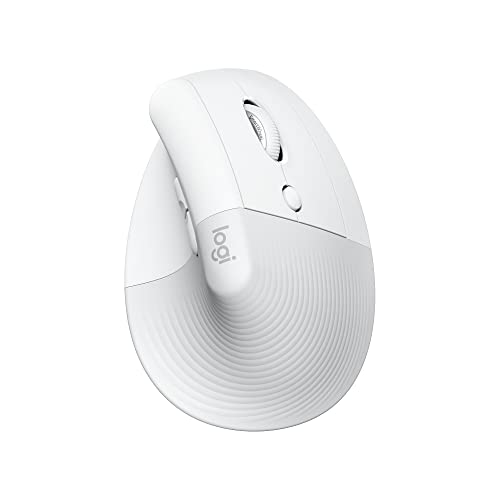
The Logitech Lift for Mac is a compact vertical mouse made for users who want a more natural hand position. Its raised design lets your thumb rest on one side while your fingers reach the buttons with little stretch. This can feel more relaxed than a flat mouse during long writing, browsing, and spreadsheet sessions. The off-white finish also fits well with a clean Mac desk.
Mac users get a simple path to daily productivity with this model. It works as a wireless mouse, and its compact size suits small and medium hands best. The vertical shape takes a short adjustment period, so I would not judge it after only a few minutes. Once the grip feels natural, Lift offers steady pointer control and useful comfort for office work.
Pros:
- Natural vertical grip can reduce inward wrist twist
- Compact size suits many small and medium hands
- Wireless design keeps the desk clear
- Mac-focused version offers a familiar setup
- Comfortable thumb support for long work sessions
- Clean off-white color matches many Apple setups
Cons:
- May feel unusual during the first few days
- Less suitable for very large hands
- Vertical shape may not suit fast gaming
What Amazon Buyers Are Saying
Buyer feedback commonly praises the comfortable grip, compact body, and reduced wrist strain during office work. Many users like the quiet, smooth feel and the way the mouse fits beside a MacBook or iMac keyboard. Some buyers need time to build accuracy with the upright shape. A smaller group reports that the size feels too small or that the vertical design does not match their hand.
My Recommendation
I recommend the Lift for Mac as the strongest all-around choice in this list. It balances comfort, size, style, and simple wireless use without adding needless bulk. It is worth buying if you have small or medium hands and want the best ergonomic mouse for Mac for daily work.
Logitech Lift Vertical Mouse in Graphite

This graphite version of the Logitech Lift uses the same compact vertical idea in a darker finish. It gives your palm a higher resting point and keeps your thumb supported during normal pointer work. The shape feels neat and controlled rather than oversized. That makes it a strong fit for a home office, shared desk, or small work surface.
I like this model for users who want ergonomic support without a large productivity mouse. It handles email, documents, web tabs, and light creative work with ease. The main trade-off is the learning curve that comes with any vertical mouse. Give your hand several work sessions before deciding if the angle feels right.
Pros:
- Compact vertical body saves desk space
- Graphite finish hides small marks well
- Thumb rest supports a relaxed grip
- Good fit for office and school tasks
- Wireless use reduces cable clutter
- Easy shape to understand after a short adjustment
Cons:
- May not fill a large hand well
- Not ideal for users who prefer a very low mouse
- Limited appeal for high-speed gaming
What Amazon Buyers Are Saying
Common buyer comments highlight the grip, small footprint, and comfort during long computer tasks. Users often mention that the graphite color looks professional and works well in an office. Some reviewers say the pointer feels less natural at first because the wrist angle changes. Others note that hand size matters, with larger users wanting a bigger shell.
My Recommendation
This Lift version is a safe pick when you want a compact ergonomic mouse with a neutral office look. I would choose it over a flat mouse for long Mac work, but I would check your hand size first. It earns a strong overall score for comfort and daily value.
ProtoArc EM11 NL Vertical Mouse

The ProtoArc EM11 NL gives budget shoppers a vertical wireless design with a rechargeable battery. That matters if you prefer USB charging over regular battery replacement. Its black finish looks understated, and the raised grip aims to keep your wrist in a more open position. This model makes sense for home offices, study desks, and general Mac browsing.
Its main appeal is practical value. You get an ergonomic form without moving to a premium price class. The fit and button feel may not seem as refined as Logitech models, but many buyers only need steady tracking and a comfortable grip. Check the current listing for connection details and supported systems before purchase, since device support can vary by setup.
Pros:
- Rechargeable design reduces disposable battery use
- Vertical shape supports a more natural grip
- Black finish suits most desk setups
- Useful option for budget-focused Mac users
- Suitable for browsing, writing, and office work
- Simple shape does not take much desk space
Cons:
- May feel less polished than higher-priced options
- Vertical control needs a short learning period
- Connection behavior can depend on the Mac setup
What Amazon Buyers Are Saying
Buyer patterns often focus on the low cost, rechargeable design, and relief from using a flat mouse. Many users see it as a useful first step into vertical mice. Some reviews mention that the buttons and shell do not feel as premium as Logitech alternatives. A few buyers also point to fit and connection preferences, so I suggest reading the latest listing feedback before ordering.
My Recommendation
The EM11 NL is worth considering when you want a rechargeable ergonomic mouse at a lower cost. I would choose it for normal Mac work, not demanding precision tasks. It offers good practical value, but buyers who want the smoothest finish and strongest software support should spend more.
Logitech MX Vertical Ergonomic Mouse

The Logitech MX Vertical is a larger and more advanced choice for people who want a serious ergonomic work mouse. Its tall body guides the hand into a handshake-like position. That design can reduce the need to turn the forearm inward while you work. The broad shell often suits medium and large hands better than the smaller Lift.
This mouse targets productivity users who value control and a substantial build. It feels stable when you move across a large display, and its extra controls can help with common work tasks. The size adds comfort for some hands but creates a clear drawback for small hands. It also costs more than basic ergonomic mice, so it makes the most sense for daily users.
Pros:
- Large vertical shape suits many medium and large hands
- Stable body supports controlled pointer movement
- Strong choice for long office sessions
- Productivity-focused design offers useful controls
- Premium feel compared with many budget models
- Works well beside a Mac desktop or laptop
Cons:
- Bulky for small hands and small desks
- Higher cost than entry-level vertical mice
- Requires adjustment before precise work feels easy
What Amazon Buyers Are Saying
Many buyer comments praise the tall grip, solid feel, and comfort during long workdays. Users with larger hands often find the shape more supportive than compact vertical mice. Some buyers need time to learn the button locations and pointer angle. The most common concern is size, since smaller hands may struggle to reach every control without shifting the palm.
My Recommendation
I recommend the MX Vertical to Mac users with medium or large hands who work for many hours each day. It is a better fit for productivity than casual travel. If the size matches your hand, it remains one of the strongest premium ergonomic choices in this guide.
Logitech Lift Vertical Mouse in Rose

The rose Logitech Lift brings the same compact vertical design to users who want a softer, more personal desk style. Its thumb rest helps keep the hand steady as you move the pointer. The raised shape may feel more relaxed than a traditional flat mouse. It also gives a colorful option for MacBook, iMac, and home office setups.
In daily use, the Lift works best for writing, browsing, planning, and other low-stress tasks. The compact size makes it easy to move without lifting your shoulder. I would still check hand fit before buying, as small ergonomic mice can feel cramped for larger users. The rose finish does not change performance, but it may matter if your desk style is part of your buying choice.
Pros:
- Comfortable vertical grip for regular office work
- Compact body suits small and medium hands
- Rose finish adds a distinct desk style
- Supportive thumb rest improves grip stability
- Wireless operation keeps the workspace tidy
- Good match for quiet home offices
Cons:
- Color may not suit every work setting
- Too small for some large-hand users
- Needs time to feel accurate
What Amazon Buyers Are Saying
Buyers often like the color, compact feel, and more relaxed hand position. Many describe it as comfortable for work, study, and long browsing sessions. As with other Lift models, some users report a short adjustment period. The main repeated limitation involves size, not the color or basic wireless design.
My Recommendation
This is a good choice if you want Lift comfort with a rose finish. I recommend it for small or medium hands and everyday Mac work. It offers the same practical strengths as the other Lift versions, so choose by color and current price.
TECKNET 3-Device Vertical Mouse

The TECKNET ergonomic mouse stands out with Bluetooth use and support for up to three devices. That feature helps if you move between a Mac, another computer, and a tablet. Its vertical shape aims to reduce the twisted feel of a flat mouse. The listed 4800 DPI setting also gives you room to adjust pointer speed for different screens and tasks.
This mouse makes the most sense for flexible workspaces. You can use one device at home, one at work, and one for travel instead of carrying several mice. The extra connection feature adds value, but it also means you should follow the pairing steps with care. I would confirm macOS support and the current control layout before purchase.
Pros:
- Can connect with up to three devices
- Bluetooth design avoids a busy cable setup
- Adjustable pointer sensitivity suits varied screens
- Vertical shape supports a more open wrist angle
- Useful for Mac users who switch devices
- Strong feature set for the price category
Cons:
- More pairing steps than a single-device mouse
- Shape may feel large or unusual to some users
- Software features may vary across operating systems
What Amazon Buyers Are Saying
Buyer feedback often highlights the three-device feature and the convenience of switching between computers. Users also like the adjustable sensitivity and low cable clutter. Some reviewers find the vertical form comfortable, while others need time to learn it. Pairing and hand fit are the main areas to check in recent reviews before ordering.
My Recommendation
I recommend TECKNET for users who need one mouse across several devices. It is a practical alternative to buying separate mice for a Mac and a second computer. Choose it when multi-device use matters more than premium materials or a Mac-only design.
Logitech Lift Vertical Mouse in Off White

This Lift model uses an off-white finish and a compact vertical body. It gives your fingers a clear place to rest while the thumb supports the side of the mouse. The design suits users who want ergonomic comfort without a large, heavy shell. It also looks at home beside a white keyboard, MacBook dock, or bright desk surface.
The Lift remains most useful for normal office work. It can help you avoid the cramped feel of a flat mouse, but no mouse can replace good posture or regular breaks. I like this version for people who want a clean color and a simple wireless experience. As with all Lift models, hand size should guide your decision.
Pros:
- Compact shape works well on smaller desks
- Vertical grip may ease wrist rotation
- Off-white design pairs with many Mac accessories
- Comfortable for email, documents, and web work
- Light, tidy wireless setup
- Easy choice for users new to ergonomic mice
Cons:
- Not the best fit for very large hands
- Needs a short period of hand training
- Light color may show dirt faster
What Amazon Buyers Are Saying
Customers commonly mention the comfortable angle, neat design, and small size. Many users say it helps them work longer with less hand tension. Some buyers find the pointer harder to guide at first. Other comments focus on the light finish and the need to keep it clean.
My Recommendation
I recommend this Lift when the off-white style matches your setup and your hand is small to medium. It delivers the same useful comfort as the other Lift versions. Buy it when you want a clean-looking ergonomic mouse for Mac with a compact shape.
Logitech MX Master 4 for Mac
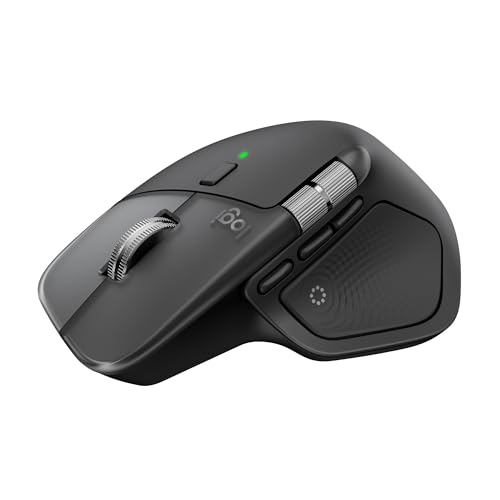
The Logitech MX Master 4 for Mac is the power-user option in this group. It uses a broad, contoured body rather than a tall vertical shell. Its listed features include Bluetooth, USB-C charging, fast scrolling, and haptic feedback. The Mac-focused version targets users who spend much of the day moving through documents, timelines, tabs, and large screens.
This mouse is built for control and speed. The thumb area gives your hand a stable base, while the scroll system can help you move through long pages with less effort. Its larger body may feel excellent for medium and large hands but too wide for small hands. I would choose it for work output and features, not for the smallest travel bag.
Pros:
- Contoured body supports long productivity sessions
- Fast scrolling helps with long documents
- Haptic feedback adds tactile response
- USB-C charging fits modern Mac setups
- Bluetooth connection keeps ports free
- Strong choice for creative and office power users
Cons:
- Larger body may not suit small hands
- Higher price than compact ergonomic mice
- Less travel-friendly than the Lift
- Some advanced features may need setup or software
What Amazon Buyers Are Saying
Buyer discussions tend to praise the comfortable contoured shell, fast scroll action, and productivity features. Many users value the rechargeable USB-C design and the fit for long work sessions. Some buyers find the mouse heavy or large for their hand. Others prefer a simpler mouse and may not use every advanced feature.
My Recommendation
I recommend the MX Master 4 for Mac to power users who want advanced control and a large, supportive body. It is worth the premium if you scroll through long files or work across complex apps. For simple browsing, the Lift costs less and feels easier to handle.
How to Choose the Best Ergonomic Mouse for Mac
Choosing the best ergonomic mouse for Mac takes more than checking the shape. Your hand size, work style, connection needs, and desk space all matter. A good mouse should feel easy to control and should not force your wrist into a tense angle. I also suggest checking current macOS support, button layout, charging method, and return terms before you buy.
1. Match the Shape to Your Hand
Vertical mice suit users who want a handshake-style grip. They can reduce the inward turn that many people feel with a flat mouse. Compact models such as the Lift suit small and medium hands. Larger models such as the MX Vertical and MX Master line may feel better for medium and large hands.
Measure your hand from the wrist crease to the tip of your middle finger. Then compare that size with the maker’s fit guidance when available. Your fingers should reach the main buttons without stretching. Your palm should also rest on the shell, not hang off the back.
2. Check Mac Connection and Control Needs
Bluetooth helps keep Mac ports free. It also works well with laptops and clean desk setups. A multi-device mouse helps if you switch between a Mac, Windows computer, or tablet. Rechargeable models save you from buying replacement batteries, while battery-powered models can be useful for travel.
Think about how many controls you need. Basic users may prefer two main buttons and a scroll wheel. Editors, developers, and office power users may gain more from side buttons, fast scrolling, or haptic feedback. Extra controls only add value when you use them often.
3. Balance Comfort, Build, and Price
A premium mouse should feel stable, smooth, and easy to guide. But a high price does not guarantee a better fit. The best ergonomic mouse for Mac is the one that matches your hand and work habits. A low-cost rechargeable model can be a smart buy for light work, while a premium Logitech model may pay off for daily use.
Do not ignore your full setup. Keep your wrist straight, place the mouse near your keyboard, and take short breaks. An ergonomic mouse can support better movement, but it cannot fix a poor chair, high desk, or strained shoulder by itself.
Final Verdict: Which Should You Buy?
The Logitech Lift for Mac is my top pick for most people. Choose the MX Vertical for larger hands, the TECKNET for three-device use, or the MX Master 4 for advanced productivity.
The best ergonomic mouse for Mac should fit your hand first. Pick the shape, connection, and features that support your real work each day.
FAQs Of best ergonomic mouse for Mac
Is a vertical mouse better for Mac users?
A vertical mouse can place the hand in a more natural handshake position. It may feel more comfortable during long work, but fit and personal preference still matter.
What is the best ergonomic mouse for small hands on a Mac?
The Logitech Lift is a strong choice for small and medium hands. Its compact body is easier to hold than larger productivity mice.
Can I use an ergonomic Bluetooth mouse with a MacBook?
Yes. A Bluetooth ergonomic mouse can connect to a MacBook without using a USB receiver, as long as the mouse supports the Mac’s Bluetooth setup.
Should I buy a rechargeable ergonomic mouse?
Rechargeable models reduce battery replacement and work well at a desk. Battery-powered models may suit users who want quick replacement during travel.
How long does it take to get used to a vertical mouse?
Many users need several work sessions to adjust to the new angle. Start with simple tasks and increase use as pointer control feels natural.