Hertz matters because a higher refresh rate makes motion smoother, clearer, and more responsive.
If you have ever compared a 60 Hz monitor with a 144 Hz or 240 Hz model, you may have noticed the difference at once. As someone who has tested monitors for gaming, office work, and video, I can say that refresh rate affects how natural motion feels, how quickly images update, and how comfortable a screen can be during long sessions. This guide explains why does hertz matter on a monitor, how refresh rate works, and which speed fits your needs.
What Does Hertz Mean on a Monitor?
Hertz, shown as Hz, measures how many times a monitor refreshes its image each second. A 60 Hz monitor refreshes the screen 60 times per second. A 144 Hz monitor refreshes it 144 times per second.
This is the basic reason why does hertz matter on a monitor. A higher refresh rate gives the screen more chances to show new image frames. The result is smoother movement, especially when you scroll, move a mouse, play a game, or watch fast video.
Think of a monitor as a flipbook. More pages per second create smoother animation. Hertz describes how quickly that flipbook can turn its pages.
Common monitor refresh rates include:
• 60 Hz: Standard for basic work, school, and general browsing
• 75 Hz: A small step up from 60 Hz
• 100 Hz or 120 Hz: Smooth for work, media, and casual gaming
• 144 Hz or 165 Hz: Popular for gaming and responsive everyday use
• 240 Hz: Designed mainly for competitive gaming
• 360 Hz and higher: Built for serious esports players who want very low display delay
Why Does Hertz Matter on a Monitor for Motion?
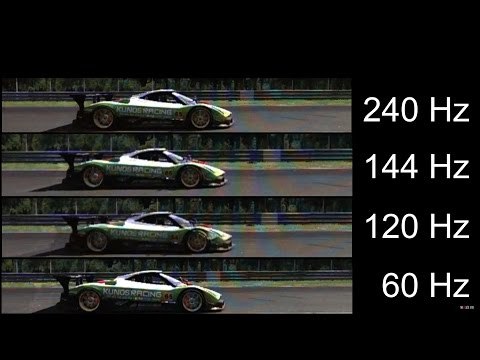
Why does hertz matter on a monitor? It matters because the screen can display changes more often when its refresh rate is higher. This makes movement look less blurry and helps the image follow your actions more closely.
At 60 Hz, each refresh takes about 16.67 milliseconds. At 120 Hz, each refresh takes about 8.33 milliseconds. At 240 Hz, each refresh takes about 4.17 milliseconds.
That does not mean every task becomes twice as fast. Your computer, graphics card, game settings, and response time also affect the result. Still, a higher refresh rate can make the whole experience feel more fluid.
You may notice the improvement when:
• Moving a window across the desktop
• Scrolling through a long webpage
• Turning the camera in a game
• Tracking a moving object
• Dragging icons or documents
• Watching sports or action scenes
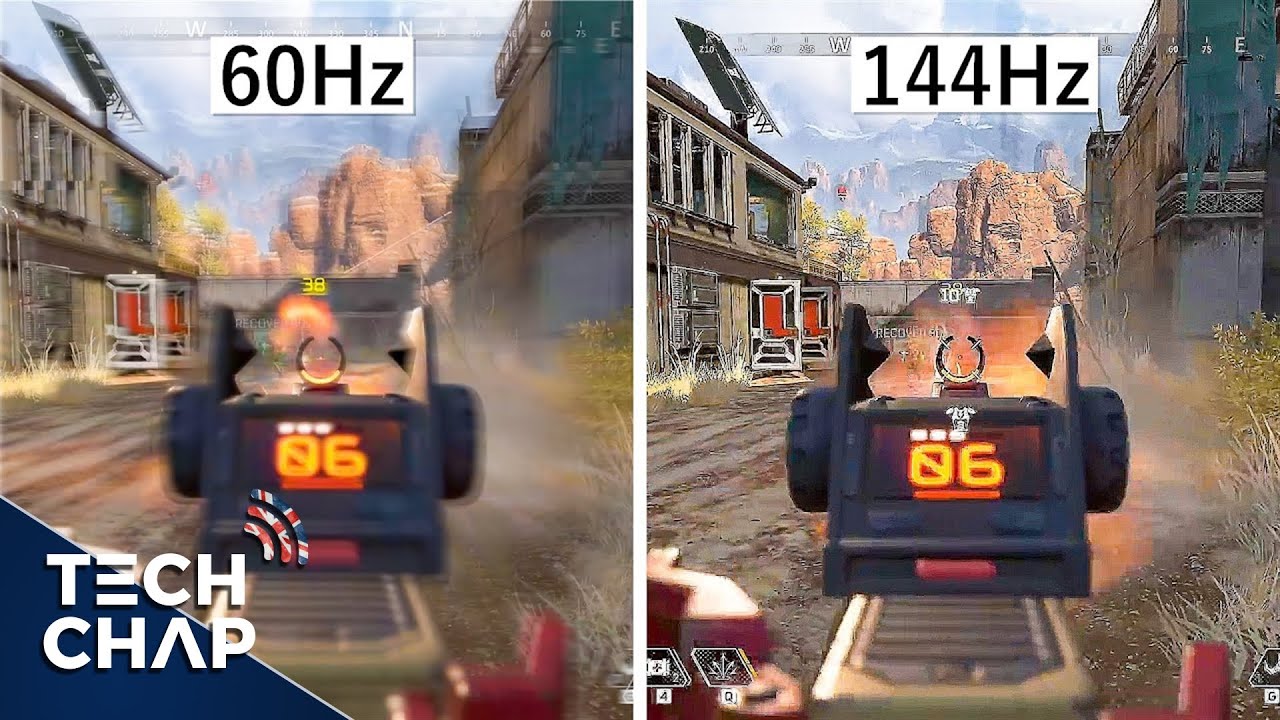
The difference between 60 Hz and 120 Hz is often easy to see. The jump from 144 Hz to 240 Hz is more subtle, but competitive players may still value it.

Refresh Rate and Frame Rate Are Different
Refresh rate is a monitor feature. Frame rate, or frames per second, is the number of images your computer or game system produces each second.
For example, a monitor may run at 144 Hz while your graphics card produces only 60 frames per second. In that case, the monitor has the ability to refresh 144 times, but it does not receive enough new frames to show the full benefit.
The best experience comes when these numbers work well together:
• 60 FPS works well with a 60 Hz monitor
• 120 FPS can make good use of a 120 Hz monitor
• 144 FPS pairs well with a 144 Hz or 165 Hz monitor
• Very high frame rates can support 240 Hz and faster screens
This is another key part of why does hertz matter on a monitor. A fast monitor cannot create extra game frames by itself. It can only display the frames supplied by the computer or console.
A mismatch is not always a problem. A 144 Hz monitor can still display a game running at 70 FPS. You simply will not receive the full smoothness that 144 Hz can provide.
How Hertz Affects Gaming
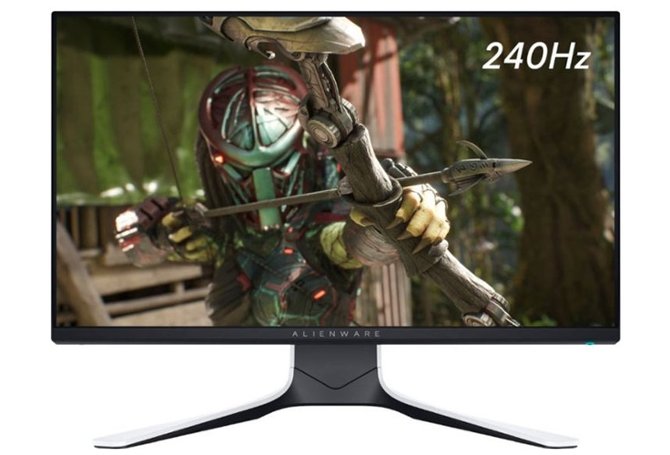
Gaming is where refresh rate often matters most. A higher refresh rate can make camera movement smoother and controls feel more immediate.
In a fast game, a 144 Hz monitor may show new visual information more often than a 60 Hz model. This can help you track opponents, follow vehicles, or aim at moving targets. It does not automatically make someone a better player, but it can remove some display limits.
A higher refresh rate is especially useful for:
• First person shooters
• Racing games
• Fighting games
• Sports games
• Battle royale games
• Rhythm games
• Competitive multiplayer games
I often suggest that new buyers test a 120 Hz or 144 Hz monitor before spending money on a 240 Hz model. The first jump from 60 Hz feels dramatic. The move from 144 Hz to 240 Hz feels smaller and may not justify the extra cost for casual play.
Remember that input delay depends on more than refresh rate. The mouse, keyboard, game engine, connection type, and monitor response time all play a role.

Hertz and Input Lag
Input lag is the delay between your action and the image response on the screen. A higher refresh rate can reduce the time between refreshes, which may help lower display delay.
At 60 Hz, a new refresh begins every 16.67 milliseconds. At 144 Hz, that interval falls to about 6.94 milliseconds. At 240 Hz, it drops to about 4.17 milliseconds.
These numbers are small, but competitive players can notice small delays. Still, refresh rate is not the same as total input lag. A monitor with poor processing can feel slow even if it has a high refresh rate.
When comparing monitors, check these details:
• Native refresh rate
• Measured input lag
• Pixel response time
• Adaptive sync support
• Connection bandwidth
• Overdrive performance
Why does hertz matter on a monitor in this case? It sets the pace at which the display can present new frames, but it is only one part of the response chain.

Hertz, Motion Blur, and Response Time
A higher refresh rate can reduce perceived motion blur, but it does not remove all blur. Pixel response time also matters.
Response time measures how quickly a pixel changes from one color to another. If the pixels change too slowly, you may see ghosting behind moving objects. If the monitor uses an overly strong overdrive setting, you may see bright trails or inverse ghosting.
A smooth monitor needs a good balance between:
• High refresh rate
• Fast pixel response
• Low input lag
• Accurate overdrive settings
• Stable frame delivery
This explains why does hertz matter on a monitor but does not tell the whole story. A cheap 165 Hz monitor with weak response time may look worse in motion than a well-tuned 120 Hz monitor.
When reviewing a screen, I recommend checking motion tests and independent measurements rather than trusting only the number on the box. A large Hz rating is useful, but it is not a complete quality score.
Does a Higher Refresh Rate Improve Eye Comfort?
A higher refresh rate may feel more comfortable because scrolling and motion appear smoother. It can also reduce the harsh, flickering feel found on some older or poorly designed displays.
However, refresh rate is not a guaranteed cure for eye strain. Brightness, glare, viewing distance, text size, room lighting, and long periods without breaks often have a larger effect.
For better comfort:
• Set brightness close to the room’s lighting
• Keep the monitor about an arm’s length away
• Increase text size if you lean toward the screen
• Reduce glare from windows and lamps
• Take regular breaks
• Use a stable refresh rate
Most modern LCD monitors do not visibly flicker in the same way older CRT displays did. Still, some screens use pulse width modulation, or PWM, to control brightness. If you are sensitive to flicker, check independent testing.
Why Does Hertz Matter on a Monitor for Office Work?
Why does hertz matter on a monitor if you mainly work with documents and spreadsheets? It can make simple actions feel more polished and less tiring.
Scrolling through a page at 120 Hz often looks smoother than scrolling at 60 Hz. Cursor movement also feels more natural. These benefits do not increase your typing speed, but they can improve the overall feel of the desktop.
For office work, a 100 Hz or 120 Hz monitor is often a strong choice. It offers smooth motion without requiring a powerful gaming computer.
Refresh rate may matter less when you mainly:
• Read static documents
• Write emails
• Edit spreadsheets
• Manage files
• Use accounting software
• Work with still images
Resolution, screen size, text clarity, color accuracy, and ergonomics may be more important for these tasks. A 4K 60 Hz monitor can be a better work tool than a blurry 1080p 240 Hz monitor.
Choosing the Right Monitor Refresh Rate
The right refresh rate depends on your work, games, hardware, and budget. You do not need the fastest monitor to enjoy a good experience.
Use this guide as a starting point:
• Choose 60 Hz for basic tasks and tight budgets
• Choose 75 Hz for a modest improvement over 60 Hz
• Choose 100 Hz or 120 Hz for smooth office work and media
• Choose 144 Hz or 165 Hz for gaming and responsive daily use
• Choose 240 Hz for competitive gaming with a powerful computer
• Choose 360 Hz or more only if you play at a high competitive level
Your computer must also support the target refresh rate. Older graphics cards may struggle to produce high frame rates at 1440p or 4K resolution.
Before buying, check:
-
Your graphics card’s typical frame rate
-
The monitor’s resolution
-
The available DisplayPort or HDMI version
-
Support for FreeSync, G-Sync, or another adaptive sync system
-
Your preferred games and applications
-
The monitor’s measured response time
Why does hertz matter on a monitor when the hardware cannot reach that speed? In that situation, the extra Hz may provide limited value. Match the monitor to the system you already have or plan to build.
Adaptive Sync and Refresh Rate
Adaptive sync helps a monitor match its refresh rate to the frame rate from the graphics card. Common names include AMD FreeSync, NVIDIA G-SYNC, and VESA Adaptive-Sync.
Without adaptive sync, a mismatch can cause screen tearing. This happens when the monitor starts showing a new frame before the previous frame has finished. The image may look split across the screen.
Adaptive sync can help by:
• Reducing screen tearing
• Limiting stutter
• Improving smoothness at changing frame rates
• Making games feel more consistent
Adaptive sync does not replace a high refresh rate. It works with refresh rate to improve frame delivery. For example, a 144 Hz monitor with adaptive sync can look smooth even when a game moves between 90 and 130 FPS.
Enable the feature in both the monitor menu and your graphics settings. You may also need to use the correct cable and port.
Common Mistakes When Buying a High Hz Monitor
Many buyers focus only on the largest refresh rate number. That can lead to an unbalanced purchase.
Common mistakes include:
• Buying 240 Hz for a computer that produces 60 FPS
• Ignoring resolution and choosing a screen that looks soft
• Assuming high Hz means low input lag
• Overlooking poor pixel response
• Using an old cable that cannot support the chosen setting
• Forgetting to change Windows or macOS to the higher refresh rate
• Paying more for speed when color accuracy matters more
A monitor may ship set to 60 Hz even though it supports 144 Hz. On Windows, open Settings, select System, choose Display, then open Advanced display settings. Select the desired refresh rate from the available options.
For gaming, check the game’s video menu too. Some games have their own frame rate limit, and some consoles support high refresh rates only at certain resolutions.
A Practical Way to Test Monitor Hertz
You can test the benefit of refresh rate without special equipment. Move your mouse quickly across the desktop, scroll through a page, and drag a window from side to side.
Then compare 60 Hz with 120 Hz or 144 Hz. Look for smoother motion, clearer moving text, and a cursor that seems to follow your hand more closely.
For gaming, use the same scene and settings at each refresh rate. Keep the resolution, brightness, field of view, and frame rate as similar as possible. This creates a fair comparison.
One lesson I often emphasize is to avoid judging a monitor from a short store demo alone. Bright colors can attract attention, but comfort, motion handling, and stable performance matter during real daily use.
Frequently Asked Questions About Why Does Hertz Matter on a Monitor
Is 144 Hz better than 60 Hz?
For motion, gaming, and scrolling, 144 Hz is usually smoother than 60 Hz. The benefit is strongest when your computer can produce close to 144 frames per second.
Does a higher Hz monitor improve image quality?
A higher refresh rate improves motion smoothness, not sharpness or color quality. Resolution, panel type, pixel density, contrast, and calibration control most other parts of image quality.
Can a 60 Hz monitor run 120 FPS?
No. A 60 Hz monitor can receive a 120 FPS signal in some cases, but it cannot show all 120 updates each second. You need a monitor with a refresh rate of at least 120 Hz to display them fully.
Is 240 Hz worth it for gaming?
240 Hz can be worthwhile for competitive players with a fast computer and high frame rates. For casual gaming, the difference from 144 Hz is often small, so a better resolution or panel may offer more value.
Why does hertz matter on a monitor for regular browsing?
A higher refresh rate makes scrolling, cursor movement, and window animation feel smoother. It does not greatly change static text or images, so other features may matter more for basic browsing.
Does HDMI support high refresh rates?
HDMI support depends on the HDMI version, resolution, color settings, and monitor design. DisplayPort is also common for high refresh rates, so check the specifications for both the monitor and graphics card.
Should I use the highest refresh rate available?
Use the highest stable setting that your monitor, cable, and computer support. If the image flickers, drops frames, or becomes unstable, choose a lower setting and check your connections.
Conclusion
Why does hertz matter on a monitor? Refresh rate controls how often the screen can update its image, which affects motion smoothness, gaming response, scrolling, and overall comfort. Higher Hz can feel much better, but it works best when paired with suitable frame rates, low input lag, fast pixel response, and adaptive sync.
For most people, 100 Hz to 165 Hz offers an excellent balance. Competitive gamers may benefit from 240 Hz or more, while office users may prefer to spend extra money on resolution, color, and ergonomics. Compare the full monitor feature set, match it to your computer, and test the refresh rate yourself before buying.