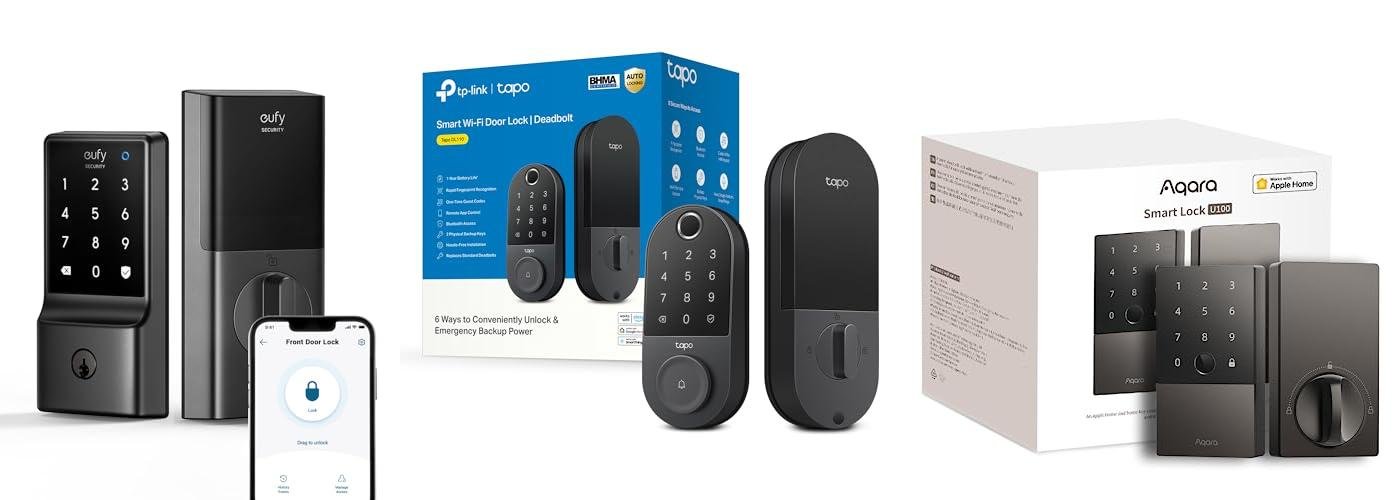
A Home Assistant smart lock is a connected door lock that integrates with the Home Assistant platform, allowing homeowners in the United States to control, monitor, and automate door access through local smart home systems, compatible hubs, and supported communication protocols.
Across the United States, many homeowners are adding smart locks to improve convenience, manage family access, and connect entry points with broader home automation systems. A Home Assistant smart lock setup can allow users to lock doors automatically, receive status updates, and create customized routines without relying only on a manufacturer’s cloud service.
The best smart lock for Home Assistant depends on the lock technology, such as Z-Wave, Zigbee, Bluetooth, Wi-Fi, or Matter compatibility, along with the user’s security needs and existing smart home equipment. Compatibility should be verified before purchase because not every smart lock works directly with every Home Assistant installation.
Source: Bing
What Is a Home Assistant Smart Lock?
A Home Assistant smart lock is a door lock connected to the Home Assistant open-source home automation platform. Instead of operating as a standalone smart device, the lock becomes part of a larger system where users can create rules, monitor activity, and connect door access with other smart devices.
Home Assistant does not manufacture smart locks. It provides integrations that allow compatible locks from different manufacturers to communicate with the platform through supported protocols and integrations.
Source: Bing
Remote monitoring
Users can view whether a connected lock is locked or unlocked when the integration and network setup support that feature.
Automation control
Smart locks can trigger or respond to routines such as locking doors at night or changing smart home settings after entry.
Local control options
Some compatible devices can communicate locally through hubs or adapters instead of depending entirely on manufacturer cloud servers.
How Home Assistant Connects With Smart Locks
Home Assistant typically connects with smart locks through communication standards including Z-Wave, Zigbee, Bluetooth, Wi-Fi, and newer Matter-based ecosystems. The connection method affects installation complexity, reliability, and available features.
Z-Wave
A popular smart home protocol designed for reliable device communication and commonly used in locks, sensors, and security devices.
Zigbee
A low-power wireless protocol that can support smart home networks through compatible coordinators.
Wi-Fi
Provides direct network connectivity but may require stronger consideration of battery usage and network reliability.
How to Choose a Smart Lock Compatible With Home Assistant
Choosing a Home Assistant smart lock requires checking compatibility, installation requirements, security features, and how the lock communicates with your smart home system. A lock that works well with another platform may not provide the same experience inside Home Assistant.
Source: Bing
Check official compatibility information
Review Home Assistant integrations and manufacturer documentation before buying a lock.
Consider your communication protocol
Choose a lock that matches your existing Z-Wave, Zigbee, Matter, or Wi-Fi setup.
Review physical door requirements
Confirm that the lock fits your door type, deadbolt style, and existing hardware measurements.
Important Features to Compare
Different smart locks offer different combinations of access methods and automation features. The right choice depends on whether the priority is convenience, security monitoring, family access, or deeper automation.
Keypad access
Allows entry using PIN codes without requiring a physical key or smartphone.
Battery alerts and easy replacement options help prevent unexpected lockouts.
How to Set Up a Home Assistant Smart Lock
Setting up a smart lock with Home Assistant usually involves installing the lock, connecting the required hub or adapter, adding the integration, and testing automation features. The exact steps vary by lock model and communication method.
Source: Bing
Step 1: Install the lock
Follow the manufacturer’s installation instructions and confirm that the lock operates manually before connecting it to Home Assistant.
Step 2: Add the required controller
Install or configure the required Z-Wave controller, Zigbee coordinator, or network connection.
Step 3: Add the integration
Use the appropriate Home Assistant integration and pair the lock according to the device instructions.
Step 4: Test automations
Verify locking, unlocking, status reporting, and any connected routines before regular use.
Signs the Setup Is Working Correctly
A properly configured Home Assistant smart lock should report its status accurately, respond consistently to commands, and maintain reliable communication with the home automation system.
Correct lock status
The Home Assistant dashboard should show the correct locked or unlocked state.
Reliable commands
Lock and unlock commands should work consistently from the approved control methods.
Common Home Assistant Smart Lock Problems and Solutions
Most smart lock problems are related to communication, power, compatibility, or configuration issues. Troubleshooting should begin with simple checks before changing advanced settings.
Source: Bing
Lock is not responding
Check battery level, network connection, and whether the lock is still paired with Home Assistant.
Incorrect lock status
Verify the integration configuration and confirm that the lock supports accurate status reporting.
Automation does not run
Review automation conditions, device triggers, and whether Home Assistant receives the expected lock events.
Security Limitations to Understand
A smart lock adds digital control features but does not remove all security risks. Users should maintain strong account security, update software when available, and keep a backup entry method.
Avoid weak access codes
Use unique PINs and remove access permissions that are no longer needed.
Maintain physical security
A smart lock should complement good door hardware and general home security practices.
Home Assistant Smart Lock Comparison Factors
The best smart lock choice depends on the user’s current smart home setup and priorities. The following comparison factors help identify the most suitable option.
Source: Bing
Best for local automation
Locks using local-compatible protocols may appeal to users who prefer reduced cloud dependency.
Best for simple installation
Wi-Fi or Bluetooth models may be easier for some users but should be evaluated for network and battery needs.
Best for advanced smart homes
Users with existing hubs and automation systems may prefer locks that integrate deeply with their current setup.
Frequently Asked Questions
Q
Does Home Assistant work with all smart locks?
No. Home Assistant supports many smart locks, but compatibility depends on the lock model, communication protocol, available integration, and required hardware.
Q
Are Z-Wave locks good for Home Assistant?
Z-Wave locks are commonly used with Home Assistant because they are designed for smart home networks and can work through compatible controllers. Users should verify the exact lock model before purchasing.
Q
Can Home Assistant smart locks work without the internet?
Some setups can continue operating locally if the lock and integration support local communication. However, remote access features may require internet connectivity.
Q
Can I automate my door lock with Home Assistant?
Yes. Compatible locks can be included in automations such as scheduled locking, arrival routines, or security notifications.
Q
What should I do if my smart lock stops responding?
Check the battery, verify network or hub communication, confirm integration status, and follow the manufacturer’s troubleshooting instructions before resetting the device.
✦ Wrapping Up
Conclusion
A Home Assistant smart lock can connect everyday door access with a customizable smart home system. The most suitable option depends on compatibility, communication protocol, installation requirements, and security priorities.
Before purchasing a smart lock, verify that the exact model works with your Home Assistant setup and consider how you will manage access, maintenance, and backup entry methods over time.
💡 Key Takeaway
Choose a Home Assistant smart lock based on verified compatibility and your home’s automation needs rather than selecting a device only by advertised smart features.
Kimberly ensures every piece of content is clear, helpful, and user-friendly. She focuses on creating guides that are easy to read while maintaining accuracy and trust.
Learn how Corsair gaming mouse software works, how to install and configure iCUE, customize buttons, adjust DPI, create profiles, and troubleshoot common issues.
Learn how to use Kwikset smart lock instructions for installation, programming codes, locking methods, battery replacement, and troubleshooting common issues.