Pro gamers use 24-inch monitors for fast focus, low input delay, and a clear view of the whole screen.
The answer to why do pro gamers use 24-inch monitors goes beyond screen size. Competitive players value speed, comfort, consistency, and the ability to track every detail without moving their eyes too far. This guide explains the design, performance, and practical reasons behind this popular esports choice.
Why Do Pro Gamers Use 24-Inch Monitors?
The main reason pro gamers use 24-inch monitors is simple: the size fits competitive play very well. A 24-inch screen gives players a full view of the game without forcing them to scan a wide display.
In fast games, small delays and missed details can change the result. A player may need to spot an enemy, read a health bar, or track a moving target in less than a second. A compact screen keeps most of that action close to the center of vision.
Professional players also prefer control and repeatable performance. A 24-inch monitor is easy to place, easy to view, and common at tournaments. This means players can build habits around one familiar screen size.
Other key reasons include:
• High refresh rates are widely available on 24-inch gaming monitors.
• Full HD resolution looks sharp enough on this screen size.
• The display fits well on most desks.
• Players can sit close without turning their heads often.
• It is easier to maintain a stable frame rate at 1080p.
• Many esports events use 24-inch or similar displays.

A 24-Inch Screen Supports Faster Visual Tracking
Competitive gaming relies on visual tracking. You may follow a character, crosshair, ball, or vehicle while reacting to sudden movement. A smaller display can make this task feel more manageable.
Think of the screen as a window. A very large window shows more space, but your eyes must travel farther to inspect each side. A 24-inch monitor keeps important areas within a tighter viewing range.
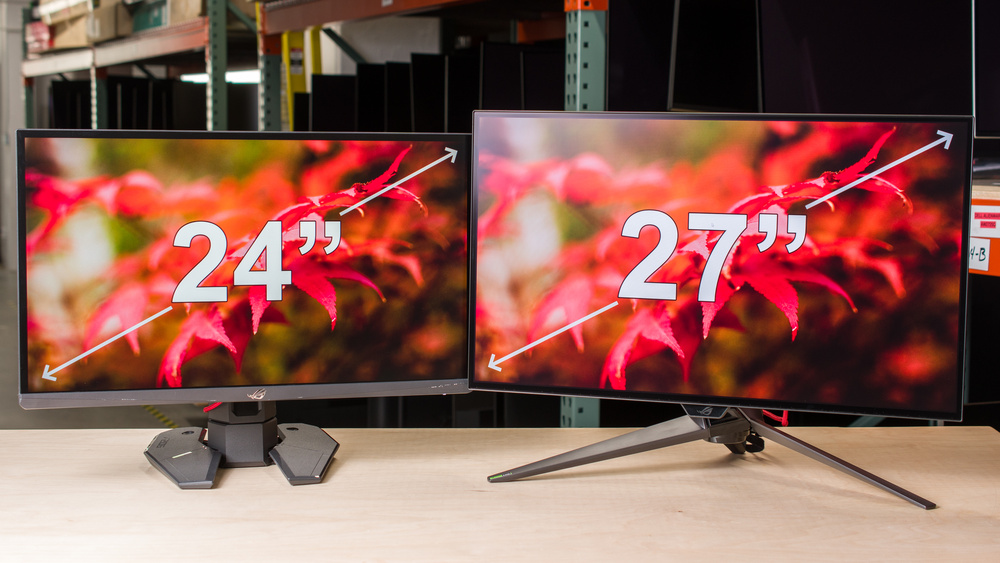
This does not mean a bigger monitor is always slower. A 27-inch screen can work well for many players. However, the larger image may require more eye movement, especially when the game interface places key details near the edges.
For games such as Counter-Strike 2, Valorant, Overwatch 2, and Fortnite, players often focus on the center of the screen. A 24-inch display supports this focused style.
A good viewing distance also matters. Most players place a 24-inch monitor about 20 to 28 inches from their eyes. The exact distance depends on vision, desk depth, and personal comfort.

High Refresh Rates Are Common on 24-Inch Gaming Monitors
Refresh rate tells you how many times a monitor can update its image each second. A 60Hz display refreshes 60 times per second. A 144Hz display refreshes 144 times per second. Many modern esports monitors offer 240Hz or even 360Hz at 24 inches.
A higher refresh rate can make motion look smoother. It can also reduce the time between visual updates. This matters when a target moves quickly across the screen.
For example, a 240Hz monitor refreshes every 4.17 milliseconds. A 144Hz monitor refreshes every 6.94 milliseconds. The difference is small, but skilled players can notice smoother motion and more consistent tracking.
Still, refresh rate is not magic. You need a graphics card and game settings that can produce a high frame rate. A 240Hz monitor will not show its full benefit if your game runs at 90 frames per second.
When comparing monitors, check these features:
• Native refresh rate
• Response time behavior
• Adaptive sync support
• Input lag measurements
• Motion blur performance
• DisplayPort support
Independent monitor tests are useful because advertised response times do not always match real performance. A monitor may claim a very low response time but show ghosting with certain overdrive settings.
1080p Resolution Is Practical for Competitive Gaming
Many 24-inch gaming monitors use a 1920 by 1080 resolution, also called Full HD. This resolution provides a good balance between image clarity and game performance.
A lower rendering demand helps your computer produce more frames. More frames can help you take advantage of a 144Hz, 240Hz, or 360Hz panel. This is one reason why do pro gamers use 24-inch monitors instead of larger high-resolution screens.
A 24-inch 1080p display also has a pixel density of about 92 pixels per inch. That is clear enough for games, menus, and text when viewed at a normal desk distance.
A 27-inch 1080p monitor has a lower pixel density. The image may look softer, especially if you sit close. A 27-inch 1440p monitor looks sharper, but it requires more graphics power.
The right choice depends on your goal:
• Choose 24-inch 1080p for high frame rates and esports games.
• Choose 27-inch 1440p for sharper images and mixed gaming.
• Choose 32-inch or ultrawide displays for immersion and single-player games.
Competitive players often give priority to stable performance over visual detail. A 24-inch monitor supports that goal without demanding an expensive graphics card.

Tournament Standards Make 24-Inch Monitors Familiar
Professional gaming events need equipment that works for many players. Tournament organizers usually select displays that are reliable, fast, and easy to transport. A 24-inch esports monitor meets these needs.
Players also benefit from familiarity. If a competitor practices on a 24-inch display at home and sees the same size at an event, the change feels smaller. Consistent equipment can reduce distractions before a match.
The exact monitor size varies by tournament, game, and sponsor. Some events use 24.5-inch monitors, which are often marketed as 24-inch models. The difference is minor, so players usually group them into the same category.
Standardized equipment also helps reduce arguments about unfair advantages. Every player receives a similar screen, refresh rate, and setup. This keeps the focus on skill, teamwork, and strategy.
This is an important point when asking why do pro gamers use 24-inch monitors. The answer is not only about preference. It is also about the competitive environment that shaped professional gaming.
Smaller Screens Can Reduce Eye and Head Movement
A large monitor can show more content, but that does not always help in a fast match. If important information sits near the corners, you may need to move your eyes or head more often.
A 24-inch display keeps the image compact. This can make it easier to check the minimap, crosshair, enemy position, and status indicators in quick steps.
During my own monitor testing, I found that screen distance mattered as much as screen size. A 27-inch display placed too close felt tiring, while a 24-inch monitor at a comfortable distance felt easier to scan. This is a useful lesson: the best monitor is not always the biggest one.
Comfort also depends on brightness, room lighting, font size, and posture. A small screen can still cause eye strain if it is too bright or poorly positioned.
Try these setup tips:
• Place the top of the display near eye level.
• Keep the monitor about an arm’s length away.
• Reduce brightness in a dark room.
• Use a neutral color mode for long sessions.
• Take short breaks every 20 minutes.
• Keep the screen directly in front of you.
A 24-inch monitor may support comfort, but it cannot replace healthy gaming habits.

24-Inch Monitors Fit Most Gaming Desks
Desk space is another practical reason why do pro gamers use 24-inch monitors. Many players use a low mouse sensitivity setting. This requires broad arm movement and plenty of mousepad space.
A smaller monitor leaves more room for the keyboard and mouse. It also gives players more freedom to position the screen and mousepad correctly.
This setup is common in tactical shooters. A player may need to swing the mouse across a large pad to make a quick turn. A huge monitor can take away desk space and make that setup harder.
A 24-inch display is also lighter and easier to move. This helps players who attend local events, gaming cafes, LAN parties, or tournaments.
If you use two monitors, a 24-inch model is easier to fit beside another screen. You can use one display for gaming and another for chat, music, streaming tools, or guides.

Low Input Lag Matters More Than Screen Size
Input lag is the delay between an action and the result on screen. You press a key or move your mouse, and the monitor displays the change. Lower input lag makes controls feel more direct.
Screen size alone does not decide input lag. A fast 27-inch monitor can perform better than a slow 24-inch model. However, 24-inch esports monitors often focus heavily on low latency and fast response.
Players should look beyond the listed response time. A true monitor test checks the full signal path, including processing delay, pixel transitions, and refresh behavior.
The gaming setup also affects total latency. Important factors include:
• Mouse polling rate
• Keyboard response
• Game engine latency
• Graphics card settings
• Frame rate
• V-Sync settings
• Network delay
A fast monitor cannot fix poor internet or low frame rates. It simply removes one possible source of delay.
For competitive play, use a stable frame rate that matches or exceeds the refresh rate when possible. Technologies such as variable refresh rate can reduce tearing, but some professional players disable extra features to keep latency as low and consistent as possible.
Why Do Pro Gamers Use 24-Inch Monitors Instead of 27-Inch Models?
The choice depends on the game and the player. Many pro gamers use 24-inch monitors because they want a compact image, high refresh rate, and easy focus. A 27-inch monitor can still be excellent, especially at 1440p.
A 27-inch display is often better for:
• Story-driven games
• Racing games
• Strategy games
• Video editing
• Photo work
• Immersive single-player gaming
A 24-inch display is often better for:
• Tactical shooters
• Fast arena shooters
• Competitive battle royale play
• Small desks
• High frame rate systems
• Players who sit close to the screen
Do not copy a professional setup without thinking about your own needs. Pros may choose a 24-inch monitor because of tournament rules, sponsorships, practice habits, or team standards.
One common mistake is buying a 360Hz 24-inch display while using a computer that cannot reach 240 frames per second. In that case, a less expensive 144Hz or 240Hz model may offer better value.
How to Choose a 24-Inch Monitor for Competitive Gaming
If you want to understand why do pro gamers use 24-inch monitors, you should also know what to look for when buying one. Screen size is only one part of the decision.
Check the Refresh Rate
A 144Hz monitor is a strong starting point for competitive gaming. A 240Hz model may feel smoother if your computer can deliver high frame rates. A 360Hz model is aimed at players who want every possible advantage and have powerful hardware.
Test Real Response Performance
Look for independent measurements of pixel response and input lag. Avoid choosing a monitor based only on a “1ms” label.
Consider Adaptive Sync
Adaptive sync can reduce screen tearing when frame rates change. Check whether the monitor supports the technology used by your graphics card.
Review the Stand
A height-adjustable stand makes it easier to set the correct viewing angle. If the stand is basic, make sure the monitor supports a compatible VESA mount.
Choose the Right Panel
Fast IPS panels now offer strong color and motion performance. TN panels may still appeal to some esports players because of their speed and simple design. VA panels can provide better contrast but may show more dark smearing on certain models.
Confirm Your Ports
DisplayPort is often needed for the highest refresh rates. Check the supported resolution and refresh rate for each port before buying.
Common Mistakes to Avoid
Many gamers focus on screen size and ignore the rest of the setup. This can lead to poor results, even with a monitor used by professionals.
Avoid these mistakes:
• Buying a high refresh rate monitor without enough computer performance.
• Using the wrong cable for the desired refresh rate.
• Leaving the monitor at 60Hz after installation.
• Setting extreme overdrive and creating bright artifacts.
• Sitting too close to the display.
• Copying a pro player’s sensitivity without testing it.
• Ignoring brightness and room lighting.
• Choosing a monitor with poor motion performance because of a low price.
After installing a new display, open your operating system settings and select the highest available refresh rate. Then test your game at the settings you plan to use.
My practical advice is to adjust one setting at a time. Change sensitivity, brightness, or overdrive separately so you can tell what improves your experience. Small changes often work better than copying a complete professional setup.
Is a 24-Inch Monitor Better for Every Gamer?
No. A 24-inch monitor is not automatically better for everyone. It is popular because it offers a strong balance for competitive play, not because it wins in every category.
Players who value cinematic visuals may prefer a larger 1440p or 4K display. People who edit video or work with large spreadsheets may also benefit from more screen space.
Your eyes, desk, game library, and computer all matter. A 24-inch monitor may be ideal for ranked shooters but less enjoyable for an open-world adventure game.
The best approach is to match the display to your use. If most of your time goes toward competitive games, a fast 24-inch monitor is a sensible choice. If you want one screen for work, films, and many types of games, a larger high-resolution model may be more flexible.
Frequently Asked Questions About Why Do Pro Gamers Use 24-Inch Monitors
Why do pro gamers use 24-inch monitors for FPS games?
Pro gamers use 24-inch monitors because the full game view stays easy to scan. The size also supports high refresh rates, low input lag, and strong performance at 1080p.
Is 24 inches enough for competitive gaming?
Yes, 24 inches is enough for competitive gaming and is especially common for tactical shooters. A fast panel with good motion handling matters more than having a larger screen.
Do 24-inch monitors improve aim?
A 24-inch monitor does not directly improve aim. It can make targets easier to track by keeping the action within a compact viewing area, but practice, sensitivity, and consistency matter more.
Is 24-inch 1080p better than 27-inch 1080p?
For many competitive players, 24-inch 1080p looks sharper because it has higher pixel density. A 27-inch 1080p display may look less sharp when viewed from a close desk distance.
Should I buy a 240Hz 24-inch monitor?
Buy a 240Hz model if your computer can produce high and stable frame rates. If your system stays below 160 frames per second, a quality 144Hz or 165Hz monitor may provide better value.
Do professional gamers use 24-inch or 24.5-inch monitors?
Many models marketed as 24-inch esports monitors have a 24.5-inch diagonal size. This small difference does not change the main benefits of the display category.
Can a 24-inch monitor be good for games besides shooters?
Yes. A 24-inch monitor works well for racing, sports, strategy, and general gaming. Larger screens may offer a more immersive experience, but the best size depends on your desk and viewing distance.
Conclusion
Why do pro gamers use 24-inch monitors? The main reasons are clear: focused viewing, high refresh rates, low latency, Full HD performance, tournament familiarity, and efficient desk use.
A 24-inch monitor is not a secret weapon, and it will not replace practice. However, it can create a clean, consistent setup that helps you focus on the game instead of the equipment. Choose a model with strong motion handling, a refresh rate your computer can support, and a stand that fits your posture.
Review your desk, game library, graphics performance, and budget before buying. Then test your settings one step at a time and build a setup that feels natural. Share your monitor size and favorite competitive game in the comments, or explore more gaming display guides to improve your setup.