Yes, this HP 17-inch laptop is worth considering for everyday work, study, browsing, and entertainment.
If you need a larger laptop for spreadsheets, schoolwork, email, streaming, and everyday Windows tasks, a compact screen can quickly become frustrating. A 17.3-inch HP notebook offers a more spacious workspace without moving into gaming-laptop territory.
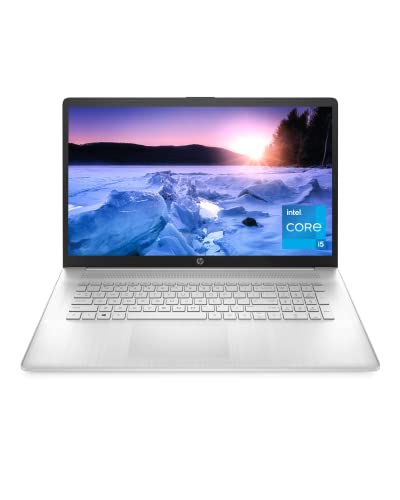
The HP 17-cn0025nr pairs an 11th Gen Intel Core i5-1135G7 processor with 8GB of RAM, a 256GB NVMe SSD, and Intel Iris Xe graphics. Its biggest appeal is the large display, while its older platform and 1600 x 900 resolution are important factors to consider before buying.
Is HP 17-cn0025nr Good?
The HP 17-cn0025nr is a sensible desktop-replacement laptop for buyers who value screen size and straightforward productivity over portability or premium features. Its Intel Core i5-1135G7, 8GB memory, 256GB NVMe storage, and Intel Iris Xe graphics provide a capable foundation for web browsing, Microsoft Office, video calls, schoolwork, and general multitasking.
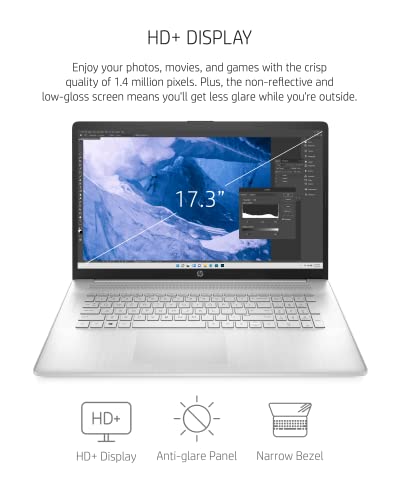
The main limitation is the 17.3-inch 1600 x 900 display. It gives you plenty of physical screen space, but its resolution is noticeably less detailed than a modern Full HD panel. The roughly 2.05 kg chassis is also better suited to a desk than frequent commuting. Those trade-offs make the laptop easier to recommend to home and office users than to travelers.
My practical takeaway is simple: the large screen is the reason to choose this model. If you mainly want a portable laptop or a sharper display for creative work, newer alternatives make more sense.

My First Impression for HP 17-cn0025nr
The design follows HP’s understated laptop approach, with a clean silver finish and a conventional full-size notebook layout. The 17-inch form factor makes it feel more like a small desktop replacement than a travel-first computer.
Setup should be familiar for anyone who has used a Windows laptop. Windows 11 Home provides the standard setup process, while the SSD helps the system feel considerably more responsive than an older hard-drive-based notebook.
The build is functional rather than luxurious. The large chassis gives you useful workspace and a comfortable typing area, but the overall size and weight mean it is best positioned on a desk, kitchen table, or home office rather than carried around all day.

What Makes It Stand Out / Key Features
- 11th Gen Intel Core i5-1135G7: The four-core, eight-thread Core i5-1135G7 is well suited to everyday productivity, browsing, office applications, video calls, and moderate multitasking.
- 17.3-Inch HD+ Display: The large 17.3-inch 1600 x 900 screen provides more physical workspace than a typical 14- or 15.6-inch notebook, making documents and multiple windows easier to view.
- 256GB NVMe SSD: NVMe solid-state storage provides faster system responsiveness and application loading than traditional mechanical hard drives, although 256GB can become limiting if you keep many large files locally.
- 8GB DDR4 RAM: The 8GB memory configuration is adequate for everyday Windows use, office applications, browsing, streaming, and normal multitasking, but heavier workloads can benefit from more memory.
- Intel Iris Xe Graphics: The integrated Iris Xe graphics are designed for everyday visual tasks, media playback, light creative work, and less demanding games rather than modern high-end gaming.
- Wi-Fi 6 and Bluetooth: Wireless connectivity supports modern home and office networking through Wi-Fi 6, along with Bluetooth for compatible peripherals and accessories.
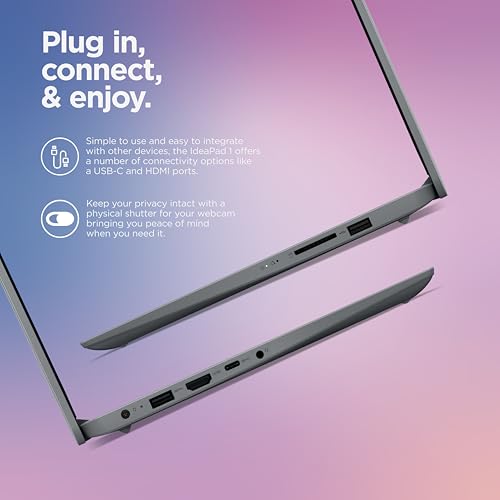
- Useful Physical Connectivity: The laptop includes multiple USB connections, HDMI, and a 3.5mm audio connection, making it practical for common accessories, external displays, and wired audio devices.
✅ What I Like
- ✔ The 17.3-inch screen provides substantially more physical workspace than smaller mainstream laptops, which is useful for documents, spreadsheets, and side-by-side windows.
- ✔ The 11th Gen Core i5-1135G7 offers enough CPU capability for common productivity tasks, browsing, streaming, and everyday multitasking.
- ✔ The 256GB NVMe SSD makes Windows and applications feel more responsive than a comparable laptop using a traditional hard drive.
- ✔ Intel Iris Xe integrated graphics are more versatile than basic integrated graphics for casual visual workloads and lighter gaming.
- ✔ Wi-Fi 6, Bluetooth, USB connectivity, HDMI, and an audio jack make the machine practical for typical home and office setups.
- ✔ The conventional full-size laptop design is well suited to users who prefer a larger keyboard and a desktop-style working experience.
⚠️ What Could Be Better
- ✖ The 1600 x 900 display is less sharp than the Full HD panels common on many newer laptops, especially when viewed closely.
- ✖ At around 2.05 kg, the 17-inch chassis is relatively bulky for frequent commuting or travel.
- ✖ The 256GB SSD can fill up quickly if you store large photo libraries, videos, games, or project files locally.

My Recommendation
I would consider this HP primarily for buyers who want a large everyday Windows laptop and expect it to spend most of its time in one place. The combination of a 17.3-inch display, Core i5 processor, SSD storage, and integrated graphics covers the needs of many students, home users, and office workers.
It is less compelling for buyers who prioritize portability, a high-resolution display, intensive video editing, or demanding modern games. In those cases, a newer laptop with a Full HD or higher-resolution screen and a more recent processor may provide better long-term value.
| Best For | Why It Fits |
|---|---|
| Home office users | The large display and conventional laptop layout are convenient for documents, email, spreadsheets, meetings, and general Windows work. |
| Students | The Core i5 processor and SSD are suitable for research, writing, presentations, online classes, and everyday school applications. |
| Desktop-replacement buyers | The 17.3-inch screen offers a spacious workspace for users who want laptop flexibility without relying on a separate monitor. |
| Everyday entertainment users | The large screen, integrated graphics, speakers, and Windows platform make it practical for streaming, browsing, and casual entertainment. |

Alternative Products You Can Consider
| Product | Best For | Key Difference |
|---|---|---|
| HP 17-cn0025nr | Large-screen home and office use | 17.3-inch display emphasizes workspace over portability. |
| HP EliteBook 840 G8 | Professional and business users | More compact business-oriented design and smaller display. |
| Dell Latitude 5420 | Portable business productivity | Compact Latitude design focuses more on mobility and business use. |

Final Verdict: Which Should You Buy?
The HP 17-cn0025nr remains a reasonable choice when your priority is a big screen for everyday computing. Its 11th Gen Core i5 processor, 8GB RAM, 256GB NVMe SSD, and Iris Xe graphics create a balanced setup for office work, school tasks, browsing, streaming, and general home use.
The biggest reason to choose it is the 17.3-inch workspace. The biggest reason to hesitate is the 1600 x 900 resolution and relatively bulky form factor, both of which make newer, smaller Full HD laptops attractive alternatives.
Buy it when a large screen matters more than portability and you find the configuration at a sensible price. Choose an alternative if you need a sharper display, lighter chassis, newer hardware, or stronger performance for demanding applications.