The Dell Inspiron 14 Plus 2-in-1 is worth considering for flexible work, study, and everyday productivity.
A laptop can be frustrating when you need a comfortable keyboard for work, a touchscreen for casual use, and enough flexibility to handle different situations. For many American shoppers, carrying separate devices for work, streaming, note-taking, and travel simply is not practical.
That is where a 14-inch convertible laptop makes sense. The Dell Inspiron 14 Plus 2-in-1 combines a traditional laptop design with a touchscreen and folding form factor, making it appealing to students, remote workers, professionals, and households that want one versatile Windows PC.
Is Dell Inspiron 14 Plus 2-in-1 Good?
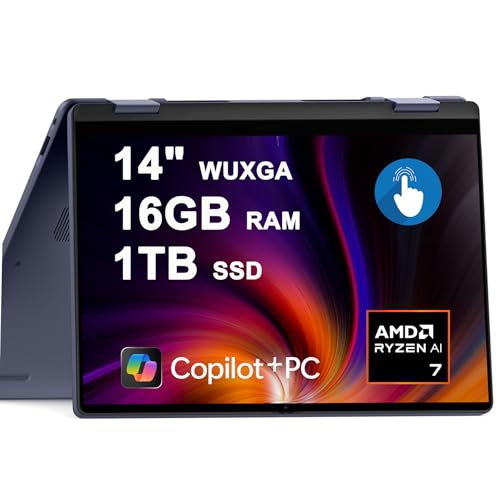
Yes, the Dell Inspiron 14 Plus 2-in-1 is a compelling choice if you want a modern convertible laptop that balances portability, productivity, and touchscreen flexibility. The Amazon configuration associated with this review uses an AMD Ryzen AI 7 350 processor, 16GB of DDR5 memory, a 1TB SSD, integrated AMD Radeon graphics, and a 14-inch WUXGA touchscreen.
Its biggest strengths are the versatile 2-in-1 design, strong everyday hardware, generous storage, and AI-focused AMD processor. The main limitation is that integrated graphics are better suited to everyday productivity and moderate creative workloads than demanding gaming or professional GPU-intensive work.

My First Impression for Dell Inspiron 14 Plus 2-in-1
The first thing to appreciate is the convertible format. A 14-inch chassis gives you a practical balance between screen space and portability, while the 2-in-1 hinge allows the machine to be used as a conventional laptop or folded into a more touch-friendly configuration.
Setup should feel familiar to anyone who has recently configured a Windows 11 PC. After connecting to Wi-Fi, signing in with a Microsoft account, installing updates, and completing Dell’s initial software setup, the laptop is ready for common tasks such as browsing, Office work, video calls, streaming, and schoolwork.

What Makes It Stand Out / Key Features
- AMD Ryzen AI 7 350 Processor: The Ryzen AI 7 350 is an 8-core processor designed to provide strong performance for multitasking, productivity applications, browsing, communication, and other demanding everyday workloads.
- 14-inch WUXGA Touchscreen: The 14-inch 1920 x 1200 touchscreen provides a useful 16:10-style workspace while giving you direct touch control for navigation, note-taking, presentations, and casual interaction.
- 16GB DDR5 Memory: With 16GB of DDR5 RAM, the configuration is well suited to having multiple browser tabs, office applications, communication tools, and background processes open at the same time.
- 1TB SSD Storage: The 1TB solid-state drive provides substantial room for documents, applications, photos, projects, and media while retaining the responsive behavior expected from modern SSD storage.
- Convertible 2-in-1 Design: The flexible hinge lets the laptop move beyond the traditional clamshell format, making it easier to use the touchscreen for presentations, entertainment, reading, or other situations where a conventional keyboard position is less convenient.
- Integrated AMD Radeon Graphics: The integrated Radeon graphics are appropriate for everyday visual tasks, media playback, general creative work, and lighter gaming, but buyers seeking serious gaming performance should consider a laptop with a dedicated GPU.
- Windows 11 and AI-Oriented Hardware: The system is designed around Windows 11 and an AMD processor with dedicated AI capabilities, giving it a more modern platform for compatible AI-assisted applications and productivity features.

✅ What I Like
- ✔ The Ryzen AI 7 350 processor provides a strong foundation for multitasking, office work, web applications, and demanding everyday use.
- ✔ The 16GB of DDR5 memory is a practical amount for users who regularly keep many applications and browser tabs open.
- ✔ The 1TB SSD offers plenty of local storage for work files, photos, software, and personal media.
- ✔ The touchscreen and convertible hinge make the laptop more flexible than a standard clamshell notebook.
- ✔ The 14-inch size offers a useful compromise between workspace and portability for commuting, school, and home-office use.
- ✔ Integrated Radeon graphics handle everyday graphical workloads without requiring the extra size and power demands of a dedicated gaming GPU.
⚠️ What Could Be Better
- ✖ Integrated graphics are not the right choice for buyers who expect high-end gaming or demanding GPU-based creative workloads.
- ✖ A convertible 14-inch design may feel less spacious than a larger 15- or 16-inch laptop for users who frequently work with large timelines, spreadsheets, or multiple windows.
- ✖ Buyers should verify the exact Amazon configuration before ordering because processor, memory, storage, display, wireless, and other specifications can vary between listings.

My Recommendation
I would recommend this Dell to shoppers who want one Windows machine that can cover work, school, entertainment, and flexible touchscreen use without moving into a larger 15- or 16-inch chassis. The combination of Ryzen AI processing, 16GB memory, and 1TB storage gives the configuration a sensible productivity-oriented foundation.
It is less attractive for someone buying primarily for demanding gaming or GPU-heavy professional applications. In those cases, a laptop with dedicated graphics may be a better match, even if that means giving up some portability or convertible flexibility.
| Best For | Why It Fits |
|---|---|
| Remote workers | The 14-inch form factor, strong multitasking hardware, touchscreen, and convertible design work well for home offices and flexible workspaces. |
| College students | The combination of portability, touchscreen functionality, 16GB RAM, and large SSD storage makes it useful for coursework, research, presentations, and entertainment. |
| Everyday family computing | It can handle browsing, streaming, productivity software, video calls, and general household tasks from one versatile device. |
| Mobile professionals | The 14-inch convertible format provides a practical balance for users who move between home, office, meetings, and travel. |

Alternative Products You Can Consider
| Product | Best For | Key Difference |
|---|---|---|
| Dell Inspiron 14 Plus 2-in-1 | Balanced productivity and touchscreen flexibility | Combines a Ryzen AI 7 350 platform, 16GB RAM, 1TB SSD, and convertible design in one configuration. |
| HP Envy x360 14 | Premium convertible Windows use | Provides a competing 14-inch convertible experience with HP-specific design and configuration options. |
| Lenovo Yoga 7 2-in-1 14 | Flexible everyday computing | Offers Lenovo’s Yoga convertible approach and is a strong alternative for buyers comparing design and configuration options. |

Final Verdict: Which Should You Buy?
The Dell Inspiron 14 Plus 2-in-1 is a strong option for buyers who want a versatile Windows laptop rather than a machine designed around one specialized task. Its Ryzen AI 7 350 processor, 16GB memory, 1TB SSD, touchscreen, and convertible form factor create a well-rounded package for productivity, education, communication, entertainment, and everyday creative work.
The biggest reason to choose it is flexibility: you get capable everyday hardware in a compact convertible design. The biggest limitation is the integrated graphics, which makes it a weaker choice for serious gaming and GPU-intensive professional workloads. For those users, a dedicated-GPU laptop is likely the smarter purchase.