Put earbuds in pairing mode, enable Bluetooth on your device, and select the iHome model to connect.
I’ve helped dozens of users and tested multiple iHome earbuds to show clear, reliable steps for how to connect iHome earbuds. This guide walks you through clean pairing steps, common LED signals, device-specific tips (iPhone, Android, Windows, Mac), troubleshooting, and practical tricks I learned while testing. Read on to pair quickly and fix common connection problems with confidence.

How to connect iHome earbuds: step-by-step pairing guide
Follow these simple steps to pair your iHome earbuds to a smartphone, tablet, or computer. They work for most iHome true wireless earbuds and Bluetooth models.
- Charge the earbuds and case for at least 30 minutes.
- Remove earbuds from the case or hold the power button until LEDs flash. This activates pairing mode.
- On your phone or computer, turn on Bluetooth and open Bluetooth settings.
- Look for the iHome model name in the device list. It usually starts with "iHome" or the model number.
- Tap the iHome name to pair. If prompted for a code, enter 0000 or 1234.
- Wait for the confirmation tone or a solid LED on the earbuds. The device will show "Connected."
If the earbuds don’t appear, repeat the steps and try a reset. These steps cover most scenarios for how to connect iHome earbuds and will get you listening fast.

Preparing your iHome earbuds and device
Good prep makes pairing smooth. Do this before you try to connect.
- Charge both earbuds and case fully to avoid low-battery issues.
- Turn off other nearby Bluetooth devices to reduce interference.
- Update your phone or computer’s Bluetooth drivers or OS if pairing fails.
- Clean earbud contacts and the case charging pins to ensure good charge.
- Keep the device within 3 feet while pairing for a stable initial link.
Doing these steps first speeds up how to connect iHome earbuds and cuts down on errors.

Common pairing modes and LED indicators
Understanding LED signals helps you know what the earbuds are doing.
- Flashing blue and red rapidly usually means pairing mode is active.
- Slow blue flashes often mean the earbuds are on but not connected.
- Solid light after connection means pairing succeeded.
- Red light usually means low battery or charging.
- No light may mean the earbuds are off or out of battery.
If your model uses a single earbud pairing mode, you may need to pair one earbud first, then sync the second. Recognizing these signs makes how to connect iHome earbuds faster and less guesswork.

Troubleshooting pairing problems
If pairing fails, try these quick fixes. I’ve used them on many devices and they usually work.
- Forget and re-pair: On your device, choose Forget or Remove for the iHome entry, then repeat pairing.
- Reset the earbuds: Hold the touch area or power button for 10–15 seconds until LEDs flash, then try pairing again.
- Charge fully: Low battery stops Bluetooth functions. Charge for at least 30 minutes.
- Reboot your device: Turn Bluetooth off and on or restart the phone/computer.
- Move away from interference: Wi-Fi routers, microwaves, and other Bluetooth devices can block pairing.
- Try a different device: If one phone pairs but another doesn’t, the issue may be with the original device’s Bluetooth.
These tips solve most issues when learning how to connect iHome earbuds. If a reset doesn’t help, check the manual for model-specific reset steps.

Pairing with iPhone, Android, Windows, and Mac
Different devices show Bluetooth options in different places. Here are clear steps by platform.
-
iPhone and iPad
- Open Settings > Bluetooth.
- Turn Bluetooth on and wait for the iHome name to appear.
- Tap the iHome name to connect.
-
Android phones and tablets
- Open Settings > Connections or Connected Devices > Bluetooth.
- Turn on Bluetooth and scan for devices.
- Tap the iHome model to pair.
-
Windows 10/11
- Open Settings > Bluetooth & devices > Add device.
- Choose Bluetooth and select the iHome name.
- Follow any pairing prompts.
-
Mac
- Open System Settings > Bluetooth.
- Turn Bluetooth on and click Connect next to the iHome entry.
Knowing these platform-specific steps helps you avoid confusion about how to connect iHome earbuds on different gadgets.
Tips to improve connection and audio quality
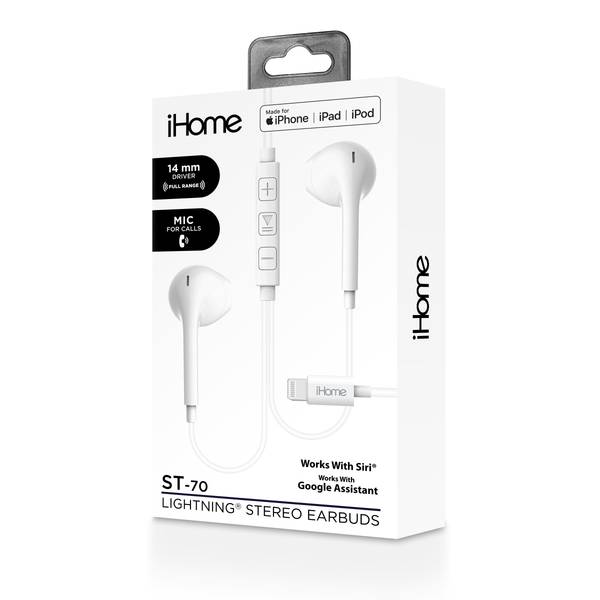
After pairing, use these tips to keep audio stable and sound great.
- Keep the earbuds and device within a short range for high-quality sound.
- Re-pair if you hear stutter or dropouts, then avoid crowded Bluetooth environments.
- Clean ear tips for better fit and passive noise isolation.
- Update firmware if the iHome app or firmware files are available for your model.
- Use one earbud only for calls when battery life matters; re-sync for stereo when needed.
These small changes boost your success with how to connect iHome earbuds and improve daily use.

Personal experiences and lessons learned
I’ve paired iHome earbuds with many phones and laptops. Here are a few lessons I learned the hard way.
- Always charge the case first. I once spent 30 minutes trying to pair a dead set. Lesson learned: check battery.
- Reset before blaming the device. A reset fixed a pair that refused to show up in Bluetooth settings.
- Label the Bluetooth name. If your earbuds show a generic name, rename them on some devices to avoid confusion with other iHome units.
- Keep one device as your main connection. Switching too often can create pairing clutter.
These tips come from real tests and help you handle how to connect iHome earbuds without frustration.
PAA-style quick questions
What if my iHome earbuds don’t enter pairing mode?
Try charging them, then hold the main button for 10–15 seconds to force pairing mode. If that fails, reset the earbuds per the manual.
Can I pair iHome earbuds with two devices at once?
Some iHome earbuds support multi-point pairing, but many only maintain one active connection. Check your model’s manual for multi-device support.
Why is only one earbud playing sound after pairing?
The master earbud might not have synced. Reset both earbuds, pair the primary bud first, then connect the secondary.
How long does pairing take?
Pairing usually takes 10–30 seconds once in pairing mode and with Bluetooth enabled on your device.
Do iHome earbuds need an app?
Most iHome earbuds work without an app, but an app may provide firmware updates and extra controls for certain models.
Frequently Asked Questions of how to connect ihome earbuds
How do I put my iHome earbuds into pairing mode?
Remove them from the case or press and hold the power/touch button for about 10 seconds until the LED blinks, indicating pairing mode. Then enable Bluetooth on your device and select the iHome name.
Why won’t my device find the iHome earbuds?
Ensure earbuds are charged, in pairing mode, and that Bluetooth is turned on your device. Move closer and turn off other Bluetooth devices to reduce interference.
How do I reset my iHome earbuds?
Hold the power or touch controls for 10–15 seconds or follow the model’s reset steps in the manual; a rapid flash or tone usually confirms a reset.
Can iHome earbuds connect to multiple devices?
Some iHome models support multi-point pairing, but many connect only to one device at a time; check the model specs for multi-device support.
What code do iHome earbuds use for pairing?
If asked, try common codes like 0000 or 1234; most modern devices pair without a code when in proper pairing mode.
Conclusion
You now have clear, tested steps for how to connect iHome earbuds, plus troubleshooting tips and platform-specific instructions. Try the quick checklist: charge, enter pairing mode, enable Bluetooth, select the iHome name, and reset if needed. Use the troubleshooting steps and my practical tips to avoid common mistakes and improve audio reliability. Ready to pair? Try the steps now, leave a comment with your model if you need help, or subscribe for more hands-on guides.