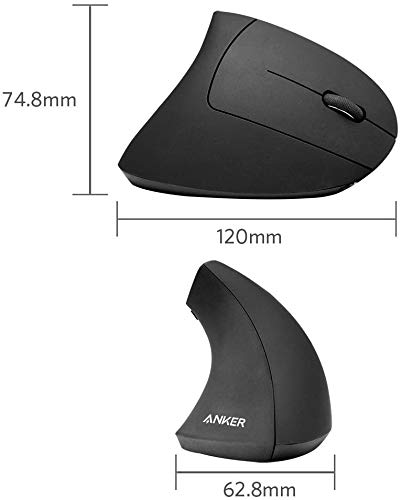
The Redragon M908 is my top pick for a feature-rich gaming mouse with many easy-to-reach buttons.
If you play an MMO, manage complex game controls, or want shortcuts close at hand, a mouse with extra buttons can make a real difference. The challenge is finding one that feels comfortable and lets you set up those controls in a way that suits you. I compared ten wired and wireless options, from full MMO keypads to versatile everyday gaming mice. My picks cover different budgets and play styles, so you can focus on the features you will actually use.
See the differences between my top picks at a glance.
| Mouse | Button style | Connection | Best for | Standout point | Buy |
|---|---|---|---|---|---|
| Redragon M908 | 12 side buttons | Wired | MMO macros | 12,400 DPI listed | View on Amazon |
| Redragon M901K | 12 side buttons; 19 programmable | Wired | Button and weight tuning | Removable weights | View on Amazon |
| UtechSmart Venus | 12 side buttons | Wired | MMO value | 16,400 DPI listed | View on Amazon |
| Redragon M913 | 12 side buttons | Wireless | Wireless MMO play | 16,000 DPI listed | View on Amazon |
| Corsair Scimitar RGB Elite | 12 side buttons | Wired | Adjustable side keypad | Moveable button panel | View on Amazon |
| Logitech G502 HERO | Multiple programmable controls | Wired | Mixed game genres | Versatile button layout | View on Amazon |
| SM809 Pro | 16 custom buttons | Tri-mode | Flexible connections | 24,000 DPI listed | View on Amazon |
| Razer Naga V2 HyperSpeed | 12 side buttons | Wireless | Wireless MMO gaming | Long battery-life claim | View on Amazon |
| Logitech G305 Lightspeed | Six buttons | Wireless | Simple wireless gaming | Compact design | View on Amazon |
| Razer Basilisk V3 | 11 programmable buttons | Wired | Mixed use and comfort | Ergonomic thumb rest | View on Amazon |
Redragon M908 Wired MMO RGB Gaming Mouse

The Redragon M908 is a wired MMO mouse built around a large set of quick-access controls. Its thumb panel has 12 buttons, which can help keep spells, items, and macros close by. The listing gives a maximum sensitivity of 12,400 DPI. RGB lighting adds a gaming look, though lighting is a style choice rather than a performance feature.
I like this layout for games that ask for many commands at once. The side keys can also help with work shortcuts, such as copy, paste, or editing tools, if the software supports the setup you want. A wired design means you do not need to charge it or pair it. Before buying, check that its size and shape suit your hand, since MMO mice tend to feel fuller than simple FPS models.
Pros:
- 12 side buttons put many commands within thumb reach.
- Wired connection avoids battery charging.
- High listed DPI gives room to adjust pointer speed.
- RGB lighting can match a gaming setup.
- Useful for MMO, MOBA, and shortcut-heavy tasks.
Cons:
- The keypad can take time to learn.
- Its full shape may not suit small hands.
- The cable limits movement compared with wireless mice.
What Amazon Buyers Are Saying
Amazon reviews can change over time, and I cannot confirm a live review count or rating here. When checking buyer feedback, look for repeated comments about side-button feel, software setup, long-term durability, and fit. Those details matter more than a single review, especially with a mouse that has many controls.
My Recommendation
I recommend the M908 to budget-minded players who want a classic 12-button MMO layout and do not mind a cable. It offers a lot of control options for the price category, but fit should come first. Overall rating: 4.3/5.
| Category | Rating |
|---|---|
| Button access | 4.5/5 |
| Wired convenience | 4/5 |
| Setup flexibility | 4/5 |
| Value | 4.5/5 |
| Overall rating | 4.3/5 |
Redragon M901K MMO Gaming Mouse

The Redragon M901K is aimed at players who want many controls and some control over mouse weight. The product listing describes 19 programmable buttons, including 12 on the side, and a maximum DPI of 12,400. It also lists eight removable 2.4-gram weights. That setup gives you room to tune how heavy the mouse feels.
The side grid suits games with long action bars or repeated commands. The extra weights may help if you prefer a heavier mouse, though adding or removing them takes more effort than using a fixed-weight model. As with any programmable mouse, the button count only helps if you can reach and remember the keys. I would plan to set up a few useful commands first, then add more as the layout becomes familiar.
Pros:
- 12 side keys support MMO-style command layouts.
- 19 programmable controls offer broad customization.
- Removable weights let you adjust the feel.
- High listed DPI supports a wide sensitivity range.
- Wired use means no battery to monitor.
Cons:
- Many keys can feel crowded for new users.
- Weight tuning adds parts to manage.
- Wired use may not suit a clean, cable-free desk.
What Amazon Buyers Are Saying
I cannot verify current Amazon review trends for this exact listing. Read recent buyer comments for practical notes on the software, weight system, and button response. A pattern of clear setup instructions and reliable button use is more useful than broad praise alone.
My Recommendation
The M901K is worth considering if you want both a large thumb keypad and a mouse weight you can adjust. It is less appealing if you want a simple plug-in experience with very few settings. Overall rating: 4.2/5.
| Category | Rating |
|---|---|
| Button access | 4.5/5 |
| Weight tuning | 4.5/5 |
| Ease of use | 3.8/5 |
| Value | 4/5 |
| Overall rating | 4.2/5 |
UtechSmart Venus Wired MMO Gaming Mouse

The UtechSmart Venus is a wired MMO mouse with a 12-button thumb panel. Its listing names a maximum sensitivity of 16,400 DPI and RGB lighting. The side keys are the main reason to choose it, since they can place many in-game actions under one thumb. It has the familiar full-size MMO form that favors command access over a very small footprint.
This mouse may suit players who want a dedicated keypad without paying for a wireless model. A wired connection keeps the setup simple and removes battery concerns. High DPI numbers do not automatically make a mouse more accurate, so I would set sensitivity based on your screen and aim style. Take time to map the side keys in a game you know before building a complex macro layout.
Pros:
- 12-button side grid supports many assigned actions.
- Wired connection is simple to set up.
- Listed 16,400 DPI offers adjustable sensitivity.
- RGB lighting adds customizable visual flair.
- Useful for MMOs and other shortcut-heavy games.
Cons:
- The large layout may feel awkward in small hands.
- It lacks the freedom of a wireless mouse.
- Many thumb keys need practice to use accurately.
What Amazon Buyers Are Saying
Amazon feedback changes, so I cannot state a current score or claim a shared buyer consensus. Check recent reviews for comments about how easily users distinguish the side buttons and whether the setup software works well on their systems. Those details can reveal whether the keypad will fit your habits.
My Recommendation
The Venus is a practical wired option for MMO players who want a full thumb keypad and adjustable sensitivity. I would compare its shape and current price with the Redragon M908 before choosing. Overall rating: 4.1/5.
| Category | Rating |
|---|---|
| Button access | 4.4/5 |
| Sensitivity range | 4/5 |
| Ease of setup | 4/5 |
| Value | 4/5 |
| Overall rating | 4.1/5 |
Redragon M913 Wireless MMO Mouse

The Redragon M913 brings a 12-button thumb panel to a wireless MMO mouse. The listing gives a maximum DPI of 16,000 and highlights remappable controls. Its wireless design can help keep a desk clear and lets you move without a cable dragging across the pad. RGB lighting completes its gaming-focused look.
I would shortlist the M913 if you want MMO-style access without a wired connection. Remember that wireless mice need power, so check the product details for the charging or battery method before you buy. Button mapping also takes some setup, but it can make a large set of skills easier to reach. This is a better fit for games with many commands than for players who only need two side buttons.
Pros:
- Wireless design reduces cable clutter.
- 12 side buttons give fast access to commands.
- Remappable controls support personal layouts.
- Listed 16,000 DPI allows sensitivity adjustment.
- RGB lighting offers a customizable appearance.
Cons:
- You must manage its power needs.
- The keypad takes practice to use without mistakes.
- Wireless setup may be unnecessary if you play at one desk.
What Amazon Buyers Are Saying
I cannot check live Amazon reviews for this product here. When you read current feedback, focus on reports about wireless stability, battery or charging life, and whether the side keys feel distinct. These points have more bearing on daily use than a short first impression.
My Recommendation
The M913 is a strong value-minded choice for players who want wireless freedom and a familiar 12-key MMO panel. Confirm its power details and software support before ordering. Overall rating: 4.2/5.
| Category | Rating |
|---|---|
| Wireless convenience | 4.3/5 |
| Button access | 4.5/5 |
| Setup flexibility | 4/5 |
| Value | 4/5 |
| Overall rating | 4.2/5 |
Corsair Scimitar RGB Elite MMO Mouse
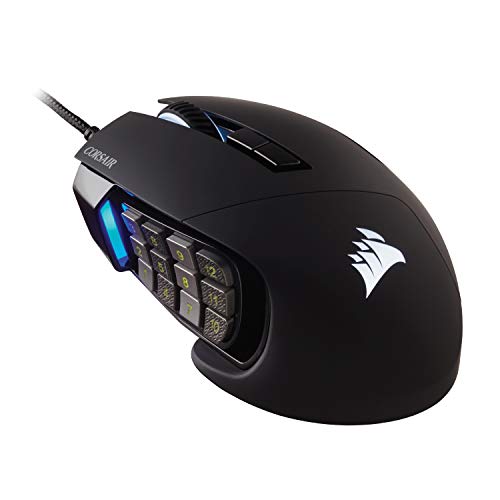
The Corsair Scimitar RGB Elite is a wired MMO and MOBA mouse with a distinctive side keypad. Its 12-button panel can slide to help you find a position that works for your thumb. That adjustment is useful because side-key reach can vary a lot from hand to hand. The mouse also has RGB lighting and supports button customization through Corsair software.
I see the adjustable panel as its key advantage over a fixed keypad. Once the panel sits in the right spot, you can map actions to the grid and build a repeatable layout for your games. It is still a substantial mouse, so buyers who prefer a compact, light FPS shape may want another pick. Check software compatibility with your system and games before relying on advanced commands.
Pros:
- Moveable side panel helps adjust thumb reach.
- 12 side buttons suit games with many actions.
- Wired connection avoids battery upkeep.
- RGB lighting can be customized.
- Button mapping can serve MMO and MOBA play.
Cons:
- Its large body may not suit every grip or hand size.
- Wired operation can add desk cable drag.
- Software-based customization requires initial setup.
What Amazon Buyers Are Saying
I cannot confirm current Amazon buyer trends for this listing. Look through recent reviews for repeated notes about the sliding panel, software, and long-session comfort. Reviewers who describe their hand size and grip can be especially helpful when judging this mouse’s fit.
My Recommendation
The Scimitar is a compelling pick if a fixed MMO keypad usually sits too far forward or back for your thumb. Its adjustable panel gives it a useful fit advantage, though the wired, full-size design will not suit everyone. Overall rating: 4.4/5.
| Category | Rating |
|---|---|
| Keypad adjustment | 4.8/5 |
| Button access | 4.5/5 |
| Software flexibility | 4.3/5 |
| Ease of fit | 4/5 |
| Overall rating | 4.4/5 |
Logitech G502 HERO Wired Gaming Mouse

The Logitech G502 HERO offers extra programmable controls without using a 12-button side grid. Its familiar thumb-side buttons and top controls suit players who want more shortcuts but still prefer a conventional layout. The HERO sensor gives it a broad sensitivity range, and the wired connection keeps it ready without charging. Its sculpted body includes a thumb rest.
This mouse works well as a middle ground for mixed game libraries. You can assign useful actions to the extra buttons for shooters, action games, or daily computer tasks without learning a dense keypad. It is not the best option if you need a separate button for every MMO skill. I would choose it for varied play, a familiar shape, and flexible shortcuts rather than maximum button count.
Pros:
- More controls than a basic two-side-button mouse.
- Conventional layout is easier to learn than a thumb grid.
- Wired operation needs no battery charging.
- Thumb rest supports a relaxed grip for many users.
- Flexible for different game genres and everyday use.
Cons:
- It has fewer dedicated side keys than MMO mice.
- The wired cable may bother some users.
- The sculpted shape may not fit every hand or grip.
What Amazon Buyers Are Saying
I cannot confirm the current review average or recent buyer consensus. Check newer reviews for feedback on comfort, button placement, and the software used to assign controls. Long-term comments can help you judge whether the shape suits your grip.
My Recommendation
The G502 HERO is an easy recommendation for players who want useful extra buttons without an MMO keypad. It offers a more balanced layout for mixed use, but MMO players with many commands may need more side keys. Overall rating: 4.4/5.
| Category | Rating |
|---|---|
| Everyday button layout | 4.6/5 |
| Genre flexibility | 4.7/5 |
| Comfort options | 4.3/5 |
| MMO button capacity | 3.7/5 |
| Overall rating | 4.4/5 |
SM809 Pro Tri-Mode MMO Gaming Mouse

The SM809 Pro listing describes a tri-mode MMO mouse with 16 custom buttons and a maximum sensitivity of 24,000 DPI. Tri-mode means the product is designed to support three connection methods, but check the current listing to confirm exactly which modes this version includes. The button count gives it room for game commands and shortcuts. Its feature set aims to combine flexibility with a high level of customization.
This mouse may appeal if you switch between devices or want a choice of connection types. A large button count looks useful on paper, but comfort and button reach matter more than the number alone. I would check the product page for included receiver, cable, and operating system details before buying. It may suit a player who enjoys setting up controls, but less so someone who wants a mouse that needs no configuration.
Pros:
- 16 custom buttons offer many possible assignments.
- Tri-mode design aims to provide connection flexibility.
- High listed DPI allows a wide sensitivity range.
- Made for MMO-style shortcut use.
- Can suit users who want a highly configurable mouse.
Cons:
- Confirm the exact connection modes before ordering.
- Many controls can take time to configure and learn.
- Current software and compatibility details should be checked carefully.
What Amazon Buyers Are Saying
I cannot verify current Amazon review patterns for this specific listing. Read recent reviews with care and look for clear reports on connection switching, button mapping, and software support. Those are the key details to confirm for a less familiar tri-mode model.
My Recommendation
The SM809 Pro could offer strong flexibility for someone who wants many controls and more than one connection option. I would confirm the exact modes and software support from the live product page before purchase. Overall rating: 3.9/5.
| Category | Rating |
|---|---|
| Button count | 4.6/5 |
| Connection flexibility | 4/5 |
| Ease of setup | 3.5/5 |
| Value potential | 4/5 |
| Overall rating | 3.9/5 |
Razer Naga V2 HyperSpeed Wireless Mouse

The Razer Naga V2 HyperSpeed is a wireless MMO mouse with a 12-button side panel. Its listing promotes up to 400 hours of battery life, though real use can vary by settings and conditions. Wireless operation keeps the desk clear, while programmable controls let you map actions to the side keys. The familiar keypad style targets games with many skills and items.
I would consider it if you want a recognizable MMO layout without a cable. Before choosing, check which battery type it uses and whether its shape fits your hand; those are daily-use details that can matter more than a headline battery figure. The 12 side buttons can be excellent for a player who uses them often, but they may feel like clutter if you only need a few shortcuts. Set up a simple layout first and expand it over time.
Pros:
- Wireless connection keeps the desk less cluttered.
- 12 side buttons support MMO command access.
- Programmable controls can be tailored to games.
- Long battery-life claim may reduce power interruptions.
- Suitable for players who want a dedicated MMO mouse.
Cons:
- Battery-life results depend on use and settings.
- Wireless mice require power management.
- The thumb keypad may be excessive for simple games.
What Amazon Buyers Are Saying
I cannot verify the current Amazon review score or summarize live buyer sentiment. Look at recent reports about wireless reliability, battery use, software setup, and the feel of the thumb buttons. These points can help you compare the Naga with wired MMO alternatives.
My Recommendation
The Naga V2 HyperSpeed is a strong fit for MMO players who want a wireless 12-button layout from a known gaming line. Treat the battery figure as a claim to verify against your own settings and habits. Overall rating: 4.5/5.
| Category | Rating |
|---|---|
| Wireless convenience | 4.7/5 |
| MMO button access | 4.6/5 |
| Battery appeal | 4.4/5 |
| Setup and comfort | 4.2/5 |
| Overall rating | 4.5/5 |
Logitech G305 Lightspeed Wireless Mouse

The Logitech G305 Lightspeed is not an MMO mouse, but it earns a place here as a compact wireless option with six buttons. That is enough for common actions such as browser navigation, push-to-talk, or a few game commands. Its Lightspeed wireless connection is designed for gaming, and the compact body travels easily. It keeps the control layout simple compared with a 12-key thumb grid.
I would not choose this mouse if your main goal is to bind a long list of MMO skills. Instead, it makes sense if you want a few extra buttons and wireless play without a large body. The shape is more compact than many ergonomic MMO models, so check its size against your hand and grip. It is a useful reminder that more buttons are not always better.
Pros:
- Wireless design avoids a cable across the desk.
- Six buttons provide a few useful extra controls.
- Compact body is easy to carry.
- Simple layout is quick to learn.
- Good alternative for players who do not need an MMO keypad.
Cons:
- Fewer controls than the other MMO-focused picks.
- Compact shape may feel small in larger hands.
- Wireless operation still requires power management.
What Amazon Buyers Are Saying
I cannot confirm current reviews for this product. Check recent buyer notes about the size, wireless use, and battery performance. These details matter if you plan to use it for long sessions or carry it with a laptop.
My Recommendation
The G305 is a sensible choice for someone who wants a few extra controls, not a full MMO keypad. It is not the best gaming mouse with multiple buttons for a player who needs a dozen thumb commands, but it can be a better match for simple, portable use. Overall rating: 4.2/5.
| Category | Rating |
|---|---|
| Wireless convenience | 4.6/5 |
| Button capacity | 3.5/5 |
| Portability | 4.6/5 |
| Ease of use | 4.5/5 |
| Overall rating | 4.2/5 |
Razer Basilisk V3 Wired Gaming Mouse

The Razer Basilisk V3 is a wired ergonomic gaming mouse with 11 programmable buttons. It offers more shortcut options than a basic mouse, but its layout feels less like a dedicated MMO keypad. A thumb rest helps create a supported grip for many right-handed users. The mouse also includes customizable RGB lighting.
This is a strong pick for players who move between shooters, action games, and daily tasks. You can assign a handful of frequent commands without learning a dense side grid. The wired connection means no charging, though cable feel can depend on your desk and mouse pad. If you need a separate control for every spell, an MMO mouse with 12 side keys may suit you better.
Pros:
- 11 programmable buttons offer flexible shortcuts.
- Ergonomic shape includes a thumb rest.
- More approachable than a full MMO keypad for many users.
- Wired design avoids battery upkeep.
- RGB lighting can be personalized.
Cons:
- It does not provide a 12-button thumb grid.
- The shape may not fit left-handed users.
- The cable may be less convenient than wireless.
What Amazon Buyers Are Saying
I cannot verify current Amazon review data for this listing. Read recent reviews for comments on comfort, scroll and button use, software setup, and cable feel. Try to find feedback from buyers with a grip style like yours.
My Recommendation
The Basilisk V3 is a versatile choice if you want several extra buttons in a familiar ergonomic form. It is not the highest-button-count option, but it makes sense for mixed gaming and everyday use. Overall rating: 4.5/5.
| Category | Rating |
|---|---|
| Button range | 4.5/5 |
| Ergonomic design | 4.6/5 |
| Genre flexibility | 4.7/5 |
| Wireless freedom | 3.5/5 |
| Overall rating | 4.5/5 |
How to Choose the Best Gaming Mouse With Multiple Buttons
The best gaming mouse with multiple buttons is not always the one with the highest button count. It should fit your hand, place controls where you can reach them, and support the games you play. Think about how you will use each button before you pay for a large feature set.
1. Match the button layout to your games
MMO and MOBA players may get the most use from a 12-button side panel. It can hold skills, items, or commands that would otherwise sit on the keyboard. If you play a mix of games, a mouse like the G502 HERO or Basilisk V3 may feel easier to manage. Their extra controls add options without filling the whole thumb area with keys.
Count the actions you want to move to the mouse. If you only need push-to-talk and two shortcuts, a simple six- or 11-button layout may be enough. More buttons can slow you down if they are hard to tell apart or easy to press by mistake. A good layout lets your thumb find the right control by feel.
2. Check comfort, reach, and grip
Mouse shape can matter as much as button count. A wide MMO mouse may support your palm, but it can feel bulky if you have small hands. A moveable side panel, like the one on the Corsair Scimitar RGB Elite, gives you a way to adjust thumb reach. If possible, compare the mouse dimensions with one you already use.
Think about your grip, too. Palm, claw, and fingertip grips place your hand in different spots. The side keys should be easy to press without shifting your whole hand. The scroll wheel, main buttons, and thumb rest should feel natural during a long session. Comfort is personal, so do not treat a high spec number as proof that a mouse will fit.
3. Weigh software, connection, and value
Programmable buttons often need software to change their jobs. Check that the software supports your computer and that it can save the settings you need. Some games may limit macros or remapped commands, so use settings that follow the game’s rules. Simple remaps are often easier to manage than complex macros.
A wired mouse does not need charging and may cost less, but its cable can get in the way. A wireless mouse offers more freedom but needs power and may cost more. Check the exact connection modes, battery details, and included accessories on the current product page. For value, pay for features you will use, not just the longest feature list.
Final Verdict: Which Should You Buy?
For most MMO players, I recommend the Redragon M908 as the best gaming mouse with multiple buttons for value and command access. Choose the Corsair Scimitar RGB Elite if adjustable thumb-key placement matters most, or the Razer Naga V2 HyperSpeed for wireless play.
Match the button layout to your games and hand before you order. A comfortable mouse with useful controls will serve you better than one with features you never touch.
FAQs Of best gaming mouse with multiple buttons
How many buttons should a gaming mouse have?
For basic gaming, six to 11 buttons may be enough. MMO players often benefit from 12 side buttons for skills and items.
Is a mouse with 12 side buttons hard to use?
It can take practice. Start with a few key actions, then add more as your thumb learns the layout.
Are wired or wireless MMO mice better?
Wired mice do not need charging. Wireless mice reduce cable clutter. Choose based on your desk, budget, and power preferences.
Is a high DPI number important for gaming?
Not by itself. DPI sets pointer sensitivity, but comfort and consistent control matter more than the highest listed number.
Can I use a multi-button gaming mouse for work?
Yes. You can often assign shortcuts for tasks like editing or browsing, as long as the mouse software supports your setup.