The Razer Basilisk V3 is my top ergonomic gaming mouse for its comfortable shape, useful controls, and strong wired performance.
Long gaming sessions can leave your hand tired, especially when your mouse feels too small, too flat, or hard to control. The right ergonomic gaming mouse can make play feel more natural, but comfort depends on your hand size, grip, and preferred games. I compared nine options, from classic right-handed gaming mice to vertical designs, so you can match the shape and features to your needs.
See the differences between my top picks at a glance.
| Mouse | Shape | Connection | Standout feature | Best for | Link |
|---|---|---|---|---|---|
| Razer Basilisk V3 | Right-handed | Wired | Custom controls and scroll wheel | All-around gaming | View on Amazon |
| Razer Pro Click V2 Vertical | Vertical | Wireless | Upright six-button design | A more relaxed hand position | View on Amazon |
| Attoe 5D Rocker Vertical | Vertical | Wireless | 12 buttons; listed 24,000 DPI | Many controls in a vertical shape | View on Amazon |
| Logitech G502 Hero | Right-handed | Wired | Programmable controls and adjustable weight | Control-focused play | View on Amazon |
| Logitech Lift Vertical | Vertical | Wireless | Comfort-first office design | Work and casual play | View on Amazon |
| Razer Basilisk V3 Pro 35K | Right-handed | Wireless | 35K sensor; listed 140-hour battery | Premium wireless gaming | View on Amazon |
| TRELC 5D Rocker Wired | Vertical | Wired | 11 buttons; onboard memory | Wired vertical control | View on Amazon |
| Redragon M811 | Right-handed MMO | Wired | Remappable side keys | MMO and shortcut-heavy games | View on Amazon |
| Razer Basilisk V3 X HyperSpeed | Right-handed | Wireless | Customizable wireless controls | Wireless everyday gaming | View on Amazon |
Razer Basilisk V3 Customizable RGB Wired Mouse

The Basilisk V3 is my strongest all-around pick for players who like a familiar, full-size right-handed shape. Its thumb rest gives your hand a clear place to settle, while the body supports a palm or relaxed claw grip for many users. The wired connection also removes battery checks from the routine. Its shape and control layout make it easy to use for both games and everyday tasks.
Razer gives this model multiple programmable controls and a scroll wheel with more than one scrolling mode. That makes it handy in games where you want quick access to skills, pings, or other commands. The wheel also helps with long pages and menus outside games. This is not a small or ambidextrous mouse, so check its size against your hand and grip before you buy.
Pros:
- Comfortable right-handed shape with a thumb rest.
- Wired connection means no battery to recharge.
- Extra controls can reduce keyboard reach for common actions.
- Scroll wheel modes suit both quick browsing and precise scrolling.
- Works well as a gaming and general-use mouse.
- RGB lighting lets you tailor the look of your setup.
Cons:
- The wired cable may feel restrictive on a crowded desk.
- The size and right-handed shape may not suit every hand or grip.
- Extra buttons can take time to learn and set up well.
What Amazon Buyers Are Saying
Amazon reviews can change over time, so check the latest comments for current owner feedback. When reading them, look for repeated notes about hand fit, button feel, scroll-wheel use, and software setup. Those details matter more than a high score alone. Pay close attention to reviews from people who share your grip style and the games you play.
My Recommendation
I recommend the Basilisk V3 to right-handed players who want a versatile ergonomic gaming mouse with a wired link and a useful set of controls. It earns its place as my best overall option, though it will not fit every hand. I rate it 4.6 out of 5.
| Category | Rating |
|---|---|
| Comfort and fit | 4.5/5 |
| Gaming control | 4.7/5 |
| Useful features | 4.7/5 |
| Value | 4.5/5 |
| Overall rating | 4.6/5 |
Razer Pro Click V2 Vertical Wireless Mouse

The Pro Click V2 Vertical takes a different path from a standard gaming mouse. Its upright design places the hand at an angle, which some people find more natural during long desk sessions. The listed model has six buttons and a wireless connection. It may suit a player who wants a vertical form but still needs extra controls for common actions.
Keep in mind that a vertical mouse feels quite different from a low, flat gaming mouse. You may need time to adjust your aim and hand movement, especially in fast games. This style often makes more sense for mixed work and play than for a player who competes in quick shooters. Check the product listing for current compatibility, included receiver details, and software support before ordering.
Pros:
- Vertical shape offers an alternative to a flat mouse.
- Wireless design keeps the desk free of a mouse cable.
- Six-button layout provides extra command options.
- Can work for both computer tasks and casual gaming.
- Useful choice for people who already prefer upright mice.
Cons:
- Vertical aiming can take practice.
- It may feel less suitable for fast, precise competitive play.
- Hand fit is personal, so shape should be checked carefully.
What Amazon Buyers Are Saying
Look at recent Amazon reviews for comments on the learning period, wireless reliability, and how well the mouse fits different hand sizes. For a vertical model, pay special attention to feedback about aiming in games, not only comfort during office work. Individual experiences can differ. Reviews from users with a similar grip and gaming style offer the most useful clues.
My Recommendation
I would shortlist the Pro Click V2 Vertical if you want an upright mouse for mixed work and play. I would not make it my first choice for fast competitive games unless you already use a vertical shape. I rate it 4.0 out of 5 for this category.
| Category | Rating |
|---|---|
| Vertical comfort | 4.4/5 |
| Gaming precision | 3.5/5 |
| Wireless use | 4.2/5 |
| Value | 3.9/5 |
| Overall rating | 4.0/5 |
Attoe 5D Rocker Vertical Gaming Mouse

The Attoe combines a vertical shape with a control-heavy layout. The product listing calls out a 5D rocker, 12 programmable buttons, and a sensitivity rating up to 24,000 DPI. That mix may appeal to players who want many actions close to the thumb. The upright form also gives it a different feel from the usual gaming mouse.
A high DPI number does not guarantee better aim. Most players should choose a comfortable pointer speed and keep it steady, rather than chase the largest number on the box. With 12 buttons, setup matters too: assign only the actions you use often, then practice until they feel natural. Before buying, confirm the current listing for connection details, supported software, and the mouse size.
Pros:
- Vertical shape gives an alternative hand position.
- 12 programmable buttons offer many possible shortcuts.
- Listed sensitivity reaches up to 24,000 DPI.
- 5D rocker adds another control option.
- Could suit games with many commands and macros.
Cons:
- Many controls can feel crowded or take time to learn.
- Vertical movement may be unfamiliar for precise aiming.
- Check software and device support before relying on custom settings.
What Amazon Buyers Are Saying
Read recent buyer feedback for reports about button placement, setup, and how the rocker works in daily use. Also look for comments about hand size and whether the vertical grip feels stable during games. I would avoid treating the advertised DPI ceiling as proof of accuracy. Real-world comfort and reliable tracking matter more than a large number by itself.
My Recommendation
The Attoe is worth a look if you specifically want a vertical gaming mouse with many controls. It is less suited to buyers who want a simple plug-and-play shape or a familiar esports feel. I rate it 3.8 out of 5, with fit and setup as the key questions.
| Category | Rating |
|---|---|
| Ergonomic shape | 4.0/5 |
| Button options | 4.4/5 |
| Aim and control | 3.5/5 |
| Value | 3.7/5 |
| Overall rating | 3.8/5 |
Logitech G502 Hero Wired Gaming Mouse

The G502 Hero is a well-known right-handed gaming mouse with a broad feature set. It offers programmable controls and adjustable weights, so you can set up the feel and commands to your taste. The thumb rest gives your hand a defined place to sit. This shape works best for people who want a substantial mouse rather than a light, minimal design.
Its many controls make it a good fit for games with several useful actions, as well as for players who want shortcuts in other apps. A wired connection keeps it ready without charging. The added weight system gives you a way to tune the feel, though some players prefer a lighter mouse. Before choosing it, think about whether its size and button layout suit your grip.
Pros:
- Right-handed shape includes a supportive thumb rest.
- Programmable controls suit games with many commands.
- Adjustable weights let you alter the feel.
- Wired connection avoids battery upkeep.
- Useful for gaming and desktop shortcuts.
- Familiar design with broad gaming appeal.
Cons:
- May feel heavy to players who prefer lightweight mice.
- Its size may not suit smaller hands or fingertip grips.
- Wired use can limit desk movement compared with wireless models.
What Amazon Buyers Are Saying
Use recent Amazon reviews to check how owners describe the size, weight, button layout, and software experience. Those points tend to matter most with a feature-rich mouse. Look for repeated details rather than one-off praise or complaints. If possible, compare its dimensions with a mouse you already find comfortable.
My Recommendation
I recommend the G502 Hero if you like a larger wired mouse with several controls and adjustable weight. It is not my pick for a light, simple setup, but it remains a practical option for players who want control over the feel. I rate it 4.4 out of 5.
| Category | Rating |
|---|---|
| Comfort and fit | 4.4/5 |
| Gaming control | 4.6/5 |
| Customization | 4.6/5 |
| Value | 4.2/5 |
| Overall rating | 4.4/5 |
Logitech Lift Vertical Ergonomic Wireless Mouse

The Logitech Lift is an office-first vertical mouse, not a dedicated gaming model. Its upright shape may feel more relaxed to people who prefer a handshake-like grip. It connects wirelessly and offers a simple set of controls for everyday computer use. That makes it a possible choice for casual games, especially if you value comfort over gaming extras.
For fast action games, the Lift has clear limits. It does not focus on the high button count or gaming setup options found on dedicated models. The vertical shape can also change how you aim, so expect an adjustment period if you have always used a standard mouse. Check the current product listing for device compatibility and connection options before purchase.
Pros:
- Vertical body offers a distinct alternative to a flat mouse.
- Wireless design suits a tidy work or gaming desk.
- Comfort-first approach works well for daily computer tasks.
- Can handle casual games and general navigation.
- Simple layout may appeal to buyers who dislike many buttons.
Cons:
- Not designed as a full-featured competitive gaming mouse.
- Vertical aim may take time to master.
- Fewer game-focused controls than the dedicated gaming picks here.
What Amazon Buyers Are Saying
Recent Amazon reviews can help you judge how the Lift fits different hands and how quickly users adapt to its vertical angle. Check for notes on connection setup and daily comfort, but separate office use from gaming impressions. A mouse can work well for long work sessions and still feel slow for a fast shooter.
My Recommendation
Choose the Lift if you want one wireless mouse for office work and light play, and you already like vertical designs. For serious gaming, I would pick a model with more gaming-focused controls. I rate it 3.7 out of 5 as an ergonomic gaming option.
| Category | Rating |
|---|---|
| Vertical comfort | 4.5/5 |
| Gaming features | 3.0/5 |
| Wireless convenience | 4.2/5 |
| Value for gaming | 3.5/5 |
| Overall rating | 3.7/5 |
Razer Basilisk V3 Pro 35K Wireless Mouse

The Basilisk V3 Pro 35K builds on the right-handed Basilisk shape and adds wireless play. Its product title lists a 35K sensor and a battery life of up to 140 hours. Treat battery figures as estimates, since settings and use can change real results. The familiar body and thumb rest make it a natural step for players moving from a wired Basilisk.
This model aims at buyers who want wireless freedom without giving up a full-size gaming layout. The extra sensor headroom will matter less to most people than a steady, comfortable setting and accurate tracking. Still, the high listed DPI range gives users room to tune sensitivity. Check the full listing for current charging details, included accessories, and compatibility with your setup.
Pros:
- Wireless design keeps the mouse cable off your desk.
- Right-handed shape includes a thumb rest.
- Listed 35K sensor gives a broad sensitivity range.
- Product title lists up to 140 hours of battery life.
- Suitable for players who want a feature-rich wireless mouse.
- Familiar Basilisk form may ease the move from a wired model.
Cons:
- Premium features may cost more than a basic wired mouse.
- Battery life varies with settings and use.
- The large right-handed shape will not suit every player.
What Amazon Buyers Are Saying
Check current buyer reviews for details on battery use, wireless connection, fit, and software setup. Those are the most useful points to compare with your needs. Look for long-term comments, not only first impressions. If you play for long sessions, pay particular attention to how owners describe charging and the mouse’s feel after hours of use.
My Recommendation
The Basilisk V3 Pro 35K is my premium wireless choice for players who want a full-size shape, broad customization, and no cable drag. It costs more than a basic option, so buy it for the wireless and feature set, not only the DPI number. I rate it 4.6 out of 5.
| Category | Rating |
|---|---|
| Comfort and fit | 4.5/5 |
| Wireless gaming | 4.7/5 |
| Feature set | 4.8/5 |
| Value | 4.2/5 |
| Overall rating | 4.6/5 |
TRELC 5D Rocker Wired Vertical Mouse

The TRELC is a wired vertical mouse with a 5D rocker and 11 programmable buttons, according to its product name. It also lists sensitivity up to 10,000 DPI and onboard memory. These features make it a control-rich option for users who want an upright shape. The cable gives it steady power without a battery to charge.
Onboard memory can be useful if you want saved settings to travel with the mouse, but check the product details to learn how profiles work. The 11-button layout may suit games with many actions, yet it can feel busy if you prefer a simple design. As with other vertical mice, aim and movement may take practice. Set a moderate sensitivity first, then adjust only after you get used to the shape.
Pros:
- Vertical layout offers a different grip from a standard gaming mouse.
- 11 programmable buttons provide shortcut options.
- Onboard memory is listed for saved settings.
- Wired connection requires no battery charging.
- Listed sensitivity reaches up to 10,000 DPI.
- 5D rocker adds another way to control actions.
Cons:
- Vertical shape can feel unusual for aiming at first.
- Extra buttons may require setup and practice.
- A cable may restrict movement on some desks.
What Amazon Buyers Are Saying
Review the latest Amazon comments for feedback on the rocker, onboard memory, button feel, and cable. Also check whether buyers describe the shape as comfortable for their hand size. I would weigh gaming comments separately from office-use comments, since quick aiming asks more of a mouse than basic navigation.
My Recommendation
The TRELC is a reasonable wired pick if you want a vertical shape and several programmable controls without a wireless battery. It is best for people willing to adjust to vertical aiming. I rate it 3.9 out of 5 for its specific mix of shape and features.
| Category | Rating |
|---|---|
| Vertical comfort | 4.0/5 |
| Programmable controls | 4.2/5 |
| Wired reliability | 4.1/5 |
| Value | 3.8/5 |
| Overall rating | 3.9/5 |
Redragon M811 Wired RGB MMO Gaming Mouse

The Redragon M811 is a wired MMO mouse built around remappable keys and a 10,000 DPI rating. Its extra controls can help keep spells, items, or other game actions close to your thumb. It also includes RGB lighting for players who want a coordinated setup. The design focuses on access to commands rather than a stripped-down, lightweight feel.
That control layout can be helpful in an MMO, but it may be more than you need for a simple shooter. Take time to map buttons in a way that feels clear and easy to remember. The mouse is not a vertical model, so it will not offer the upright grip some people seek. Check the current listing for the exact control count, software details, and supported systems.
Pros:
- Remappable keys suit games with many actions.
- 10,000 DPI rating gives room to set pointer speed.
- Wired design avoids charging or battery swaps.
- RGB lighting adds a customizable visual feature.
- Useful for MMO players who want thumb-accessible commands.
Cons:
- Extra keys may feel unnecessary in simpler games.
- Wired design may not suit a cable-free setup.
- It has a standard gaming shape, not a vertical grip.
What Amazon Buyers Are Saying
For current buyer insight, check comments about the side keys, software, and comfort during longer sessions. MMO players should look for feedback on whether the buttons are easy to tell apart by touch. Also see if owners mention a learning period. A high button count helps only when you can press the right control without losing focus.
My Recommendation
The M811 is a practical pick for MMO players who want remappable controls and do not mind a cable. It is not the best match if your main need is a vertical ergonomic shape. I rate it 4.1 out of 5 for its focused gaming use.
| Category | Rating |
|---|---|
| Hand fit | 4.0/5 |
| MMO controls | 4.5/5 |
| Setup options | 4.1/5 |
| Value | 4.0/5 |
| Overall rating | 4.1/5 |
Razer Basilisk V3 X HyperSpeed Wireless Mouse

The Basilisk V3 X HyperSpeed brings wireless play to the Basilisk family’s familiar right-handed shape. It has customizable controls and a design aimed at everyday gaming. The wireless setup helps keep the desk clear and avoids cable pull during broad mouse movements. Its form may suit players who want a thumb rest and a more traditional gaming layout.
This model is a sensible middle ground for players who want a wireless Basilisk but do not need every premium feature. Check the product page for the exact connection modes, battery type, and current software support. Those details can affect how well it fits your setup. As with any larger mouse, compare the shape with your hand size and grip before you order.
Pros:
- Wireless connection reduces cable clutter.
- Right-handed shape includes a thumb rest.
- Customizable controls support personal game layouts.
- Suitable for regular play and general computer use.
- Good option for fans of the Basilisk shape who want wireless freedom.
Cons:
- Battery needs and connection details should be checked before purchase.
- Right-handed shape will not suit left-handed users.
- May be larger than some players prefer.
What Amazon Buyers Are Saying
Read recent reviews for owner notes about connection, battery use, grip comfort, and button setup. Compare feedback across long-term and short-term use where possible. For wireless mice, comments about the receiver or connection stability can be useful. Check the latest listing too, as included items and product details can change.
My Recommendation
I recommend the Basilisk V3 X HyperSpeed to players who want a wireless gaming mouse with a familiar ergonomic shape and customizable controls. It offers a solid balance, though buyers should confirm the power and connection details first. I rate it 4.3 out of 5.
| Category | Rating |
|---|---|
| Comfort and fit | 4.4/5 |
| Wireless use | 4.3/5 |
| Customization | 4.2/5 |
| Value | 4.2/5 |
| Overall rating | 4.3/5 |
How to Choose the Best Ergonomic Gaming Mouse
The best ergonomic gaming mouse should fit your hand and your games. A high DPI figure or a long button list does not matter if the shape feels awkward. Start with how you hold a mouse, how long you play, and how much control you need. Then compare the design, connection, and setup tools.
1. Match the shape to your hand and grip
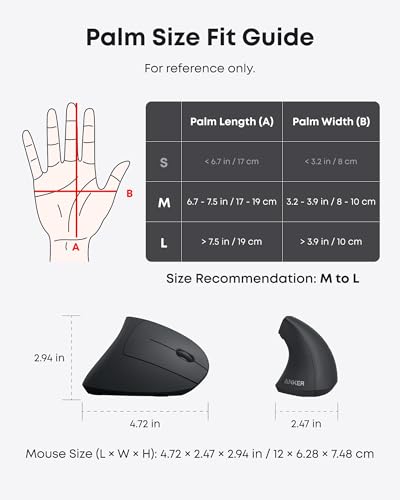
Think about whether you use a palm, claw, or fingertip grip. A palm grip often feels best with a fuller body that supports more of your hand. A claw grip may work better with a shorter or more sculpted shape. If you are not sure, measure your hand and compare it with the product dimensions when listed.
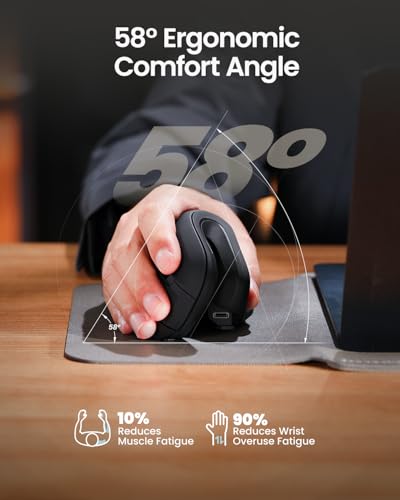
Vertical mice can feel more relaxed to some users, but they change the way you move and aim. Give yourself time to learn the angle before judging one in a game. A vertical model may suit long sessions and mixed work better than fast competitive play. No mouse can promise to prevent pain or treat a health problem; take breaks and seek professional advice if discomfort continues.
2. Choose controls and tracking for your games
For a shooter, reliable tracking and a shape that lets you move freely may matter more than many side buttons. For an MMO or action game, extra controls can keep common actions within reach. Map only the commands you use often. Too many poorly placed buttons can slow you down instead of helping.
DPI describes how far the pointer moves for a given mouse movement. A higher number is not automatically more accurate. Pick a setting you can control, then keep it steady while you learn the mouse. Also check whether the mouse software works with your computer and whether it can save the settings you need.
3. Balance connection, weight, and price
A wired mouse stays powered and often costs less, but its cable can drag if your desk is tight. Wireless models make a cleaner setup, though you must check their battery and connection details. Weight is personal: some players like a solid feel, while others want a light mouse for quick movement. If possible, test the shape or buy from a seller with a clear return policy.
Look beyond the headline specs. Check the warranty, software support, button feel, and fit. Compare the total price with the features you will actually use. A more expensive model makes sense only when its shape or tools solve a real problem for you.
Final Verdict: Which Should You Buy?
For most right-handed players, I recommend the Razer Basilisk V3 as the best ergonomic gaming mouse overall. It pairs a comfortable shape with useful controls and steady wired use. Choose a vertical model if its upright grip is your clear priority.
Match your mouse to your hand, grip, and games before you buy. The best ergonomic gaming mouse is the one you can control comfortably through long sessions.
FAQs Of best ergonomic gaming mouse
What is the best ergonomic gaming mouse for most players?
The Razer Basilisk V3 is my top all-around choice for its right-handed shape, customizable controls, and wired connection.
Are vertical mice good for gaming?
They can work well for casual games and mixed use, but the upright grip may take practice for precise or fast aiming.
Does a higher DPI make a gaming mouse better?
No. DPI sets pointer speed, not overall quality. Comfort, reliable tracking, and a setting you can control matter more.
Should I choose a wired or wireless ergonomic gaming mouse?
Choose wired for simple power and no battery checks. Choose wireless for less cable clutter, and review its connection and battery details.
How do I know if an ergonomic gaming mouse fits my hand?
Compare the mouse size with your hand and grip. Check recent fit reviews, and use a clear return policy if you cannot test it first.