Gaming laptops are better because they combine strong performance, portability, and upgrade-ready features in one device.
If you are asking why gaming laptops are better than regular laptops, the answer goes beyond gaming. Modern gaming laptops offer fast processors, powerful graphics, better cooling, high refresh rate screens, and enough power for work, study, editing, and creative projects. After comparing laptop hardware, thermal systems, display quality, and everyday use, it becomes clear that a gaming laptop can serve as a flexible long-term computer when you choose the right model.
Why Gaming Laptops Are Better for Performance
The main reason why gaming laptops are better is their strong hardware. Most models use high-performance CPUs and dedicated graphics cards. These parts help the laptop handle demanding games, large software tools, video files, and many tasks at once.
A regular laptop may use integrated graphics. This is fine for email, web browsing, and simple office work. However, integrated graphics share system memory with the processor. A gaming laptop usually has a separate graphics card with its own video memory, known as VRAM.
This design offers several benefits:
• Faster game performance at higher settings
• Smoother video editing and 3D rendering
• Better support for external monitors
• Stronger performance in design and engineering apps
• More room for future software updates
A powerful processor also helps with daily work. You can run a browser with many tabs, a video call, a music app, and a document editor without the system slowing down as quickly.
The key point is simple: gaming laptops are built for heavy workloads. Gaming is only one example of what they can do.

Dedicated Graphics Make a Major Difference
A dedicated graphics processing unit, or GPU, is one of the clearest answers to why gaming laptops are better. The GPU processes images, lighting, shadows, textures, and visual effects. It also supports tasks such as video encoding, 3D modeling, and artificial intelligence tools.
Many current gaming laptops use graphics cards from NVIDIA or AMD. Features may include ray tracing, upscaling, frame generation, and hardware-based video encoding. Support varies by model, so buyers should check the exact GPU rather than relying only on the laptop name.
For example, a laptop with an entry-level dedicated GPU may run popular games well at 1080p. A higher-tier GPU can support higher resolutions, stronger visual settings, and more demanding creative work.
A dedicated GPU is useful for more than games:
• Adobe Premiere Pro and DaVinci Resolve can use GPU acceleration
• Blender can use the GPU for rendering
• CAD software can benefit from graphics power
• Machine learning tools may use compatible GPU cores
• Multiple high-resolution displays can run more smoothly
This extra power is like having a second engine. You may not use it every minute, but it is valuable when the road becomes steep.
Gaming Laptops Have Better Displays
Display quality is another important reason why gaming laptops are better. Many gaming models include a high refresh rate screen. Common options include 120Hz, 144Hz, 165Hz, 240Hz, and higher.
A standard laptop screen often runs at 60Hz. A higher refresh rate shows more frames each second. This can make motion look smoother and improve the feel of fast games.
A high refresh rate can also help outside gaming. Scrolling through long pages feels smoother, and moving windows around the desktop can look more fluid. The benefit is easy to notice once you return to a basic 60Hz display.
Other display features matter too:
• Full HD resolution gives sharp results on smaller screens
• QHD resolution offers more workspace and detail
• IPS panels usually provide good viewing angles
• OLED panels can offer deep blacks and rich contrast
• Adaptive sync can reduce screen tearing
However, no display is perfect for every person. Some gaming laptops focus on speed, while others focus on color accuracy. If you edit photos or video, check the panel’s color coverage and calibration. If you mostly play competitive games, refresh rate and response time may matter more.

Strong Cooling Helps Maintain Speed
Gaming laptops are better equipped for heat because demanding games push the CPU and GPU for long periods. Manufacturers often add larger fans, heat pipes, vapor chambers, and multiple exhaust vents.
Cooling matters because modern chips can reduce their speed when temperatures become too high. This behavior is called thermal throttling. A laptop may look powerful on paper but perform poorly if it cannot control heat.
Good cooling provides:
• More stable performance during long sessions
• Lower risk of sudden speed drops
• Better fan control under mixed workloads
• Improved support for demanding software
• More consistent frame rates
In my hardware comparisons, cooling is one of the details that is easy to overlook. Two laptops may use the same processor, yet the better-cooled model can feel much faster after 30 minutes of work or play.
You should still expect fan noise. Gaming laptops often become loud under load. That is not always a fault. The fans are moving heat away from the internal parts. A cooling pad, a hard surface, and regular dust cleaning can help.

Gaming Laptops Are Useful for Work and School
Some people ask why gaming laptops are better when they only need a computer for work or school. The answer is headroom. Extra performance gives you more room to grow.
A gaming laptop can handle common tasks such as:
• Writing reports and presentations
• Online classes and video meetings
• Programming and software development
• Large spreadsheets
• Photo and video editing
• Music production
• Research with many browser tabs
The strong hardware also helps with multitasking. You can move from a work document to a creative app without waiting as long for programs to load.
Many gaming laptops include a full-size keyboard, useful shortcut keys, and several ports. Some models offer HDMI, USB-C, Ethernet, and multiple USB-A ports. These options can reduce the need for adapters.
Still, design matters. A heavy laptop may be tiring to carry across a college campus. A quieter business laptop may be better for a shared office. The best choice depends on your daily routine, not just benchmark scores.

Gaming Laptops Offer Better Value for Power Users
The answer to why gaming laptops are better often comes down to value. A gaming laptop may cost more than a basic notebook, but it often includes stronger parts from the start.
A single gaming laptop can replace several devices for some users. It may serve as:
• A gaming system
• A school or work computer
• A video editing machine
• A portable media station
• A desktop replacement
• A development or design computer
This can be useful if you live in a small space or move often. You do not need a separate desktop for demanding work and a second laptop for travel.
Value depends on the full configuration. Look at the processor, GPU, RAM, storage, screen, battery, and build quality together. A laptop with a powerful GPU but only 8GB of RAM may create limits in modern games and creative apps.
For most buyers, 16GB of RAM is a sensible starting point. A 1TB solid-state drive can also provide useful space for games, projects, and system files. Some models allow upgrades, while others have parts soldered to the motherboard.
Portability Is a Major Advantage Over Desktop PCs
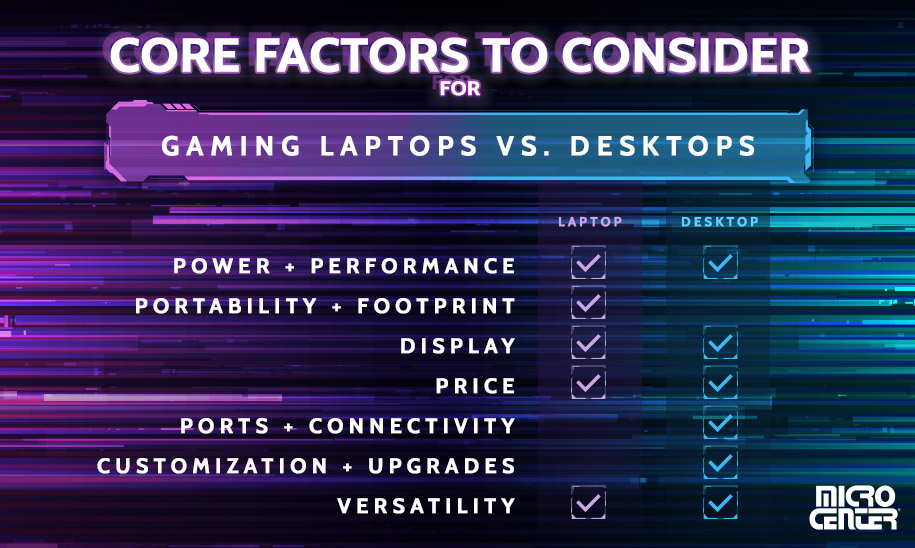
Gaming desktops can offer more power for the money, but they stay in one place. Gaming laptops are better for people who need to move their setup between rooms, homes, offices, or campuses.
You can take a gaming laptop to:
• A friend’s house
• A college class
• A work trip
• A gaming event
• A hotel room
• A family visit
This freedom is one of the strongest benefits of a portable gaming computer. Your files, settings, games, and apps travel with you.
Portability does have limits. Gaming laptops are often heavier than thin-and-light models. Their power adapters can also be large. Battery life may drop quickly during gaming because the CPU and GPU use much more energy.
A practical habit is to carry the charger in your bag and use battery mode for light work. Most people should not expect many hours of unplugged gaming. When the power cable is connected, the laptop can usually deliver its best performance.

Gaming Laptops Often Support Future Upgrades
Upgrade support is another reason why gaming laptops are better than many thin laptops. Depending on the design, you may be able to replace or expand the RAM and storage.
An upgrade can extend the useful life of the laptop. More storage gives you room for modern games, which can take up well over 100GB each. Extra memory can also improve multitasking and creative work.
Before buying, check for:
• Accessible RAM slots
• A second M.2 storage slot
• Replaceable Wi-Fi hardware
• An easy-to-remove bottom panel
• Manufacturer repair documents
• Warranty rules for upgrades
Not every gaming laptop supports every upgrade. Some newer models use soldered memory. Others may include only one storage slot. Review the service manual or manufacturer specifications before making a purchase.
One lesson worth remembering is that upgrade potential can matter more than a small benchmark gain. A laptop that lets you add storage later may be more useful than a slightly faster model with no expansion room.

Gaming Laptops Have Some Important Drawbacks
A fair answer to why gaming laptops are better must also discuss their limits. No computer is ideal for every user.
Common drawbacks include:
• Shorter battery life during demanding work
• More fan noise under heavy load
• Greater weight than basic laptops
• Higher prices for premium hardware
• Heat around the keyboard or vents
• Large power adapters
• Possible repair costs after the warranty ends
Gaming laptops can also have confusing product names. Two models may share a similar name but use different GPUs, screens, or power limits. Always check the full specification sheet.
Battery life is another area where expectations should stay realistic. A gaming laptop may last well during web browsing, but gaming on battery can reduce runtime sharply. Performance may also drop when the charger is removed.
Build quality varies as well. Some affordable models use more plastic, while premium models may use aluminum or stronger hinges. Read independent reviews that test keyboard comfort, surface temperatures, fan noise, battery life, and sustained performance.
How to Choose the Best Gaming Laptop
The best gaming laptop is not always the most expensive one. Start with your main use, then match the hardware to that need.
Choose the right graphics card
The GPU has a major effect on game performance. A 1080p player may not need the same graphics card as someone who wants QHD or 4K gaming.
Consider:
• Your target resolution
• The games you play
• Ray tracing needs
• Desired frame rate
• Creative software requirements
• External monitor plans
Pick enough memory and storage
Choose at least 16GB of RAM for modern gaming and multitasking when possible. A 1TB SSD is a practical choice for many users, but large game libraries may require more storage.
Check the display
Look for a refresh rate that suits your games. Also check brightness, color accuracy, response time, and resolution. A fast screen with poor brightness may disappoint in a bright room.
Study the cooling design
Look for reviews that measure temperatures and sustained performance. Short benchmark tests do not always show how the laptop behaves during a long gaming session.
Consider repair and upgrade options
A repairable laptop can offer better long-term value. Confirm whether the RAM and storage can be replaced before you buy.
Match the laptop to your lifestyle
If you travel often, weight and battery life deserve more attention. If the laptop will stay on a desk, stronger cooling and a larger screen may matter more.
Gaming Laptop Settings That Improve Real-World Use
Even a powerful gaming laptop needs sensible settings. Small changes can improve heat, noise, battery life, and frame rates.
Try these practical steps:
- Keep the laptop on a firm, flat surface.
- Clean dust from the vents with care.
- Update graphics drivers from the official software.
- Use a frame rate limit when maximum speed is not needed.
- Lower ray tracing before reducing texture quality.
- Use performance mode while plugged in.
- Use balanced or quiet mode for office work.
- Keep important files backed up.
- Avoid blocking the intake vents.
- Replace the battery only with a suitable approved part.
A frame rate limit can make a surprising difference. If your display runs at 144Hz, you may not need the GPU to produce 300 frames per second in every game. Limiting frames can reduce heat and fan noise.
Use reputable software for system control. Unofficial tuning tools can be useful for experienced users, but incorrect voltage or power changes can cause crashes. When in doubt, use the manufacturer’s built-in settings.
Are Gaming Laptops Better Than Regular Laptops?
Gaming laptops are better than regular laptops for demanding tasks, graphics performance, high refresh rate displays, and long periods of heavy use. Regular laptops may be better for buyers who value low weight, quiet operation, long battery life, and a simple design.
A regular laptop is often enough for:
• Email and web browsing
• Word processing
• Streaming video
• Basic schoolwork
• Light photo editing
• Simple business software
A gaming laptop is the stronger choice for:
• Modern PC games
• 3D design
• Video production
• Programming with demanding tools
• Engineering applications
• Advanced multitasking
The right answer depends on your priorities. Buying more power than you need can add cost and weight without giving you a real benefit.
Frequently Asked Questions About Why Gaming Laptops Are Better
Why are gaming laptops better than normal laptops?
Gaming laptops are better for demanding work because they usually include dedicated graphics, faster processors, stronger cooling, and high refresh rate displays. Normal laptops are often lighter and more efficient, so they may be better for simple tasks and long battery life.
Can a gaming laptop be used for work and school?
Yes, a gaming laptop can handle documents, online meetings, programming, research, and creative software. Its main disadvantages for school or work may be extra weight, fan noise, and shorter battery life.
Do gaming laptops last longer than regular laptops?
A gaming laptop can last for many years if it receives proper care and has enough memory and storage. Its useful life depends on build quality, heat control, battery health, software updates, and whether the hardware can run newer games.
Are gaming laptops good for video editing?
Yes, gaming laptops can be excellent for video editing because their CPUs, GPUs, and fast SSDs can speed up previews, exports, and effects. Check the display’s color accuracy if you edit content where accurate color is important.
Do gaming laptops have poor battery life?
Many gaming laptops have shorter battery life during gaming or other heavy tasks. Battery performance can be reasonable for light browsing and documents, but the charger is usually needed for full gaming performance.
Are gaming laptops worth the extra money?
Gaming laptops can be worth the price if you need strong graphics, fast performance, or one device for gaming and creative work. They may not be worth the extra cost if you only use basic office apps and prioritize low weight.
Conclusion
Gaming laptops are better for users who want strong performance, dedicated graphics, smooth displays, useful ports, and one portable system for many tasks. They can support gaming, school, work, editing, design, and entertainment without the limits of a basic laptop.
They are not perfect. Weight, fan noise, battery life, heat, and price should all be part of your decision. Compare the full configuration, read long-term reviews, and choose a model that fits your real daily needs.
Start by listing the games and apps you use most. Then set a budget, check upgrade options, and compare GPU performance before choosing a laptop. Explore more hardware guides, and share your gaming laptop experience in the comments.