Laptops no longer have DVD drives because streaming, downloads, cloud storage, and thinner designs made discs less useful.
If you have opened a modern laptop and found no disc slot, you are not alone. Many people still ask why do laptops no longer have DVD drives, especially when older computers used them for movies, software, music, and backups. The change was not caused by one single decision. It came from new technology, lower prices for digital storage, faster internet, and customer demand for lighter devices.
This guide explains the main reasons behind the change, when a DVD drive still makes sense, and how to use CDs or DVDs with a laptop today.

The main reason laptops stopped using DVD drives
The clearest answer to why do laptops no longer have DVD drives is that most users stopped needing them. Digital services now handle many tasks that once required a physical disc.
People now stream movies, download apps, store files online, and listen to music through subscription services. A laptop DVD drive became like a pay phone: useful in the past, but less practical once better tools became common.
Several changes happened at the same time:
• Streaming replaced many movie and TV DVDs.
• Software moved from discs to downloads and online installers.
• Cloud storage reduced the need for disc-based backups.
• USB drives became faster, smaller, and easier to reuse.
• Thin laptops had less room for bulky optical hardware.
• Many users preferred instant access over physical media.
Laptop makers follow customer behavior. When most buyers stopped using optical drives, manufacturers removed them to save space, weight, and cost.
Why streaming and downloads replaced DVDs
One major reason why do laptops no longer have DVD drives is the growth of high-speed internet. Services such as Netflix, Disney+, YouTube, Spotify, and software stores let people access content without carrying discs.
A DVD usually stores about 4.7 GB of data on a single-layer disc. That sounds useful, but downloading or streaming can be easier when a reliable internet connection is available. Modern broadband also makes software updates and large game downloads far more convenient than installing from several discs.
Digital delivery offers other benefits:
• Content can be updated without sending a new disc.
• Users can access files on several devices.
• Purchases do not require physical storage space.
• Digital services can recommend related content.
• Companies can reduce packaging and shipping costs.
This does not mean DVDs have no value. They still work well for older movies, archived photos, offline installers, and collections that people already own. The issue is convenience. For many users, opening an app is easier than finding a disc, inserting it, and waiting for the drive to read it.

Thin laptops need every millimeter of space
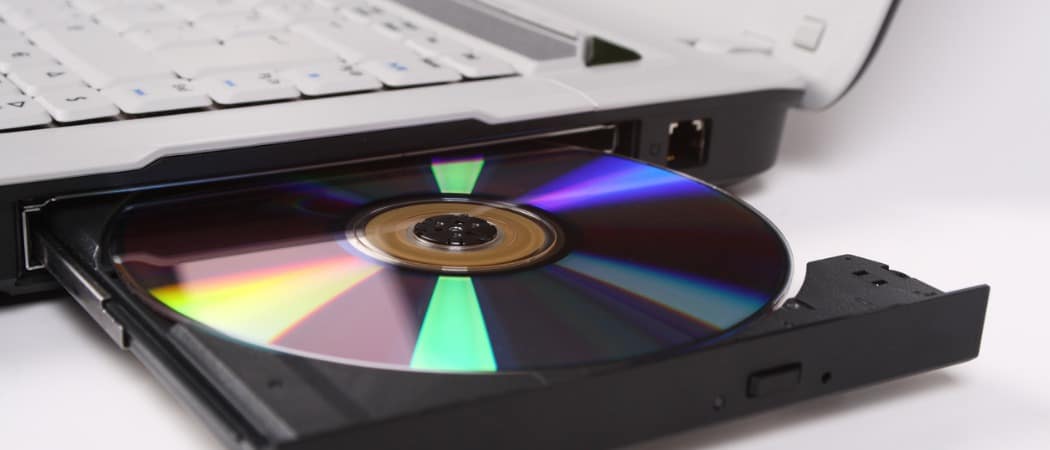
A DVD drive is a mechanical device. It needs a tray or slot, a motor, a laser, and room for the disc to spin. Those parts add thickness and weight to a laptop.
Modern laptops compete on portability. A computer that is thinner and lighter is easier to place in a backpack, carry through an airport, or use in a classroom. Removing the optical drive gives designers more room for other parts.
That space may support:
• A larger battery
• Better cooling
• A bigger solid-state drive
• More speakers
• A stronger frame
• Additional ports or wireless components
This is another key part of why do laptops no longer have DVD drives. A built-in optical drive is not just an extra feature. It affects the shape of the whole computer.
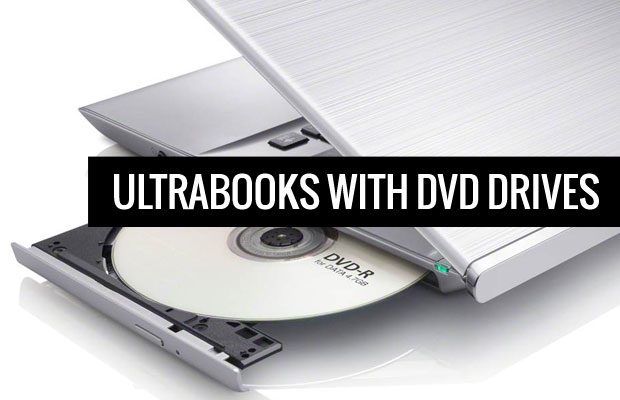
Ultrabooks made this trend especially clear. These laptops focused on low weight, quick startup, and long battery life. A DVD drive did not fit that design goal. Many premium laptops now use solid-state drives, sealed batteries, and slim metal bodies that leave little space for mechanical hardware.
DVD drives add cost and possible points of failure
A built-in DVD drive increases manufacturing costs, even when the cost per unit is small. The laptop needs extra parts, assembly time, testing, and space in the case.
Mechanical drives can also wear out. A disc tray may stop opening. The laser can become weak. Dust or scratches can cause reading errors. Removing the drive can make a laptop simpler and potentially more reliable.
This does not mean every laptop without a DVD drive is automatically more durable. Other components can fail, and thin designs may create their own repair challenges. Still, fewer moving parts can reduce one category of hardware trouble.
From a business view, the decision is simple. If most customers rarely use a feature, companies may remove it and use the space for something more valuable. This is a practical reason why do laptops no longer have DVD drives, rather than a sign that DVD technology suddenly became useless.
USB drives and external storage are more flexible
USB flash drives replaced many everyday uses for DVDs. They are small, rewritable, and available in much larger capacities. A USB drive can hold a bootable operating system, photos, documents, drivers, or software tools.
External hard drives and portable solid-state drives offer even more space. They can store large video libraries and backups without needing a disc collection. Cloud services also provide access from different computers and phones.
Compared with DVDs, USB storage has several advantages:
• It usually transfers data much faster.
• It can be erased and reused many times.
• It does not need a special drive in every computer.
• It can store more data in a smaller space.
• It works well with modern operating systems.
USB storage is not perfect. Flash drives can fail, become infected with malware, or get lost easily. Important files should have more than one backup. For long-term archives, use at least two copies in different places and check them from time to time.
Software installation moved away from physical discs
Older laptops often came with DVD drives because computer programs were sold in boxes. A customer might buy office software, a printer driver, a game, or an operating system on a disc.
Today, most software arrives through:
• A website download
• An app store
• A cloud account
• A product activation portal
• An automatic update system
This shift also changed how software companies work. A downloaded app can receive security patches and new features soon after release. A DVD cannot change after it is manufactured.
Operating system installation has changed too. Many users create a bootable USB drive instead of using a DVD. Microsoft, Apple, and Linux communities provide tools or instructions for USB-based installation. Newer laptops may also include recovery tools built into the system or stored online.
There are exceptions. Some businesses, schools, and industrial systems still use disc-based software. Older programs may also require a physical disc or a disc check. In those cases, an external DVD drive is usually enough.

DVDs have limits for modern files
Large files make DVDs less attractive. High-resolution videos, game files, photo libraries, and system images can exceed the capacity of a standard disc.
A single-layer DVD stores about 4.7 GB. A dual-layer DVD stores about 8.5 GB. Blu-ray discs hold more, but Blu-ray drives cost more and are also uncommon in thin laptops.
Modern files often need much more space:
• A 4K video can use many gigabytes.
• A modern video game may require more than 50 GB.
• A full computer backup can fill several DVDs.
• High-resolution photo collections grow quickly.
Splitting large files across many discs creates extra work. It also increases the chance that one damaged disc will make the entire backup difficult to restore.
For this reason, DVDs are better suited to small archives, music albums, home videos, and documents than to large modern media libraries.
Why do laptops no longer have DVD drives if DVDs still work?
DVDs still work because the format itself has not stopped functioning. The drive can read the disc as long as the hardware, software, and disc condition are compatible.
The important distinction is between “still useful” and “useful to most buyers.” A DVD drive may be valuable to someone with a large movie collection, old family recordings, or legacy business files. It may be unnecessary for someone who streams media and stores documents online.
Laptop companies design for the average buyer. They cannot include every useful feature for every person without making the device thicker and more expensive. This is why do laptops no longer have DVD drives even though DVDs remain available.
If you need discs only a few times each year, an external drive is usually the better choice. You keep the laptop thin and connect the drive only when required.

The advantages and disadvantages of removing the drive
Removing a DVD drive brings clear benefits, but it also creates trade-offs. Understanding both sides can help you choose the right laptop.
Benefits
• Slimmer and lighter laptop designs
• More room for batteries and cooling
• Lower manufacturing costs
• Fewer mechanical parts
• Better space for solid-state storage
• Easier focus on digital services
Limitations
• You cannot insert a disc without extra hardware
• Older software may be harder to install
• Disc-based backups become less convenient
• You may need an internet connection for downloads
• Physical media collections need an external drive
• Some professional equipment may still rely on discs
The best choice depends on your habits. If you use DVDs every week, a desktop computer or business laptop with an optical drive may be more practical. If you use discs only once in a while, an external USB DVD drive costs less than limiting your laptop options.
How to use DVDs with a modern laptop
You do not need to replace a new laptop just because it lacks an optical drive. An external USB DVD drive can read and write CDs and DVDs through a standard USB port.
Follow these steps:
-
Buy a USB external DVD drive from a trusted brand.
-
Check whether it uses USB-A, USB-C, or includes an adapter.
-
Connect it directly to the laptop.
-
Insert the disc and wait for the operating system to detect it.
-
Open the file manager or media application.
-
Copy important files to the laptop or another backup device.
Some external drives receive enough power from the USB port. Others may need a separate power adapter, especially with older computers or USB hubs.
For DVD movies, software support can vary by operating system and region. A data DVD may open normally, while a commercial movie DVD can require compatible playback software. Encrypted or copy-protected discs may have additional restrictions.
A useful tip from helping people move old files is to copy the contents of aging discs sooner rather than later. Scratches, disc rot, and missing software support can turn a simple transfer into a difficult recovery job.
Should you buy a laptop with a DVD drive?
A laptop with a built-in DVD drive can still be the right choice for certain users. Business-focused models, older refurbished laptops, and some larger budget computers may include one.
Consider a built-in drive if you:
• Use training or medical discs at work
• Install older programs from physical media
• Watch DVDs often without internet access
• Manage a large home video collection
• Need to read discs in remote locations
• Work with legacy equipment or records
However, do not choose an older laptop only for the DVD drive. Check the processor, memory, battery health, operating system support, screen quality, and security updates too. A working optical drive does not make an outdated computer safe or fast.
For most buyers, an external drive offers a better balance. It keeps the laptop modern while preserving access to older media.
What happened to CD and Blu-ray drives?
The same market forces affected CD and Blu-ray drives. CDs lost much of their role as music moved to streaming and digital downloads. Blu-ray remains useful for high-quality video and large archives, but it never became a standard feature in most thin laptops.
Blu-ray also involves licensing and playback requirements. Manufacturers must consider the drive, software, codecs, and regional rules. That makes it less appealing as a built-in feature.
Game consoles and home theater systems have kept physical media alive in some areas. Collectors also value discs because they can own a physical copy. Yet laptops are now built mainly for web work, productivity, communication, and portable entertainment.
This broader change helps answer why do laptops no longer have DVD drives. The laptop became a mobile internet device first and a disc player second.

Common mistakes when replacing a DVD drive
People often make simple mistakes when moving from internal discs to external storage. Avoiding them can save time and protect your files.
• Buying the wrong connector: Check whether your laptop has USB-A, USB-C, or both.
• Using one backup only: Keep another copy on a separate drive or cloud service.
• Assuming every disc is readable: Damaged, encrypted, or unusual discs may need special software.
• Ignoring file formats: Old programs may not run on newer operating systems.
• Waiting too long: Older discs can deteriorate, and older drives may become harder to find.
• Using unknown software: Download playback or disc tools only from reputable sources.
When transferring family photos or important records, open several copied files to confirm that the transfer worked. A copy process can finish without obvious errors while some files remain damaged.
Frequently Asked Questions
Why do laptops no longer have DVD drives?
Laptops no longer have DVD drives because most users stream media, download software, and store files on USB devices or cloud platforms. Removing the drive also helps manufacturers create thinner, lighter, and more energy-efficient computers.
Can I add a DVD drive to a laptop?
Yes. You can connect an external USB DVD drive to most modern laptops. Check the connector type and make sure your operating system supports the drive and any needed playback software.
Are DVD drives outdated?
DVD drives are less common, but they are not completely obsolete. They remain useful for old software, family recordings, offline media, and organizations that still use physical archives.
Is an external DVD drive better than an internal one?
For most people, an external drive is more practical because you use it only when needed. It also lets you buy a thinner laptop while keeping access to CDs and DVDs.
Can a laptop without a DVD drive play DVD movies?
Yes. Connect an external DVD drive and use compatible DVD playback software. Commercial movie discs may require support for regional codes and copy protection.
Are DVDs good for backups?
DVDs can work for small, offline backups, but they have limited capacity and can degrade over time. For important data, use multiple copies on reliable storage devices and keep at least one copy in another location.
Why do laptops no longer have DVD drives but desktop computers sometimes do?
Desktop computers have more internal space and are less focused on low weight. A desktop case can include an optical drive without affecting portability, while a laptop must balance every part against size and battery life.
Conclusion
The answer to why do laptops no longer have DVD drives comes down to changing habits and smarter use of space. Streaming, cloud storage, downloads, USB drives, and solid-state storage now handle most tasks that once required a disc.
Removing the optical drive helps laptops become thinner, lighter, and easier to carry. Still, DVDs remain useful for older files, physical collections, offline access, and legacy software. If you need discs, an external USB DVD drive is usually the simplest solution.
Before buying your next laptop, think about how often you truly use physical media. Choose a modern design if portability matters, or select a model with optical support if discs are part of your daily work. Share your experience with DVD drives or explore more practical laptop guides to make your next technology decision with confidence.