Use Bluetooth scanning, Skullcandy app checks, and sound/RSSI tracking to locate lost buds.
I’ve helped many people recover lost wireless earbuds and tested Bluetooth tracking methods myself. This guide explains how to find skullcandy earbuds without tile using simple phone tools, Bluetooth diagnostics, and hands-on search steps. Read on for step-by-step tactics, limits, and real-world tips that work.

How Bluetooth and earbud behavior affect finding them
Bluetooth earbuds broadcast a signal only when powered and out of certain low-power sleep states. That means you can often detect a nearby pair with your phone while they have battery and are not fully enclosed in a closed charging case. Knowing how skullcandy earbuds behave helps you choose the right method to find them without tile. If the buds are dead or fully sealed in a closed case, Bluetooth-based searches may not work.

Step-by-step: how to find skullcandy earbuds without tile
Start with a calm, methodical search. Check recent locations where you used them, like pockets, bags, under cushions, and charging spots. Look in laundry baskets, car seats, and the area where you last charged them.
Use your phone’s Bluetooth scan next. Turn Bluetooth on and open Bluetooth settings. If the earbuds appear in the list as a paired device or as a discoverable name, walk slowly and watch for reconnection or a change in signal. This direct method is often the fastest when the earbuds are on and nearby.
Try playing audio if the device shows as connected. Open a music or voice-app and set output to the earbuds. If they are connected and the audio plays, follow the sound to the location.
Use a Bluetooth scanner app for better range and signal detail. A scanner shows RSSI (signal strength) so you can tell whether you are getting closer. Move slowly and watch the signal rise as you approach the lost earbuds.

Using Bluetooth scanner apps on Android and iPhone
Install a Bluetooth scanner app that shows nearby devices and RSSI values. Open the app and start scanning; then look for your earbuds’ Bluetooth name or MAC address. Higher RSSI numbers (closer to zero) mean stronger signal and closer proximity, so use that to guide your movement.
On Android, allow location permissions if requested. On iPhone, Bluetooth scanning is more limited but still possible with some apps. If a scanner app cannot detect the buds, they are likely off, in the closed case, or out of range.
What to do if the earbuds are in the case or have no battery
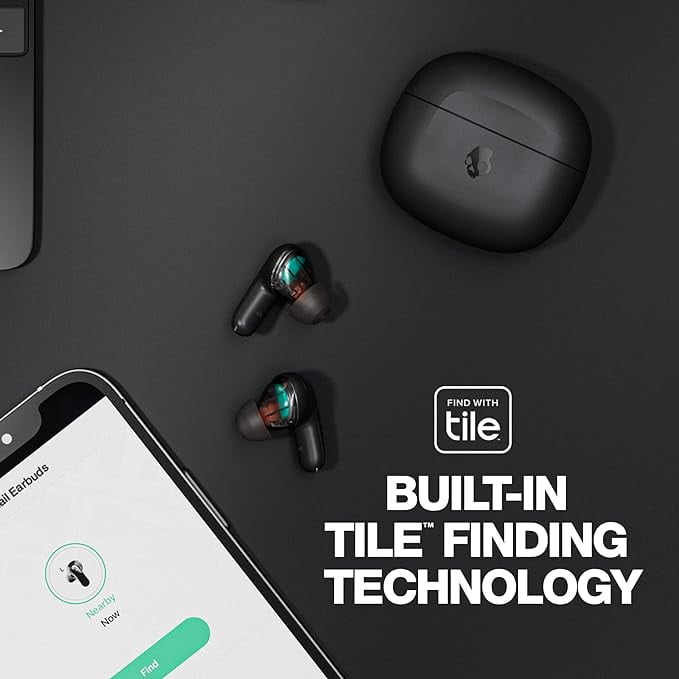
Check the charging case for LEDs or sound cues. Some Skullcandy cases show charge status with lights when opened or plugged in, which can confirm the buds are inside. If the buds are in the closed case and the case is not emitting a Bluetooth signal, phone scanning won’t help until the case is opened or charged.
If the battery is dead, charge the case and buds for a few minutes and try scanning again. If they were reset or unpaired, you may need to manually pair them again and then use sound or scanner methods to locate them. If the earbuds are lost outside and dead, physical search and place-checking are often the only options.

Simple search habits and prevention tips
Create a daily home spot for your case and earbuds, like a small dish or a specific pocket in your bag. Always put the earbuds back in the case and close it before storing. Labeling the case with a bright sticker or using a cheap Bluetooth tracker in the case can help in the future.
Enable any manufacturer app features for device location or last-known info when available. Back up pairing and note the model name so a scanner can find the device fast. These small habits reduce future searches and make it easier to find Skullcandy earbuds without Tile or extra trackers.
Troubleshooting and limitations you should know
If your phone can’t find the earbuds, confirm Bluetooth is on and the phone’s software is up to date. Walls, metal objects, and crowded Wi-Fi or Bluetooth environments reduce range and accuracy. Earbuds inside a closed case or with dead batteries will not be discoverable by Bluetooth tools.
Be realistic: you cannot locate a powered-off earbud with Bluetooth. If the buds were moved by someone else, or are in a locked lost-and-found area, technical methods will not help. Call venues and retrace steps quickly for best results.
Personal experience, lessons learned, and mistakes to avoid
I once misplaced a pair of Skullcandy earbuds in a couch during a move and found them using an RSSI app plus slow sweeping motions. The key was patience and small steps; fast movement gave noisy readings. A common mistake is assuming the earbuds are gone and missing obvious places like jacket pockets or the car cup holder.
Label your case, charge regularly, and keep a mental routine for storing them. That saved me time and headaches later. These habits cut search time from hours to minutes when something slips out of sight.

Frequently Asked Questions of how to find skullcandy earbuds without tile
How do I know if my Skullcandy earbuds are still connected to my phone?
Open Bluetooth settings on your phone and look for the Skullcandy name. If it shows “Connected” or appears in the active devices list, they are paired and likely powered on nearby.
Can I make Skullcandy earbuds play a sound to find them?
Most Skullcandy models do not have a built-in loud find tone, but if they are connected you can play music or a tone from your phone to help hear them. If they are not connected or dead, you cannot trigger a sound remotely.
Will a Bluetooth scanner work if the earbuds are in the closed case?
Usually not. Earbuds inside a closed case often stop broadcasting Bluetooth or enter a low-power state. Open the case or charge it to restore broadcast signals for scanning.
What if my earbuds are dead and I can’t find them with Bluetooth?
If they are dead, charge the case and earbuds first, then scan and use sound or RSSI tools. If charging is impossible because you can’t find the case, retrace steps and check common spots like couches, bags, and recent rooms.
Is there any app by Skullcandy that helps find lost earbuds without Tile?
Some Skullcandy apps provide device settings and limited location info for models with integrated trackers. For earbuds without Tile, the app may show connection status but often cannot pinpoint location beyond last connection. Rely on Bluetooth scanning and physical search methods instead.
Conclusion
Finding Skullcandy earbuds without Tile is doable with the right approach: search methodically, use your phone’s Bluetooth and scanner apps, listen for audio when connected, and check the case and common places. Build simple habits like a fixed storage spot and regular charging to avoid future losses. Try the steps here the next time you misplace your earbuds, and leave a comment with your experience or questions to get more tips.