The Dell Slim ECS1250 is worth considering for everyday work, school, and home-office productivity.
If your desk is already crowded with a monitor, speakers, printer, and other accessories, a bulky desktop tower can become frustrating. A slim computer such as the Dell ECS1250 is designed to deliver capable everyday performance while taking up less space.
For a typical American home office, student workspace, or small business desk, the combination of an Intel Core Ultra 5 processor, 16GB of DDR5 memory, and a 512GB SSD makes this configuration practical for documents, web browsing, video calls, multitasking, and general productivity.
Is Dell Slim Desktop ECS1250 Good?
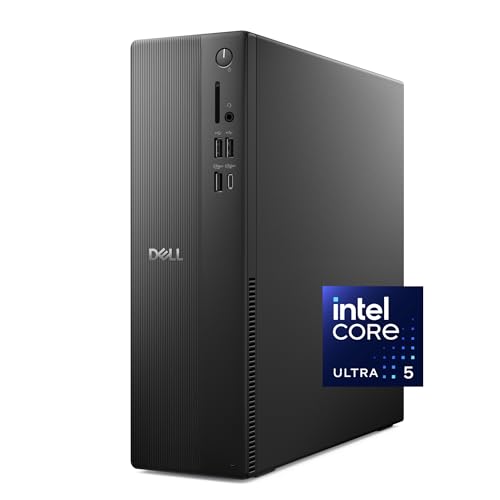
Yes, the Dell Slim ECS1250 is a strong fit for buyers who want a compact Windows desktop for everyday productivity rather than a dedicated gaming machine. The configuration associated with this listing uses an Intel Core Ultra 5-225 processor, 16GB DDR5 memory, a 512GB M.2 SSD, integrated Intel graphics, Wi-Fi 6, Bluetooth, and Windows 11 Home.
Its biggest strengths are the space-saving chassis, modern processor platform, solid memory and SSD configuration, and useful connectivity. The main limitation is the integrated graphics, which makes this system better suited to office work, schoolwork, media, and general computing than demanding gaming or GPU-heavy creative workloads.

My First Impression of the Dell Slim ECS1250
The slim black chassis is the first thing that stands out. At roughly 11.54 x 3.74 x 11.95 inches, it is substantially easier to place beside or underneath a typical desk setup than a full-size tower, while still retaining the familiar desktop form factor.
Setup should be straightforward for most Windows users because the system is sold with Windows 11 Home and, in this configuration, includes a wired Dell keyboard and mouse. The tool-less entry and removable side panel are also useful for buyers who want easier access to internal components later.
The overall design feels oriented toward practical home and office use rather than flashy aesthetics. That is a good match for a professional workspace where a compact, understated computer is more useful than gaming-style lighting or an oversized chassis.

What Makes It Stand Out / Key Features
- Intel Core Ultra 5-225 Processor: The 10-core Intel Core Ultra 5-225 provides a modern processing platform for everyday productivity, multitasking, business applications, and other common desktop workloads.
- 16GB DDR5 Memory: The 16GB DDR5 configuration provides a useful amount of memory for running multiple browser tabs, office applications, communication tools, and other everyday software at the same time.
- 512GB M.2 SSD: The 512GB solid-state drive provides faster application and file access than a traditional mechanical hard drive and offers practical storage for documents, programs, photos, and other everyday files.
- Slim Space-Saving Design: The compact tower measures approximately 11.54 x 3.74 x 11.95 inches, making it easier to fit into smaller home-office or workplace setups.
- Integrated Intel UHD Graphics: Integrated graphics are suitable for everyday display output, productivity software, streaming, and general computing, but they are not intended to replace a dedicated high-performance graphics card.
- Modern Display Connectivity: The system includes HDMI 2.1 and DisplayPort 1.4a connectivity, providing flexible options for modern monitor setups and supporting multiple displays within the platform’s stated limits.
- Wi-Fi 6 and Bluetooth: Built-in Wi-Fi 6 and Bluetooth provide convenient wireless networking and peripheral connectivity without requiring separate adapters for typical home or office use.
- Tool-Less Internal Access: The removable side panel and tool-less entry make it more convenient to access internal components when maintenance or compatible upgrades are needed.

✅ What I Like
- ✔ The slim chassis is easier to place in a compact home office, classroom workspace, or small-business environment than a conventional full-size tower.
- ✔ The Intel Core Ultra 5-225 processor provides a modern foundation for productivity, multitasking, and everyday computing.
- ✔ 16GB of DDR5 memory is a sensible starting point for users who regularly keep several applications and browser tabs open.
- ✔ The 512GB M.2 SSD provides responsive storage and enough capacity for many common work, school, and personal files.
- ✔ Wi-Fi 6 and Bluetooth reduce cable clutter and make it easier to connect compatible peripherals and networks.
- ✔ The inclusion of a wired keyboard and mouse in this configuration can simplify the initial setup for buyers starting from scratch.
- ✔ The tool-less internal access is useful for owners who may want to maintain or upgrade compatible components later.
⚠️ What Could Be Better
- ✖ The integrated Intel UHD graphics are not the right choice for buyers who need strong performance in modern graphics-intensive games or demanding GPU-focused workloads.
- ✖ The 512GB SSD may feel limiting for users who store large video libraries, extensive game collections, or many large creative projects locally.
- ✖ Buyers should check the exact configuration before ordering because Dell desktop listings can offer different processor, memory, storage, service, and accessory combinations.

My Recommendation
I would consider this Dell desktop for users who value reliability, a compact footprint, and straightforward Windows productivity more than gaming performance. It has enough modern hardware for common work-from-home routines, school assignments, web research, video meetings, office applications, and everyday personal computing.
I would be more cautious if your main goal is gaming, professional 3D work, or GPU-heavy video production. In those situations, a desktop with a dedicated graphics card can be a better long-term choice, even if the chassis is larger.
| Best For | Why It Fits |
|---|---|
| Home Office Users | The compact tower, modern processor, 16GB memory, SSD storage, and wireless connectivity fit common remote-work and productivity needs. |
| Students | It provides a practical Windows desktop for research, documents, online learning, presentations, and general multitasking. |
| Small Business Workstations | The understated design, productivity-focused hardware, and compact footprint work well in offices where desk space matters. |
| Everyday Home Computing | The combination of SSD storage, modern processing hardware, and integrated connectivity suits browsing, streaming, personal documents, and routine tasks. |

Alternative Products You Can Consider
| Product | Best For | Key Difference |
|---|---|---|
| Dell Slim ECS1250 | Compact everyday productivity | Combines a slim chassis with a modern Core Ultra processor, DDR5 memory, SSD storage, and integrated graphics. |
| Dell OptiPlex Small Form Factor | Business-focused desktop users | Offers an alternative Dell business desktop family with configuration options that vary by model. |
| HP ProDesk Small Form Factor | Office and small-business computing | Provides a competing compact business desktop platform from HP. |

Final Verdict: Which Should You Buy?
The Dell Slim ECS1250 is a sensible choice for buyers who want a modern, compact Windows desktop without moving into gaming-oriented hardware. Its Core Ultra 5-225 processor, 16GB DDR5 memory, 512GB SSD, wireless connectivity, and slim chassis create a well-rounded foundation for home, school, and office tasks.
The main reason to choose it is balance: it saves desk space while still offering a capable modern desktop platform. The biggest limitation is its integrated graphics, so buyers who need demanding gaming or professional GPU acceleration should look toward a system with a dedicated graphics card instead.
Before ordering, check the specific Amazon configuration carefully, especially the processor, memory, storage, included accessories, and service package. With desktop listings, those details can vary between configurations even when the product family name remains similar.