Press and hold each TOZO earbud's multifunction button for about two seconds to power them on.
I’ve used, tested, and fixed many wireless earbuds, so I know the small steps that save time. This guide clearly explains how to turn on TOZO earbuds across common models, how to pair them, how to read LED indicators, and how to fix power problems. Read on for simple, tested steps and practical tips to get your TOZO earbuds working fast.

How TOZO earbuds power on: simple methods and behavior
Most TOZO earbuds follow two power-on paths. One is automatic: the earbuds turn on when you remove them from the charging case. The other is manual: you press and hold the multifunction button on each earbud for about two seconds. Knowing both methods helps when you ask how to turn on tozo earbuds for the first time or after a reset.
Many models show a small LED light when they power on. A steady or flashing white or blue light usually means power and pairing mode. If no light appears, check battery level and the charging case. I rely on the manual press method when the case acts up. It works reliably across models.

Step-by-step: how to turn on tozo earbuds (detailed)
- Open the charging case and remove the earbuds.
- Most TOZO earbuds power on automatically when taken from the case. If they do not, move to the next step.
- Press and hold the multifunction button on each earbud for about two seconds.
- The earbuds will power on and show a brief LED light or voice prompt.
- Wait for pairing mode if this is the first time.
- You will often see a flashing blue or white LED when the earbud is ready to pair.
- Pair to your phone or device.
- Enable Bluetooth on your device, find the earbud name, and tap to connect.
These steps answer how to turn on tozo earbuds reliably. If one earbud powers on but the other does not, place both back into the case, close the lid for five seconds, then repeat the steps above.

Pairing and using after you turn them on
Once you know how to turn on tozo earbuds, pairing is usually simple. Many models enter pairing mode automatically after power-up if they have not been paired before. If they do not, hold the button for longer (about five seconds) until the LED flashes rapidly to force pairing mode.
After pairing:
- Use single-tap, double-tap, or long-press controls to play, pause, skip tracks, or answer calls.
- The left and right earbuds may pair to each other before pairing with your device. This is called master-slave pairing.
- Reconnect automatically: once paired, your device should reconnect when you turn the earbuds on.
I keep a short note in my phone showing the model name. It speeds up reconnects when I test multiple earbuds. Knowing how to turn on tozo earbuds and how they pair saves wasted time.

Troubleshooting: if your TOZO earbuds won't power on
Common causes for earbuds not powering on include low battery, dirty contacts, or firmware glitches. Try these steps if you can’t power them on.
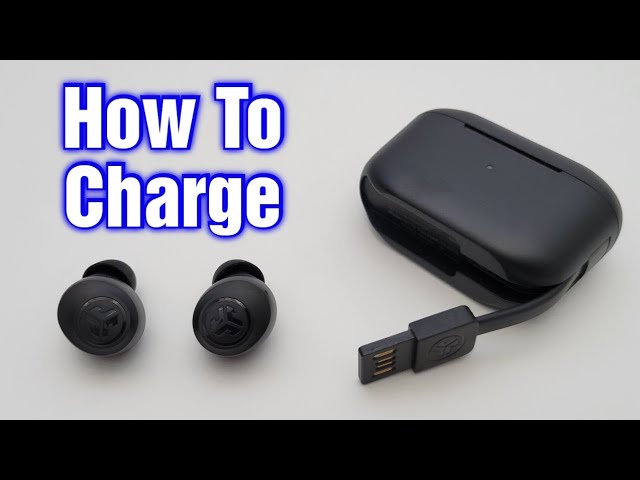
- Charge both earbuds and the case for at least 30 minutes.
- Ensure the charging pins are clean and aligned.
- Reset the earbuds.
- Place them in the case and hold the case button (if available) or follow the reset steps in the manual for your model.
- Clean the contacts.
- Use a dry soft cloth or a cotton swab with minimal isopropyl alcohol to clean charging pins.
- Try manual power-on.
- Press and hold the multifunction button for two seconds to force power on.
I once fixed a pair by cleaning a speck of lint inside the case. Small issues often look like big problems.

Tips to extend battery life and care for power issues
Good care reduces power problems and helps when you ask how to turn on tozo earbuds and have them stay on.
- Charge regularly. Avoid letting the battery fall to zero often.
- Keep the case battery topped up. The case provides multiple charges.
- Store earbuds in the case when not in use to prevent accidental power drain.
- Update firmware if the manufacturer provides updates. Updates can fix power and connectivity bugs.
- Avoid extreme temperatures that can reduce battery life.
These habits helped me get more hours out of test units. Small routines fix most power surprises.

PAA-style quick questions
Q: Will TOZO earbuds turn on automatically when removed from the case?
A: Yes, most models power on when removed from the case, though some require manual button press if the case is low on power.
Q: How long do I press the button to turn them on?
A: Press and hold the multifunction button for about two seconds for power on; press longer to enter pairing or reset.
Q: What does a flashing blue or white LED mean?
A: A flashing LED usually shows pairing mode or that the earbuds are ready to connect.
Frequently Asked Questions of how to turn on tozo earbuds
How do I power on my TOZO earbuds for the first time?
For most models, remove the earbuds from the charged case and they power on automatically. If not, press and hold the multifunction button for about two seconds to turn them on.
Why do my TOZO earbuds not turn on after charging?
Check that the case is charged and the contacts are clean. If they still won't turn on, try a reset by placing them in the case and following the model reset steps.
Can I turn on only one TOZO earbud?
Yes. You can power on a single earbud by holding its multifunction button for about two seconds. Single-ear use works for calls and voice assistants on most models.
What does the LED color mean when turning on TOZO earbuds?
LEDs vary by model, but steady or flashing blue/white often indicates power or pairing. A red or flashing red light usually means low battery.
How do I force pairing mode if they won’t enter automatically?
Press and hold the earbud multifunction button for about five seconds until the LED flashes rapidly or you hear the pairing voice prompt.
Conclusion
You can get your audio going quickly by knowing how to turn on tozo earbuds: remove them from the case or press and hold the multifunction button for two seconds. Keep your case charged, clean the contacts, and use short resets when things act up. Try the steps above, and you should be listening in minutes. If you found this helpful, leave a comment, share your model and issue, or subscribe for more practical audio tips.