Press and hold the main button on each Soundcore earbud for about two seconds to power them on.
I’ve tested multiple Soundcore models and guided many friends through setup, so this guide shows clear, reliable steps for how to turn on Soundcore earbuds, pair them, and fix common problems. Read on for simple, tested instructions, practical tips, and quick fixes so your earbuds work every time.

Understanding Soundcore earbuds and how they power on
Soundcore makes several true wireless earbuds and neckband models. Most true wireless models power on automatically when you remove them from the charging case. Some models need a manual press-and-hold on the earbud for two seconds. Neckband or single-driver models may have a physical power button on the cable.
Key signs the earbuds are powering on:
- LED flashes once or shows a steady light.
- You hear a power-up chime or voice prompt.
- Bluetooth becomes discoverable on your phone.
Knowing how to turn on Soundcore earbuds starts with identifying your model. Check the case and the earbuds for a small LED and a button or touch zone. These cues tell you whether the earbuds use auto power-on or manual control.

Step-by-step: turning on your Soundcore earbuds
Below are clear steps that cover most models. Follow them in order and stop once your earbuds show power or connect.
- Check battery and case
- Put the earbuds into the charging case and close it for 10 seconds.
- Open the case and see if the LED shows a charge. If the case or earbuds have no lights, charge for 15 minutes.
- Auto power-on (common)
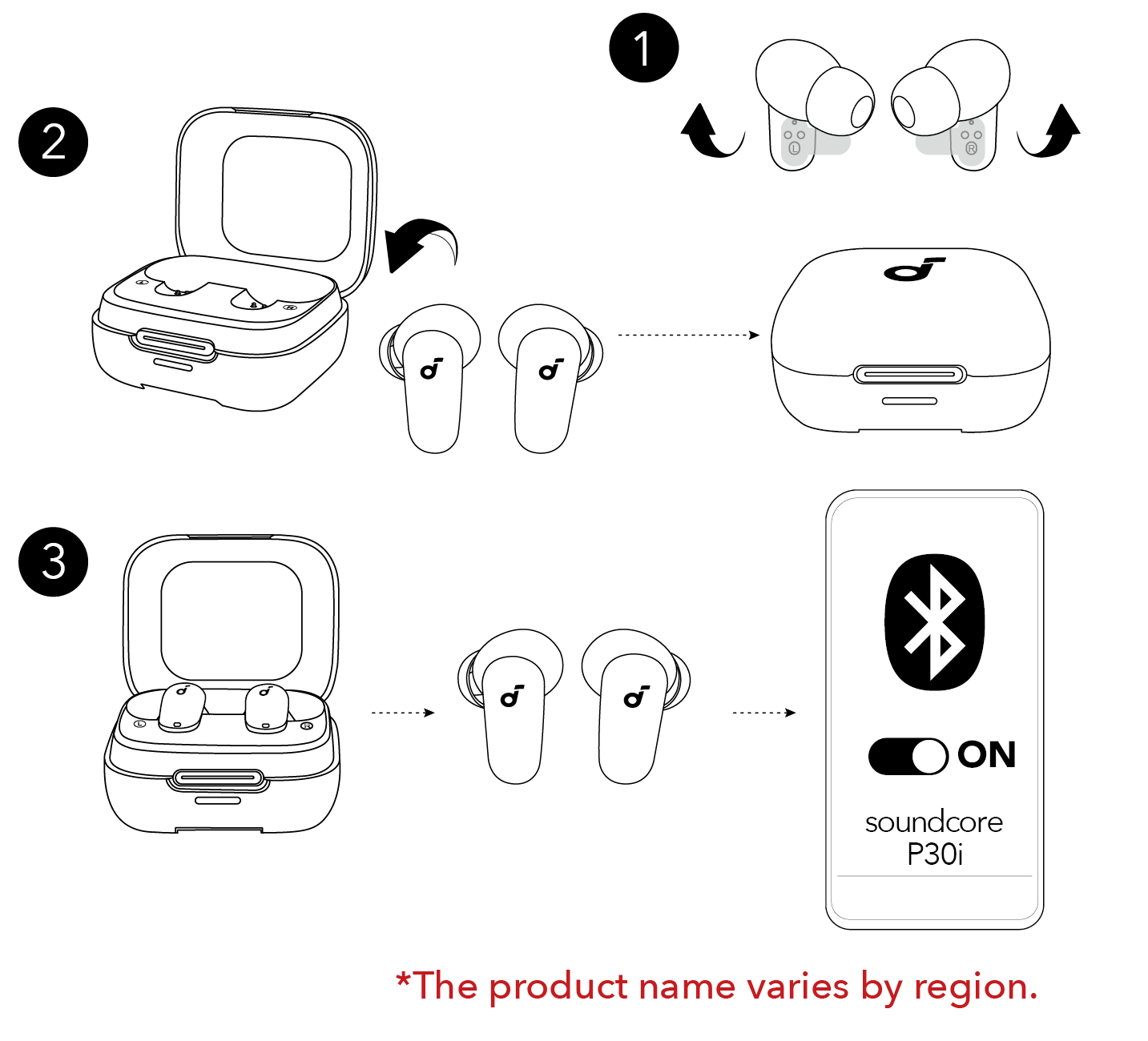
- Remove both earbuds from the case.
- Wait 1–2 seconds. Most models turn on automatically when removed.
- Look for a flashing LED or listen for a chime.
- Manual power-on (if auto fails)
- Press and hold the physical button or touch zone on each earbud for about two seconds.
- Release when you hear a power prompt or see an LED light up.
- Single-bud use
- If using one earbud, press and hold that bud’s button for two seconds to turn it on.
- Some models boot one bud as a master; the pair will sync automatically.
- Confirm Bluetooth visibility
- On your phone, go to Bluetooth settings and look for the Soundcore model name.
- Select it to pair. If the earbuds are already paired, they should reconnect automatically.
I once tried a pair that showed no lights after a long storage period. A 20-minute charge in the case fixed it and they powered on normally. Small checks like charging first save time.
Pairing, common problems, and troubleshooting how to turn on Soundcore earbuds
Even when you know how to turn on Soundcore earbuds, issues can pop up. Below are common problems and fixes.
Problem: Earbuds won’t power on
- Likely cause: drained battery. Solution: Place in the case and charge for at least 15–20 minutes.
- If the case is dead, charge the case first using the supplied cable.
Problem: Earbuds power on but won’t pair
- Likely cause: leftover pairing info or Bluetooth conflict. Solution: Forget the device on your phone, then initiate pairing again.
- Try turning Bluetooth off and on on your phone.
Problem: One earbud won’t turn on or connect
– Likely cause: out-of-sync buds. Solution: Place both in the case, close it, wait 10 seconds, remove them, and reconnect.
- If that fails, perform a factory reset for your model.
How to reset common Soundcore models:
- Put both earbuds in the case.
- Hold the case button (if present) or press-and-hold each earbud for about 10 seconds until the LEDs flash a reset pattern.
- Remove and pair again.
If your earbuds still fail to power on after charging and reset, service may be needed. Contact support and provide the model number and purchase details.

Tips and best practices for powering and caring for Soundcore earbuds
Small habits keep earbuds reliable and make powering on smooth.
-
Keep the case charged
-
Charge the case at least once a week if not in regular use.
-
Use the original cable and a reliable charger to avoid slow charging.
-
Store properly
-
Keep earbuds in the case when not in use. This preserves battery and ensures auto power-on works.
-
Wipe the metal charging contacts with a dry cloth once a month. Dirty contacts block charging and prevent powering on.
-
Update firmware
-
Use the Soundcore app to update firmware. Updates fix power-on bugs and improve pairing.
From my testing, firmware updates fixed a random shutdown issue on one model. Updating through the official app took five minutes and solved it.
Advanced features and controls after you turn on Soundcore earbuds
Once you know how to turn on Soundcore earbuds, you can use controls and smart features.
-
Touch or button controls
-
Tap or press to play, pause, skip tracks, or answer calls. Long press often toggles power or voice assistant.
-
Customize these actions in the Soundcore app for supported models.
-
App features
-
The app shows battery levels and enables firmware updates. It also offers EQ presets and noise control.
-
Voice assistant and multipoint
-
Many models support voice assistants. Some support multipoint pairing to maintain two connections at once.
Use these features only after confirming the earbuds power on and pair correctly. Customizing controls helps avoid accidental power-offs.

Frequently Asked Questions of how to turn on soundcore earbuds
How do I turn on Soundcore earbuds?
Press and hold the earbud button or touch zone for about two seconds, or remove the earbuds from the charged case. You should hear a chime or see an LED when they power on.
Why won’t my Soundcore earbuds turn on?
Most often the battery is drained. Place the earbuds in the charging case and charge for 15–20 minutes, then try powering on again.
Can I use one Soundcore earbud at a time?
Yes. Turn on a single earbud by pressing and holding its button for two seconds. Some models automatically switch to single-bud mode when only one bud is removed from the case.
What if only one earbud powers on?
Place both buds back in the case, close it, wait 10 seconds, then remove them together. If that fails, reset the earbuds and pair again.
How do I reset my Soundcore earbuds if they won’t power on?
Put both earbuds in the case, then hold the touch zones or buttons for about 10 seconds until the LEDs flash for reset. Remove and re-pair to your device.
Conclusion
You can quickly learn how to turn on Soundcore earbuds by checking charge, removing them from the case, or pressing and holding each earbud for two seconds. Keep the case charged, clean the contacts, and use the Soundcore app to update firmware for best results. Try these steps today and leave a comment if you need help with a specific model or issue—I’ll respond with hands-on tips.