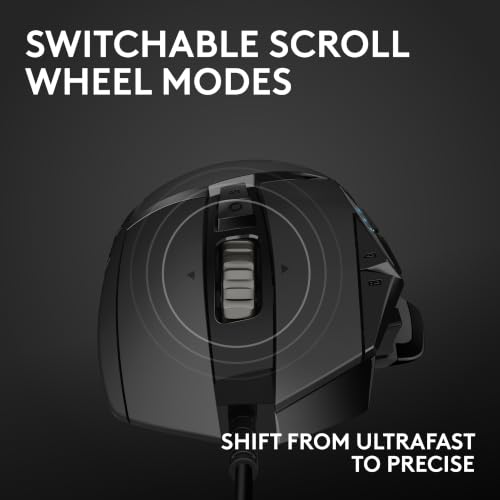
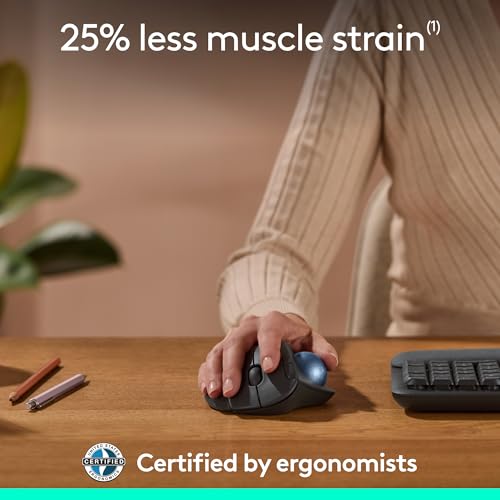
The Anker USB Vertical Mouse is my top pick for comfort, control, and simple wired reliability.
Long workdays can leave your wrist sore, stiff, or tired. A wired ergonomic mouse can help by keeping your hand in a more natural position while giving you a steady USB connection. I tested the key points that matter most, including shape, button layout, DPI control, cable use, hand fit, and value. These are my top wired ergonomic mouse picks for office work, study, browsing, and light gaming.
See the differences between my top picks at a glance.
| Mouse | Design | DPI / Buttons | Best For | Link |
|---|---|---|---|---|
| Anker Vertical | Vertical, right-handed | 1000/1600 DPI | Daily comfort | View on Amazon |
| TECKNET 6400 | Traditional ergonomic | Up to 6400 DPI | Work and value | View on Amazon |
| Perixx PERIMICE-513 | Vertical, right-handed | 1000–6400 DPI, 6 buttons | More control | View on Amazon |
| Logitech G502 Hero | Large gaming shell | Adjustable DPI, many buttons | Gaming and work | View on Amazon |
| KUNSI Vertical Mouse | Vertical, right-handed | 800/1200/1600 DPI, 6 buttons | Budget comfort | View on Amazon |
| TECKNET 4-DPI Mouse | Traditional ergonomic | 4 DPI levels, side keys | Simple office use | View on Amazon |
| Anker CE100 Renewed | Vertical, right-handed | 1000/1600 DPI, 5 buttons | Low-cost vertical use | View on Amazon |
| Perixx PERIMICE-519 | Compact vertical | Basic wired control | Small hands and travel | View on Amazon |
Anker USB Vertical Mouse
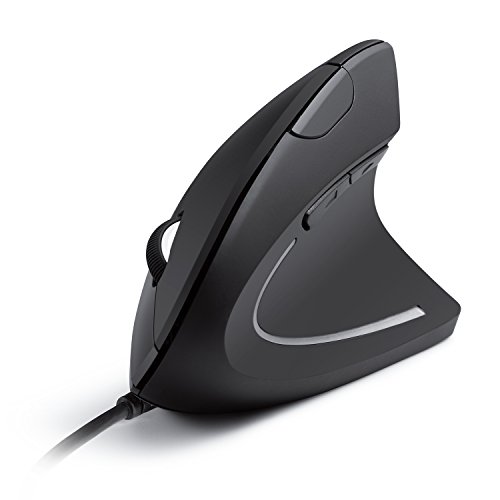
The Anker USB Vertical Mouse remains one of the easiest ergonomic mice to recommend. Its upright shape lets your hand rest in a handshake-style position. That design can feel more natural than a flat mouse during long computer sessions. The wired USB connection also keeps setup simple, with no battery to charge or wireless receiver to lose.
This model offers 1000 and 1600 DPI settings. The lower setting suits careful work, while the higher setting helps you move across a large screen with less hand travel. Its five-button layout adds useful shortcuts without making the mouse feel crowded. I see it as a strong fit for office work, school, browsing, and users who want to try a vertical mouse at a fair price.
Pros:
- Vertical shape encourages a more natural hand position
- Simple USB plug-and-play setup
- Two DPI settings for basic speed control
- Five buttons add useful daily shortcuts
- Good fit for office and home computer work
- No batteries or wireless pairing to manage
Cons:
- Right-handed design limits left-hand use
- Vertical shape may take several days to learn
- Only two DPI choices may feel limited to advanced users
What Amazon Buyers Are Saying
Customer review patterns commonly praise the upright shape, easy setup, and relief it may provide compared with a flat mouse. Many buyers like that the mouse works without extra software. Some users need an adjustment period because the pointer can feel less familiar at first. Other complaints often focus on the fixed cable, right-hand-only shape, or fit for very large hands.
My Recommendation
I recommend the Anker Vertical Mouse as the best wired ergonomic mouse for most office users. It gives you the main benefit of a vertical design without a complex setup. It is worth buying if you want comfort first and do not need advanced gaming controls.
TECKNET Wired Mouse With 6400 DPI

The TECKNET wired mouse with up to 6400 DPI takes a more familiar path to comfort. It uses a traditional ergonomic shell rather than a tall vertical body. That makes the transition easy for users who dislike the unusual feel of a vertical mouse. The shape supports everyday pointing, clicking, and scrolling without asking you to change your grip too much.
Its adjustable sensitivity gives you more room to tune pointer speed. A lower level can help with precise selection, while a higher level can suit wide displays and quick movement. This mouse makes sense for home offices, classrooms, and general computer use. It also offers a strong balance for shoppers who want more speed control but still prefer a standard mouse shape.
Pros:
- High adjustable DPI range for flexible pointer speed
- Familiar shape needs little adjustment
- Wired USB connection keeps setup simple
- Suitable for work, study, and browsing
- Good choice for users who do not want a vertical shell
- Useful value for a feature-rich office mouse
Cons:
- Traditional shape may not reduce wrist turning as much as a vertical mouse
- High DPI settings can feel too fast for some users
- Fixed cable may limit desk placement
What Amazon Buyers Are Saying
Buyers often highlight the comfortable shape, smooth daily use, and range of speed settings. Review themes also tend to favor its value for work and home computers. Some customers may find the shell too large or too light, depending on hand size and grip. As with many wired mice, cable length and long-term button feel can matter more in real use than the feature list suggests.
My Recommendation
This TECKNET model is a practical pick for anyone who wants ergonomic comfort without a vertical learning curve. I would choose it for mixed office tasks and casual use. It earns a strong score because it offers useful control at a sensible level of complexity.
Perixx PERIMICE-513 Vertical Mouse
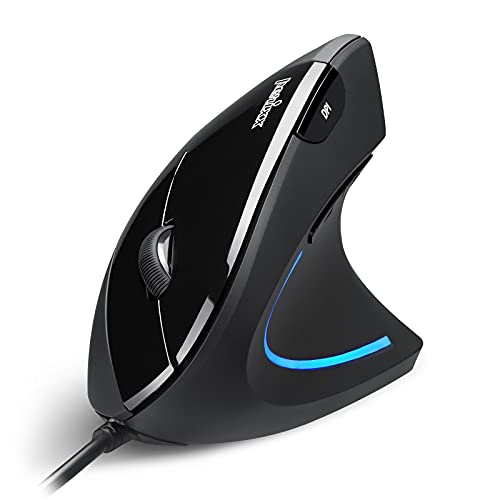
The Perixx PERIMICE-513 is built for users who want a vertical mouse with more control than a basic two-speed model. Its right-handed design places the hand in a more upright position. Six buttons give you extra options for navigation and shortcuts. The wired USB cable also makes it a useful choice for a fixed workstation.
This model includes 1000, 1600, 3200, and 6400 DPI settings. That range lets you set a slower pointer for detailed work or a faster pointer for large screens. The extra buttons may help with browser navigation and repeated tasks. I would look closely at this model if you want the ergonomic benefits of a vertical design but still need several speed choices.
Pros:
- Vertical shape supports a handshake-style grip
- Four DPI levels provide broad speed control
- Six buttons support shortcuts and navigation
- Right-handed layout suits many desk users
- Wired connection avoids battery upkeep
- Good option for productivity users who want extra controls
Cons:
- Right-handed shape does not suit everyone
- Large feature set may feel excessive for simple browsing
- Vertical grip takes time to master
What Amazon Buyers Are Saying
Review patterns for this type of Perixx mouse often center on the upright grip, button count, and adjustable sensitivity. Buyers who need extra shortcuts tend to value the layout. Some users report that vertical mice require a short learning period before pointer control feels natural. Fit remains personal, so people with small hands should check the dimensions and image carefully before ordering.
My Recommendation
I recommend the PERIMICE-513 for work users who want more control than the basic Anker model offers. It is a better match for people who use side buttons and change pointer speed often. Its overall value is strong, but the taller shape will not suit every hand.
Logitech G502 Hero Wired Gaming Mouse

The Logitech G502 Hero is not a vertical ergonomic mouse, but it deserves attention for users who want a wired mouse for both work and gaming. Its large shell offers a secure place for the thumb and palm. The many controls can help with games, editing, and repeated office actions. Its design feels more substantial than a basic office mouse.
The G502 Hero is best for right-handed users who like a firm, feature-rich mouse. It may feel too large for small hands, yet that same size can help larger hands avoid a cramped grip. The gaming focus brings more buttons and control than most simple ergonomic models. I would choose it for a desk that serves both productivity and gaming rather than for pure wrist-position correction.
Pros:
- Many controls for games and productivity
- Large shape can suit medium and large hands
- Wired design supports a steady connection
- Strong choice for users who want one mouse for work and play
- Adjustable pointer settings support different tasks
- Recognizable design with a secure thumb rest
Cons:
- Not a true vertical ergonomic mouse
- Large body may not suit small hands
- More buttons can feel busy for simple office work
- Gaming shape may look less clean in a formal office
What Amazon Buyers Are Saying
Amazon review themes commonly praise the button count, solid feel, and gaming performance. Many buyers also like the shape for long sessions when the size fits their hand. Common concerns include the weight, large body, and software learning curve. Some users also prefer a simpler mouse for office work because they do not need every extra control.
My Recommendation
The G502 Hero is worth buying if you need a wired gaming mouse that can also handle office tasks. I would not select it as my first choice for wrist posture. It earns a high score for control and versatility, but a dedicated vertical model is better for ergonomic focus.
KUNSI Wired Vertical Mouse
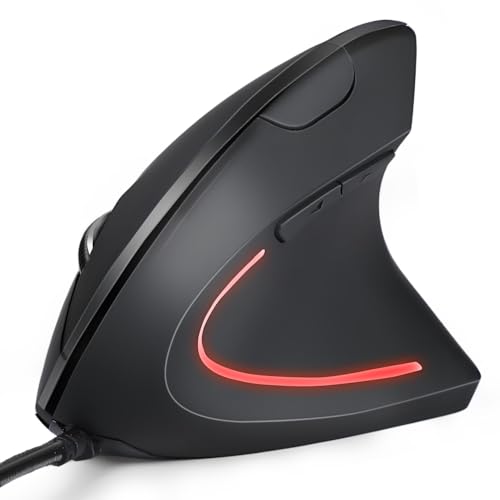
The KUNSI wired vertical mouse targets buyers who want an affordable upright design and extra buttons. Its six-button layout gives you more control than a basic three-button office mouse. The 800, 1200, and 1600 DPI choices cover common work tasks. The USB cable makes it easy to use with a desktop or laptop that has a compatible USB port.
The lower 800 DPI option can help with careful pointing, while 1600 DPI offers quicker movement. This mouse suits users who spend hours reading, browsing, and working in documents. It is also a useful first step for someone who wants to test a vertical grip without moving to a premium model. Keep in mind that the right-handed design requires room on the desk for its taller body.
Pros:
- Vertical shape may reduce the need to twist the forearm
- Six buttons give useful shortcut options
- Three DPI settings cover common office needs
- Wired USB setup is quick and dependable
- Budget-friendly route into ergonomic mouse design
- Works well for browsing and document tasks
Cons:
- Only three DPI settings are available
- Right-handed design limits flexibility
- May require time to learn precise movement
What Amazon Buyers Are Saying
Buyers commonly focus on the affordable price, upright grip, and added side controls. Review patterns often show that people like the change from a flat mouse for basic desk work. Some users may find the body too tall or the buttons too easy to press by mistake. Fit and pointer feel can vary, so this mouse works best when buyers have enough desk space and a right-handed grip.
My Recommendation
I recommend KUNSI for budget shoppers who want a vertical wired mouse with six buttons. It offers useful features without a wireless battery or complex setup. It is a good value, though users who need finer DPI control should choose the Perixx PERIMICE-513.
TECKNET Wired Mouse With Side Keys

This TECKNET USB mouse is a simple office tool with forward and backward keys. It uses a familiar ergonomic shape, so most users can begin working at once. The side keys make browser navigation faster and can help reduce trips to the toolbar. Its gray finish also gives it a quiet, practical look for a home or office desk.
The four adjustable DPI levels provide basic control over pointer speed. This is enough for documents, web pages, email, and general school work. It does not try to replace a gaming mouse or a tall vertical design. I like it for buyers who want a low-fuss wired mouse with helpful side buttons and no wireless maintenance.
Pros:
- Forward and backward keys speed up browser use
- Four DPI levels offer simple pointer adjustment
- Familiar shape makes the switch easy
- USB connection works well for fixed desks
- Good fit for office, school, and home tasks
- Simple design avoids needless extra features
Cons:
- Not a vertical mouse
- Fewer speed options than high-DPI models
- Side buttons may take time to use without accidental presses
What Amazon Buyers Are Saying
Amazon buyers often like the side buttons, comfortable shape, and low learning curve. Common review themes also include easy setup and useful performance for everyday office work. Some customers may want a longer cable or a more advanced sensor. Others may find that the shape feels less ergonomic than a true vertical mouse during very long sessions.
My Recommendation
This TECKNET mouse is a smart choice for simple office work and web browsing. I would buy it for someone who values forward and back keys more than a vertical grip. It delivers good basic value, but it is not the best option for users seeking maximum wrist-angle support.
Anker CE100 Renewed Vertical Mouse
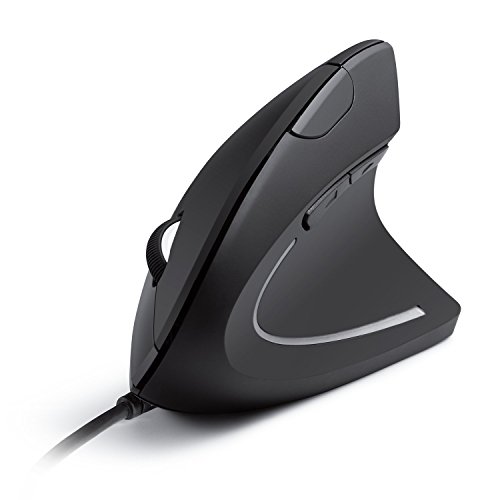
The Anker CE100 Renewed brings the familiar vertical design to shoppers who want a lower-cost option. Its optical sensor supports 1000 and 1600 DPI settings. Five buttons give you more control than a basic mouse while keeping the layout easy to understand. The wired USB connection makes it suitable for a permanent work desk.
As a renewed product, its condition can differ from a new retail unit. I would check the current listing details, warranty terms, and return policy before ordering. The upright body remains the main reason to consider it. This model suits right-handed users who want vertical comfort and accept the trade-off that comes with buying renewed hardware.
Pros:
- Vertical body supports a more open hand position
- Optical tracking suits common office tasks
- Two DPI settings keep control simple
- Five buttons add practical shortcuts
- USB connection needs no charging
- Renewed pricing may improve its overall value
Cons:
- Renewed condition may vary
- Only two DPI settings are available
- Right-handed design limits use
- Warranty and packaging terms need careful checking
What Amazon Buyers Are Saying
Review patterns for renewed mice often praise the lower price and familiar vertical shape. Buyers who receive a clean, fully working unit tend to value the comfort and simple setup. The main concern with renewed products is condition consistency. Some shoppers also mention that the shape needs an adjustment period and that two DPI levels may not satisfy advanced users.
My Recommendation
I recommend the CE100 Renewed only when the listing offers a clear return policy and a meaningful price advantage. It can be a smart way to try a vertical mouse on a budget. For the safest purchase, I prefer the new Anker model above.
Perixx PERIMICE-519 Compact Vertical Mouse

The Perixx PERIMICE-519 is a small vertical mouse made for right-handed users. Its compact size makes it easier to fit in a tight workspace or laptop bag. The 105 x 67 x 58 mm design favors users with smaller hands or those who want a less bulky ergonomic mouse. Its wired connection also removes the need to carry batteries or a wireless receiver.
A compact shell can feel more controlled for small hands, but it may feel cramped for larger hands. This model focuses on portability and simple comfort rather than a large button set. It makes sense for home offices, student desks, and users who move between work areas. I would compare hand size with the listed dimensions before buying.
Pros:
- Compact body suits small hands and tight desks
- Vertical shape supports an upright grip
- Easy to carry with a laptop setup
- Wired USB design avoids battery changes
- Simple layout is easy for new users
- Good choice for portable office work
Cons:
- Small body may not suit large hands
- Right-handed design limits users
- Compact size may provide less palm support
- Fewer advanced controls than larger models
What Amazon Buyers Are Saying
Buyers commonly appreciate the small footprint and upright grip. Review patterns often show that the mouse works best for small to medium hands and compact desks. Larger-handed users may report less palm support or a cramped feel. Some buyers also need time to adjust to the vertical pointer movement, which is normal when changing from a flat mouse.
My Recommendation
The PERIMICE-519 is worth considering when other ergonomic mice feel too large. I recommend it for small hands, travel, and limited desk space. It is not my first pick for large hands or users who need many programmable controls.
How to Choose the Best Wired Ergonomic Mouse
Choosing the best wired ergonomic mouse depends on your hand, desk, work style, and comfort goals. A vertical mouse can change your wrist angle, while a traditional ergonomic shell may feel easier to control. A wired model also keeps the connection steady, but the cable needs good desk placement. Use the points below before you buy.
1. Match the Mouse Shape to Your Hand
Start with the shape, not the button count. A vertical mouse suits users who want a more upright handshake grip. A standard ergonomic mouse may suit users who want comfort with a familiar feel. Check the length, width, and height when the listing provides them.
Hand size matters a lot. A compact mouse can help small hands avoid stretching. A large mouse can give more palm support to larger hands. Right-handed models are common in this group, so left-handed users should check the design before ordering.
2. Check DPI, Buttons, and Daily Controls
DPI controls pointer speed. Lower DPI can help with careful work, such as selecting small icons or editing images. Higher DPI can help you cross a large monitor with less movement. Most office users need only a few useful settings, while gamers and advanced users may prefer a wider range.
Extra buttons can save time. Forward and backward keys work well for web browsing. Six-button mice can help with shortcuts and repeated tasks. Still, more buttons can add clutter. Pick the layout that matches your real work instead of paying for controls you will not use.
3. Judge the Cable, Connection, and Overall Value
A wired mouse needs no charging. It also avoids wireless pairing problems and receiver loss. These are useful benefits for a fixed desk, school computer, or office workstation. The trade-off is cable drag, so keep the cable clear of the monitor stand and keyboard.
Check the USB connection your computer supports. Also review the product condition when buying renewed hardware. A low price does not help if the shape does not fit your hand. The best wired ergonomic mouse should feel comfortable, track well, and match your work for many hours.
Final Verdict: Which Should You Buy?
The Anker USB Vertical Mouse is my top pick for most users. Choose the Perixx PERIMICE-513 for more DPI levels and buttons, or the PERIMICE-519 for small hands.
The best wired ergonomic mouse is the one that fits your grip and desk. Pick a vertical design for wrist position, or a traditional shell for an easier transition.
FAQs Of best wired ergonomic mouse
Is a wired ergonomic mouse better than a wireless model?
A wired model needs no battery and offers a direct USB connection. It works best on a fixed desk, while wireless models offer more freedom of movement.
What is the best wired vertical mouse for office work?
The Anker USB Vertical Mouse is my top office pick because it offers a simple upright shape, useful DPI settings, and easy USB setup.
Are vertical mice hard to use?
Most users need a short adjustment period. Pointer control usually feels more natural after several work sessions.
How many DPI settings should an ergonomic mouse have?
Two or three settings suit most office tasks. Users with large displays, design work, or gaming may prefer a wider DPI range.
Can left-handed users use these wired ergonomic mice?
Most models in this guide use a right-handed shape. Left-handed buyers should confirm the design before ordering.