The Razer Viper V3 Pro SE is my top pick for competitive FPS, thanks to its light 54g build and focused wireless design.
A mouse that feels too heavy, too large, or hard to control can make quick aim adjustments feel like work. The right shape and weight can help you move with more comfort and consistency, whether you play tactical shooters or fast arena games. I compared these ten options by their stated features, connection type, shape, and likely fit for FPS play. My picks range from lightweight wireless designs to heavier wired mice with extra buttons, so you can choose what suits your grip and budget.
See the key differences between my top picks at a glance.
| Mouse | Connection | Weight | Best suited for | Link |
|---|---|---|---|---|
| Razer Viper V3 Pro SE | Wireless | 54g | Competitive FPS | View on Amazon |
| Logitech G305 Lightspeed | Wireless | 99g with AA battery | Value and compact grip | View on Amazon |
| SteelSeries Prime | Wired | 69g | Lightweight right-hand use | View on Amazon |
| Logitech G Pro Gaming Mouse | Wired | About 83g | Simple, classic FPS use | View on Amazon |
| NSYCA G11 Wireless | Tri-mode | Not stated here | Flexible connection options | View on Amazon |
| NSYCA G11 Wireless (Black) | Tri-mode | Not stated here | Wireless setup choice | View on Amazon |
| Razer Basilisk V3 | Wired | About 101g | Ergonomic shape and extra controls | View on Amazon |
| Logitech G502 Hero | Wired | About 121g | Button-heavy play | View on Amazon |
| Corsair Nightsword RGB | Wired | Adjustable weight | Large hand and tuning options | View on Amazon |
| Corsair Ironclaw Wireless SE | Wireless | Check listing | Large-hand comfort | View on Amazon |
Razer Viper V3 Pro SE Wireless Gaming Mouse
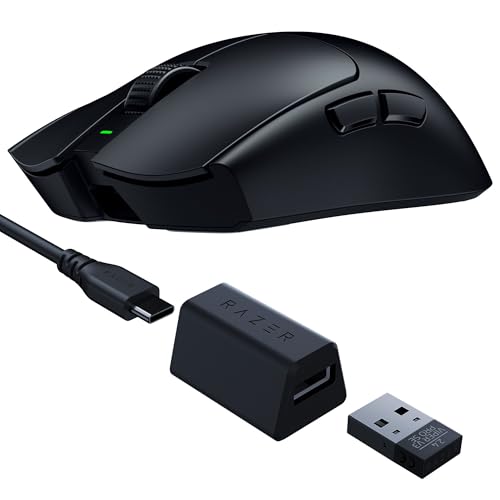
The Viper V3 Pro SE is the strongest pick here for players who want a light wireless mouse for FPS. Its listed 54g weight makes quick swipes and small corrections feel less tiring than with a heavier design. The shape uses a simple, low-button layout that keeps the focus on aim. Razer lists up to 95 hours of battery life, though actual time depends on use and settings.
Its wireless connection also helps keep the desk clear of cable drag. The design suits players who use a fingertip or claw grip, but hand size and comfort are personal. This model is a sensible choice if you want a current, lightweight competitive mouse and do not need many side buttons. Check the exact listing for included accessories and current product details before you buy.
Pros:
- Very light 54g build for fast movement
- Wireless design keeps the desk uncluttered
- Simple button layout suits focused FPS play
- Listed battery life reaches up to 95 hours
- Low-profile shape can suit claw and fingertip grips
Cons:
- May feel too small or flat for some hands
- Fewer extra controls than MMO-style mice
- Wireless gear often costs more than basic wired options
What Amazon Buyers Are Saying
I can’t confirm the current mix of Amazon reviews, so I won’t claim a review consensus. When checking recent buyer comments, focus on reports about shape, wireless stability, battery life, and whether the light body feels controlled rather than too easy to move.
My Recommendation
This is my top choice for a competitive FPS player who values low weight and wireless freedom. It costs more than simple wired picks, but its focused design fits the job well. I rate it 4.7 out of 5 overall.
| Category | Rating |
|---|---|
| Aim-focused design | 4.8/5 |
| Weight and control | 4.9/5 |
| Wireless convenience | 4.6/5 |
| Value | 4.3/5 |
| Overall Rating | 4.7/5 |
Logitech G305 Lightspeed Wireless Gaming Mouse

The G305 Lightspeed is a well-known low-cost wireless option with a compact, simple shape. Logitech lists a 99g weight with its AA battery, so it is not an ultralight mouse by current esports standards. Still, it avoids a cable and keeps the main controls clear. The small shell tends to suit smaller and medium hands better than very large hands.
This mouse uses a replaceable AA battery rather than a built-in rechargeable cell. That can be useful if you prefer swapping a battery instead of planning charging time. For FPS, the G305 can be a practical first wireless mouse, especially if you are watching your budget. Its shape and weight are the main trade-offs against newer, lighter competitive models.
Pros:
- Wireless connection at a usually accessible price point
- Replaceable AA battery is easy to change
- Compact shape can suit smaller hands
- Simple controls keep setup easy
- Works for both everyday PC use and gaming
Cons:
- Heavier than dedicated ultralight FPS mice
- Small body may not fit large hands well
- Requires an AA battery instead of USB charging
What Amazon Buyers Are Saying
I can’t verify today’s review patterns. For this model, compare recent comments on battery life, shell size, and wireless performance, and look for feedback from buyers with a grip and hand size like yours. Those details matter more than a high DPI number for most FPS players.
My Recommendation
I recommend the G305 as a value-minded wireless choice, not as the lightest option for tournament play. If you want a compact mouse and prefer a replaceable battery, it offers a useful balance. My overall rating is 4.2 out of 5.
| Category | Rating |
|---|---|
| FPS control | 4.1/5 |
| Wireless use | 4.4/5 |
| Comfort range | 3.9/5 |
| Value | 4.5/5 |
| Overall Rating | 4.2/5 |
SteelSeries Prime FPS Gaming Mouse

The SteelSeries Prime is a wired mouse built around a light 69g body and a right-hand shape. The listing names a TrueMove Pro sensor rated at 18K CPI and magnetic optical switches. For competitive shooters, its lower weight can make repeated lifts and broad mouse-pad sweeps feel easier. The five-button layout also avoids the extra controls found on larger multi-purpose mice.
Because it is wired, you do not need to recharge it or replace a battery. The cable may still brush your pad, so a bungee or careful cable routing can help. Its shape is more specific than a plain symmetrical shell, which makes trying the fit important. I would consider it for players who want a lightweight, direct setup and do not mind a cable.
Pros:
- Light 69g listed weight
- Wired connection avoids battery upkeep
- Five-button layout stays simple
- 18K CPI sensor rating leaves room for varied settings
- Optical switch design is aimed at gaming use
Cons:
- Cable can create drag without good routing
- Right-hand shape may not suit every grip
- Limited buttons for players who want many binds
What Amazon Buyers Are Saying
I can’t check the live Amazon review feed here. Look for recent comments on the shape, cable feel, and switch sound, as those are practical details that can affect day-to-day use. Also check whether buyers mention the exact Prime version in the listing.
My Recommendation
The Prime is a strong wired option if you want a low-weight shell without paying for wireless features. Its form and five-button layout make more sense for FPS than for games that need many commands. I rate it 4.4 out of 5.
| Category | Rating |
|---|---|
| FPS-ready weight | 4.6/5 |
| Sensor features | 4.4/5 |
| Shape fit | 4.1/5 |
| Value | 4.3/5 |
| Overall Rating | 4.4/5 |
Logitech G Pro Gaming FPS Mouse

This wired Logitech G Pro is a straightforward gaming mouse with a familiar shape and a focus on core controls. Its older design is less feature-heavy than recent wireless esports models, but many players want exactly that. At about 83g, it sits between heavier everyday mice and modern ultralight choices. That middle ground can work well if you want some weight without a bulky shell.
The simple form can suit several grip styles, though your hand size still matters. A wired connection removes charging from the routine and can keep the price lower than a premium wireless model. Before buying, confirm the listing’s exact sensor and product version, since similarly named G Pro products can differ. I see it as a practical basic pick, rather than the most advanced choice for a new competitive setup.
Pros:
- Simple design keeps the focus on aim
- Wired connection needs no charging
- About 83g is manageable for many FPS players
- Familiar shape is easy to understand
- Few extra controls reduce accidental presses
Cons:
- Older model compared with current esports mice
- Cable can drag during wide swipes
- Check the exact listing version before purchase
What Amazon Buyers Are Saying
Amazon reviews can vary by seller and listing version, and I can’t confirm the current comments. Check recent buyer notes for sensor behavior, cable condition, and fit. For an older product, also confirm that the listing matches the model you intend to order.
My Recommendation
This can be a good basic wired FPS mouse if you find it at a fair price and want a clean layout. I would compare it with the lighter SteelSeries Prime before choosing. My overall rating is 4.0 out of 5.
| Category | Rating |
|---|---|
| Simple FPS layout | 4.3/5 |
| Weight balance | 4.1/5 |
| Current features | 3.7/5 |
| Value | 4.0/5 |
| Overall Rating | 4.0/5 |
NSYCA G11 Lightweight Wireless Gaming Mouse
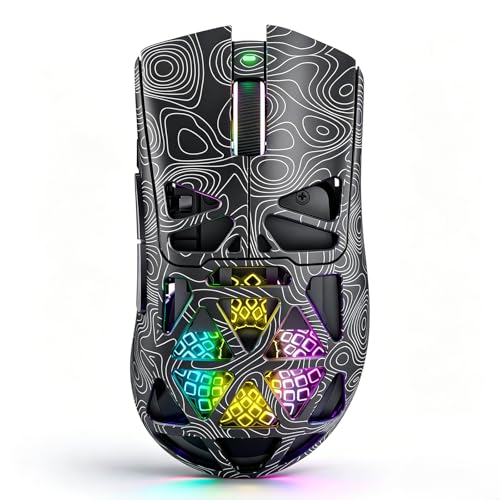
The NSYCA G11 listing highlights three connection modes: Bluetooth, 2.4GHz wireless, and USB-C. It also lists a sensor setting up to 22,000 DPI, RGB lighting, and programmable buttons. These features offer flexibility for use with a PC, laptop, or Mac. For a competitive FPS setup, the 2.4GHz mode is the one to investigate first, since Bluetooth often favors general use over low-latency gaming.
The listing does not give a verified weight in the details provided here, so I would not assume it is truly ultralight from the name alone. Check the full listing for weight, battery life, polling rate, and what comes in the box. A high DPI ceiling does not by itself make a mouse more accurate. It is more important that the sensor tracks well at your chosen setting and that the shape feels stable.
Pros:
- Offers Bluetooth, 2.4GHz, and USB-C modes per listing
- 22,000 DPI maximum is stated in the product name
- Programmable buttons add setup options
- RGB lighting for users who want it
- Listed for PC, laptop, and Mac use
Cons:
- Weight is not confirmed in the details available here
- Check latency and polling details before esports use
- More product claims need review against the full listing
What Amazon Buyers Are Saying
I can’t confirm current buyer review themes for this listing. Before ordering, look for recent verified-purchase comments about 2.4GHz response, battery life, software setup, and build quality. Those points are more useful for FPS than RGB or a high DPI limit alone.
My Recommendation
The G11 may suit buyers who want multiple connection choices at a lower cost. I would verify its weight and wireless performance before relying on it for ranked or tournament play. My overall rating is 3.6 out of 5 based on the stated features and the information that still needs checking.
| Category | Rating |
|---|---|
| Connection choice | 4.2/5 |
| FPS-ready details | 3.4/5 |
| Feature range | 4.0/5 |
| Value confidence | 3.5/5 |
| Overall Rating | 3.6/5 |
NSYCA G11 Wireless Gaming Mouse (Black)

This black G11 listing appears to offer the same broad feature set as the other G11 entry: tri-mode connection, a stated 22,000 DPI maximum, RGB, and programmable buttons. The dark finish gives it a low-key look that fits most desk setups. Multiple connection modes can be handy if you switch between a gaming PC and a laptop. For play, confirm which mode supports the best response before choosing it for FPS.
The color option does not change the key buying questions. I would check exact weight, shape dimensions, polling rate, and battery details in the product information. A sensor’s DPI ceiling tells you how far its setting can go, not whether it will improve your aim. If the seller lists clear support and return terms, that can also help reduce the risk with a lesser-known brand.
Pros:
- Black color offers a simple, easy-to-match look
- Tri-mode connection is listed
- Programmable buttons allow custom commands
- RGB can be adjusted to personal taste
- Potentially useful for more than one computer
Cons:
- Weight and dimensions need confirmation
- Competitive wireless performance needs careful checking
- May not have the same support history as major esports brands
What Amazon Buyers Are Saying
I can’t verify the latest Amazon reviews for this black version. Compare recent buyer notes with the other G11 listing, and check that comments refer to the same model and color. Pay close attention to wireless behavior, battery life, and software support.
My Recommendation
I would choose this version only after confirming the details that matter for your grip and play style. It has a broad feature list, but the listing alone does not confirm its competitive feel. My overall rating is 3.6 out of 5.
| Category | Rating |
|---|---|
| Connection choice | 4.2/5 |
| FPS-ready details | 3.4/5 |
| Style and controls | 4.0/5 |
| Value confidence | 3.5/5 |
| Overall Rating | 3.6/5 |
Razer Basilisk V3 Customizable Wired Mouse

The Basilisk V3 is a wired ergonomic mouse with a broad feature set and a thumb rest. Its shape and extra controls make it comfortable for many right-handed users who want more than a basic FPS layout. The scroll wheel can switch between controlled steps and a freer spin, which helps outside shooters too. At about 101g, it is heavier than a dedicated lightweight esports mouse.
That weight is the main reason I would not rank it first for low-sensitivity competitive FPS. It can still work well if you prefer a solid, supportive shape and use the extra buttons for useful binds. The wired connection keeps it ready without charging. For a player who mixes shooters with work, browsing, and other game types, the Basilisk offers more daily flexibility.
Pros:
- Ergonomic right-hand design includes a thumb rest
- Extra programmable controls support useful binds
- Wired connection needs no battery charging
- Scroll wheel offers more than one feel
- RGB and software options allow personalization
Cons:
- Heavier than most competitive FPS-focused picks
- Shape does not suit left-handed players
- Extra buttons may matter little in a simple shooter
What Amazon Buyers Are Saying
I can’t confirm the current Amazon review mix. When you read recent comments, look for notes on the thumb-rest fit, button feel, scroll wheel behavior, and software setup. These details help show whether the mouse fits your everyday use, not just its spec list.
My Recommendation
The Basilisk V3 is a good fit if comfort and extra functions matter more than minimum weight. For pure competitive FPS, I would pick the Viper V3 Pro SE or Prime first. My overall rating is 4.1 out of 5.
| Category | Rating |
|---|---|
| Ergonomic comfort | 4.5/5 |
| FPS weight | 3.6/5 |
| Extra features | 4.7/5 |
| Value | 4.1/5 |
| Overall Rating | 4.1/5 |
Logitech G502 Hero Wired Gaming Mouse

The G502 Hero is a feature-rich wired mouse with many programmable controls and an ergonomic right-hand shape. Logitech lists a Hero sensor with a high DPI range, and the mouse also offers adjustable weights. Its roughly 121g base weight is much higher than a modern ultralight FPS mouse. That can appeal to players who prefer a grounded feel, but it may slow repeated flicks for others.
For competitive play, I would treat the G502 as a multi-use mouse rather than a pure esports tool. Its extra buttons can help with game commands, streaming, or work shortcuts. The broad shape and thumb rest may feel comfortable during long sessions. If you play tactical shooters at low sensitivity, compare its weight with a lighter option before making a choice.
Pros:
- Many buttons support custom binds
- Adjustable weights let you tune the feel
- Ergonomic design includes a thumb rest
- Wired use avoids battery management
- Useful beyond FPS for work and varied games
Cons:
- Heavy for fast, repeated FPS swipes
- Large shape may not fit small hands
- Extra buttons can take time to learn
What Amazon Buyers Are Saying
I can’t confirm live Amazon review trends. Recent feedback worth checking includes weight preferences, button durability, scroll wheel behavior, and hand fit. Since the product has several controls and adjustable weights, comments about setup can help you judge whether you will use those features.
My Recommendation
The G502 Hero is worth considering if you want one mouse for work and many game types. It is not my first choice for a lightweight competitive FPS setup. I give it 4.0 out of 5 overall.
| Category | Rating |
|---|---|
| Button options | 4.8/5 |
| FPS weight | 3.3/5 |
| Build and features | 4.5/5 |
| Everyday value | 4.2/5 |
| Overall Rating | 4.0/5 |
Corsair Nightsword RGB Adjustable Weight Mouse
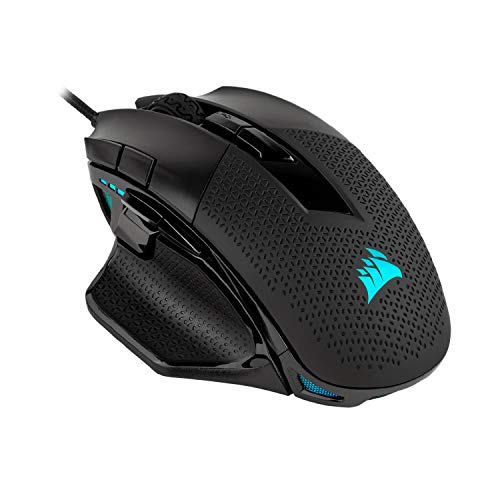
The Corsair Nightsword is a wired mouse with a broad ergonomic shell and adjustable weight options. Its design gives players a way to tune balance and mass instead of accepting one fixed feel. This can be helpful if you like a substantial mouse and want to adjust it over time. For competitive FPS, though, its larger and heavier form is a clear contrast to lightweight models.
The Nightsword makes more sense for players who value a palm-friendly shape, extra controls, and customization. I would not choose it simply because it has RGB or a high sensor rating. Instead, think about how you aim and whether a heavy shell feels stable or tiring. If you use low sensitivity and lift the mouse often, a lighter pick may be easier to manage.
Pros:
- Adjustable weights allow personal tuning
- Ergonomic shape can support a palm grip
- Wired connection means no battery charging
- Extra buttons add control options
- RGB lighting can match a gaming setup
Cons:
- Heavy design is not ideal for every FPS player
- Large shape may not fit smaller hands
- Weight tuning adds parts and setup steps
What Amazon Buyers Are Saying
I can’t verify current Amazon review patterns. Look for recent comments about the weight system, how the shell fits different hand sizes, and whether the mouse feels comfortable after long play. Make sure reviews match this exact Nightsword model.
My Recommendation
The Nightsword can be a good buy if you want a large, tunable mouse for mixed gaming. For a fast, minimal FPS setup, I would go lighter. My overall rating is 3.9 out of 5.
| Category | Rating |
|---|---|
| Weight tuning | 4.5/5 |
| Comfort potential | 4.3/5 |
| FPS agility | 3.3/5 |
| Feature value | 4.0/5 |
| Overall Rating | 3.9/5 |
Corsair Ironclaw Wireless SE Gaming Mouse

The Corsair Ironclaw Wireless SE is a wireless choice in a family known for a larger, right-hand ergonomic shape. That can make it worth a look if smaller mice cramp your palm or feel hard to hold. The provided product details do not confirm this version’s weight, battery life, or exact wireless modes, so check the current listing before purchase. Those facts matter when comparing it with a dedicated esports mouse.
For FPS, a large body can feel secure, but it may be less nimble for players who use fingertip grip or make frequent low-sensitivity swipes. Wireless play reduces cable drag, which many players prefer. Check whether the version has the sensor and connection features you need, rather than assuming all Ironclaw models share the same specs. I would compare its full size and weight with your current mouse before ordering.
Pros:
- Wireless design avoids a cable across the pad
- Larger ergonomic form may suit broad hands
- Right-hand shape can provide a supported hold
- Potentially useful for mixed gaming and everyday use
- Check listing for model-specific features and controls
Cons:
- Exact weight and battery details need confirmation
- Large shape may not suit small hands or fingertip grip
- Less clearly focused on ultralight competitive FPS
What Amazon Buyers Are Saying
I can’t confirm the current buyer feedback for this specific SE listing. Check reviews for comments about hand size, wireless connection, charging, and the exact model name. Do not rely on feedback for a different Ironclaw version when checking performance or battery life.
My Recommendation
This could suit players who want wireless use and a roomy right-hand grip. I would confirm its specifications and dimensions before choosing it for competitive FPS. My overall rating is 3.8 out of 5, with the final fit depending on the exact listing details.
| Category | Rating |
|---|---|
| Wireless freedom | 4.2/5 |
| Large-hand fit potential | 4.2/5 |
| Verified FPS details | 3.4/5 |
| Value confidence | 3.7/5 |
| Overall Rating | 3.8/5 |
How to Choose the Best Gaming Mouse for Competitive FPS
The best gaming mouse for competitive FPS is the one you can move with control for a full match. Sensor numbers and marketing claims matter less than a shape that fits, a weight you can handle, and reliable tracking. Start with how you hold a mouse, then look at the features that support your play style. Try to compare real measurements and clear product details rather than choosing by brand alone.
1. Match the Shape and Weight to Your Grip
Grip affects how a mouse feels during fast aim changes. Palm grip users often want more body support, while claw and fingertip grips may feel better with a smaller or shorter shell. Hand size matters too, so check the mouse dimensions and return policy if you cannot try it first. Weight is just as personal: a light mouse can make fast movement easier, while a heavier one may feel more planted to some players. Do not assume that the lightest option will fit every hand.
Think about how far you move your mouse in a typical fight. If you use low sensitivity and make wide sweeps, a lighter model can reduce effort. If you use high sensitivity and keep the mouse close, shape and button reach may matter more. The best gaming mouse for competitive FPS should feel easy to reset and lift without losing your grip.
2. Check Tracking, Buttons, and Connection
A good sensor should track steadily at the setting you use. A very high DPI number does not guarantee better aim, and most players do not need the maximum listed value. Check the polling rate, sensor details, and connection mode in the official product information. For a wireless mouse, use its gaming-focused wireless mode when available. Bluetooth often serves general use better than fast competitive play.
Keep the button count simple unless you know you need extra binds. Two side buttons are enough for many shooters. Extra buttons can be useful for utility, push-to-talk, or other commands, but they add weight and can lead to missed presses if poorly placed. For wired mice, think about cable drag and whether your desk setup can route the cable out of your way.
3. Compare Build, Support, and Total Value
Look beyond the sale price. Consider build quality, switch feel, software support, warranty terms, and replacement options. With an unfamiliar brand, confirm the return window and check whether the listing gives clear details for the exact model. For a wireless mouse, include charging or battery needs in your choice. For a wired one, factor in the cable and whether you may want a bungee.
Read recent buyer reviews with care. Sort out feedback for the same model, and look for patterns in comfort, tracking, battery life, and durability. One complaint does not prove a flaw, and a high rating does not guarantee a fit for your hand. A good purchase should match your setup and feel comfortable over long sessions, not just look impressive on a spec sheet.
Final Verdict: Which Should You Buy?
For most serious players, I recommend the Razer Viper V3 Pro SE as the best gaming mouse for competitive FPS in this group. Its low listed weight, wireless design, and focused layout suit fast aim adjustments.
For a lower-cost wireless pick, consider the Logitech G305. Choose by shape and weight first, then compare verified details and current prices to find the right FPS mouse for your setup.
FAQs Of best gaming mouse for competitive FPS
What is the best gaming mouse for competitive FPS?
My top pick here is the Razer Viper V3 Pro SE. Its listed 54g weight and simple wireless design suit players who want quick, controlled movement.
Is a wired or wireless mouse better for competitive FPS?
Both can work well. A wired mouse avoids charging, while a modern gaming wireless mouse removes cable drag. Choose the one that feels more reliable and comfortable to you.
What mouse weight is best for FPS games?
There is no single best weight. Many players like lighter mice for broad swipes, but hand size, grip, sensitivity, and personal control all matter.
Does higher DPI make a gaming mouse more accurate?
No. DPI sets how far the pointer moves for a given hand movement. A high maximum does not guarantee better tracking or aim.
Is the Logitech G305 good for competitive FPS?
It can work well as an affordable wireless option. It is heavier than ultralight models, so compare its weight and compact shape with your preferences.