The Bloody A70x is my top pick for high CPS because its click-focused design suits rapid clicking styles.
If you play click-speed games, compete in Minecraft modes, or just want a mouse that feels quick under your fingers, the right fit matters. A fast sensor alone will not raise your clicks per second (CPS). Button feel, grip, control, and your own clicking method matter too. Below, I compare ten gaming mice, from the click-focused Bloody A70x to feature-rich MMO models, so you can find the best gaming mouse for high CPS and your play style.
See the differences between my top picks at a glance.
| Mouse | Best for | Connection | Useful feature | CPS fit | Link |
|---|---|---|---|---|---|
| Bloody A70x | Rapid-click play | Wired | Light Strike click system | Strongest match | View on Amazon |
| Logitech G502 Hero | All-around gaming | Wired | Programmable controls | Good general use | View on Amazon |
| Razer Basilisk V3 | Comfort and control | Wired | Custom controls and scroll wheel | Good for varied play | View on Amazon |
| Redragon M602 | Budget gaming | Wired | 9 programmable buttons | Value choice | View on Amazon |
| Logitech G305 | Wireless freedom | Wireless | LIGHTSPEED connection | Good for untethered play | View on Amazon |
| Redragon M901K | MMO commands | Wired | 12 side buttons | Feature-rich, not click-first | View on Amazon |
| Redragon M612 | Budget customization | Wired | Remappable keys | Flexible daily use | View on Amazon |
| Corsair Scimitar RGB Elite | MMO and MOBA play | Wired | Side-button command access | Best for many commands | View on Amazon |
| Redragon M801 | Macro controls | Wired | Fire button and macros | Versatile gaming | View on Amazon |
| Redragon M908 | MMO shortcuts | Wired | 12 side keys | Best for command-heavy games | View on Amazon |
Bloody A70x Matte Drag Click Mouse

The Bloody A70x stands out because its design targets players who care about fast clicking. Its listing calls out Light Strike technology and a 0.2 ms response claim. That makes it a more direct match for CPS play than a general office-style gaming mouse. A fast click system still cannot guarantee a certain CPS result; your grip and method matter.
The matte shell gives your fingers a surface to work against, which can help if you use a drag-click style. The wired design avoids battery charging and keeps the setup simple. I would choose it for click-focused games, not as a one-size-fits-all pick for every genre. Check the game rules before using any rapid-click method, since some servers limit it.
Pros:
- Designed with rapid clicking in mind
- Light Strike system is a key feature for click-focused play
- Wired setup needs no battery charging
- Matte finish may suit drag-click technique
- More purpose-built for CPS than a typical MMO mouse
Cons:
- High CPS still depends on skill and technique
- Drag clicking may not be allowed in every game or server
- Less versatile than mice with many programmable controls
What Amazon Buyers Are Saying
Buyer feedback can change over time, so I would check the current listing for recent reviews before purchase. When reading them, focus on repeated comments about click feel, build quality, software, and long-term reliability. Give more weight to reviews from players who describe the same clicking method and games you use. A high CPS claim alone is not proof that the mouse will suit your hand.
My Recommendation
This is my top pick when the main goal is fast clicking and drag-click play. It is not a shortcut to better aim or higher scores, and game rules still matter. I rate it 4.4/5 for CPS-focused gaming, with a lower fit for players who want a lightweight, all-purpose FPS mouse.
| Category | Rating |
|---|---|
| Click-focused design | 4.7/5 |
| Everyday versatility | 3.8/5 |
| Ease of use | 4.2/5 |
| CPS value | 4.5/5 |
| Overall Rating | 4.4/5 |
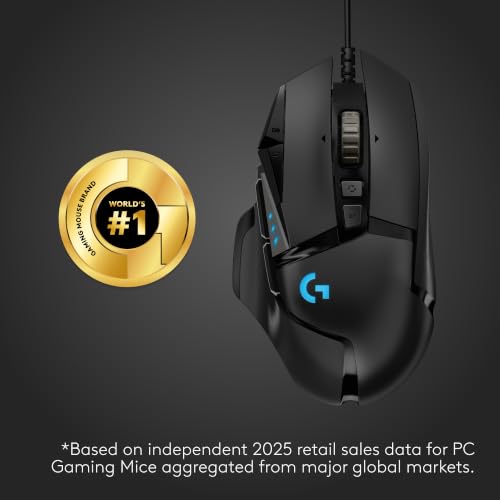
Logitech G502 Hero Wired Gaming Mouse

The G502 Hero is a strong all-round wired mouse with a shape that fills the hand. It has several programmable controls, so you can assign useful game commands without reaching for the keyboard. Its Hero sensor and adjustable sensitivity settings help you tune pointer movement. Those features matter more for broad gaming use than for a single CPS trick.
The G502 line is known for a larger, sculpted shape and a thumb rest. That can feel secure during long sessions, though small hands may find it bulky. Its extra controls can support action games, strategy titles, and daily computer work. For high CPS, treat it as a capable general gaming mouse rather than a specialist drag-click model.
Pros:
- Comfortable sculpted shape for many right-handed users
- Programmable controls add useful shortcuts
- Wired connection avoids charging concerns
- Adjustable sensitivity supports different game styles
- Useful beyond CPS games, including work and general play
Cons:
- Large shape may not suit small hands
- Extra features do not make it a dedicated CPS mouse
- Wired cable can catch or drag on a crowded desk
What Amazon Buyers Are Saying
Check current Amazon reviews for patterns about fit, button use, and software setup. A helpful review should mention hand size or grip style, as those details affect comfort with this larger shape. Look for repeated reports rather than relying on one very positive or negative account. I would also check recent comments about the exact model and included software.
My Recommendation
Choose the G502 Hero if you want one mouse for varied games and everyday tasks. It can handle quick clicking, but its main strength is broad control and comfort for users who like a larger shape. I rate it 4.2/5 overall, and 3.7/5 specifically as a high-CPS pick.
| Category | Rating |
|---|---|
| Control options | 4.6/5 |
| Comfort and shape | 4.3/5 |
| CPS suitability | 3.7/5 |
| All-around value | 4.2/5 |
| Overall Rating | 4.2/5 |
Razer Basilisk V3 Wired Gaming Mouse

The Basilisk V3 focuses on comfort, customization, and a useful set of controls. Its ergonomic right-handed shape and thumb area can help keep the hand settled during play. The scroll wheel offers extra control for games and work, while onboard buttons can be assigned through supported software. This makes it a flexible pick for players who switch between game types.
For CPS play, the key question is whether the main buttons feel right to you. The mouse is not sold as a dedicated drag-click device, so do not assume it will match the A70x for that purpose. Its wired connection keeps the setup direct, and its customizable design suits users who like to tune controls. I see it as a comfort-first generalist.
Pros:
- Ergonomic shape supports a relaxed right-hand grip
- Programmable controls can fit different games
- Scroll wheel adds practical control options
- Wired connection means no battery upkeep
- RGB and software options let users personalize the setup
Cons:
- Shape may not suit left-handed users
- Not a purpose-built high-CPS or drag-click mouse
- Software features may take time to set up
What Amazon Buyers Are Saying
Before buying, sort current reviews by recent date and look for comments on comfort, button feel, and setup. These points matter more than broad claims about speed. Reviewers have different hand sizes and grip styles, so compare their use case with yours. Do not assume RGB or software features will improve CPS on their own.
My Recommendation
The Basilisk V3 is a sensible choice if you want a comfortable, customizable gaming mouse for many tasks. It is less suited to buyers whose only goal is the highest possible click count. My overall rating is 4.3/5, with 3.8/5 for high-CPS use.
| Category | Rating |
|---|---|
| Comfort | 4.5/5 |
| Customization | 4.5/5 |
| CPS suitability | 3.8/5 |
| Everyday use | 4.4/5 |
| Overall Rating | 4.3/5 |
Redragon M602 Wired Gaming Mouse

The Redragon M602 offers a budget-friendly mix of gaming controls and an ergonomic shape. Its listing states up to 7200 DPI and nine programmable buttons. DPI is a measure of cursor sensitivity, not click speed, so it should not be confused with CPS. The extra buttons are handy for shortcuts if you play games that use several commands.
This wired mouse is a practical entry point for someone who wants more than a basic office mouse. Its shape and button layout may suit right-handed users who prefer a fuller body. For high CPS, button feel and your clicking method matter more than the maximum DPI number. I would pick it for value and general gaming, not for a dedicated drag-click setup.
Pros:
- Affordable route into gaming-mouse features
- Listing specifies nine programmable buttons
- Adjustable DPI helps match cursor speed to your preference
- Wired design does not need battery charging
- Extra controls can reduce keyboard reaches
Cons:
- Not designed specifically for drag clicking
- Many buttons may feel unnecessary for simple games
- Software support and setup can vary by system
What Amazon Buyers Are Saying
Check the live listing for recent buyer comments about comfort, software, and durability. I recommend looking for reviews that explain how long the mouse was used and what games it served. Comments about DPI alone do not tell you whether the buttons suit rapid clicking. Confirm that the current listing matches the M602 model and features you expect.
My Recommendation
The M602 is a fair value choice for casual gaming, especially if you want programmable buttons at a modest cost. It can work for fast clicking practice, but it is not my first choice for serious CPS play. I give it 4.0/5 overall and 3.6/5 for high-CPS focus.
| Category | Rating |
|---|---|
| Button options | 4.2/5 |
| CPS suitability | 3.6/5 |
| Ease of setup | 3.9/5 |
| Budget value | 4.2/5 |
| Overall Rating | 4.0/5 |
Logitech G305 LIGHTSPEED Wireless Mouse

The G305 is a compact wireless gaming mouse for players who want a clean desk and free movement. Logitech’s LIGHTSPEED connection is designed for gaming use, while the HERO sensor supports adjustable sensitivity. The mouse uses a replaceable AA battery, so there is no built-in battery to recharge. That trade-off may suit players who prefer swapping a battery over plugging in a cable.
Its simple button layout keeps the focus on the main controls. This can be helpful for CPS play if you like a smaller, straightforward mouse, though it is not marketed as a drag-click specialist. Wireless freedom may also make broad arm movements feel less restricted. Factor in the battery and shape before you choose it for long sessions.
Pros:
- Wireless design keeps the desk free of cable drag
- LIGHTSPEED connection is built for gaming use
- HERO sensor offers adjustable sensitivity
- Replaceable battery can be swapped instead of recharged
- Simple control layout is easy to learn
Cons:
- Requires battery replacement over time
- Not a dedicated high-CPS or drag-click mouse
- Compact body may not fit every hand or grip
What Amazon Buyers Are Saying
Read current feedback for notes on wireless use, battery handling, shape, and connection stability. The best reviews will describe the buyer’s computer setup and session length. Since battery needs are personal, check whether buyers prefer replaceable batteries or a rechargeable mouse. A compact design can also feel very different across hand sizes.
My Recommendation
I recommend the G305 if you value a wireless setup and a simple shape. It can serve as a general gaming mouse and handle quick clicks, but it is not the specialist pick in this list. I rate it 4.3/5 overall and 3.8/5 for high-CPS play.
| Category | Rating |
|---|---|
| Wireless convenience | 4.6/5 |
| CPS suitability | 3.8/5 |
| Ease of use | 4.3/5 |
| Value | 4.2/5 |
| Overall Rating | 4.3/5 |
Redragon M901K MMO Gaming Mouse

The M901K is aimed at MMO players who need many commands close to the thumb. Its listing describes 19 programmable buttons, 12 side buttons, adjustable DPI up to 12,400, and tuning weights. Those features can help keep spells and items within reach. They do not directly raise CPS, but they offer a lot of control for command-heavy games.
The side-button grid takes practice, especially if you have not used an MMO mouse before. The weight system gives you a way to change the feel, though more weight may not suit fast, repeated movement. This mouse is wired, so you do not need to manage a battery. Choose it for macros and game commands rather than for a light click-first feel.
Pros:
- Many programmable buttons for MMO commands
- 12 side buttons keep shortcuts near the thumb
- Adjustable DPI offers sensitivity choices
- Tuning weights let users alter the feel
- Wired operation avoids battery charging
Cons:
- Side-button grid takes time to learn
- Weight options may not suit players who want a light mouse
- Not built specifically for high-CPS clicking
What Amazon Buyers Are Saying
Look for recent reviews that discuss side-button layout, weight adjustment, and software use. Buyers who play MMOs can offer more relevant feedback than users who only browse the web. Pay attention to comments about reaching the thumb buttons without shifting your grip. Also confirm that the current product page lists the version and features you want.
My Recommendation
The M901K is a good fit for players who want many commands on one mouse. I would not buy it only to chase a high CPS score, since its main value is the button grid and customization. My rating is 4.1/5 overall and 3.5/5 for CPS-focused play.
| Category | Rating |
|---|---|
| Macro controls | 4.6/5 |
| CPS suitability | 3.5/5 |
| Adjustability | 4.4/5 |
| MMO value | 4.2/5 |
| Overall Rating | 4.1/5 |
Redragon M612 Wired RGB Gaming Mouse

The M612 is a wired optical gaming mouse with remapping keys and an advertised maximum of 8000 DPI. Its controls can be adjusted for different tasks, which gives it more flexibility than a basic mouse. DPI changes how far the cursor moves; it does not change how fast the button can click. Keep that distinction in mind when comparing mice for CPS.
The M612 may suit players who want RGB, programmable controls, and a low-cost way to customize their setup. A wired link keeps the mouse ready without charging. It is not presented as a specialist drag-click model, so test the main buttons if click feel is your top need. For everyday gaming, its remapping options are the bigger draw.
Pros:
- Remappable keys support custom control layouts
- Adjustable sensitivity lets you tune cursor speed
- Wired connection requires no battery
- RGB lighting adds a personal touch
- Useful for mixed gaming and everyday computer use
Cons:
- Maximum DPI does not mean higher CPS
- Not a dedicated rapid-click mouse
- Software setup may be more than some users need
What Amazon Buyers Are Saying
Use current Amazon reviews to check how buyers rate button feel, software, and day-to-day comfort. Try to find feedback from people who use the same operating system and games as you. Reviews that only praise lighting say little about CPS performance. Repeated comments about setup and control layout are more useful when deciding if this model fits.
My Recommendation
The M612 is worth a look if you want remapping features and adjustable sensitivity on a wired mouse. It is not my first recommendation for high CPS alone, but it can be a useful budget gaming choice. I rate it 4.0/5 overall and 3.6/5 for high-CPS use.
| Category | Rating |
|---|---|
| Remapping options | 4.2/5 |
| CPS suitability | 3.6/5 |
| Ease of use | 4.0/5 |
| Everyday value | 4.1/5 |
| Overall Rating | 4.0/5 |
Corsair Scimitar RGB Elite MMO Mouse
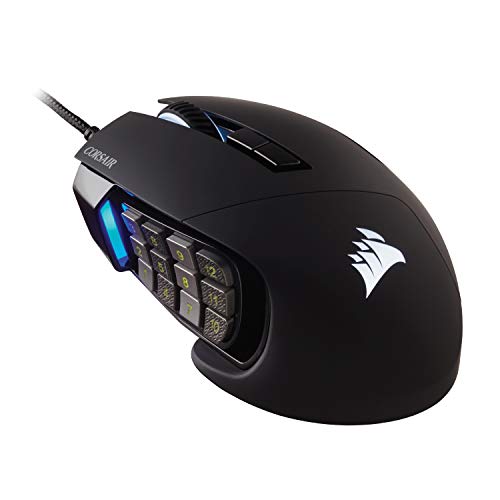
The Scimitar RGB Elite is made for MMO and MOBA players who want many actions within thumb reach. Its side-key layout helps put skills and shortcuts near the hand. This design is useful when a game asks for many commands, but it is not the same as a mouse made for rapid main-button clicking. The wired connection keeps the setup simple.
For a player who moves between MMO raids and other command-heavy games, the Scimitar can help reduce keyboard reaches. The side buttons need practice, and the best layout depends on the game. For high CPS, check how the main buttons feel and avoid assuming that extra side keys will increase click rate. Its strength is access to controls, not a CPS claim.
Pros:
- Designed for MMO and MOBA command access
- Side controls can keep game actions close to the thumb
- Wired setup needs no charging
- Useful for players who use many hotkeys
- Programmable controls support a tailored layout
Cons:
- Side-button layout takes time to master
- Extra controls may feel excessive for simple games
- Not purpose-built for drag clicking or high CPS
What Amazon Buyers Are Saying
Read the latest buyer notes about the side-button grid, setup, and comfort. Try to compare feedback from MMO or MOBA players with your own use. Look for details on whether users can tell the buttons apart by touch. Since listings and versions can change, confirm the exact model before ordering.
My Recommendation
The Scimitar RGB Elite makes sense if you need many game commands under your thumb. It is a niche pick for CPS, but a useful one for MMO and MOBA fans. I rate it 4.3/5 overall and 3.5/5 for high-CPS use.
| Category | Rating |
|---|---|
| Command access | 4.7/5 |
| CPS suitability | 3.5/5 |
| MMO and MOBA fit | 4.6/5 |
| Learning curve | 3.7/5 |
| Overall Rating | 4.3/5 |
Redragon M801 Wired Gaming Mouse

The Redragon M801 offers a wired gaming setup with a high advertised DPI ceiling and programmable buttons. Its listing also calls out a fire button, which can be useful for a mapped game action. A button that sends more than one input may be restricted in some games, so check the game rules before using it. DPI and macros should not be confused with natural click speed.
This mouse is a fit for players who like extra controls and want to set up macros for allowed tasks. It can serve in many PC games, but it is not a dedicated high-CPS model. Its wired design avoids charging, while software gives you ways to set controls. Keep the setup simple if your goal is fair, manual clicking.
Pros:
- Programmable controls support custom layouts
- Fire button offers an extra mapped control
- Adjustable sensitivity helps tune pointer movement
- Wired use avoids battery concerns
- Works as a multi-purpose gaming mouse
Cons:
- Macros may break some game or server rules
- High DPI does not equal high CPS
- Not a specialist drag-click mouse
What Amazon Buyers Are Saying
Check recent reviews for notes on software, button setup, and how the mouse holds up in regular use. Focus on detailed comments rather than claims about a single feature. If buyers mention macros, confirm that their use matches the rules for your games. Also review the current listing details, as product bundles can differ.
My Recommendation
The M801 is a solid option for someone who wants programmable controls and a fire button. I would not choose it as the best gaming mouse for high CPS if fast manual clicks are the only goal. My rating is 4.0/5 overall and 3.6/5 for CPS focus.
| Category | Rating |
|---|---|
| Programmable features | 4.2/5 |
| CPS suitability | 3.6/5 |
| Control range | 4.1/5 |
| Value | 4.0/5 |
| Overall Rating | 4.0/5 |
Redragon M908 Wired MMO Gaming Mouse

The M908 is another command-heavy mouse, with a side-button grid and remappable controls. Its listing advertises up to 12,400 DPI. That number describes sensor sensitivity, not how many clicks you can make in a second. The mouse aims to keep commands close for MMO play, where quick access to skills can matter.
The M908 suits players who want a dedicated set of side controls for game actions. It may feel crowded if you prefer a clean, simple mouse. For CPS play, consider its size and main-button feel instead of relying on DPI or macro claims. A wired connection keeps it ready for long sessions without battery upkeep.
Pros:
- Side-button layout supports many shortcuts
- Remappable keys allow a custom setup
- Wired design has no battery to charge
- High advertised DPI range gives sensitivity options
- Strong fit for MMO players who use many commands
Cons:
- Side buttons need practice and can feel crowded
- Large command layout is not ideal for every genre
- Not designed as a dedicated high-CPS mouse
What Amazon Buyers Are Saying
Look at recent Amazon feedback for useful details about side-button access, software, and comfort over long sessions. MMO players may give the clearest insight into whether the grid is easy to learn. Check if buyers describe their grip and hand size. Those details are more useful than a general statement that the mouse is fast.
My Recommendation
The M908 is a practical buy for MMO users who want many remappable commands. It is not the strongest choice for players who only want a quick main click. I give it 4.1/5 overall and 3.5/5 for high-CPS focus.
| Category | Rating |
|---|---|
| Side-button access | 4.5/5 |
| CPS suitability | 3.5/5 |
| MMO fit | 4.5/5 |
| Learning ease | 3.7/5 |
| Overall Rating | 4.1/5 |
How to Choose the Best Gaming Mouse for High CPS
Choosing the best gaming mouse for high CPS means looking past marketing numbers. The mouse should feel steady in your hand and suit the click style you use. A high DPI rating does not mean a higher click rate. Focus on the main buttons, shape, and game rules first.
1. Match the Main Buttons to Your Clicking Style
Think about how you click before you shop. Normal clicking, jitter clicking, butterfly clicking, and drag clicking all put different demands on your fingers and the mouse surface. The A70x is the most click-focused option in this group. Other models offer wider use, but they may not suit drag clicking as well. If possible, test the button feel or check the return policy before you buy.
Button feel is personal. Some players like a short, crisp press; others want a more defined click. Do not judge a mouse by its advertised response figure alone. Also check whether your chosen game or server allows your clicking method. Fair-play rules can vary, and macros or rapid-click tools may be restricted.
2. Choose a Shape and Weight You Can Control
A mouse that fits your hand can help you keep a steady grip. A large, sculpted shape such as the G502 may suit a palm grip, while a compact shape like the G305 may feel better to some claw or fingertip users. These are starting points, not rules. Hand size and finger reach matter, so compare the mouse shape with a model you already like.
Weight also affects control. A heavier MMO mouse may feel stable, but it can take more effort to move quickly. A lighter mouse can feel nimble, though it may not feel as planted. For high CPS, focus on control and comfort rather than assuming the lightest mouse always wins.
3. Separate Useful Features from Marketing Numbers
DPI, button count, and RGB lighting do not directly raise CPS. DPI controls cursor speed. Extra buttons can help with game commands, but they will not make your main click faster. A clear software setup can be useful, but check whether the features you plan to use are allowed in your game.
Think about the whole cost too. A wired mouse avoids charging, while a wireless model can reduce cable drag but needs a battery or charging plan. MMO mice may offer many controls, but you may pay for features you will not use. Compare price, comfort, and the main task you want the mouse to do before choosing.
Final Verdict: Which Should You Buy?
The Bloody A70x is my top choice if fast clicking is your main goal. Its click-focused design makes it a closer match for CPS play than the general and MMO mice here.
For comfort, wireless use, or many game commands, the other picks may suit you better. The best gaming mouse for high CPS is the one that fits your hand, click style, and game rules.
FAQs Of best gaming mouse for high CPS
What is the best gaming mouse for high CPS?
The Bloody A70x is my top pick in this list for click-focused play. Your CPS still depends on your technique, comfort, and game settings.
Does a higher DPI mean a higher CPS?
No. DPI changes cursor sensitivity. It does not measure how many times you can click per second.
Can any gaming mouse support drag clicking?
Not every mouse suits drag clicking. Surface feel and button behavior matter, and some games or servers may not allow the method.
Is a wired or wireless mouse better for high CPS?
Either can work. A wired mouse avoids charging, while a wireless model removes cable drag. Choose the one that feels more controlled to you.
Are mouse macros allowed in CPS games?
Rules vary by game and server. Check them first, since macros or automated clicks may be restricted or treated as cheating.