The Logitech G502 HERO is my top pick for precise aim, a useful sniper shift, and dependable wired control.
Aiming at a distant target can be tough when your mouse makes you lift or adjust your hand before every shot. A sniper button solves that by lowering your sensitivity while you hold it, then restoring your usual setting when you let go. I compared ten gaming mice with that feature or related programmable controls. Some are a close fit; others suit MMO players or wireless users better than players who need a dedicated sniper button.
See the differences between my top picks at a glance.
| Mouse | Sniper-button fit | Connection | Best for | Quick take | Shop |
|---|---|---|---|---|---|
| Logitech G502 HERO | Strong; adjustable DPI shift | Wired | All-around gaming | Best overall balance | View on Amazon |
| Redragon M614 | Dedicated sniper button | Wired | Budget FPS play | Direct feature match | View on Amazon |
| Razer Basilisk V3 | Clutch can lower sensitivity | Wired | Custom controls | Comfortable, versatile shape | View on Amazon |
| MOJO Pro Performance | Sniper key listed | Wired | Quiet play | Silent-button option | View on Amazon |
| Wired Rapid Fire & Sniper | Sniper button listed | Wired | Low-cost FPS controls | Feature-focused pick | View on Amazon |
| Redragon M801 | Programmable/rapid-fire controls | Wireless | Macro-heavy play | Many buttons | View on Amazon |
| Corsair Scimitar RGB Elite | No dedicated sniper control listed | Wired | MMO/MOBA play | Thumb-button specialist | View on Amazon |
| Redragon M908 | No dedicated sniper control listed | Wired | MMO shortcuts | Large button set | View on Amazon |
| Redragon M913 | No dedicated sniper control listed | Wireless | Wireless MMO play | Programmable side keys | View on Amazon |
| Logitech G305 LIGHTSPEED | No dedicated sniper control listed | Wireless | Simple wireless gaming | Not a sniper-button pick | View on Amazon |
Best Gaming Mouse With Sniper Button: Reviews
A sniper button is only useful if you can reach it without changing your grip. It should also lower sensitivity in a way that feels natural, not so far that your aim becomes hard to control. I gave extra weight to mice that list a dedicated sniper control or let you set a nearby button to a lower DPI level. The other picks may still be good gaming mice, but they are not equal matches for this specific feature.
Logitech G502 HERO Wired Gaming Mouse

The G502 HERO is my best all-around choice for players who want a mouse that can handle more than one game style. Its programmable buttons include a DPI shift control that can serve as a sniper button when you set a lower sensitivity in Logitech software. The wired connection avoids battery charging and keeps setup simple. The shape and control layout give you several useful commands close to your thumb.
This is a full-size mouse with a more involved layout than a basic two-button model. That can be a plus if you want to bind actions, but the extra controls take time to learn. Its DPI shift works best when you choose a lower setting that still lets you track a moving target. I recommend testing the shift in a practice match before relying on it in ranked play.
Pros:
- DPI shift can provide the sensitivity drop many FPS players want.
- Programmable buttons support game commands and shortcuts.
- Wired operation means no battery to charge.
- Useful for both shooter games and general PC use.
- Onboard weight tuning lets you adjust the feel.
- Well-known Logitech software supports button and sensitivity setup.
Cons:
- It is wired, so the cable may catch or drag on a crowded desk.
- The large shape and button count may not suit small hands.
- It takes time to set up the DPI shift and other controls well.
What Amazon Buyers Are Saying
Amazon reviews and stock can change, so I would check the latest verified-purchase comments before you buy. When reading feedback, look for notes about hand fit, long-term button feel, and whether the software works well on your computer. Those points matter more than a high DPI number if you plan to use the mouse for long sessions. Also check recent comments for any concerns about the cable or scroll wheel.
My Recommendation
I recommend the G502 HERO to players who want a capable wired mouse and a DPI shift they can assign to precise aiming. It is the most balanced choice here, though it is not the lightest or simplest option. My overall rating is 4.6/5.
| Category | Rating |
|---|---|
| Sniper-style DPI control | 4.5/5 |
| Button customization | 4.7/5 |
| Everyday versatility | 4.7/5 |
| Ease of setup | 4.3/5 |
| Overall Rating | 4.6/5 |
Redragon M614 Wired Gaming Mouse

The Redragon M614 stands out because its listing calls out an extra sniper button. That makes it a direct choice for shoppers who want a control made for temporary low-DPI aiming, rather than a button they must repurpose. The mouse is wired and lists up to 8,000 DPI, along with 11 programmable buttons. It also offers RGB lighting for a more colorful desk setup.
For FPS play, the main benefit is having a dedicated control that you can reach while keeping your main fingers on the standard buttons. The DPI range gives you room to tune the pointer for different games and screen sizes. As with any mouse, a larger number does not automatically mean better aim; a steady setting matters more. Take time to check whether the side-button layout suits your thumb.
Pros:
- Its product title specifically lists an extra sniper button.
- Up to 8,000 DPI gives several sensitivity options.
- 11 programmable buttons offer room for game commands.
- Wired design does not need a battery.
- RGB lighting gives you a way to customize the look.
- Its feature set is aimed at PC gaming rather than office use alone.
Cons:
- The wired cable may feel limiting if you prefer a clear desk.
- Many buttons can take time to learn and configure.
- Confirm software and OS support before buying if you use a less common setup.
What Amazon Buyers Are Saying
Buyer feedback can shift over time, and I will not treat a few comments as a fixed pattern. Check recent Amazon reviews for reports on how easy the sniper button is to reach, whether the mouse fits your hand, and how the software handles button changes. These are the most useful real-world details for this model. Pay special attention to comments from buyers who play FPS games with a similar grip to yours.
My Recommendation
The M614 is a strong value candidate if a dedicated sniper button is your main requirement. Its listed button count and DPI range also make it flexible for other games. I would choose it over a mouse with no clear sniper control if you want a straightforward feature match. My overall rating is 4.4/5.
| Category | Rating |
|---|---|
| Dedicated sniper control | 4.6/5 |
| Button options | 4.4/5 |
| FPS suitability | 4.4/5 |
| Value potential | 4.4/5 |
| Overall Rating | 4.4/5 |
Razer Basilisk V3 Wired Gaming Mouse

The Basilisk V3 is a strong option for players who want a custom control layout and a comfortable right-handed shape. Its clutch paddle can be set to a lower sensitivity, so it can act like a sniper button after configuration. You can also assign other commands to the mouse buttons through Razer software. The wired connection keeps the mouse ready without battery upkeep.
This model is not the same as a mouse that arrives with a clearly labeled sniper key. You need to set up the clutch function and test it before play. That flexibility can be useful if you want one button to handle different tasks across games. If you prefer a simple setup or use a left-handed grip, check the shape and controls carefully before choosing it.
Pros:
- Clutch control can be assigned for lower-DPI aiming.
- Programmable controls let you tailor actions to each game.
- Ergonomic shape suits many right-handed users.
- Wired power removes battery concerns.
- Customizable RGB lighting adds desk personalization.
- Useful as an all-purpose gaming mouse beyond FPS titles.
Cons:
- The sniper-style function needs configuration.
- Its right-handed shape is not a fit for every user.
- Wired use may not appeal to players who want wireless freedom.
What Amazon Buyers Are Saying
Check current buyer comments for comfort, software setup, and how the clutch feels during fast play. Those details can depend on hand size and grip, so reviews from users with a similar setup are most helpful. Do not assume every buyer uses the clutch as a sniper control; people may assign it to other commands. Look for recent notes about software compatibility as well.
My Recommendation
I recommend the Basilisk V3 if you want a refined wired mouse with a flexible clutch and do not mind setting up your sensitivity levels. It is a strong choice, but the M614 is more direct if you want the listing to specify a sniper button. My overall rating is 4.5/5.
| Category | Rating |
|---|---|
| Sniper-style control | 4.4/5 |
| Customization | 4.7/5 |
| Comfort and shape | 4.5/5 |
| Ease of setup | 4.2/5 |
| Overall Rating | 4.5/5 |
MOJO Pro Performance Silent Gaming Mouse

The MOJO Pro is a wired gaming mouse listed with nine programmable buttons, a sniper key, and up to 12,000 DPI. Its silent-button design may appeal to people who play late or share a room. The product title also lists 1,000 Hz and custom profiles. Taken together, those features make it a practical option for someone who wants a dedicated aiming control without a loud click feel.
Its best use depends on whether you like the shape and the feel of its buttons. Silent switches can feel different from standard gaming clicks, so consider that if you depend on clear sound or tactile feedback. The custom-profile feature can help you keep settings for different games, but you should confirm how profiles are managed before purchase. A high DPI ceiling is useful only if it matches your control style.
Pros:
- The listing includes a sniper key.
- Nine programmable buttons allow game-specific assignments.
- Silent-button design suits quieter rooms.
- Up to 12,000 DPI supports a range of sensitivity settings.
- Custom profiles can help separate game setups.
- Wired connection avoids recharging.
Cons:
- Silent clicks may feel less crisp than standard switches.
- It is wired, so the cord remains part of your setup.
- Buyers should verify profile software and compatibility details.
What Amazon Buyers Are Saying
Review patterns can change as more buyers use the mouse, so check the latest Amazon comments rather than relying on a fixed summary. Look for details about how quiet the buttons are in practice, whether the sniper key is easy to press, and how stable the software feels. Reviews that mention long gaming sessions can also help you judge comfort. Confirm the return terms if you are unsure about silent switch feel.
My Recommendation
The MOJO Pro is worth considering if you want both a listed sniper key and quieter clicks. It is a feature-rich choice on paper, but I would verify current user feedback on fit and software before making it your main mouse. My overall rating is 4.2/5.
| Category | Rating |
|---|---|
| Sniper-key fit | 4.4/5 |
| Button customization | 4.3/5 |
| Quiet-use appeal | 4.5/5 |
| Setup confidence | 3.8/5 |
| Overall Rating | 4.2/5 |
Wired Gaming Mouse With Sniper Button

This wired gaming mouse makes its two key selling points clear in its product name: rapid-fire and sniper buttons. That direct feature focus can suit a player who wants extra controls without choosing a large MMO mouse. Its programmable design should let you adapt the buttons to your needs, though exact software features should be checked on the live listing. The cable keeps it powered without a battery.
A mouse with this feature set can be a good starting point for a budget FPS setup, especially if you want a dedicated sensitivity control. Before buying, make sure the seller page explains how the sniper button changes sensitivity and whether you can set its behavior. Button position matters too: a hard-to-reach control may be less useful than a simple DPI shift you can press naturally. Compare current buyer photos and comments for scale.
Pros:
- The product title lists both sniper and rapid-fire buttons.
- Programmable controls provide room for personal setup.
- Wired operation avoids battery charging.
- Feature set targets shooter games.
- May suit players who want extra controls in a simple wired format.
Cons:
- Confirm the exact DPI range and software options on the current listing.
- The wire can restrict movement compared with a wireless mouse.
- Less-established product details make recent buyer feedback important.
What Amazon Buyers Are Saying
Because listing details and review totals can change, read the newest Amazon reviews before you decide. Focus on whether buyers can configure the sniper button, how the mouse fits their hand, and whether the software works on their PC. I would also check for comments about build feel after regular use. Avoid relying on a short product title alone for performance claims.
My Recommendation
This is a sensible feature-first option if the current listing confirms the controls and software you need. I would choose it only after checking recent comments and the return policy, since exact specifications can vary across listings. My overall rating is 3.9/5.
| Category | Rating |
|---|---|
| Sniper-button match | 4.2/5 |
| Feature clarity | 3.7/5 |
| FPS potential | 4.0/5 |
| Value confidence | 3.8/5 |
| Overall Rating | 3.9/5 |
Redragon M801 Wireless Gaming Mouse

The Redragon M801 is a wireless mouse with nine programmable macro buttons and up to 16,000 DPI, according to its product title. It also lists a rapid-fire button, which can serve specific game actions. However, the title does not clearly promise a dedicated sniper button. I include it as an alternative for players who value wireless use and many programmable controls more than a purpose-built low-sensitivity key.
Its wide range of buttons may help if you want to map skills or macros without reaching for the keyboard. That same layout can feel busy for players who want a clean FPS mouse. Set up your DPI levels and check which buttons can be reassigned before using it for precision aiming. Wireless convenience is useful, but remember to consider battery care and the receiver setup.
Pros:
- Wireless design reduces cable drag.
- Nine programmable macro buttons offer flexible control.
- Up to 16,000 DPI gives room to set different sensitivities.
- Rapid-fire control may suit games that use repeated actions.
- RGB lighting adds visual customization.
- Can work across MMO and general gaming tasks.
Cons:
- The product title does not clearly list a dedicated sniper button.
- Many controls may feel excessive for simple FPS play.
- Wireless use means you should plan for battery upkeep.
What Amazon Buyers Are Saying
Check recent customer reviews for battery experience, wireless setup, button comfort, and software use. Those are the areas most likely to affect daily ownership. Look specifically for comments about assigning a low-DPI action, since the rapid-fire label does not guarantee a sniper function. A buyer’s hand size and game type can make their experience different from yours.
My Recommendation
The M801 is a better fit for macro-heavy play than for shoppers who require a dedicated sniper button. Choose it if wireless control and programmable keys come first, but pick the M614 or G502 HERO for clearer sniper-style use. My overall rating for this category is 3.8/5.
| Category | Rating |
|---|---|
| Wireless flexibility | 4.2/5 |
| Programmable controls | 4.4/5 |
| Sniper-button suitability | 3.2/5 |
| Game versatility | 4.1/5 |
| Overall Rating | 3.8/5 |
Corsair Scimitar RGB Elite Wired MMO Mouse
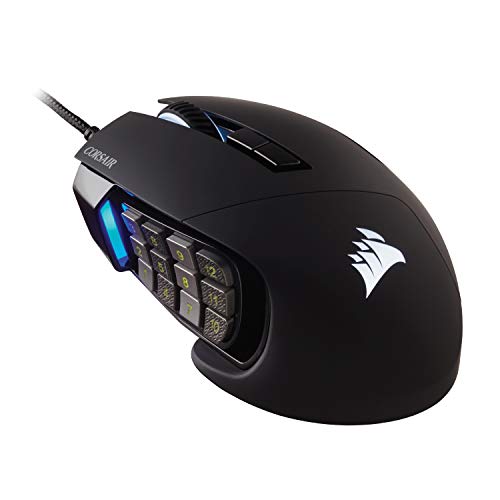
The Corsair Scimitar RGB Elite is designed around a side panel of programmable controls for MMO and MOBA games. That layout can place many commands under your thumb and reduce the need to use keyboard shortcuts. It is a wired mouse, which keeps it ready without a battery. The product title does not list a dedicated sniper button, so I see it as a specialist alternative rather than a direct match.
For a shooter player, a large side-button grid may be more than needed. It can still be useful if you play several genres and want to map actions to one device. Think about whether your thumb can reach the buttons without shifting your palm. If your only goal is to lower sensitivity while aiming, a mouse with a clear sniper control may be easier to use.
Pros:
- Large programmable side-button layout suits MMO and MOBA commands.
- Wired connection avoids charging.
- Useful for players who want many mapped actions.
- Can support varied game profiles and shortcut needs.
- RGB lighting offers a customizable look.
Cons:
- No dedicated sniper button is listed in the supplied product title.
- The many side controls can take practice to use well.
- Its MMO-focused layout may feel bulky for simple FPS play.
What Amazon Buyers Are Saying
Read current Amazon comments about the side-button panel, grip comfort, and setup. Buyers who use MMO controls may value the layout in a way that FPS players do not, so match the review context to your own needs. Check for recent notes on software and button assignment. A comment about overall quality alone may not tell you whether it works for sniper-style aiming.
My Recommendation
I recommend the Scimitar for MMO or MOBA players who need many thumb commands. It is not my pick for a dedicated sniper button because that feature is not stated in the supplied product details. My overall rating for sniper-button use is 3.5/5.
| Category | Rating |
|---|---|
| Sniper-button match | 2.8/5 |
| Side-button utility | 4.7/5 |
| Genre versatility | 4.2/5 |
| FPS simplicity | 3.4/5 |
| Overall Rating | 3.5/5 |
Redragon M908 Wired MMO Gaming Mouse

The Redragon M908 is a wired MMO mouse with remapping keys and a product title that lists up to 12,400 DPI. Its main appeal is its large set of side controls, which can help players bind skills and commands. That design may also suit users who want many shortcuts for work. The title does not state that it includes a dedicated sniper button, so do not assume its extra keys have that function by default.
It can make sense if you want a low-cost path into a multi-button gaming layout. But if you plan to use one control to lower sensitivity, confirm that the software supports the exact assignment you want. A button grid also needs a little practice so you can press the right key without looking. For a more direct FPS setup, a mouse with an explicit sniper button may save time.
Pros:
- Many remapping keys support MMO commands and shortcuts.
- Up to 12,400 DPI is listed in the product title.
- Wired use avoids battery charging.
- Programmable layout can suit different games.
- RGB lighting adds a gaming-style look.
Cons:
- No dedicated sniper button is stated in the supplied title.
- The many side keys may be hard to learn at first.
- Its MMO design may not feel ideal for fast, simple FPS play.
What Amazon Buyers Are Saying
Before buying, read recent reviews for comments on side-button placement, software, and hand comfort. A large button grid helps some MMO players but can feel crowded to others. Look for comments that mention the same games you play. If you want a sniper action, verify that buyers describe a working low-DPI assignment rather than relying on the product’s DPI figure.
My Recommendation
The M908 is a reasonable MMO pick, but it is not a clear sniper-button choice based on the supplied listing details. I would buy it for remappable side keys, not just for precision aiming. My overall rating for this use is 3.6/5.
| Category | Rating |
|---|---|
| Sniper-button match | 2.9/5 |
| Macro and remap use | 4.4/5 |
| MMO suitability | 4.5/5 |
| FPS ease | 3.4/5 |
| Overall Rating | 3.6/5 |
Redragon M913 Wireless MMO Gaming Mouse

The Redragon M913 combines wireless play with an MMO-style set of remapping keys and a product title that lists 16,000 DPI. It is aimed at players who want multiple commands close to the thumb without a cable crossing the desk. The product details supplied here do not identify a dedicated sniper button. That makes it a better fit for wireless MMO play than for a strict sniper-button shortlist.
Its wireless setup can make a desk feel less cluttered, and its side controls can support games with many abilities. You should still check battery details and included connection options on the current product page. For shooter use, consider whether you can set one of its buttons to a temporary low-DPI action. If not, another mouse in this guide offers a clearer path to the feature.
Pros:
- Wireless format removes cable drag.
- Side keys support MMO commands and remaps.
- Up to 16,000 DPI is listed in the product title.
- RGB lighting gives you control over the look.
- Can work well for players who switch between MMO and other games.
Cons:
- The supplied title does not list a dedicated sniper button.
- Wireless use requires attention to battery and connection setup.
- Side keys can feel crowded if you prefer a simple mouse.
What Amazon Buyers Are Saying
Use current Amazon reviews to check wireless stability, battery life, and how easy the side keys are to reach. Look for comments from people who use the mouse for long sessions, not just first impressions. If you want a sniper button, check whether recent users explain how they assigned one. Review details matter more than the DPI number for this purpose.
My Recommendation
The M913 is worth a look if you want wireless MMO controls, but it is not a confirmed dedicated sniper-button pick from the supplied details. Choose it for its button layout and wireless form, after checking current specs. My overall rating for sniper-button use is 3.7/5.
| Category | Rating |
|---|---|
| Sniper-button match | 3.0/5 |
| Wireless convenience | 4.2/5 |
| MMO control options | 4.4/5 |
| FPS suitability | 3.5/5 |
| Overall Rating | 3.7/5 |
Logitech G305 LIGHTSPEED Wireless Mouse

The Logitech G305 LIGHTSPEED is a compact wireless gaming mouse for people who value a clean desk and a simple control layout. Its product title does not list a sniper button, so it is not a direct match for this guide’s main feature. It can still appeal to players who want wireless gaming without a large MMO-style button panel. Consider it as a general gaming alternative, not as the best gaming mouse with sniper button.
Its simpler design may be easier to learn than a mouse with many extra controls. Check current product information for sensor, battery, and software details before buying, since listings can change. If you need a temporary lower sensitivity, see whether its available buttons can be assigned to that task in the software. If they cannot, select a mouse with a stated sniper or clutch control instead.
Pros:
- Wireless design keeps the desk clear of a mouse cable.
- Simple layout can suit players who dislike many side buttons.
- Compact form is easy to move between setups.
- Useful for general gaming and everyday computer use.
- Logitech software may offer button and sensitivity setup options.
Cons:
- No dedicated sniper button is listed in the supplied product title.
- Battery upkeep is part of wireless ownership.
- May not suit users who want a larger ergonomic shape or many controls.
What Amazon Buyers Are Saying
Check recent Amazon reviews for wireless setup, battery use, shape, and button feel. These are practical points that can affect daily use. Since buyers may use the G305 for different games, prioritize feedback from FPS players if that is your main use. Do not treat general praise for wireless play as proof that it has a dedicated sniper feature.
My Recommendation
The G305 is a reasonable wireless gaming mouse, but I would not choose it when a sniper button is essential. It belongs on this list as a useful alternative for simple wireless play, not as a direct feature match. My overall rating for this category is 3.4/5.
| Category | Rating |
|---|---|
| Sniper-button match | 2.5/5 |
| Wireless convenience | 4.3/5 |
| Simple control layout | 4.2/5 |
| Overall gaming use | 4.0/5 |
| Overall Rating | 3.4/5 |
How to Choose the Best Gaming Mouse With Sniper Button
The best gaming mouse with sniper button is not always the one with the highest DPI or the most buttons. It is the one you can hold comfortably and use without breaking your aim. Start with the feature you need, then check the shape, connection, and software. A few minutes of setup can make a larger difference than a long list of specs.
1. Confirm How the Sniper Button Works
A true sniper button usually lowers mouse sensitivity while you hold it. Some mice use a dedicated key. Others let you assign a clutch or DPI shift button in their software. Check whether the change is temporary or stays active after you press it. For a temporary shift, the control should feel easy to press and release without changing your grip.
Choose a lower DPI that still lets you track targets. A very low setting can make it hard to follow a moving player. Try a few levels in a practice area, then keep the one that gives you steady aim. If the product page only says “programmable button,” do not assume it includes a sniper function. Confirm the software can assign a DPI shift before purchase.
2. Match the Shape and Button Position to Your Hand
The sniper button only helps if you can reach it at the right time. Check the mouse shape, length, and thumb-rest design. A button placed too far forward may feel awkward if you have smaller hands. A cluster of extra controls may also cause mistakes if you use a relaxed grip or move your thumb often.
Think about how you hold a mouse. Palm grip users often prefer a fuller shape, while claw or fingertip users may want a more compact feel. If possible, compare the dimensions with a mouse you already own. Read buyer comments that mention hand size and grip style. Comfort matters during long play sessions, and it can affect how steady your aim feels.
3. Choose the Right Connection and Button Set
A wired mouse is simple to keep powered, but its cable can drag across the desk. A wireless mouse gives you more freedom, but you need to plan for battery care and receiver setup. Neither option is always better. Pick the one that fits your desk, play habits, and budget.
Next, decide how many extra buttons you will use. An MMO mouse can offer many commands, but a crowded layout may distract an FPS player. If you mainly play shooters, one clear sniper control and a few useful side buttons may be enough. If you play games with many abilities, more programmable keys can save keyboard space. Compare the real controls, not just the total button count.
Final Verdict: Which Should You Buy?
The Logitech G502 HERO is my best overall pick because its DPI shift can serve as a sniper control, and its other buttons suit many games. Choose the Redragon M614 if you want a model whose listing directly calls out an extra sniper button.
For the best gaming mouse with sniper button, focus on comfort, easy button access, and a sensitivity shift you can control. Check current prices, software details, and recent buyer reviews before ordering.
FAQs Of best gaming mouse with sniper button
What does a sniper button do on a gaming mouse?
It lowers sensitivity while you press or hold the button. This can make small aim adjustments easier, then restore your normal sensitivity when you release it.
Is the Logitech G502 HERO a good mouse for sniper aiming?
Yes. Its DPI shift can work as a sniper-style control after you set a lower sensitivity in Logitech software.
Which mouse in this guide lists a dedicated sniper button?
The Redragon M614 and MOJO Pro list a sniper control in their supplied product titles. The wired rapid-fire model also lists a sniper button.
Is a higher DPI better for sniper aiming?
Not always. A lower DPI can help with small movements, but the best setting depends on your control and game. Test a few settings and use the one that feels steady.
Should I buy a wired or wireless gaming mouse with a sniper button?
Choose wired if you want power without battery upkeep. Choose wireless if you want less cable drag and are comfortable managing its battery and connection.