For most players, the Logitech G502 Hero offers a strong blend of control, comfort, and useful thumb shortcuts.
If you keep reaching for the keyboard to reload, switch tools, or cast a spell, a gaming mouse with side buttons can make play feel smoother. Four easy-to-reach thumb controls are often enough for common commands without crowding your grip. Many mice below have more than four side buttons, so you can map only the ones you need. I compare their layouts, connection types, features, and limits to help you find the best gaming mouse with 4 side buttons for your games and hand.
See the differences between my top picks at a glance.
| Mouse | Connection | Button style | Best for | Product focus | Link |
|---|---|---|---|---|---|
| Logitech G502 Hero | Wired | Several thumb controls | Mixed games | Versatile control | View on Amazon |
| Corsair Scimitar RGB Elite | Wired | Large MMO side grid | MMO and MOBA | Many mapped commands | View on Amazon |
| Redragon M913 | Wireless | MMO side controls | Wireless MMO play | Cord-free setup | View on Amazon |
| Redragon M901K | Wired | 12 side buttons | Macro-heavy games | Programmable controls | View on Amazon |
| Redragon M908 | Wired | MMO-style remapping keys | Hotkeys and macros | Feature-rich setup | View on Amazon |
| AFUNTA C12 | Wired | 12 programmable buttons | Budget button mapping | Four-level speed switch | View on Amazon |
| UtechSmart Venus Pro | Wired | MMO-style side controls | Many hotkeys | High listed DPI | View on Amazon |
| Redragon M921 | Wired | Remappable keys | Wired macro use | RGB lighting | View on Amazon |
| SM809 Pro | Tri-mode | 16 custom buttons | Flexible connection needs | High listed DPI | View on Amazon |
| Redragon M901P-KS | Wireless | 12 side buttons | Wireless macro use | Listed 70-hour battery life | View on Amazon |
Logitech G502 Hero Wired Gaming Mouse

The G502 Hero is a wired gaming mouse built for players who want several quick controls without using a full MMO keypad. Its thumb area gives you shortcuts for common commands, while the main buttons handle regular play. It suits people who switch between shooters, action games, and strategy titles. This is the most balanced pick here if you want a familiar shape and a manageable number of controls.
The G502 Hero is not a simple four-button MMO mouse, so check its layout before you buy if four thumb buttons are a firm requirement. Its appeal is the mix of extra controls and a more general-purpose design. A wired connection also means you do not need to charge it or manage a wireless receiver. I would pick it for flexible use, not for a large grid of side keys.
Pros:
- Useful extra controls for common in-game actions.
- Wired connection avoids battery charging.
- More versatile for mixed game types than a dense MMO keypad.
- Logitech gaming software supports custom control setup.
- Suitable for players who want shortcuts without a large side grid.
Cons:
- It does not provide a simple four-button side-only layout.
- The wire may bother players who prefer a clean, cable-free desk.
- Its extra controls still require time to learn and set up.
What Amazon Buyers Are Saying
Amazon review totals and comments can change, and I cannot confirm the current review mix for this listing. Before buying, look for recent verified-purchase reviews that discuss button feel, comfort during long sessions, and software setup. Also check whether reviewers describe the shape as a good fit for their hand size and grip.
My Recommendation
I recommend the G502 Hero to players who want a strong all-round wired mouse and a few useful shortcuts. It is my overall pick in this group, but it is not the best choice if you need exactly four side buttons in a clean row. Overall rating: 4.4/5.
| Category | Rating |
|---|---|
| Control layout | 4.2/5 |
| Mixed-game use | 4.7/5 |
| Connection ease | 4.6/5 |
| Value | 4.2/5 |
| Overall Rating | 4.4/5 |
Corsair Scimitar RGB Elite Wired MMO Mouse
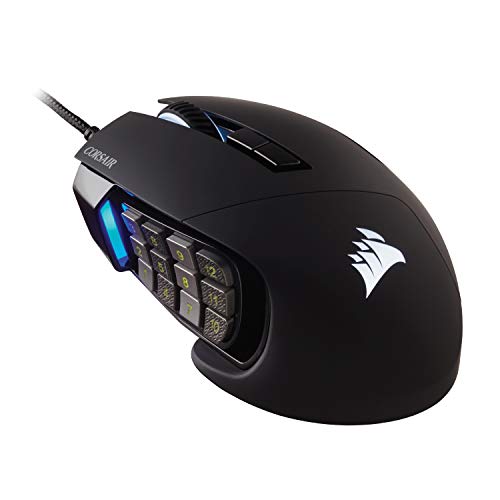
The Scimitar RGB Elite is made for players who want many commands under the thumb. Its MMO-style side grid can hold skills, items, and other key binds. That makes it a natural fit for games with large action bars or frequent ability use. It also works for people who want to assign work shortcuts to a gaming mouse.
This is a bigger step up from a four-side-button layout. You can use only a few keys at first, then add more as you learn the placement. The dense grid may feel crowded if you prefer a simple shape or play games that need fast, broad mouse movement. Check the current listing for the exact model details and software support before ordering.
Pros:
- Side keypad supports many commands in one place.
- Useful for MMO and MOBA games with frequent ability use.
- Can reduce the need to reach for keyboard hotkeys.
- RGB lighting lets you tailor the look of the setup.
- Wired power means no battery charging routine.
Cons:
- The number of side keys can feel like too much for simple games.
- Players need practice to find the right thumb key by feel.
- A wired cable may not suit every desk layout.
What Amazon Buyers Are Saying
Current Amazon ratings and written feedback may change over time, so I will not assign a review consensus without checking the live listing. When you read recent buyer reviews, focus on comments about the side-key feel, thumb reach, software setup, and long-session comfort. These details matter more than RGB preferences if you plan to use the mouse for long MMO sessions.
My Recommendation
The Scimitar RGB Elite makes sense if you want many side commands and are willing to learn a keypad. It is less suited to someone who wants exactly four simple buttons. Overall rating: 4.3/5.
| Category | Rating |
|---|---|
| Side-key capacity | 4.8/5 |
| Ease of learning | 3.8/5 |
| MMO fit | 4.7/5 |
| Value | 4.0/5 |
| Overall Rating | 4.3/5 |
Redragon M913 Wireless RGB MMO Mouse

The Redragon M913 is a wireless MMO mouse with RGB lighting and remappable keys. It aims to give MMO players a cluster of thumb controls without a cable running to the PC. That can make a desk feel less cluttered and leave more room for broad mouse movement. Its button-heavy style works best when you plan to bind skills or repeated actions.
The M913 makes more sense for someone who values wireless use than for someone seeking a basic four-button layout. Before buying, check the listing for included wireless parts, connection details, and software compatibility. Wireless comfort depends on your setup and how you manage charging. Keep the first set of bindings simple, then add more when the layout feels familiar.
Pros:
- Wireless design helps keep the desk clear.
- Remappable keys support personal game layouts.
- MMO-style controls suit games with many actions.
- RGB lighting adds a visual option for a gaming setup.
- Suitable for players who want wireless thumb shortcuts.
Cons:
- It has more controls than many four-button buyers need.
- You must plan for charging or battery care.
- Wireless setup and software needs can vary by computer.
What Amazon Buyers Are Saying
I cannot verify the live Amazon review mix for this listing, so I will not claim a set of buyer opinions as fact. Read recent verified reviews for notes on connection stability, battery use, side-key placement, and the setup process. Those points will help you judge whether this wireless MMO design fits your routine.
My Recommendation
Choose the M913 if you want wireless MMO controls and do not mind learning a larger button layout. If your main need is exactly four side buttons, a simpler mouse may feel easier. Overall rating: 4.1/5.
| Category | Rating |
|---|---|
| Wireless use | 4.3/5 |
| Button flexibility | 4.4/5 |
| Ease of setup | 3.8/5 |
| Value | 4.0/5 |
| Overall Rating | 4.1/5 |
Redragon M901K Wired MMO Gaming Mouse

The Redragon M901K is a wired MMO mouse listed with 19 programmable buttons and 12 side buttons. Its 12,400 DPI rating gives you room to set different cursor speeds, though a high DPI number alone does not make a mouse more accurate. The side grid can hold many commands for games with skill bars or repeated actions. You can also leave unused keys alone and start with a smaller set.
This model is best for a player who wants a lot of controls at a modest level of complexity in the software. It is not the right pick if you want four buttons spaced far apart. The close grid can take practice, especially if you want to press a key without looking. A wired connection keeps the mouse ready without battery planning.
Pros:
- 12 side buttons give room for many custom commands.
- 19 programmable buttons provide broad control options.
- Wired use avoids charging and pairing steps.
- High listed DPI range allows cursor-speed adjustment.
- Useful for MMO, MOBA, and macro-heavy game layouts.
Cons:
- Many side keys may feel crowded for small hands.
- The full layout can take time to learn by touch.
- It is more complex than a mouse with four simple thumb buttons.
What Amazon Buyers Are Saying
Amazon buyer feedback changes, and I cannot confirm the current review themes for this exact listing. Check recent verified reviews for reports about the thumb grid, button response, software, and fit. Pay close attention to comments from players who use the mouse for the same game type as you.
My Recommendation
The M901K is worth considering if you want a wired MMO mouse with many assignable controls. For four core shortcuts, you can map only four keys, but the larger grid may still feel busy. Overall rating: 4.0/5.
| Category | Rating |
|---|---|
| Macro capacity | 4.7/5 |
| Four-key simplicity | 3.5/5 |
| Wired convenience | 4.3/5 |
| Value | 4.1/5 |
| Overall Rating | 4.0/5 |
Redragon M908 Wired MMO Gaming Mouse

The Redragon M908 is a wired MMO gaming mouse with remapping keys and a listed 12,400 DPI setting. It is designed for players who want more commands within thumb reach. That can help when a game asks you to switch skills or items often. It can also suit creative apps if you like to bind common shortcuts to mouse buttons.
Because the product listing stresses remappable keys, plan on spending time with the setup rather than expecting every button to fit your game by default. More keys can help, but they can also slow you down if they sit too close together. A good test is to bind only your most-used actions first. Add more after you can find those keys without looking.
Pros:
- Remapping gives you control over the button layout.
- Wired operation does not need battery charging.
- MMO design supports multiple in-game shortcuts.
- Listed 12,400 DPI offers cursor-speed choices.
- Can be useful for games and apps with repeated commands.
Cons:
- The many-key style may not suit a simple shooter setup.
- Custom mapping takes time to arrange and test.
- Confirm the current listing for exact included features.
What Amazon Buyers Are Saying
I cannot verify current Amazon comments for this product, so I will not invent buyer quotes or claim a specific review trend. Read recent verified-purchase feedback about software, side-button reach, and long-term use. Look for detailed reviews that explain the buyer’s hand size and main games.
My Recommendation
The M908 is a practical wired option for players who want a remappable MMO layout. It can cover four key actions, but it includes more complexity than a true four-button mouse. Overall rating: 4.0/5.
| Category | Rating |
|---|---|
| Button mapping | 4.4/5 |
| Everyday ease | 3.9/5 |
| Wired reliability | 4.3/5 |
| Value | 4.0/5 |
| Overall Rating | 4.0/5 |
AFUNTA C12 12-Button Gaming Mouse
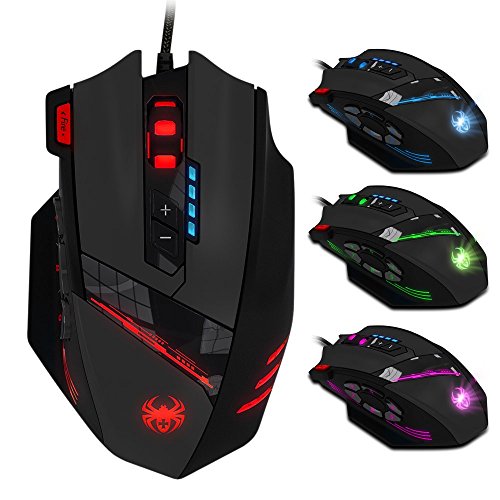
The AFUNTA C12 is listed with 12 programmable buttons, an 8,000 DPI laser sensor, and a four-level speed switch. That mix gives buyers several ways to set up commands and cursor speed. It may suit players who want a budget route into macro controls. It can also work for someone who likes to adjust speed through preset steps.
The C12 has far more than four programmable buttons, so think about how you will use the layout before you buy. If only four actions matter, map those first and ignore the rest. The listing describes the sensor as laser, which is worth checking against your surface and preferred tracking feel. Make sure the current product page lists software that works with your computer.
Pros:
- 12 programmable buttons allow several custom commands.
- Four-level speed switch offers quick DPI changes.
- 8,000 DPI rating gives a broad listed range.
- Wired setup avoids the need to charge a battery.
- Can offer a lower-cost way to try a multi-button layout.
Cons:
- The side layout may feel crowded if you only need four controls.
- Confirm software support before relying on custom profiles.
- Sensor type and surface needs may not suit every desk mat.
What Amazon Buyers Are Saying
I cannot confirm live buyer feedback or review patterns for the C12 listing. Read recent verified reviews for notes on software installation, button response, and sensor tracking on common mouse pads. Also check if reviewers can save and switch profiles as you plan to do.
My Recommendation
The AFUNTA C12 may suit a budget-minded buyer who wants many buttons and speed steps. I would confirm software and surface compatibility before purchase. Overall rating: 3.8/5.
| Category | Rating |
|---|---|
| Programmable controls | 4.2/5 |
| Speed adjustment | 4.0/5 |
| Setup confidence | 3.4/5 |
| Value | 3.8/5 |
| Overall Rating | 3.8/5 |
UtechSmart Venus Pro Wired MMO Mouse

The UtechSmart Venus Pro is described as a wired MMO mouse with RGB lighting and a listed 16,400 DPI. Its design targets players who need several commands close to the thumb. That can make it a better fit for a complex action bar than a basic mouse. It is also an option for users who want a wired setup and do not need wireless freedom.
A high DPI ceiling is not a reason by itself to choose this mouse. Most players should set a speed that feels controlled, then keep it steady while learning the buttons. The MMO layout may take time to master, so give yourself a few sessions before judging it. Check the live listing for exact button count and software details, as product descriptions can vary by version.
Pros:
- Listed 16,400 DPI gives several cursor-speed options.
- MMO-style layout supports extra commands.
- Wired use avoids charge time and wireless pairing.
- RGB lighting offers a custom visual touch.
- Useful for players who favor hotkeys near the thumb.
Cons:
- Its larger command layout can overwhelm a new user.
- Exact version details should be checked on the current listing.
- A cable can limit desk placement or movement preference.
What Amazon Buyers Are Saying
I cannot verify current Amazon review themes for this product. Check recent verified reviews for comments on hand comfort, thumb-key spacing, tracking, and software setup. Try to find feedback from buyers who use it for the same kinds of games that you play.
My Recommendation
The Venus Pro is worth a look for MMO players who want a wired mouse with a high listed DPI range. It is not my first choice for a clean four-button design. Overall rating: 3.9/5.
| Category | Rating |
|---|---|
| MMO controls | 4.2/5 |
| Wired use | 4.2/5 |
| Ease of learning | 3.6/5 |
| Value | 3.8/5 |
| Overall Rating | 3.9/5 |
Redragon M921 Wired RGB MMO Mouse

The Redragon M921 is a wired RGB MMO mouse listed with 12,400 DPI and remapping keys. Its core draw is the option to assign controls for games that rely on repeated skills or commands. A wired connection keeps the setup direct and means you do not need to manage a wireless battery. The lighting gives you a way to match the mouse to a gaming desk.
The listing name does not tell the full story of its button layout, so check the product details and photos before you order. Do not assume it has exactly four thumb buttons. If it has a larger side layout, decide whether you can use the extra keys or leave them idle. A good return policy matters when you cannot test the fit in person.
Pros:
- Remapping keys allow custom game commands.
- Wired connection keeps it ready for play.
- RGB lighting offers a visual setup option.
- 12,400 DPI is the listed maximum sensitivity.
- MMO focus suits games with many hotkeys.
Cons:
- Check the current listing for the exact number and position of buttons.
- A macro-focused design may be unnecessary for casual play.
- Software and profile features should be confirmed before purchase.
What Amazon Buyers Are Saying
I cannot confirm current buyer review patterns for this listing. Before purchase, scan recent verified reviews for details about the real button layout, software, and long-term use. A clear buyer photo may also help you judge the mouse size and thumb reach.
My Recommendation
The M921 is a possible pick for players who want a wired Redragon MMO model with remapping and RGB. Verify its layout first if you need exactly four side buttons. Overall rating: 3.8/5.
| Category | Rating |
|---|---|
| Remapping | 4.0/5 |
| Layout clarity | 3.5/5 |
| Wired convenience | 4.2/5 |
| Value | 3.8/5 |
| Overall Rating | 3.8/5 |
SM809 Pro Tri-Mode MMO Gaming Mouse

The SM809 Pro is listed as a tri-mode MMO mouse with 16 custom buttons and 24,000 DPI. Tri-mode means the listing offers more than one way to connect, but check the exact modes and included receiver before buying. The button count suggests a focus on macro-heavy play rather than a simple four-button setup. It may appeal to someone who wants one mouse for more than one connection situation.
With this many buttons, comfort and layout matter more than the headline DPI number. Check product photos and current details to see where the extra controls sit and how the modes work. You should also confirm whether its software supports your operating system and the profiles you want. If you only need four commands, a simpler model may be faster to learn.
Pros:
- Tri-mode connection offers multiple connection options as listed.
- 16 custom buttons support many possible commands.
- High listed DPI range allows sensitivity choices.
- Designed for MMO players who use many hotkeys.
- May suit users who want one mouse for different devices or setups.
Cons:
- Exact connection modes should be checked on the live listing.
- 16 buttons can be excessive for players who want four controls.
- Software support and included accessories need confirmation.
What Amazon Buyers Are Saying
I cannot verify Amazon’s current review mix for this listing. Check recent verified feedback for connection mode changes, software setup, charging or battery details, and the feel of the side controls. Since this model’s listing focuses on many features, look for reviews that report which ones work well in daily use.
My Recommendation
The SM809 Pro could suit a player who wants a multi-connection MMO mouse and many custom buttons. I would not buy it for a four-button need without first confirming the layout. Overall rating: 3.9/5.
| Category | Rating |
|---|---|
| Connection flexibility | 4.2/5 |
| Custom controls | 4.5/5 |
| Ease of use | 3.5/5 |
| Value | 3.8/5 |
| Overall Rating | 3.9/5 |
Redragon M901P-KS Wireless MMO Mouse

The Redragon M901P-KS is a wireless MMO mouse listed with 16,000 DPI, 16 macro-programmable buttons, 12 side buttons, and up to 70 hours of battery life. That feature set gives it a strong focus on wireless macro use. The 12-key thumb area can suit games with many actions, while the cordless design cuts desk cable clutter. Battery life figures depend on how the mouse is used, so check the current listing for test conditions.
This mouse is a better match for a player who wants a large side grid than for someone seeking only four buttons. You can begin with four assigned commands and leave the rest unused. It still takes time to learn the key positions and manage software profiles. Check whether the size, hand fit, and charging method fit your habits before committing.
Pros:
- Wireless design keeps a cable off the desk.
- 12 side buttons provide space for many shortcuts.
- 16 macro-programmable buttons support custom layouts.
- Listed battery life reaches up to 70 hours.
- Listed 16,000 DPI allows sensitivity adjustment.
Cons:
- The 12-button side grid may feel too dense for some players.
- Battery life can change with settings and use.
- Wireless software and charging add setup tasks.
What Amazon Buyers Are Saying
I cannot confirm current Amazon feedback for this exact listing. Look at recent verified reviews for battery life in real use, wireless connection, software, and how easy it is to find each thumb key. Those points matter most for a wireless MMO mouse.
My Recommendation
The M901P-KS is appealing if you want wireless control and a large macro layout. It is more mouse than most four-button users need, but it gives room to grow. Overall rating: 4.1/5.
| Category | Rating |
|---|---|
| Wireless freedom | 4.3/5 |
| Macro capacity | 4.6/5 |
| Battery convenience | 4.0/5 |
| Four-button simplicity | 3.5/5 |
| Overall Rating | 4.1/5 |
How to Choose the Best Gaming Mouse With 4 Side Buttons
The best gaming mouse with 4 side buttons should put the controls you use most within easy thumb reach. It should also suit your hand, game type, and preferred connection. Some mice in this list have many more than four side keys. That can work if you can ignore the extras, but a simpler layout may be easier to use.
1. Match the Side Layout to Your Games
Think about the actions you want to move from the keyboard. Four side buttons can handle reload, melee, push-to-talk, or common skills. In an MMO, you may want more keys for abilities and items. If you choose a 12-button grid, check whether the keys have a clear feel or spacing so you can find each one without looking.
Do not choose a mouse only because it has the largest button count. Extra keys help only when you can reach and use them. For shooters, a few well-placed buttons may be easier to manage than a dense thumb keypad. For MMOs, a larger grid may cut down on keyboard reaches.
2. Check Fit, Grip, and Connection
Your hand should rest on the mouse without strain. Check the product size and shape, and read reviews from people with a similar hand size if that information is available. A side button that sits too far forward or too close to another key can be hard to use well. If possible, try the mouse in person or buy from a retailer with a fair return policy.
Choose wired if you want to skip battery care and do not mind a cable. Choose wireless if a clear desk and free movement matter more. For wireless models, confirm the connection types, receiver, and charging method on the current product listing. “Tri-mode” can mean different connection options by model, so check the exact details.
3. Judge Software, DPI, and Value
Button software matters because you need a way to assign actions. Check that the mouse supports your computer and that the setup tool can save the profiles you need. Start with simple key binds. Macros can help with repeated actions, but they should follow the game’s rules and terms.
DPI is a measure of cursor sensitivity, not a simple score for quality. A very high maximum may look impressive, but a stable setting that feels right matters more. Compare build, comfort, side-key access, support, and price instead of chasing the biggest number. The best gaming mouse with 4 side buttons is the one that feels natural and makes your most-used actions easier.
Final Verdict: Which Should You Buy?
For most players, I recommend the Logitech G502 Hero as the most versatile pick in this group. It has useful extra controls and suits more than one game type. For MMO players who need a large side grid, consider the Corsair Scimitar RGB Elite or a Redragon MMO model.
Before you buy the best gaming mouse with 4 side buttons, confirm the exact layout, fit, software, and connection details on the current listing. Choose the fewest buttons that meet your needs.
FAQs Of best gaming mouse with 4 side buttons
Is a mouse with four side buttons good for FPS games?
Yes. Four side buttons can hold useful commands such as reload, melee, or push-to-talk. A simple layout may be easier to use than a large MMO keypad.
Are MMO mice with 12 side buttons hard to learn?
They can take practice because the keys sit close together. Start with a few commands, then add more as you learn the layout by touch.
Should I choose a wired or wireless gaming mouse?
Choose wired if you want to avoid charging. Choose wireless if you prefer less cable clutter. Check the exact connection and battery details for each model.
Does higher DPI make a gaming mouse better?
No. DPI sets cursor sensitivity. A comfortable, steady setting matters more than the highest number printed in a product listing.
Can I use only four buttons on a mouse that has more?
Usually, you can assign only the controls you need and leave the rest unused. Check the product software and current listing before buying.