The Logitech G305 Lightspeed is my best gaming mouse for PS5 for wireless play, value, and dependable controls.
A mouse can make aiming and menu use feel more natural, but PS5 mouse support depends on the game. Some games accept a mouse and keyboard; others require a controller. I focus here on comfort, connection type, useful controls, and value, while keeping that game-by-game limit in view. Before you buy, check whether your favorite PS5 game supports mouse input and whether it works with a standard USB mouse.
See the differences between my top picks at a glance.
| Mouse | Connection | Standout feature | Best for | PS5 setup note | Buy |
|---|---|---|---|---|---|
| Logitech G305 Black | 2.4GHz USB receiver | Wireless LIGHTSPEED link | Most players | Uses a USB receiver | View on Amazon |
| Redragon M612 | Wired USB | Extra side controls | Budget wired play | No battery or receiver | View on Amazon |
| Logitech G305 White | 2.4GHz USB receiver | Wireless design | Wireless setups | Needs an open USB port | View on Amazon |
| Corsair Scimitar RGB Elite | Wired USB | Many side buttons | MMO and shortcut use | Check game button support | View on Amazon |
| Razer DeathAdder Essential | Wired USB | Right-hand shape | Simple FPS controls | Direct USB connection | View on Amazon |
| Logitech G703 Lightspeed | Wireless with USB receiver | Rechargeable design | Larger right hands | Receiver uses USB | View on Amazon |
| Razer Orochi V2 | 2.4GHz or Bluetooth | Small, portable shape | Compact setups | Use its USB receiver | View on Amazon |
| Corsair Harpoon Wireless | Wireless or wired | Several connection modes | Flexible setups | Use a supported USB mode | View on Amazon |
| Logitech G305 Lilac | 2.4GHz USB receiver | G305 features in a color option | Colorful wireless setups | Needs a USB receiver port | View on Amazon |
| Redragon M730 PRO | Wireless | RGB lighting | Wireless value seekers | Check receiver details before buying | View on Amazon |
Logitech G305 Lightspeed Wireless Gaming Mouse

The black Logitech G305 is my top pick for players who want a simple wireless mouse for a PS5 setup. It connects through a small USB receiver and uses Logitech’s LIGHTSPEED wireless system. Its familiar shape and standard button layout suit many game types. The mouse runs on one AA battery, so you do not need to charge it between sessions.
The G305 has six buttons, including two side buttons, and Logitech’s HERO sensor. Logitech lists up to 12,000 DPI, but a high DPI number does not make a mouse better for every player. The key PS5 question is whether your game accepts mouse input. If it does, plug the receiver into the console and check the game’s control settings.
Pros:
- Wireless use keeps a cable off the desk.
- The USB receiver is simple to connect.
- Two side buttons add handy shortcuts where a game supports them.
- A replaceable AA battery avoids a built-in battery aging out.
- It offers a strong mix of features and price for everyday play.
Cons:
- The receiver takes up a USB port.
- The AA battery adds weight compared with some rechargeable mice.
- It does not suit every hand size or grip style.
What Amazon Buyers Are Saying
Buyer feedback can change over time, so check the current Amazon listing for recent comments on comfort, battery life, and receiver use. Those are the details that matter most in day-to-day use. I would also look for feedback from buyers who use the mouse for a similar grip and game style.
My Recommendation
I recommend the G305 as the best gaming mouse for PS5 for most players who want wireless control without a complex setup. Its receiver makes it a practical console option, as long as the game supports a mouse. It is a sensible buy for casual play and compatible shooters.
| Category | Rating |
|---|---|
| PS5 connection ease | 4.5/5 |
| Wireless convenience | 4.5/5 |
| Control options | 4/5 |
| Value | 4.5/5 |
| Overall rating | 4.5/5 |
Redragon M612 Wired RGB Gaming Mouse

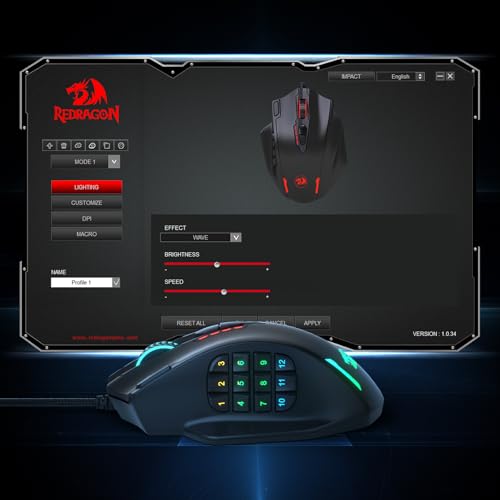
The Redragon M612 is a wired option for players who want extra buttons at a low cost. Its cable means you do not need a battery or wireless receiver. The listing describes an optical sensor with up to 8,000 DPI and remappable controls. That makes it more flexible than a basic office mouse when a supported game lets you assign extra actions.
The main trade-off is the cable. It can snag or pull if your desk is tight, so leave enough slack between the mouse and console. RGB lighting adds a gaming look, but it does not improve aiming or PS5 compatibility. For console use, the best test is still to connect it and check whether the game recognizes mouse input.
Pros:
- Wired USB use avoids charging and battery changes.
- Extra controls can help with supported game actions.
- The listed DPI range offers room to adjust pointer speed.
- RGB lighting lets you add color to a gaming desk.
- It can be a budget-friendly way to try mouse play.
Cons:
- The cable may limit movement on a crowded desk.
- Some side buttons may not work in every PS5 game.
- Lighting and remapping features may need computer software to set up.
What Amazon Buyers Are Saying
Review details may vary by listing and over time. When reading current Amazon feedback, focus on reports about cable quality, button feel, and whether the shape fits your hand. Also check whether buyers mention setting up custom controls on a computer, since console games may not let you use every mouse feature.
My Recommendation
The M612 is worth a look if you want an affordable wired mouse with extra controls. I would choose it for a simple desk setup, not for a cable-free play space. Treat its extra buttons as a bonus rather than a promise that every PS5 game will support them.
| Category | Rating |
|---|---|
| PS5 connection ease | 4/5 |
| Button flexibility | 4/5 |
| Cable-free use | 2/5 |
| Value | 4/5 |
| Overall rating | 3.5/5 |
Logitech G305 Lightspeed Wireless Gaming Mouse

This white G305 has the same core design as the black version. It uses a USB receiver for wireless play and offers a familiar six-button layout. The lighter color can suit a white console or a clean desk setup. If the shape and features appeal to you, choose the finish that best fits your room.
As with the other G305 colors, this model uses one AA battery and Logitech’s LIGHTSPEED connection. You can change the sensor setting to match your preferred pointer speed. The listed sensor range is not a guarantee that every PS5 game will accept mouse controls. Confirm game support first, then make sure you have a free USB port for the receiver.
Pros:
- Wireless use helps keep a play area tidy.
- The white finish gives you a color choice beyond black.
- Two side buttons provide extra controls in supported games.
- A removable AA battery is easy to replace.
- Its familiar layout works for many general gaming tasks.
Cons:
- The white shell may show dirt more clearly over time.
- The USB receiver uses a console port.
- It lacks Bluetooth, so it depends on its receiver for wireless use.
What Amazon Buyers Are Saying
Check recent Amazon reviews for comments on the white finish, hand comfort, and battery use. Feedback often depends on hand size and grip, so one buyer’s comfort may not match yours. Verify that the listing is for the color and model you intend to order.
My Recommendation
I would choose this version when you want G305 performance in a lighter color. The hardware choice is much like the black model, so do not pay extra just for the finish unless the look matters to you. It remains a useful wireless pick for PS5 games that support mouse input.
| Category | Rating |
|---|---|
| PS5 connection ease | 4.5/5 |
| Wireless convenience | 4.5/5 |
| Color choice | 4/5 |
| Value | 4.5/5 |
| Overall rating | 4.5/5 |
Corsair Scimitar RGB Elite MMO Mouse
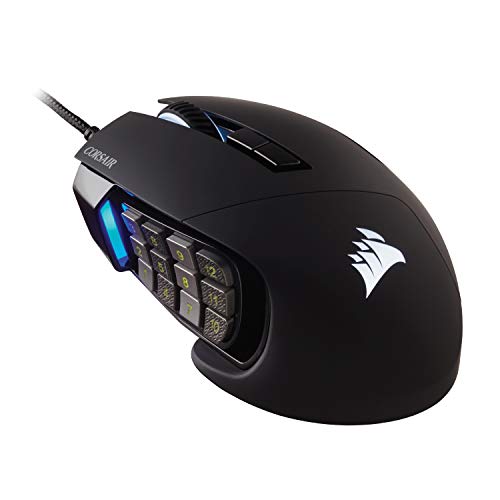
The Corsair Scimitar RGB Elite is built for players who want many controls close to the thumb. Its side panel holds a large group of buttons, which can suit MMO play and shortcut-heavy games. The panel can slide to help you find a more natural thumb position. It connects by cable, so you do not need to charge it or pair a receiver.
This design is more specialized than the other mice in this guide. A large button grid can be useful on a computer, but its value on PS5 depends on the game’s mouse and button support. Do not expect every side key to work as a separate command on console. Its size and button layout also take time to learn, so it is not my first choice for a simple FPS setup.
Pros:
- Many thumb buttons can place shortcuts within easy reach.
- The side panel can be adjusted to suit your hand.
- A wired link needs no battery or wireless receiver.
- It can serve MMO and MOBA players who use many commands.
- RGB lighting adds a custom look to a PC-style desk.
Cons:
- The many side buttons can feel crowded at first.
- The large shape may not suit smaller hands.
- PS5 games may not support all of its extra controls.
What Amazon Buyers Are Saying
Check the current listing for recent comments about the side panel, button feel, and hand fit. Those points matter more than the lighting for most buyers. Look closely at reviews from MMO players, but remember that PC software features may not carry over to a PS5.
My Recommendation
The Scimitar is a specialist choice. I recommend it only if you have a clear use for a large set of thumb buttons and your game supports them. For a basic PS5 mouse, a simpler model will likely feel easier and cost less.
| Category | Rating |
|---|---|
| PS5 connection ease | 4/5 |
| Shortcut potential | 4.5/5 |
| Ease for beginners | 2.5/5 |
| Value for MMO use | 4/5 |
| Overall rating | 3.5/5 |
Razer DeathAdder Essential Wired Mouse

The Razer DeathAdder Essential keeps the design simple. It has a right-hand shape, a wired USB connection, and a familiar set of main and side buttons. Razer lists a 6,400 DPI optical sensor. That setting range gives you options, though comfort and steady control matter more than a high number.
This mouse can be a good fit if you want to avoid wireless setup. Plug the cable into the PS5 and see whether your game detects it. The large, curved shape often suits a palm grip, but the fit depends on your hand. It is not an ambidextrous design, so left-handed players should consider a different mouse.
Pros:
- Wired USB setup keeps things simple.
- The right-hand shape supports a relaxed palm grip for many users.
- Two side buttons add useful controls in supported games.
- There is no battery to replace or recharge.
- The straightforward layout is easy to learn.
Cons:
- The cable can limit movement or catch on desk edges.
- The shape is made for right-handed use.
- It has fewer extra controls than MMO-focused mice.
What Amazon Buyers Are Saying
Before you buy, scan current Amazon reviews for notes about shape, cable feel, and long-term use. Hand fit is personal, so pay attention to comments from people with a similar grip. Also confirm that the listing matches the Essential model, not another DeathAdder version.
My Recommendation
I recommend the DeathAdder Essential to right-handed players who want a familiar wired mouse. It is a sensible value pick if its shape suits you and your PS5 game supports mouse controls. It is less appealing if you need wireless play or a mouse for either hand.
| Category | Rating |
|---|---|
| PS5 connection ease | 4.5/5 |
| Right-hand comfort | 4/5 |
| Control range | 3.5/5 |
| Value | 4/5 |
| Overall rating | 4/5 |
Logitech G703 Lightspeed Wireless Mouse

The Logitech G703 is a wireless mouse with a rounded right-hand shape. It uses LIGHTSPEED wireless and a USB receiver, and it has a rechargeable battery. The shape gives your palm more support than a small travel mouse. That may feel better during long sessions, especially if you use a palm grip.
The G703 costs more than simple wired models, so make sure its comfort and rechargeable design matter to you. Its receiver still needs a USB port on the PS5. Logitech also offers PowerPlay charging support, but that requires a separate compatible accessory. On console, focus first on basic pointer and button support in your chosen game.
Pros:
- Wireless play keeps the desk clear of a mouse cable.
- The contoured right-hand shell offers palm support.
- A rechargeable battery removes the need for disposable cells.
- Side buttons give you extra controls in supported games.
- It can pair well with a larger desk setup.
Cons:
- Its larger shape may not suit small hands or fingertip grip.
- The USB receiver takes up a port.
- Charging features beyond the cable may require extra gear.
What Amazon Buyers Are Saying
Check recent buyer reviews for hand comfort, battery behavior, and wireless receiver use. These points can vary with desk layout and play time. If you plan to use optional charging gear, confirm what comes in the box and what you must buy separately.
My Recommendation
The G703 is a strong pick if you want a larger, rechargeable wireless mouse. I would choose it over the G305 when palm support matters more than compact size or low cost. It is a good fit for compatible PS5 games, but its extra features cannot make an unsupported game accept mouse input.
| Category | Rating |
|---|---|
| PS5 connection ease | 4.5/5 |
| Comfort for larger hands | 4.5/5 |
| Wireless convenience | 4.5/5 |
| Value | 3.5/5 |
| Overall rating | 4/5 |
Razer Orochi V2 Wireless Gaming Mouse
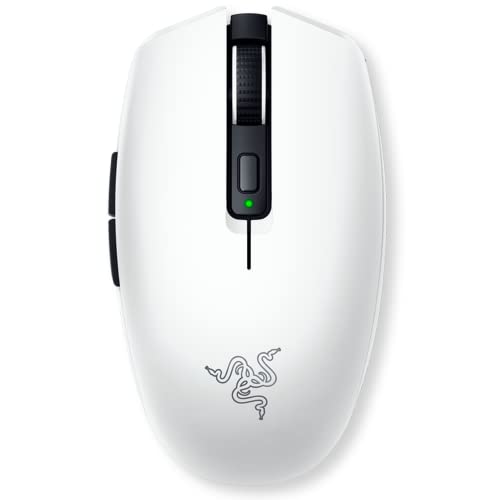
The white Razer Orochi V2 is a compact wireless mouse made for smaller setups and travel. It offers two wireless modes: 2.4GHz through a USB receiver and Bluetooth. For a PS5, the receiver is the mode to check first, since Bluetooth mouse support can vary by device and game. Its small body can be easier to move on a crowded desk.
Razer advertises long battery life, but actual use depends on the chosen connection, battery, and settings. The mouse uses a replaceable battery rather than a built-in rechargeable pack. Its smaller shape can suit fingertip or claw grips, but may feel cramped in a large hand. As with every mouse here, console game support remains the deciding factor.
Pros:
- Compact size suits a small desk or travel bag.
- Two wireless modes provide setup options.
- The white finish pairs well with light-colored gear.
- A replaceable battery can be swapped when needed.
- Its small shape can feel quick and easy to move.
Cons:
- The compact shell may feel too small for large hands.
- Bluetooth is not the connection I would assume will work on PS5.
- You need to manage battery replacement or charging outside the mouse.
What Amazon Buyers Are Saying
Look through current Amazon feedback for comments on size, hand comfort, and battery choice. The Orochi’s small body is a benefit for some buyers and a drawback for others. Check review notes for the white finish and confirm which battery or configuration the listing includes.
My Recommendation
I recommend the Orochi V2 if you want a small mouse and know you prefer a compact shape. Use the receiver for the clearest console setup, then test it with a supported game. It is less suitable for players who want a large palm rest or a built-in rechargeable battery.
| Category | Rating |
|---|---|
| PS5 connection ease | 4/5 |
| Compact use | 4.5/5 |
| Connection choice | 4/5 |
| Large-hand comfort | 3/5 |
| Overall rating | 4/5 |
Corsair Harpoon Wireless Gaming Mouse

The Corsair Harpoon Wireless gives you more than one way to connect. Depending on the exact version and included parts, the Harpoon line can support wireless and wired use. That flexibility can help if you want to use the mouse at a desk or avoid battery worries during a session. The listing identifies this model as a lightweight RGB mouse for FPS and MOBA play.
Before ordering, read the product details closely. Similar names and revisions can differ, so confirm the connection modes and included receiver for this exact listing. For PS5 use, a standard USB receiver or wired USB connection is the main point to verify. The mouse’s game support still depends on the title, not just the brand or wireless feature.
Pros:
- Wireless use can reduce desk clutter.
- A wired option may help when you want to avoid wireless setup.
- The listing presents it as a lightweight gaming design.
- Side controls can be useful in games that support them.
- RGB lighting adds a custom look.
Cons:
- Confirm the exact version and connection options before purchase.
- Wireless use may require a USB receiver and an open port.
- Lighting and software controls may offer little value on PS5.
What Amazon Buyers Are Saying
Check the current listing for review comments on wireless stability, battery use, and the mouse’s size. Also make sure the reviews match the same Harpoon version, since product names can cover different models. For console buyers, feedback about USB setup matters more than computer software features.
My Recommendation
The Harpoon Wireless is worth considering if you want a flexible mouse and confirm the exact model has the connection you need. I would not buy it based on the word “wireless” alone. Check the receiver details and test the mouse with a game that supports mouse input.
| Category | Rating |
|---|---|
| PS5 setup potential | 4/5 |
| Connection flexibility | 4/5 |
| Ease of buying the right version | 3/5 |
| Value | 3.5/5 |
| Overall rating | 3.5/5 |
Logitech G305 Lightspeed Wireless Gaming Mouse

The lilac G305 offers the same core features as the other color versions in this guide. It uses a wireless USB receiver, has six buttons, and runs on a replaceable AA battery. Its main draw is the color, which gives a gaming setup a softer look than a standard black mouse. It can be a good match for a coordinated desk or console space.
Color does not change the main buying questions. Check the shape against your hand, confirm that you have a free USB port, and make sure your game accepts mouse input. The receiver-based setup is simple, but the PS5 cannot make unsupported games work with a mouse. If the price is higher than another G305 color, decide whether the finish is worth the difference.
Pros:
- Distinct lilac color gives you a style option.
- Wireless receiver keeps the mouse cable-free.
- Two side buttons can help with supported game actions.
- The replaceable battery is easy to change.
- It shares the useful everyday layout of the G305 family.
Cons:
- The lilac finish may cost more than another color.
- A USB receiver takes up a console port.
- It may not fit players who prefer a larger mouse.
What Amazon Buyers Are Saying
Read current Amazon reviews to check color accuracy, comfort, and battery use. Color can look different on a screen than in person, so look for buyer photos if available. As with all G305 options, focus on the fit and receiver setup rather than assuming the color version changes performance.
My Recommendation
I recommend the lilac G305 if you like the color and find it at a fair price. It gives you the same practical wireless design as the other G305 finishes. For a PS5 setup, it remains a solid choice when your game supports a mouse and keyboard.
| Category | Rating |
|---|---|
| PS5 connection ease | 4.5/5 |
| Wireless convenience | 4.5/5 |
| Color choice | 4.5/5 |
| Value | 4/5 |
| Overall rating | 4.5/5 |
Redragon M730 PRO Wireless Gaming Mouse

The Redragon M730 PRO is listed as a wireless, lightweight gaming mouse with RGB lighting and a sensor rating up to 10,000 DPI. It may appeal to players who want wireless use without spending on a premium brand. Its feature list looks broad for a mouse in this class. Still, connection details matter more than lighting when your goal is PS5 play.
Review the current Amazon listing to confirm how it connects and what comes in the box. A wireless mouse needs a compatible receiver or another connection method that the PS5 and game support. Do not assume every wireless mode or custom button setting will work on console. If the receiver is included, save it in a safe place when you move the mouse between setups.
Pros:
- Wireless use can keep a desk clear.
- The listing advertises a sensor setting up to 10,000 DPI.
- RGB lighting adds a colorful look.
- It may offer a lower-cost way to try a wireless gaming mouse.
- A lightweight design can make quick movement feel easier.
Cons:
- Confirm receiver type and included parts before ordering.
- Custom controls may need setup on a computer.
- PS5 game support can limit the value of extra features.
What Amazon Buyers Are Saying
Because feedback and product details can change, read the newest Amazon reviews before you buy. Look for comments on wireless connection, battery life, and actual weight in hand. Make sure the review refers to the same M730 PRO version, and check the seller’s product details for the exact receiver included.
My Recommendation
The M730 PRO could suit a budget-minded buyer who wants wireless features, but I would verify the connection details first. It is not my safest pick when PS5 compatibility is the top concern. If you want a known receiver-based option, the G305 is the simpler recommendation.
| Category | Rating |
|---|---|
| PS5 setup confidence | 3/5 |
| Wireless features | 4/5 |
| Setup clarity | 3/5 |
| Potential value | 4/5 |
| Overall rating | 3.5/5 |
How to Choose the Best Gaming Mouse for PS5
Finding the best gaming mouse for PS5 starts with checking your game, not the mouse’s highest DPI number. A solid mouse can feel smooth and responsive, but it cannot add mouse support to a game that only accepts a controller. Use these checks to narrow your choice.
1. Confirm Mouse Support in Your PS5 Game
Look at the game’s settings, help pages, or support notes before you spend money. Some PS5 games support a mouse and keyboard, while others do not. Support can differ by game and may change after updates. If possible, check whether the game accepts mouse input in the mode you plan to play. This step matters more than RGB lighting, extra buttons, or a very high sensor rating.
Also check what controls the game supports. It may accept a mouse but not let you remap every side button. Some features require software that runs on a computer, not the console. Set those expectations before you buy.
2. Pick a USB Setup That Fits Your Desk
A wired mouse is easy to connect and does not need a battery, but its cable can pull or snag. A wireless mouse can make a desk feel cleaner. Most wireless models use a small USB receiver, so plan for an open port on the PS5. Some mice also offer Bluetooth, but do not assume that Bluetooth mode will work with your console and game.
Think about where you sit and how far the mouse must reach. Keep the receiver close enough for a steady link, and avoid placing it behind a cabinet or other objects if that causes trouble. If you often move your setup, a simple wired model may be easier to manage.
3. Match the Shape and Buttons to Your Hand
Mouse shape can change how comfortable a long session feels. A larger right-hand mouse may support a palm grip. A compact mouse can suit a small desk or fingertip grip, but it can feel cramped in a large hand. If you can, compare the mouse size with one you already own. Think about whether you want a basic two-side-button layout or a large MMO-style button panel.
Extra controls help only when you can reach them and your game uses them. Choose a simple design if you mainly need aim and menu control. If you want to adjust sensor settings or button assignments, check whether those changes work without computer software. A good value mouse is one that fits your hand and game, not one with the longest feature list.
Final Verdict: Which Should You Buy?
The Logitech G305 Lightspeed is my best gaming mouse for PS5 for most players. It has a simple receiver setup, useful controls, and strong value, as long as the game supports mouse input.
Choose the G703 for a larger rechargeable shape, or the DeathAdder Essential for a simple wired design. Check your game’s settings before you buy any PS5 mouse.
FAQs Of best gaming mouse for PS5
Can I use a gaming mouse with a PS5?
Yes, some PS5 games support mouse input. Support depends on the game, so check its settings or help page before buying a mouse.
Does the Logitech G305 work on PS5?
The G305 uses a USB wireless receiver. It may work in PS5 games that support a mouse, but it will not add mouse support to games that lack it.
Is a wired or wireless mouse better for PS5?
Both can work in supported games. A wired mouse avoids charging and receiver setup, while a wireless model can reduce desk clutter.
Can I use a Bluetooth gaming mouse on PS5?
Do not assume every Bluetooth mouse will work. Check the PS5 and game support details, and use a compatible USB receiver when the mouse offers one.
Will a gaming mouse work in every PS5 game?
No. Each game decides whether it accepts mouse controls. Check the game’s control options before choosing a mouse.