For a sub-$20 gaming mouse deal, the Redragon M612 stands out for adjustable DPI and remappable keys.
A low-cost mouse can make a real difference when your old one skips, feels awkward, or lacks useful buttons. But prices and features vary, and not every mouse on this list will stay under $20. I compare the listed features and focus on practical needs, such as wired or wireless use, DPI settings, extra buttons, and comfort. Check the current price before you buy, especially for models that may cost more than your budget.
See the differences between my top picks at a glance.
| Mouse | Connection | Listed feature | Best fit | Link |
|---|---|---|---|---|
| Redragon M612 | Wired | Up to 8000 DPI; remapping keys | Feature-rich budget setup | View on Amazon |
| BENGOO Wired Gaming Mouse | Wired | RGB lighting; ergonomic design | Simple wired gaming | View on Amazon |
| Razer DeathAdder Essential | Wired | Ergonomic shape | Familiar gaming brand | View on Amazon |
| Lacolain Wireless | Wireless | Rechargeable; three DPI settings | Cable-free everyday use | View on Amazon |
| MELOGAGA Wired RGB | Wired | Four DPI settings; six buttons | Basic controls on a budget | View on Amazon |
| Redragon M730 PRO | Wireless | Up to 10,000 DPI; RGB | Wireless feature set | View on Amazon |
| Redragon M730 Wired | Wired | 10K DPI; remapping keys | Wired control options | View on Amazon |
| Redragon M602 | Wired | Up to 7200 DPI; nine buttons | Many on-mouse controls | View on Amazon |
| Seven-Button Wired PC Mouse | Wired | RGB; adjustable DPI | Gaming and everyday PC use | View on Amazon |
| Typehaven G57 | Wireless | Up to 8000 DPI | Wireless gaming on a budget | View on Amazon |
Redragon M612 Wired RGB Gaming Mouse

The Redragon M612 is a wired gaming mouse with RGB lighting, a listed maximum of 8000 DPI, and remapping keys. DPI controls how far the pointer moves when you move the mouse. A higher setting can suit fast turns, while a lower one can help with careful aim. These settings let you adjust the feel to match your game and screen.
The extra keys are useful if you want to assign common actions without reaching for the keyboard. Its cable means you do not need to charge it or replace batteries. Before buying, check the current listing for software support, included features, and price, since those details can change. It is my first pick when its price fits the budget.
Pros:
- Wired connection needs no battery charging.
- Listed DPI range gives room to tune pointer speed.
- Remapping keys can put common actions within reach.
- RGB lighting adds a gaming look to a desk.
- Several controls may suit games with varied commands.
Cons:
- The cable can catch or add drag on a crowded desk.
- Extra buttons may take time to learn.
- Its price may rise above $20, so confirm before checkout.
What Amazon Buyers Are Saying
I can’t verify current Amazon review text from the product details provided, so I won’t claim a specific buyer consensus. Check recent reviews for comments about button feel, comfort during long sessions, and how well the mouse works with your computer. Give extra weight to reviews that describe the same games and grip style you use.
My Recommendation
I would start with the M612 if you want a wired gaming mouse with adjustable DPI and remappable keys. It has a useful set of features for the price, provided the live listing falls within your budget. My score reflects the stated features, not hands-on testing.
BENGOO Wired RGB Gaming Mouse

The BENGOO is a wired gaming mouse with RGB backlighting and an ergonomic design, based on its product listing. It may suit a player who wants a familiar mouse shape and a direct USB connection. A wired model is ready to use without pairing or charging. That simple setup can be helpful for a spare computer or a first gaming desk.
The listing title does not state a DPI range, so I would not buy it for a specific sensitivity target without checking the current product page. Think about how the mouse fits your hand and whether its buttons match your play style. RGB lighting is a visual extra, not a measure of tracking quality. Compare the price and recent listing details with other wired options before deciding.
Pros:
- Wired design avoids battery upkeep.
- RGB backlighting gives the mouse a gaming style.
- Ergonomic design may appeal to users who prefer a shaped mouse.
- Simple connection suits a basic PC setup.
- Can serve as a spare mouse for gaming or general use.
Cons:
- The listed title does not confirm DPI settings.
- A cable can limit movement around the desk.
- Check the current listing for software and button details.
What Amazon Buyers Are Saying
I can’t confirm current Amazon buyer comments for this listing. Look through recent reviews for repeated notes on its shape, cable, lighting, and button response. Also check whether buyers mention the same operating system and type of games that you plan to use.
My Recommendation
The BENGOO is worth considering if you want a straightforward wired mouse with RGB and an ergonomic design. I would compare its current price with models that clearly list their DPI settings before choosing it for competitive play. My rating is based on the available listing details.
Razer DeathAdder Essential

The Razer DeathAdder Essential is a wired gaming mouse with an ergonomic shape. Its simple design may suit players who want a known gaming brand without a complex setup. It connects by cable, so you do not need to charge it. The shape is the main detail to consider, since comfort depends on hand size and grip.
This model may fall outside a strict $20 limit, so check the live price before treating it as a budget pick. The product details supplied here do not include a DPI figure or button count, so verify those on the current listing if they matter to you. It is a sensible option to compare when discounted. Do not pay extra for the name alone if a lower-cost mouse covers your needs.
Pros:
- Wired connection keeps setup simple.
- Ergonomic shape is a key design feature.
- Suitable for buyers who prefer an established gaming brand.
- No battery charging is needed.
- Worth watching for a sale if you have a strict budget.
Cons:
- May cost more than $20 at the time you shop.
- Hand fit can vary from person to person.
- Check the current listing for DPI and button information.
What Amazon Buyers Are Saying
I can’t verify current Amazon review themes for this specific listing. Read recent buyer feedback for comments on hand comfort, long-term use, and the feel of the main buttons. Reviews that mention hand size and grip style are more useful than short comments that only rate the package.
My Recommendation
I recommend comparing the DeathAdder Essential if you value its ergonomic design and find it on sale. It is not an automatic best gaming mouse under $20 because its live price may exceed that limit. Check the listing and consider the fit before buying.
Lacolain Rechargeable Wireless Gaming Mouse

The Lacolain mouse is a wireless model with a rechargeable battery and Type-C charging, according to its title. It lists three adjustable DPI settings, six silent buttons, and LED lighting. Wireless use keeps a mouse cable off the desk, while the charging port gives you a way to recharge it. The title also says it works with laptop, PC, and Mac, but check the listing for full device details.
Three DPI steps make adjustment simple, though they offer fewer choices than some gaming mice. The silent-button claim may appeal if you share a room or use the mouse for work as well as games. The product title says battery life is long but does not give a runtime figure, so check current product details before relying on that claim. Keep charging in mind when choosing any wireless mouse.
Pros:
- Wireless design reduces cable clutter.
- Rechargeable battery avoids routine battery replacement.
- Type-C charging is listed.
- Three DPI settings offer basic sensitivity choices.
- Six silent buttons and LED lighting are listed features.
Cons:
- Needs charging from time to time.
- Three DPI settings may feel limited to some players.
- Check battery runtime and wireless details on the listing.
What Amazon Buyers Are Saying
I can’t verify the latest Amazon reviews for this mouse. Look for recent feedback about wireless reliability, battery life between charges, and whether the silent buttons feel right for gaming. Buyer notes about the Type-C cable and charging process may also help set expectations.
My Recommendation
The Lacolain is a practical choice if you want a rechargeable wireless mouse for light gaming and everyday computer use. Its listed controls look simple, not highly specialized. I would check its live price and battery details before buying it for long gaming sessions.
MELOGAGA Wired RGB Gaming Mouse

The MELOGAGA is a wired USB gaming mouse with RGB lighting, four DPI settings, and six buttons in the supplied title. That gives you a few sensitivity choices without a long list of settings to manage. A wired connection also means there is no battery to charge. Its black finish keeps the look simple while the lighting adds color.
This mouse may suit a new PC gamer who wants basic controls at a low price. The title does not state the exact DPI steps, so check the live listing if you want to match a precise sensitivity. Six buttons can help with common actions, but the listing details here do not confirm that all buttons can be programmed. Consider it for everyday play rather than assuming advanced software features.
Pros:
- Four DPI settings allow basic pointer-speed changes.
- Six buttons provide more controls than a simple two-button mouse.
- Wired USB use avoids charging.
- RGB lighting adds a gaming look.
- Simple feature set may suit a first gaming mouse.
Cons:
- The exact DPI values are not stated in the provided title.
- Programmable-button support is not confirmed here.
- The wire can restrict movement compared with a wireless model.
What Amazon Buyers Are Saying
I can’t confirm current Amazon customer feedback for this listing. Before buying, scan recent reviews for repeated reports about button response, build feel, and whether the DPI controls work as expected. Check whether reviewers discuss the mouse with the same kind of games you play.
My Recommendation
I would consider the MELOGAGA if you want a wired mouse with several DPI settings and six buttons. It offers a clear basic feature set, but I would confirm exact sensitivity values and software support first. Its value depends on the price shown when you shop.
Redragon M730 PRO Wireless Gaming Mouse

The Redragon M730 PRO is described as a wireless, lightweight RGB gaming mouse with a listed maximum of 10,000 DPI. That combination may appeal to players who want a cable-free setup and a wide sensitivity range. A high DPI number does not guarantee better aim, but it gives you more room to adjust pointer speed. The wireless design also helps keep the desk clear.
The title does not say how the mouse connects, how long its battery lasts, or whether it includes wired use while charging. Check the live product details for those points before you buy. This model may sit above a strict $20 budget, so treat it as a sale candidate rather than assume it fits. Compare its actual price with the wired M730 as well.
Pros:
- Wireless design avoids a mouse cable across the desk.
- Listed maximum of 10,000 DPI offers a broad sensitivity range.
- RGB lighting gives a gaming-focused look.
- Lightweight design is stated in the product title.
- May suit buyers seeking a more feature-rich Redragon option.
Cons:
- May cost more than the $20 target.
- Battery life and connection type need checking.
- High DPI alone does not ensure better in-game control.
What Amazon Buyers Are Saying
I can’t verify current Amazon review patterns for this newer-looking product listing. Read recent reviews for details on wireless stability, battery life, weight, and how easy it is to adjust settings. Give more attention to specific reports than to broad claims about speed or precision.
My Recommendation
The M730 PRO makes sense if wireless use and a listed 10,000 DPI ceiling matter more to you than a strict budget. I would not call it a $20 buy unless the current price confirms that. Check its connection and battery details before deciding.
Redragon M730 Wired RGB Gaming Mouse

This wired Redragon M730 lists RGB lighting, 10K DPI, and remapping keys. It shares some headline features with the wireless M730 PRO, but this version uses a cable. That means you can skip battery charging and keep the mouse ready to use. Remapping may help put common game actions closer to your thumb or fingers.
The 10K DPI figure is a maximum setting, not a target that every player needs. Many people prefer a lower sensitivity for steady aim. The product details provided do not list its exact button count, dimensions, or software features, so verify those before ordering. Its price may also exceed $20, making a price check essential for budget shoppers.
Pros:
- Wired connection requires no battery charging.
- Listed 10K DPI maximum allows sensitivity adjustment.
- Remapping keys can make common actions easier to reach.
- RGB lighting suits a gaming setup.
- Useful feature combination for players who prefer wired mice.
Cons:
- The cable may limit movement or add drag.
- Exact button count and software support need confirmation.
- Its current price may not meet the $20 limit.
What Amazon Buyers Are Saying
I can’t confirm current Amazon reviews for this listing. Look for recent comments about the cable, remapping process, and whether the mouse feels comfortable over longer sessions. Check for clear buyer notes on software setup instead of assuming every feature works on every computer.
My Recommendation
I would shortlist the wired M730 if you want remapping and a high stated DPI limit without a wireless battery. It could be a strong value if discounted, but check the current price and software details first. The number on the box matters less than whether its shape and settings feel right to you.
Redragon M602 Wired Gaming Mouse

The Redragon M602 is a wired RGB gaming mouse with up to 7200 adjustable DPI and nine programmable buttons, according to the supplied title. That many buttons can help in games with repeated commands or shortcuts. Its adjustable sensitivity lets you change pointer speed to suit different tasks. The title also lists software for customization.
Extra buttons can be useful, but they may take time to set up and remember. If you mostly play games that need only a few controls, a simpler mouse may feel easier. The wired design keeps charging off your to-do list, though the cable still needs room. Confirm the current price and software compatibility before you order.
Pros:
- Nine programmable buttons offer many possible shortcuts.
- Adjustable DPI supports changes in pointer speed.
- Wired connection avoids battery maintenance.
- RGB lighting adds visual flair.
- Listed software gives you a way to customize controls.
Cons:
- Nine buttons may feel crowded for some users.
- Software setup may take extra time.
- A cable can get in the way during broad mouse movements.
What Amazon Buyers Are Saying
I can’t verify the current Amazon review consensus for the M602. Read recent feedback about the extra buttons, software setup, and how the shape feels in different hands. Look for comments that explain whether the programmable controls stayed useful after the first few weeks.
My Recommendation
The M602 is a good model to consider if you want more than the usual few mouse buttons. I would choose it for games where shortcuts matter, not just for its high button count. Confirm that its software works with your system and that the price fits your budget.
Seven-Button Wired PC Gaming Mouse

This wired PC mouse lists RGB backlighting, adjustable DPI, and seven programmable buttons. Its title also names Windows, Mac, Linux, and Chrome support, which may help if you use more than one computer system. The extra controls can make shortcuts easier to reach. A wired connection keeps the mouse ready without a charge cycle.
The title does not give a maximum DPI figure, so check the current listing if that number matters to you. It also describes the mouse as ergonomic, but comfort still depends on your hand and grip. Confirm how the buttons can be programmed and whether the needed software supports your operating system. The broad device list is useful, but it is worth checking for your exact setup.
Pros:
- Seven buttons offer added control options.
- Adjustable DPI lets you change pointer speed.
- Wired connection needs no charging.
- RGB backlighting adds a gaming style.
- Listed support covers several common operating systems.
Cons:
- The DPI range is not stated in the supplied title.
- Software support may differ by operating system.
- Hand comfort is personal and needs careful review.
What Amazon Buyers Are Saying
I can’t verify live Amazon buyer comments for this product. Check current reviews for details on operating-system support, button programming, and the feel of the shape. If you plan to use it on Mac, Linux, or Chrome, focus on feedback from people using the same system.
My Recommendation
This mouse looks useful for buyers who want several buttons and broad listed system support. I would confirm the DPI range and software needs before choosing it for gaming. It is worth considering if its current price is low and its controls match your games.
Typehaven G57 Wireless Gaming Mouse

The Typehaven G57 is a black wireless gaming mouse with a listed maximum of 8000 DPI. A wireless design can make a desk feel less crowded and give the mouse more room to move. The 8000 DPI figure points to a range of sensitivity choices, though most players do not need to use the highest setting. Its simple color may suit a plain or gaming-focused setup.
The listing title does not state its battery type, charging method, wireless range, or button count. Check the product page for these details before you buy. Also look for information about how it connects to your computer and whether a receiver comes in the box. The price may make it a candidate for a low-cost wireless setup, but verify the current total.
Pros:
- Wireless design removes a mouse cable from the desk.
- Listed 8000 DPI maximum allows sensitivity adjustment.
- Black finish fits many desk setups.
- May suit buyers who want a wireless gaming mouse.
- Can be compared with wired choices for a cable-free setup.
Cons:
- Battery and charging details are not stated in the title.
- Connection method needs confirmation.
- Button count and extra controls are not listed here.
What Amazon Buyers Are Saying
I can’t confirm current Amazon buyer review patterns for the G57. Read recent comments for clear details about connection stability, battery life, and included accessories. For gaming, look for specific reports about pointer response rather than relying only on broad claims of high DPI.
My Recommendation
The G57 is worth a closer look if you want wireless play and its price fits your budget. I would verify its connection type, battery setup, and button layout before ordering. The listed DPI is useful context, but the missing practical details matter just as much.
How to Choose the Best Gaming Mouse Under $20
Choosing the best gaming mouse under $20 means picking useful features, not chasing the biggest number on the box. Start with how you play and how the mouse will fit your desk. Then check the live price and read recent product details before you place an order.
1. Choose Wired or Wireless for Your Setup
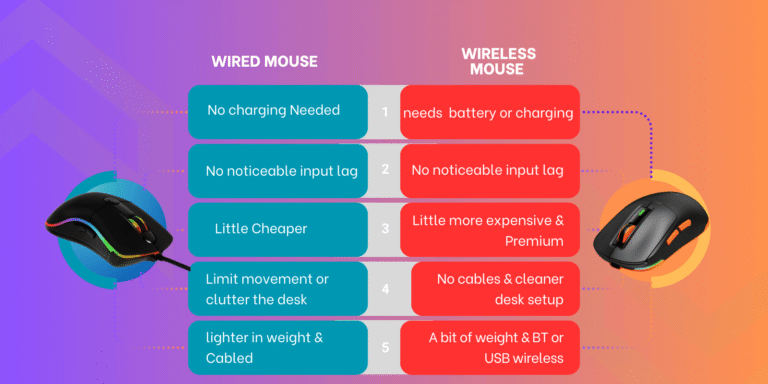
A wired mouse is ready when you plug it in, and you do not need to charge it. The cable can get in the way if you make wide, quick movements, though. A wireless mouse keeps the desk clear, but you need to check its battery, charging method, and connection type. For a low-cost gaming mouse, decide which trade-off matters more in your daily use.
2. Match DPI and Buttons to Your Games
DPI changes how far the pointer moves when the mouse moves. More DPI does not always mean better aim. Many players prefer a lower setting for careful shots and a higher one for fast turns. Look for easy DPI controls and enough buttons for the actions you use often. Programmable keys can help, but they are only useful if the mouse software works with your computer.
3. Check Shape, Compatibility, and Real Price
A mouse should feel easy to hold. Check its listed shape and size, then use reviews to see whether buyers with a similar hand size found it comfortable. Confirm that the model supports your computer and that any software works on your operating system. Prices can change, so compare the final price with your $20 limit before checkout. Also check the return terms in case the fit does not work for you.
Final Verdict: Which Should You Buy?
The Redragon M612 is my leading pick when it is on sale under $20. It lists adjustable DPI and remapping keys, which give it a useful mix of control and flexibility. The Redragon M602 is a strong alternative if you want more buttons.
The best gaming mouse under $20 is the one that fits your hand, games, and budget. Check current prices and product details before you buy.
FAQs Of best gaming mouse under $20
What is the best gaming mouse under $20?
The Redragon M612 is my top pick when its current price is under $20. It lists adjustable DPI and remapping keys.
Is a wired or wireless gaming mouse better under $20?
A wired mouse avoids charging and often has a simple setup. A wireless mouse reduces cable clutter, but you should check its battery and connection details.
Is a higher DPI always better for gaming?
No. High DPI makes the pointer move farther with less hand movement. Many players prefer lower sensitivity for steadier aim.
Can I use a gaming mouse for everyday work?
Yes. A gaming mouse can also handle browsing and office tasks. Check its comfort, button layout, and compatibility with your computer.
How can I tell if a gaming mouse is really under $20?
Check the current Amazon price before checkout. Prices can change, and some models may only fall under $20 during a sale.