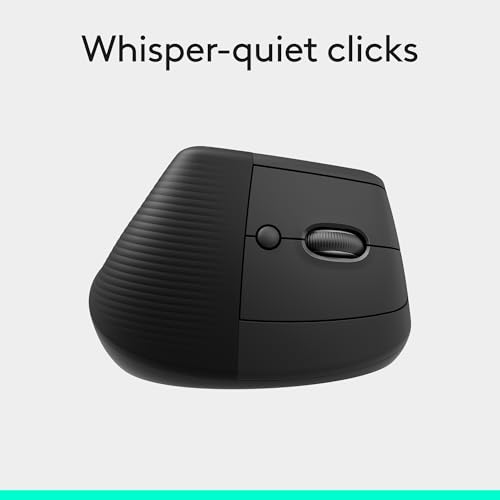
The Logitech Lift is my top ergonomic travel mouse for comfort, easy control, and reliable wireless use on the road.
Travel can make even a good laptop setup feel awkward. A flat touchpad may slow you down, while a small mouse can leave your hand tired after a long work session. I tested the key traits that matter in a travel mouse: size, grip, wireless setup, tracking, power, and comfort. These eight picks cover foldable designs, vertical mice, Bluetooth models, and low-cost options. My goal is simple: help you find the best ergonomic travel mouse for your hand and your travel style.
See the differences between my top picks at a glance.
| Mouse | Design | Connection | Best For | Main Trade-Off | Buy |
|---|---|---|---|---|---|
| Logitech Lift | Vertical | Wireless | Long work sessions | Less compact | View on Amazon |
| Lenovo Yoga Pro | Right-hand ergonomic | Bluetooth, dual mode | Feature-rich travel | Right-hand only | View on Amazon |
| ProtoArc EM11 NL | Vertical | Wireless | Rechargeable comfort | Takes adjustment | View on Amazon |
| TECKNET Folding | Flat folding | 2.4G | Small bags | Needs USB receiver | View on Amazon |
| Bluetooth Arc Mouse | Foldable arc | Bluetooth, 2.4G | Multi-device travel | Unfamiliar shape | View on Amazon |
| PHILIPS SPK7628 | Ergonomic shell | Wireless | Simple daily use | Fewer advanced controls | View on Amazon |
| TECKNET 2600 DPI | Contoured | 2.4G | Budget buyers | USB receiver required | View on Amazon |
| Logitech Mobi Fold | Foldable | Wireless | Quiet travel use | Less palm support | View on Amazon |
Logitech Lift Vertical Ergonomic Mouse

The Logitech Lift stands out because it uses a vertical design rather than a flat shape. Your hand rests in a more natural handshake position. That position can feel easier on the wrist during long work sessions. The mouse also has a soft thumb rest and a clear place for the fingers.
This is not the smallest mouse here, so it suits a work bag more than a pocket. Still, its wireless design makes setup easy in a hotel, office, or café. I like it most for people who value hand comfort over the smallest possible pack size. It is a strong choice when you want the best ergonomic travel mouse for daily laptop work.
Pros:
- Vertical shape supports a more natural hand angle
- Comfortable thumb rest
- Good choice for long computer sessions
- Wireless setup keeps the desk tidy
- Premium build and clear button layout
Cons:
- Larger than a folding travel mouse
- Vertical shape needs a short adjustment period
- Designed mainly for right-handed use
What Amazon Buyers Are Saying
Amazon buyers commonly focus on the comfortable vertical grip and the reduced need to twist the wrist. Many also like the quiet, smooth feel for office work. The main concerns tend to involve the larger body, the learning curve, and fit for very small hands. Check current buyer comments for the latest color and connectivity details before ordering.
My Recommendation
I recommend the Logitech Lift for travelers who work for hours at a time and can spare room in a laptop bag. It is not my pick for the smallest kit, but it offers the best comfort-first design in this group.
Lenovo Yoga Pro Travel Mouse

The Lenovo Yoga Pro Mouse brings a polished design and a useful set of controls. It supports Bluetooth and dual-mode use, which gives you more flexibility with modern laptops and other devices. Its six-button layout can help if you use shortcuts or move between tasks often. The metal scroll wheel adds a more refined feel than a basic travel mouse.
This mouse has a right-handed ergonomic shape, so it is best for users who want a full-featured pointer in a portable setup. USB-C charging is also a practical touch for travelers who already carry a USB-C cable. The body does not fold, but it still makes sense in a laptop sleeve or work bag. I see it as a good match for mobile professionals who want features without a gaming look.
Pros:
- Bluetooth and dual-mode connection options
- USB-C rechargeable design
- Six buttons support productive shortcuts
- Comfortable right-handed shape
- Two-way metal scroll wheel adds control
Cons:
- Right-handed design limits flexibility
- Not as compact as a foldable mouse
- Extra buttons may be more than casual users need
What Amazon Buyers Are Saying
Buyer discussions commonly highlight the sleek look, extra buttons, and easy fit with modern laptop bags. Users who prefer Bluetooth often appreciate avoiding a separate receiver. Some shoppers may find the shape or button layout less familiar than a basic mouse. Since software support and device pairing can change, review the current listing details for your operating system.
My Recommendation
The Lenovo Yoga Pro is worth considering if you want a rechargeable, feature-rich mouse for work travel. It is less ideal for left-handed users or anyone seeking an ultra-flat design.
ProtoArc EM11 NL Vertical Mouse

The ProtoArc EM11 NL uses a vertical design to reduce the flat, palm-down feel of a standard mouse. Its rechargeable setup helps reduce the need to carry spare batteries. The black finish looks simple and work-ready. Its shape targets users who want more wrist support while using a laptop away from home.
A vertical mouse can feel strange during the first few hours, so I suggest practicing with it before a major trip. Once your hand learns the grip, the design can feel stable for browsing, documents, and email. It is not a foldable model, but it remains a sensible choice for a backpack or briefcase. This is a strong alternative to the Logitech Lift when rechargeable use matters most.
Pros:
- Vertical grip encourages a neutral hand position
- Rechargeable design reduces battery waste
- Good palm and thumb support
- Suitable for office and travel work
- Simple black finish fits most work setups
Cons:
- Needs adjustment for users of flat mice
- Uses more bag space than a folding model
- May not suit left-handed users
What Amazon Buyers Are Saying
Common buyer themes include comfort during office work, the helpful vertical angle, and the convenience of rechargeability. Some users report that the grip feels natural after a short learning period. As with most vertical mice, fit opinions vary by hand size and personal grip. Read recent reviews if you have small hands or need a very compact mouse.
My Recommendation
I recommend the ProtoArc EM11 NL for travelers who want an affordable vertical mouse and do not mind a little practice. It delivers a useful comfort-focused design without the bulk of a desktop-only model.
TECKNET Folding Wireless Mouse
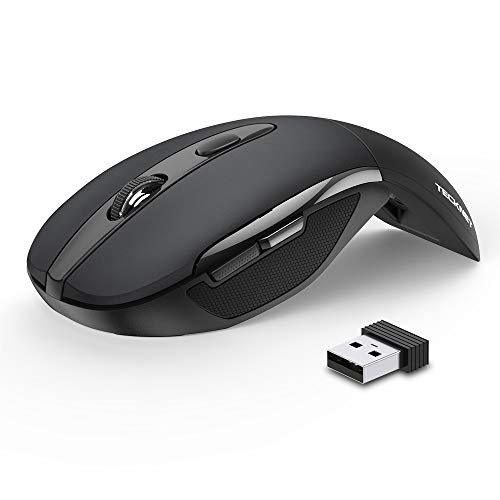
The TECKNET Folding Wireless Mouse focuses on portability. Its folding body takes up less room than a full-size ergonomic mouse. The 2.4G wireless connection uses a small USB receiver, which suits many Windows laptops and desktop computers. Three adjustable DPI settings let you choose a slower or faster pointer feel.
This model works well when bag space matters more than advanced comfort features. The folding action also helps protect the mouse during storage. Its shape may feel less supportive than a vertical or full palm mouse during long sessions. Still, for short work blocks, travel planning, and basic laptop tasks, it offers a practical balance.
Pros:
- Folding design saves space in a travel bag
- Three DPI settings offer basic control
- 2.4G setup is simple on compatible devices
- Lightweight form suits mobile work
- Good low-cost option for occasional travel
Cons:
- USB receiver can be easy to lose
- Flat travel shape gives less palm support
- Not the best choice for very long sessions
What Amazon Buyers Are Saying
Amazon buyers often point to the compact folding body and simple setup as the main benefits. Many shoppers choose it for occasional trips or as a backup mouse. The most likely concerns involve the smaller feel, receiver storage, and comfort over long work periods. Confirm that your laptop has a suitable USB port or adapter.
My Recommendation
The TECKNET Folding Mouse is worth buying when portability and price lead your decision. It is one of the easiest models to pack, but it is not my first choice for full-day ergonomic use.
Bluetooth Arc Foldable Travel Mouse

This Bluetooth Arc mouse uses a rotating, foldable body that changes its shape for storage and use. It supports Bluetooth and 2.4G connections, giving travelers more ways to connect. The tri-mode style is useful when you move between a laptop, tablet, or desktop. A USB-C rechargeable design also reduces the need for disposable batteries.
The arc shape sits between a flat mouse and a taller ergonomic mouse. That makes it easier to pack than many comfort models while giving more shape than a simple slab. It may take time to find the best hand position. I like it for people who carry several devices and want one mouse for different work spots.
Pros:
- Foldable design saves valuable bag space
- Bluetooth and 2.4G options improve flexibility
- USB-C charging suits modern travel kits
- Works with many common computer platforms
- Arc shape offers more form than a flat mouse
Cons:
- Unusual shape may require practice
- Small body may not suit large hands
- Connection modes can add setup steps
What Amazon Buyers Are Saying
Buyer feedback often centers on the folding action, small packed size, and multi-device connection choices. Users who travel with more than one computer may value the flexible setup. Some buyers may prefer a taller palm shape or a more familiar click feel. Check the latest listing details to confirm compatibility with your devices.
My Recommendation
This Arc mouse is a good buy for travelers who want a foldable design with more than one connection method. It earns a place on my list for versatility, though it may not offer the deep support of a vertical mouse.
PHILIPS SPK7628 Ergonomic Mouse

The PHILIPS SPK7628 takes a simple approach to ergonomic travel use. Its contoured body aims to make daily pointing more comfortable than a very flat mouse. Three adjustable DPI settings let you change pointer speed for different screens and tasks. Wireless operation keeps your travel desk free from a cable.
This mouse may suit users who want a familiar shape without paying for many extra controls. It fits common tasks such as email, web work, documents, and presentations. It does not fold, so measure your travel case if space is tight. For a basic work mouse with an ergonomic shell, it offers a sensible feature set.
Pros:
- Familiar shape is easy to learn
- Three DPI choices support different work styles
- Wireless design reduces desk clutter
- Useful for everyday office tasks
- Simple layout suits casual users
Cons:
- Less compact than folding models
- Fewer advanced controls for power users
- Hand fit may vary by user
What Amazon Buyers Are Saying
Buyer comments commonly discuss the comfortable shell, basic wireless setup, and easy use for routine tasks. Some shoppers choose it as a straightforward replacement for a standard mouse. The main limits relate to size, features, and the lack of a foldable body. Review the current product page for updated battery and compatibility information.
My Recommendation
I recommend the PHILIPS SPK7628 for buyers who want a simple ergonomic wireless mouse for occasional travel. It offers good everyday value, but advanced users may prefer the Lenovo or Logitech options.
TECKNET 2600 DPI Wireless Mouse
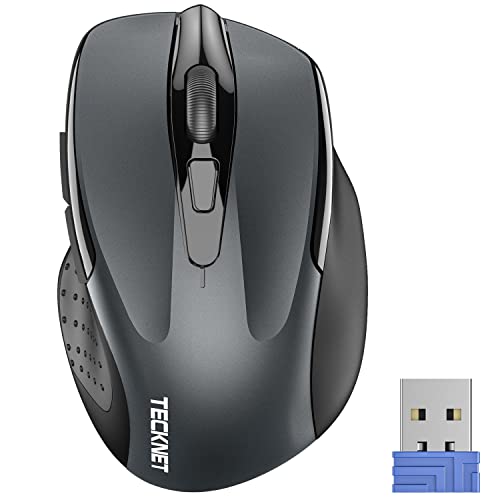
The TECKNET 2600 DPI mouse is built for shoppers who want comfort at a low cost. Its curved body gives the hand more shape than a thin travel mouse. The 2.4G connection uses a USB receiver for a direct wireless link. With up to 2600 DPI listed, it gives users useful pointer speed control.
This model is not a foldable mouse, but its familiar shape makes it easy to use. It works well for email, browsing, school work, and office documents. The grey finish looks neutral in a work bag or home office. If you need a budget travel mouse for regular short sessions, this one is easy to understand and easy to recommend.
Pros:
- Affordable option for everyday travel
- Contoured shape supports a relaxed grip
- Adjustable resolution supports varied screens
- Simple 2.4G wireless setup
- Familiar design needs little practice
Cons:
- USB receiver takes up a port
- Not as compact as a folding model
- May offer less support for long workdays
What Amazon Buyers Are Saying
Amazon shoppers often mention the low price, familiar shape, and easy wireless connection. Many buyers use this type of mouse for routine home or office work. Common concerns can include receiver storage, hand size, and long-term comfort. As always, check current reviews for the latest user experience and package contents.
My Recommendation
The TECKNET 2600 DPI mouse is a good value pick for casual travelers and students. It is not the most advanced choice, but it covers the basics at a sensible price.
Logitech Mobi Fold Wireless Mouse

The Logitech Mobi Fold targets travelers who want a mouse that packs flat and clicks quietly. Its foldable form helps it fit into smaller spaces than a traditional ergonomic mouse. Quiet click operation can be useful in libraries, planes, cafés, and shared offices. The graphite finish also gives it a clean, low-key look.
Foldable mice usually give up some palm support to save space, and this model follows that trade-off. It is best for short and medium work sessions rather than nonstop desk work. The simple shape should appeal to users who want less bulk in a laptop sleeve. If silent use matters as much as portability, this is a compelling option.
Pros:
- Foldable body supports compact packing
- Quiet clicks suit shared spaces
- Light travel design is easy to carry
- Clean graphite finish looks professional
- Simple shape works well for basic tasks
Cons:
- Less palm support than taller ergonomic mice
- May not suit full-day mouse use
- Foldable designs can feel less solid to some users
What Amazon Buyers Are Saying
Buyer interest centers on the quiet click action and the space-saving foldable body. These traits matter to people who work in public places or carry a small laptop bag. Some shoppers may want a larger grip for extended use. Check current reviews for details on fit, click feel, and the exact connection method.
My Recommendation
I recommend the Logitech Mobi Fold for quiet, light travel. It is a smart choice for short work sessions, but users who need strong wrist support should choose a vertical model instead.
How to Choose the Best Ergonomic Travel Mouse
Choosing the best ergonomic travel mouse means balancing comfort with size. A mouse that feels great at a desk may be too large for a small bag. A flat mouse may pack well but offer less support. I suggest matching the design to your hand, travel habits, and daily work time.
1. Match the Shape to Your Hand and Work Style
Start with the grip. A vertical mouse suits people who want a more upright hand position. It can feel helpful during long sessions, but it needs practice. A contoured mouse feels more familiar and may be easier for quick trips. A foldable mouse saves space, yet it often gives less palm support.
Also check whether the mouse fits your dominant hand. Many ergonomic designs target right-handed users. Left-handed shoppers should confirm the shape before buying. If you have large hands, avoid choosing a mouse only because it is small. A cramped grip can defeat the purpose of an ergonomic design.
2. Check Connection, Charging, and Device Support
Travel mice use Bluetooth, a 2.4G USB receiver, or both. Bluetooth keeps your USB ports free. It works well with many modern laptops, tablets, and Mac computers. A receiver can offer simple plug-and-play use, but it needs a USB port and careful storage.
Dual-mode or tri-mode mice offer more flexibility when you switch devices. Rechargeable models reduce the need to pack spare batteries. Battery models can still work well on long trips because you can carry a replacement. Before buying, check the current product listing for supported systems, charging details, and included accessories.
3. Compare Travel Size, Control, and Real Value
Look at the packed size, not just the open size. A folding mouse can fit in a slim sleeve. A vertical mouse needs more room but may provide better comfort. If you work for many hours, comfort can matter more than saving a few inches in your bag.
DPI settings affect pointer speed, but more DPI does not always mean better use. Most office tasks need smooth, steady tracking rather than extreme speed. Extra buttons can help with browser navigation and shortcuts. However, simple controls may be better if you want quick setup. The best ergonomic travel mouse gives you the features you will use without adding weight or confusion.
Final Verdict: Which Should You Buy?
For most travelers, I recommend the Logitech Lift. Its vertical grip offers the strongest comfort focus, while the Lenovo Yoga Pro is best for extra controls and dual-mode use.
Choose a foldable TECKNET or Logitech Mobi Fold when bag space matters most. The best ergonomic travel mouse is the one that fits your hand, device, and daily travel routine.
FAQs Of best ergonomic travel mouse
What is the best ergonomic travel mouse for long work sessions?
The Logitech Lift is my top pick for long sessions because its vertical design supports a more natural hand angle. The ProtoArc EM11 NL is another strong option.
Are vertical mice good for travel?
Yes, if comfort matters more than the smallest packed size. Vertical mice take more room and may need a short adjustment period.
Is Bluetooth better than a USB receiver for a travel mouse?
Bluetooth saves a USB port and works well with many modern devices. A USB receiver can offer simple setup, so the better choice depends on your laptop and travel gear.
What should I look for in a foldable ergonomic mouse?
Check the folded size, grip comfort, tracking control, connection type, and how securely the body folds. Also confirm that the mouse fits your hand.
Do ergonomic travel mice work with MacBooks?
Many Bluetooth models work with MacBooks, while USB receiver models may need a suitable adapter. Always check the current compatibility details before purchase.