⚡ Quick Verdict
The Dell Slim Desktop ECS1250 is worth considering for compact everyday work, home use, and productivity.
A crowded desk can make a traditional desktop tower feel unnecessarily bulky, especially when your daily routine mainly involves email, documents, web browsing, streaming, and video calls.
The Dell Slim Desktop ECS1250 is designed for buyers who want desktop-style connectivity and upgrade flexibility without giving up much desk space. Its slim chassis makes it a practical option for a home office, family computer, or small workplace.

Is Dell Slim Desktop ECS1250 Good?
Yes, the Dell Slim Desktop ECS1250 is a strong choice when the priority is a compact Windows desktop for productivity rather than a dedicated gaming machine. Dell offers the model with several processor, memory, and storage configurations, so the exact performance depends heavily on the version you purchase.
Its main strengths are the slim 8.5-liter chassis, useful front and rear connectivity, integrated graphics, modern wireless options, and support for internal expansion. The biggest limitation is that its 180W power supply and compact design make it less suitable for buyers who want a powerful discrete-GPU gaming or workstation setup.
A practical observation is that the chassis is narrow enough to fit comfortably beside many monitors without dominating the desk. Another important consideration is configuration: choosing 16GB of memory instead of an entry-level 8GB setup can make the computer a more comfortable long-term multitasking machine.

My First Impression for Dell Slim Desktop ECS1250
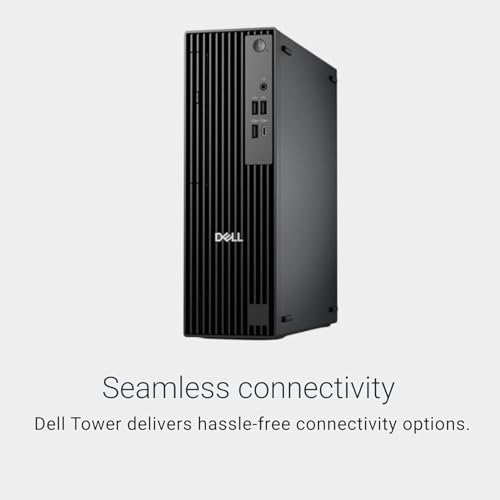
The ECS1250 has the understated appearance expected from a mainstream Dell desktop. Its slim black chassis measures about 11.95 inches high, 3.74 inches wide, and 11.54 inches deep, with a starting weight of roughly 7.69 pounds.
Setup is straightforward for a typical home or office environment. Connect a monitor through HDMI or DisplayPort, attach the included keyboard and mouse when supplied with the configuration, connect power and network access, and complete the Windows setup process.
The front panel is particularly convenient because it places USB connections, USB-C, and the headset jack within easy reach. The narrow design also helps when desk depth or available floor space is limited.

What Makes It Stand Out / Key Features
- Slim 8.5-Liter Chassis: The compact tower measures approximately 11.95 inches high, 3.74 inches wide, and 11.54 inches deep, making it easier to place in a small home office or workspace.
- Multiple Intel Processor Options: Depending on configuration, the ECS1250 can be equipped with processors ranging from the Intel Core i3-14100 to Core i5-14400, Core i7-14700, Core Ultra 5 225, and Core Ultra 7 265.
- DDR5 Memory: The platform supports DDR5 memory configurations, with available options depending on the processor and system configuration. Buyers should check the exact Amazon listing before ordering because memory capacity and channel configuration can vary.
- NVMe SSD Storage: The system supports an M.2 PCIe NVMe solid-state drive, providing fast everyday storage and responsive Windows application loading compared with older mechanical-drive systems.
- Useful Front and Rear Ports: Connectivity includes front USB ports, USB-C, a headset jack, and rear USB, HDMI 2.1, DisplayPort, and Gigabit Ethernet connections, giving users plenty of options for everyday peripherals and displays.
- Wireless Connectivity: Depending on configuration, the ECS1250 can include Wi-Fi 6 or Wi-Fi 6E along with Bluetooth, providing convenient wireless networking and peripheral connectivity.
- Expansion Potential: Despite its slim profile, the desktop provides three half-height PCIe expansion slots and internal provisions for an M.2 SSD and SATA storage, giving it more flexibility than many ultra-small desktop computers.
- 180W Bronze Power Supply: The 180W Bronze internal power supply suits the system’s compact productivity-focused design, but it also reinforces that this desktop is not intended as a high-power gaming tower.

✅ What I Like
- ✔ The slim chassis takes up substantially less desk width than a conventional tower, which is useful for compact home offices.
- ✔ The range of Intel processor configurations lets buyers choose a performance level that matches basic office work or more demanding multitasking.
- ✔ Front USB and USB-C connectivity makes it convenient to connect frequently used accessories without reaching behind the computer.
- ✔ HDMI and DisplayPort outputs provide practical display flexibility for home and office monitor setups.
- ✔ The M.2 NVMe storage design supports fast everyday responsiveness and provides a more modern storage platform.
- ✔ Three half-height PCIe expansion slots give the system more upgrade potential than many mini PCs.
- ✔ Wi-Fi and Bluetooth support reduce cable clutter for compatible networks and accessories.
⚠️ What Could Be Better
- ✖ The 180W power supply limits the type of high-power graphics upgrades that make sense in this slim chassis.
- ✖ Entry configurations with 8GB of RAM can feel restrictive for heavier multitasking, so buyers should carefully check the memory configuration before ordering.
- ✖ The slim form factor prioritizes space efficiency over the extensive internal component space found in larger desktop towers.

My Recommendation
I would consider the ECS1250 for buyers who want a traditional Windows desktop but have limited room for a large tower. It makes particular sense for office applications, web browsing, schoolwork, home administration, media consumption, and general productivity.
The most important buying decision is the configuration rather than simply the model name. For demanding multitasking, a 16GB configuration is a more sensible starting point than 8GB, while buyers interested in gaming or graphics-heavy workloads should look beyond this slim productivity-oriented platform.
| Best For | Why It Fits |
|---|---|
| Home Office Users | The compact chassis, multiple display connections, wired networking, and everyday Windows performance fit common home-office workloads. |
| Students and Families | Its small footprint leaves more room on a shared desk while providing enough flexibility for documents, research, video calls, and general computing. |
| Small Business Workstations | The slim form factor and business-friendly connectivity make it practical when several workstations need to fit into limited office space. |
| Users Replacing an Older Desktop | Modern processor, DDR5 memory, NVMe storage, and current display connectivity provide a straightforward path from an aging desktop to a newer Windows system. |

Alternative Products You Can Consider
| Product | Best For | Key Difference |
|---|---|---|
| Dell Slim Desktop ECS1250 | Compact home and office computing | Slim tower design combines a narrow footprint with multiple connectivity and expansion options. |
| HP Pro SFF Desktop | Business and office users | Offers an alternative business-oriented small-form-factor platform from HP. |
| Lenovo ThinkCentre Small Form Factor Desktop | Business productivity | Provides a compact Lenovo business desktop option for buyers comparing workplace ecosystems. |

Final Verdict: Which Should You Buy?
The Dell Slim Desktop ECS1250 is a sensible choice for anyone who wants a space-conscious Windows desktop without moving all the way down to an ultra-small mini PC. Its strongest combination is the narrow chassis, broad connectivity, modern processor choices, NVMe storage support, and useful internal expansion.
Buyers should be more cautious if their priority is serious gaming, professional GPU workloads, or extensive hardware upgrades. In those cases, a larger desktop with a more capable power supply and greater graphics-card support is likely to be a better fit.
For everyday productivity, home computing, schoolwork, and small-business use, the ECS1250 offers a practical balance between desktop flexibility and space savings. Just verify the exact processor, RAM, storage, operating system, and wireless configuration on the listing before purchasing.