The Dell OptiPlex 7050 Micro is worth considering for affordable everyday computing and compact workspaces.
If your home office desk is crowded with a large tower, a compact refurbished desktop can make everyday computing much easier. The Dell OptiPlex 7050 Micro is designed around that idea, giving you a small business-class PC that takes up far less room than a traditional desktop.
For shoppers who mainly need web browsing, office applications, streaming, email, and general productivity, this type of refurbished Dell desktop can be an appealing value-focused choice. Its older processor means it is not aimed at demanding modern workloads, but the included memory and SSD configuration can make it practical for basic use.

Is Dell OptiPlex 7050 Micro Good?
The Dell OptiPlex 7050 Micro is a good fit for buyers who want a compact, inexpensive Windows desktop for everyday tasks. The configuration associated with this Amazon listing includes an Intel Core i5-6500T processor, 16GB of DDR4 memory, a 256GB SSD, integrated graphics, and Windows 11 Pro.
Its strongest advantages are its compact business-desktop design, generous memory for basic multitasking, SSD storage, and useful display connectivity. The main limitation is the aging sixth-generation processor, so buyers should not expect it to compete with current mini PCs for demanding creative work, modern gaming, or heavy multitasking.
My First Impression of the Dell OptiPlex 7050 Micro
Because this is a renewed business PC, packaging and exterior condition can vary somewhat by refurbisher. The important point is that buyers should evaluate the unit as refurbished hardware rather than expecting the presentation of a brand-new retail desktop.
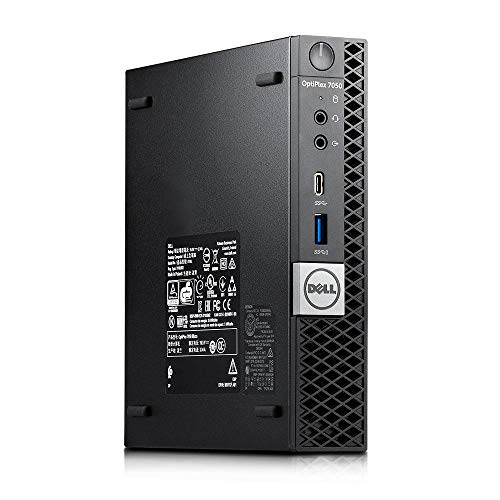
The compact chassis is one of the first things that stands out. The system measures about 7.2 by 7 by 1.4 inches according to listed specifications, making it easy to position on a small desk or in a workspace where a full-size tower would be inconvenient.
Setup should be straightforward for most Windows users: connect a monitor, keyboard, mouse, network connection if needed, and power, then complete the Windows setup process. The listing also identifies a USB keyboard and mouse among the included accessories, although buyers should confirm the current seller’s package before ordering.

What Makes It Stand Out / Key Features
- Intel Core i5-6500T Processor: The quad-core i5-6500T is an older desktop processor with a listed maximum speed of up to 3.1GHz. It is suitable for everyday productivity but is not designed for demanding modern workloads.
- 16GB DDR4 Memory: The listed 16GB of DDR4 RAM gives the system a comfortable starting point for web browsing, office software, email, streaming, and ordinary multitasking.
- 256GB SSD: The 256GB solid-state drive provides faster everyday storage access than a traditional hard drive and offers enough space for a basic Windows and productivity setup.
- Compact Micro Form Factor: The small OptiPlex chassis is designed for space-conscious workstations, making it easier to fit into a home office, study area, or business desk than a conventional tower.
- Dual Display Support: The listed configuration includes HDMI and DisplayPort outputs and is described as supporting dual 4K displays, giving productivity users the option to work across two monitors.
- Useful Business Connectivity: The specification listing includes an RJ-45 network port, HDMI, DisplayPort, and six USB 3.0 ports, providing practical connectivity for common desktop peripherals.
✅ What I Like
- ✔ The micro form factor saves substantial desk space compared with a traditional desktop tower.
- ✔ The 16GB memory configuration is well suited to everyday multitasking and office applications.
- ✔ The 256GB SSD provides responsive storage for Windows, applications, and routine files.
- ✔ HDMI and DisplayPort connectivity can support a two-monitor productivity setup when paired with compatible displays.
- ✔ Six USB 3.0 ports provide plenty of connection options for keyboards, mice, external drives, and other peripherals.
- ✔ The renewed format can make an established business-class desktop more accessible to shoppers focused on value.
⚠️ What Could Be Better
- ✖ The sixth-generation Intel processor is considerably older than the CPUs found in many current mini PCs.
- ✖ Integrated graphics make it a poor choice for demanding modern gaming or graphics-heavy creative workloads.
- ✖ Because it is renewed, exterior condition, packaging, and included accessories can vary by seller or current listing configuration.
My Recommendation
I would consider this Dell primarily for buyers who need a straightforward Windows desktop without the footprint of a conventional tower. It makes the most sense when your workload centers on browsing, documents, email, video playback, schoolwork, point-of-sale tasks, or other everyday applications.
I would be more cautious if you need a PC for current AAA games, professional video editing, 3D rendering, or other CPU- and GPU-intensive work. In those situations, a newer mini PC with a more recent processor can provide a better long-term platform.
| Best For | Why It Fits |
|---|---|
| Home Office Users | The compact chassis and 16GB memory configuration make it practical for documents, email, browsers, and routine productivity. |
| Students | It provides a familiar Windows desktop format for research, writing, online classes, and general schoolwork without occupying much desk space. |
| Budget-Conscious Buyers | A renewed business desktop can provide useful everyday hardware at a potentially lower cost than buying a new full-size desktop. |
| Small Business Workstations | Its compact design and business-oriented connectivity are useful when multiple workstations need to fit into limited office space. |
Alternative Products You Can Consider
| Product | Best For | Key Difference |
|---|---|---|
| Dell OptiPlex 7050 Micro | Affordable everyday desktop use | Refurbished business-class design with an older Intel platform and compact chassis. |
| HP EliteDesk 800 G4 Mini | Compact business productivity | Newer business-platform generation than the OptiPlex 7050 Micro. |
| Lenovo ThinkCentre M710q Tiny | Small office and home productivity | Lenovo’s compact ThinkCentre design provides another established business-PC option. |
Final Verdict: Which Should You Buy?
The Dell OptiPlex 7050 Micro is a sensible choice when your priority is getting a compact Windows computer for everyday work while keeping the budget under control. Its 16GB RAM, 256GB SSD, multiple USB ports, and dual-display connectivity give the older platform useful practical strengths.
Buyers who want the smallest possible workstation for browsing, office work, school tasks, and basic home computing should give it serious consideration. However, shoppers planning demanding creative workloads or looking for the best long-term performance may be better served by a newer mini PC such as the HP EliteDesk 800 G4 Mini or a current-generation consumer mini computer.