Yes, the Dell 16 DC16250 is worth considering for everyday work, school, streaming, and general home computing.
If your current laptop feels cramped when you are juggling browser tabs, documents, video calls, and entertainment, a larger 16-inch screen can make daily computing more comfortable. The Dell 16 DC16250 targets this practical middle ground with a spacious 16:10 display and mainstream Intel processor options.
For a U.S. household, this type of laptop can fit naturally into remote work, college assignments, home-office tasks, streaming, and everyday browsing. The important question is whether its productivity-focused design matches your workload or whether you need stronger graphics performance, a lighter chassis, or longer battery endurance.

Is Dell 16 Laptop Model DC16250 Good?
The Dell 16 DC16250 is a sensible everyday Windows laptop rather than a performance-focused machine. Dell lists configurations with Intel Core 5 120U or Core 7 150U processors, integrated Intel graphics, DDR5 memory, and a 16-inch 1920 x 1200 anti-glare display.
Its biggest strengths are the roomy 16:10 screen, familiar Dell design, useful connectivity, and configurations aimed at general productivity. The main limitations are its integrated graphics, relatively large footprint compared with smaller laptops, and the fact that battery and performance can vary depending on the exact configuration.
One useful observation is that the model is designed around practicality rather than flashy hardware. Another is that buyers should check the exact Amazon configuration before ordering because the DC16250 family is sold with different processor, memory, storage, and display configurations.

My First Impression for Dell 16 Laptop DC16250
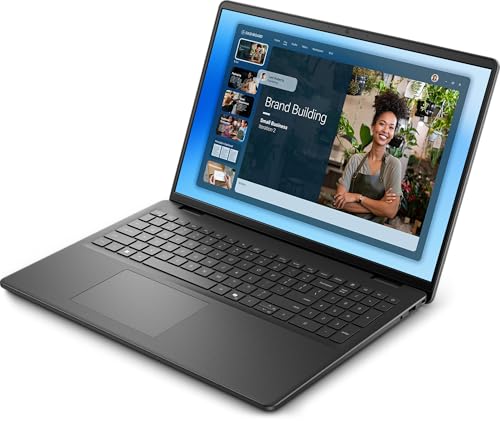
The Dell 16 DC16250 has a straightforward, business-friendly appearance with a Carbon Black finish on configurations listed by Dell. The chassis uses plastic for the display cover, base, bezel, and palm rest, which helps keep the design practical but does not give it the premium feel of an aluminum laptop.
Getting started should be familiar for Windows users: connect the power adapter, turn the laptop on, connect to Wi-Fi, and complete Windows setup. Dell’s setup documentation recommends connecting to a network so Windows can receive updates during the initial configuration.
The overall usability is centered on a large display, full-size keyboard layout options with a numeric keypad, and everyday ports. That makes the machine particularly approachable for people replacing an older home or office laptop.
What Makes It Stand Out / Key Features
- 16-inch 16:10 Display: The DC16250 can be configured with a 16-inch 1920 x 1200 anti-glare WVA/IPS-style display rated at 300 nits, giving everyday documents, websites, and video content more vertical workspace than a traditional 16:9 panel.
- Intel Core Processor Options: Dell lists Intel Core 5 120U and Core 7 150U options for the DC16250, giving buyers a choice between mainstream productivity configurations rather than a single fixed performance level.
- DDR5 Memory: Available configurations include DDR5 memory, with Dell listing 16GB configurations at 5200 MT/s on the configurations reviewed here. This is a practical capacity for office applications, browsing, communication, and general multitasking.
- NVMe SSD Storage: Dell offers PCIe NVMe SSD storage options including 512GB and 1TB configurations, providing the quick application and file-access experience buyers generally expect from a modern Windows laptop.
- Useful Port Selection: The listed configuration includes two USB-A ports, one USB-C port with Power Delivery and DisplayPort, HDMI 1.4, a universal audio jack, and a power connector. This covers many common home-office and peripheral needs without relying entirely on adapters.
- Wi-Fi 6 Connectivity: The DC16250 uses a Realtek Wi-Fi 6 wireless module in the listed configuration, providing a current wireless standard suitable for everyday home, school, and office networking.
- Fingerprint Reader and Backlit Keyboard Options: Dell lists a fingerprint reader on the palm rest and a backlit keyboard with a numeric keypad for the configuration shown, adding convenience for sign-in and low-light typing. Exact keyboard and security features should be checked against the specific listing before purchase.

✅ What I Like
- ✔ The 16-inch 1920 x 1200 display provides a useful 16:10 workspace for documents, spreadsheets, web browsing, and multitasking.
- ✔ Intel Core 5 and Core 7 configurations give buyers flexibility to choose a performance level that fits their budget and workload.
- ✔ The available 16GB DDR5 and 512GB or 1TB SSD configurations are well suited to everyday productivity and general multitasking.
- ✔ The combination of USB-A, USB-C, HDMI, and audio connectivity makes it practical for common home-office accessories and external displays.
- ✔ The full-size keyboard layout with a numeric keypad can be especially useful for spreadsheets, accounting tasks, and data entry.
- ✔ Wi-Fi 6 support provides a modern wireless connection standard for compatible home and office networks.
⚠️ What Could Be Better
- ✖ Integrated Intel graphics make this primarily a productivity and entertainment laptop rather than a strong choice for demanding modern gaming or GPU-heavy creative work.
- ✖ The 16-inch chassis starts around 1.98 kg in the listed configuration, so frequent travelers may prefer a smaller and lighter notebook.
- ✖ The integrated 3-cell 41Wh battery listed for the configuration may be less appealing to buyers who prioritize maximum unplugged runtime over screen size and everyday practicality.

My Recommendation
I would consider the Dell 16 DC16250 for buyers who want a large-screen Windows laptop for productivity without moving into a specialized workstation or gaming machine. It makes the most sense for office applications, schoolwork, browsing, video meetings, streaming, and other routine computing tasks.
Before purchasing, pay close attention to the exact configuration offered by the seller. The DC16250 family has multiple processor, memory, storage, and display combinations, so the specifications of one listing should not automatically be assumed to apply to every version.
| Best For | Why It Fits |
|---|---|
| Home Office Users | The large 16:10 screen, numeric keypad options, modern wireless connectivity, and useful ports suit documents, spreadsheets, email, meetings, and browser-based work. |
| College Students | The spacious display is helpful for research, writing, online classes, presentations, and multitasking between school applications. |
| Everyday Home Users | It provides a familiar Windows experience for web browsing, streaming, communication, personal documents, and general household computing. |
| Small-Business Users | The productivity-oriented hardware and connectivity make it a practical option for routine administrative work, especially when a larger display is preferred. |

Alternative Products You Can Consider
| Product | Best For | Key Difference |
|---|---|---|
| Dell 16 DC16250 | Large-screen everyday productivity | Dell’s model emphasizes a 16:10 1920 x 1200 display, mainstream Intel processors, practical ports, and familiar Windows productivity features. |
| HP Pavilion 16 | Mainstream home and office computing | Offers a competing 16-inch Windows laptop design and configuration ecosystem for shoppers comparing HP and Dell. |
| Lenovo IdeaPad Slim 5 16 | Students and productivity-focused users | Provides a competing large-screen design with Lenovo’s own keyboard, chassis, and configuration approach. |

Final Verdict: Which Should You Buy?
The Dell 16 DC16250 is a solid choice if your priority is a roomy screen and dependable everyday computing rather than high-end gaming or professional GPU workloads. Its 16:10 1920 x 1200 display, mainstream Intel processor choices, DDR5 memory options, SSD storage, and practical port selection create a well-rounded productivity package.
Buyers who spend most of their time writing, browsing, working with spreadsheets, attending online meetings, studying, or watching media should find the overall design appealing. If you regularly edit demanding video, run graphics-intensive applications, or need a highly portable laptop for frequent travel, a more specialized alternative may make more sense.
The biggest reason to choose this Dell is its combination of a large working area and straightforward everyday hardware. The biggest limitation is that the model is fundamentally built around integrated graphics and a relatively large chassis, so performance-focused and ultra-mobile buyers should compare other options before deciding.