The Inspiron 14 Plus Snapdragon is worth considering for efficient everyday work, study, and portable productivity.
If your current laptop feels heavy, runs hot during routine work, or needs frequent charging between meetings and classes, a modern 14-inch system can be a practical upgrade.
The Dell Inspiron 14 Plus 7441 is aimed at that audience, pairing a Snapdragon X Plus processor with a sharp 14-inch QHD+ touchscreen, 16GB of onboard memory, and a slim aluminum chassis. It makes particular sense for people who spend their days browsing, writing, attending video calls, streaming, and working with Microsoft 365.

Is Dell Inspiron 14 Plus 7441 Good?
Yes, the Inspiron 14 Plus 7441 is a strong productivity-focused laptop when its Snapdragon-based Windows experience matches your software needs. The Snapdragon X Plus X1P-64-100 configuration uses 10 cores and includes a neural processing unit rated for up to 45 TOPS, while the system pairs it with Qualcomm Adreno integrated graphics. Dell lists 16GB LPDDR5X memory and a 14-inch QHD+ 2560 x 1600 touchscreen with 400 nits brightness and 100% sRGB coverage.
Its biggest strengths are the high-resolution 16:10 display, compact aluminum design, modern connectivity, and efficient ARM-based platform. The main limitation is compatibility: some Windows applications, drivers, utilities, and games can behave differently on ARM64 than they do on conventional Intel or AMD laptops. For typical productivity, web, communication, and entertainment workloads, that tradeoff may be reasonable; for specialized legacy software, it deserves more attention before buying.
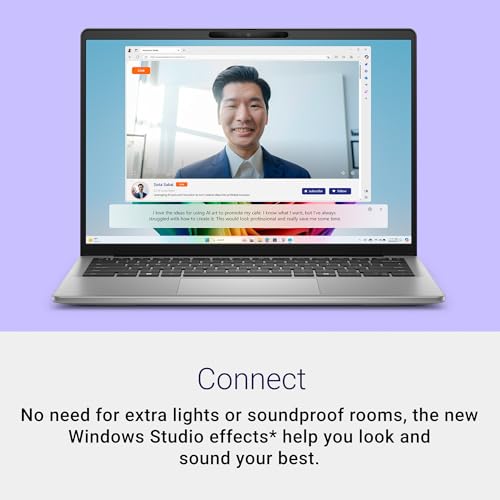
My First impression of the Dell Inspiron 14 Plus 7441
The overall design is understated rather than flashy. Dell uses an aluminum chassis, and the machine starts at roughly 3.17 pounds, making it a reasonable size for carrying between a home office, classroom, coffee shop, or workplace.
Getting started should feel familiar to anyone who has used Windows 11. The important point is that the Snapdragon platform is ARM-based, so buyers should check the compatibility of any specialized Windows applications they depend on before making the switch.
The port selection is practical for a thin 14-inch laptop: Dell specifies two USB4 Type-C ports with DisplayPort and Power Delivery, one USB 3.2 Type-A port, and a headset jack. A MicroSD card slot is also included, which is useful for photographers and creators who move files from compatible cards.

What Makes It Stand Out / Key Features
- Snapdragon X Plus Processor: The X1P-64-100 configuration has 10 CPU cores with speeds up to 3.4 GHz and a dedicated NPU capable of up to 45 TOPS, giving the laptop a modern ARM-based platform for Windows productivity workloads.
- QHD+ Touchscreen: The 14-inch 16:10 display runs at 2560 x 1600, supports touch input, reaches 400 nits, and covers 100% of the sRGB color space, making it well suited to documents, browsing, media, and general creative work.
- 16GB LPDDR5X Memory: The available configuration uses 16GB of onboard LPDDR5X memory, providing a comfortable amount of RAM for multitasking across browsers, office applications, communication tools, and everyday workloads.
- Fast Connectivity: Two USB4 Type-C ports support up to 40Gbps along with DisplayPort and Power Delivery, while a USB-A port and headset jack provide compatibility with common peripherals.
- Portable Aluminum Chassis: The aluminum construction and approximately 3.17-pound starting weight give the 14-inch laptop a practical balance between screen size, durability, and portability.
- Integrated Qualcomm Graphics: The laptop uses Qualcomm Adreno integrated graphics rather than a separate graphics card, which is appropriate for everyday visual workloads but is not intended to replace a dedicated gaming or workstation GPU.
- AI-Oriented Hardware: The Snapdragon platform includes a dedicated NPU rated up to 45 TOPS, providing hardware designed for supported AI features in compatible Windows applications.
- MicroSD Expansion: A built-in MicroSD card slot gives users a convenient way to access compatible removable storage without relying entirely on an external card reader.

✅ What I Like
- ✔ The 14-inch QHD+ 2560 x 1600 touchscreen provides more vertical workspace than a typical 16:9 Full HD panel.
- ✔ The 16:10 display offers 100% sRGB coverage and 400-nit brightness, useful for office work, web browsing, and general content consumption.
- ✔ The Snapdragon X Plus platform includes a dedicated NPU for supported AI workloads while keeping the design focused on efficient mobile computing.
- ✔ Two USB4 ports provide high-speed connectivity with support for DisplayPort and Power Delivery, giving users useful options for docks, displays, and accessories.
- ✔ The aluminum chassis and roughly 3.17-pound starting weight make the laptop reasonably portable for commuting, school, and hybrid work.
- ✔ The MicroSD slot is a useful convenience for users who regularly transfer files from cameras or other compatible devices.
⚠️ What Could Be Better
- ✖ The 16GB LPDDR5X memory is onboard and not designed for user expansion, so buyers should choose their preferred memory configuration carefully.
- ✖ ARM64 Windows compatibility can still matter for specialized applications, older utilities, drivers, and certain games, so software requirements should be checked before purchase.
- ✖ Integrated Adreno graphics are better suited to productivity and everyday multimedia than demanding modern PC gaming or GPU-heavy professional workloads.

My Recommendation
I would consider this Dell for students, remote workers, office users, and frequent travelers who prioritize a sharp screen, portability, and a modern low-power computing platform. The combination of a 14-inch QHD+ touchscreen, 16GB memory, and Snapdragon X Plus processor gives it a sensible productivity-oriented feature set.
I would be more cautious if your daily workflow depends on niche Windows software, older peripherals, specialized drivers, or demanding PC games. In those cases, an Intel- or AMD-based alternative can provide a more predictable compatibility path.
| Best For | Why It Fits |
|---|---|
| College Students | The portable 14-inch design, high-resolution touchscreen, and 16GB memory are well suited to research, writing, online classes, and multitasking. |
| Remote and Hybrid Workers | The compact chassis, modern USB4 connectivity, high-resolution display, and productivity-focused Snapdragon platform fit common home-office routines. |
| Frequent Travelers | The relatively light 14-inch aluminum design offers a practical balance between screen space and portability. |
| Everyday Home Users | Web browsing, streaming, email, documents, video calls, and general Windows tasks are a natural match for this configuration. |

Alternative Products You Can Consider
| Product | Best For | Key Difference |
|---|---|---|
| Dell Inspiron 14 Plus 7441 | Productivity and portability | Combines a 14-inch QHD+ touchscreen with Snapdragon X Plus and an aluminum chassis. |
| Dell XPS 13 | Premium compact computing | Places greater emphasis on a compact premium design and portability. |
| Lenovo IdeaPad Slim 5 | Mainstream everyday computing | Offers a broad range of configurations and processor platforms for different budgets and workflows. |

Final Verdict: Which Should You Buy?
The Dell Inspiron 14 Plus 7441 is a compelling choice for buyers who want a portable Windows laptop with a high-resolution touchscreen, modern connectivity, and Snapdragon-based efficiency. Its 14-inch 2560 x 1600 display and 16GB memory make the configuration particularly attractive for everyday productivity, schoolwork, remote work, browsing, and entertainment.
The biggest reason to choose it is the combination of a sharp 16:10 display and modern Snapdragon platform in a relatively light aluminum design. The biggest reason to choose an alternative is software compatibility: if your work depends on specialized Windows programs, older drivers, or demanding games, a conventional Intel- or AMD-based laptop may be the safer purchase.
Overall, this is best viewed as a productivity-focused Copilot+ PC rather than a gaming or workstation machine. If your applications are ARM-compatible or run well through Windows compatibility support, the Inspiron 14 Plus 7441 deserves a place on your shortlist.