A vertical monitor saves desk space, shows more text, and makes reading, coding, and browsing easier.
If you often scroll through long pages or switch between many windows, you may wonder why use a vertical monitor instead of a standard horizontal screen. The answer depends on your work, body position, and desk setup. This guide explains the benefits, limits, ideal uses, and setup tips so you can make a smart choice.
What Is a Vertical Monitor?
A vertical monitor is a computer display turned 90 degrees into portrait mode. Most monitors use landscape mode, which is wider than it is tall. A vertical monitor reverses those proportions.
Many modern monitors include a height-adjustable stand that lets you rotate the screen. You can also use a VESA monitor arm. After rotating the display, you must change the screen orientation in your computer settings.
A vertical monitor does not need to be a special model. Any monitor with a rotating stand, VESA support, and suitable viewing angles may work. An IPS panel is often a good choice because it provides clear colors and wide viewing angles.
Why Use a Vertical Monitor?
The main reason to use a vertical monitor is simple: it shows more vertical content at once. You can read longer sections without scrolling as often.
This design can make common tasks feel smoother. It is like replacing a short notepad with a long sheet of paper. You see more of the page while keeping the text at a comfortable size.
Here are the main reasons why use a vertical monitor:
• Reading long documents with less scrolling
• Writing and editing articles more comfortably
• Viewing full web pages in a single screen
• Reviewing code with more lines visible
• Monitoring chat, email, or social media feeds
• Saving horizontal desk space
• Keeping a second display beside a main monitor
A vertical monitor can also reduce the need to zoom out. When text stays larger, it may be easier to read. However, it does not automatically improve eyesight or prevent all eye strain. Lighting, screen distance, brightness, and regular breaks still matter.
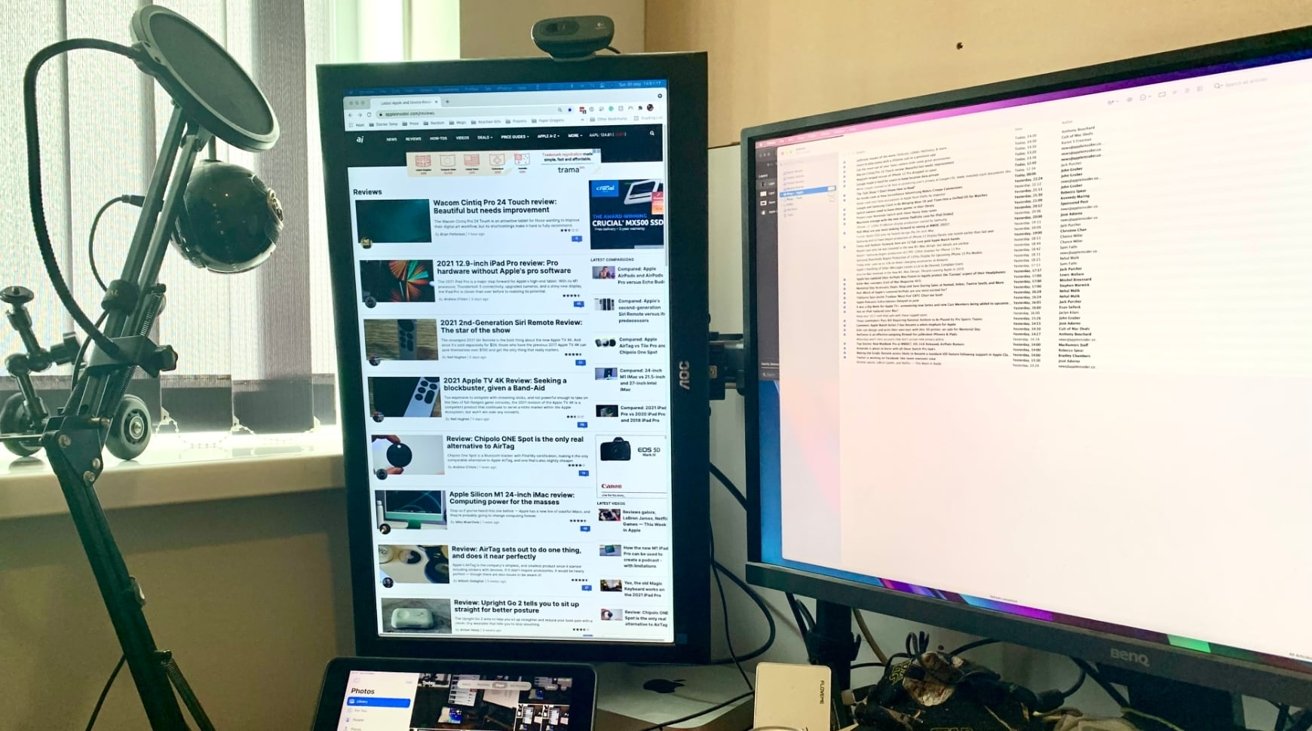
Key Benefits of a Vertical Monitor
Better reading and writing
A vertical screen matches the shape of many pages. This makes it useful for articles, reports, research papers, PDFs, and online books.
Writers and editors can view more lines at once. This helps with flow, grammar, and repeated words. You can also compare nearby paragraphs without moving the page as much.
More code on the screen
Developers often ask why use a vertical monitor for programming. The answer is the extra line count. A portrait display can show more code without shrinking the font.
This can reduce constant scrolling during code reviews. It may also make it easier to follow a function from start to finish. The benefit is strongest when the code uses long files and short line lengths.
Easier web browsing
Most websites scroll from top to bottom. A vertical monitor fits this layout well. You may see more headlines, product details, comments, or search results at once.
This can help researchers, students, and customer support workers. It is also useful for checking long forms and dashboards.
Useful second-screen layout
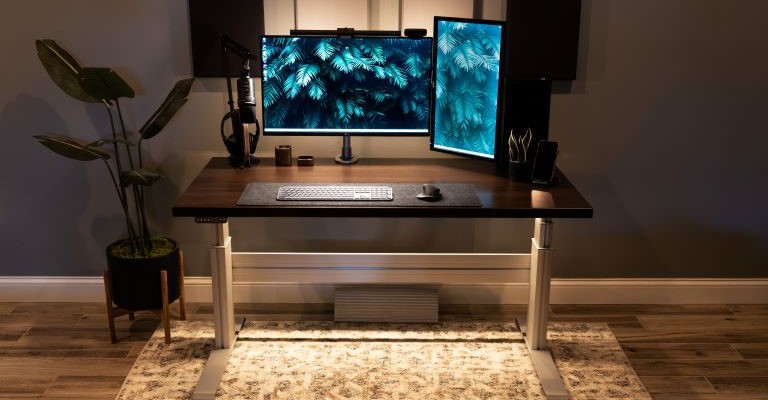
A vertical monitor works well beside a horizontal primary screen. You can use the main display for active work and the portrait display for supporting information.
For example, you might place these items on the vertical screen:
• Team chat
• Calendar
• Reference notes
• Documentation
• Music controls
• Live dashboards
This setup can reduce window switching. It may also make your desk feel more organized.
Better use of narrow desk space
A vertical monitor takes up less width than a large landscape screen. This can help on a small desk or in a shared workspace.
The screen still needs enough depth for safe viewing. Do not place it so close that you must turn your neck often. Space savings should not come at the cost of comfort.

Who Should Use a Vertical Monitor?
A vertical monitor can suit many users, but it is not ideal for every task. Your work matters more than the trend.
A vertical display may be a strong choice for:
• Writers and copy editors
• Software developers
• Students and researchers
• Lawyers and office workers
• Customer service teams
• Social media managers
• Streamers who read chat
• Traders who track long data lists
• Programmers reviewing logs
• People who read many PDFs
The best answer to why use a vertical monitor depends on your daily screen habits. If most of your work involves wide spreadsheets, video editing, gaming, or large design canvases, landscape mode may serve you better.
Many people benefit from a two-monitor setup. A horizontal screen handles wide work, while a vertical monitor handles text and reference content. This gives each screen a clear role.
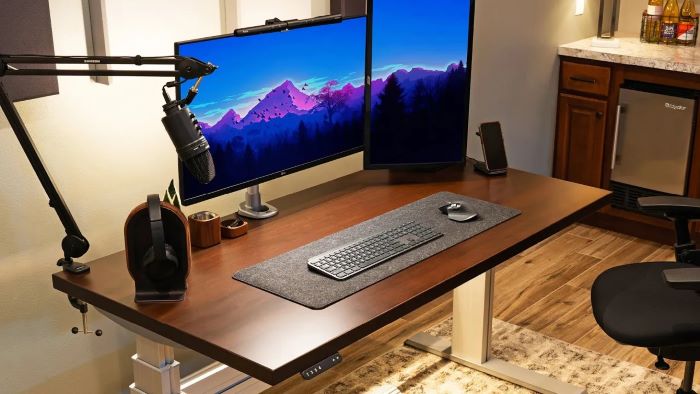
Vertical Monitor vs. Horizontal Monitor
Neither orientation is always better. Each one fits different content.
A horizontal monitor is usually better for:
• Movies and television
• Video editing timelines
• Wide spreadsheets
• Graphic design
• Photo editing
• Modern video games
• Large charts
• Side-by-side documents
A vertical monitor is usually better for:
• Text-heavy websites
• Coding
• Long documents
• Email and chat
• Research
• Social feeds
• Logs and reports
• Portrait photography
The most flexible setup combines both orientations. You can keep the main screen horizontal and rotate a second monitor vertically. This approach gives you a wide workspace without forcing every task into one format.

Does a Vertical Monitor Improve Productivity?
It can, but the effect depends on the task. A vertical monitor may improve productivity by reducing scrolling and window changes. It does not make every person work faster.
Productivity often improves when the screen matches the content. A portrait display can make text-heavy work easier to scan. It may also reduce small interruptions, such as opening and closing a reference window.
Research on office ergonomics supports matching equipment to the task and maintaining a comfortable viewing position. Still, productivity studies do not prove that every person will gain the same benefit from portrait mode.
In practical desk setups I have evaluated, the biggest improvement usually comes from assigning each monitor a purpose. For example, the primary screen handles writing, while the vertical monitor holds research notes. The mistake to avoid is filling both screens with random windows. More space is useful only when it creates less visual clutter.
How to Set Up a Vertical Monitor Correctly
Choose the right position
Place the vertical monitor close to your main display. The top of the screen should be near eye level, though the exact height depends on your posture and screen size.
Keep the monitor about an arm’s length away. You should be able to read normal text without leaning forward.
Rotate the screen safely
Turn off the monitor before changing its position if the stand feels stiff. Hold the display with both hands. Do not twist the panel while the base remains locked.
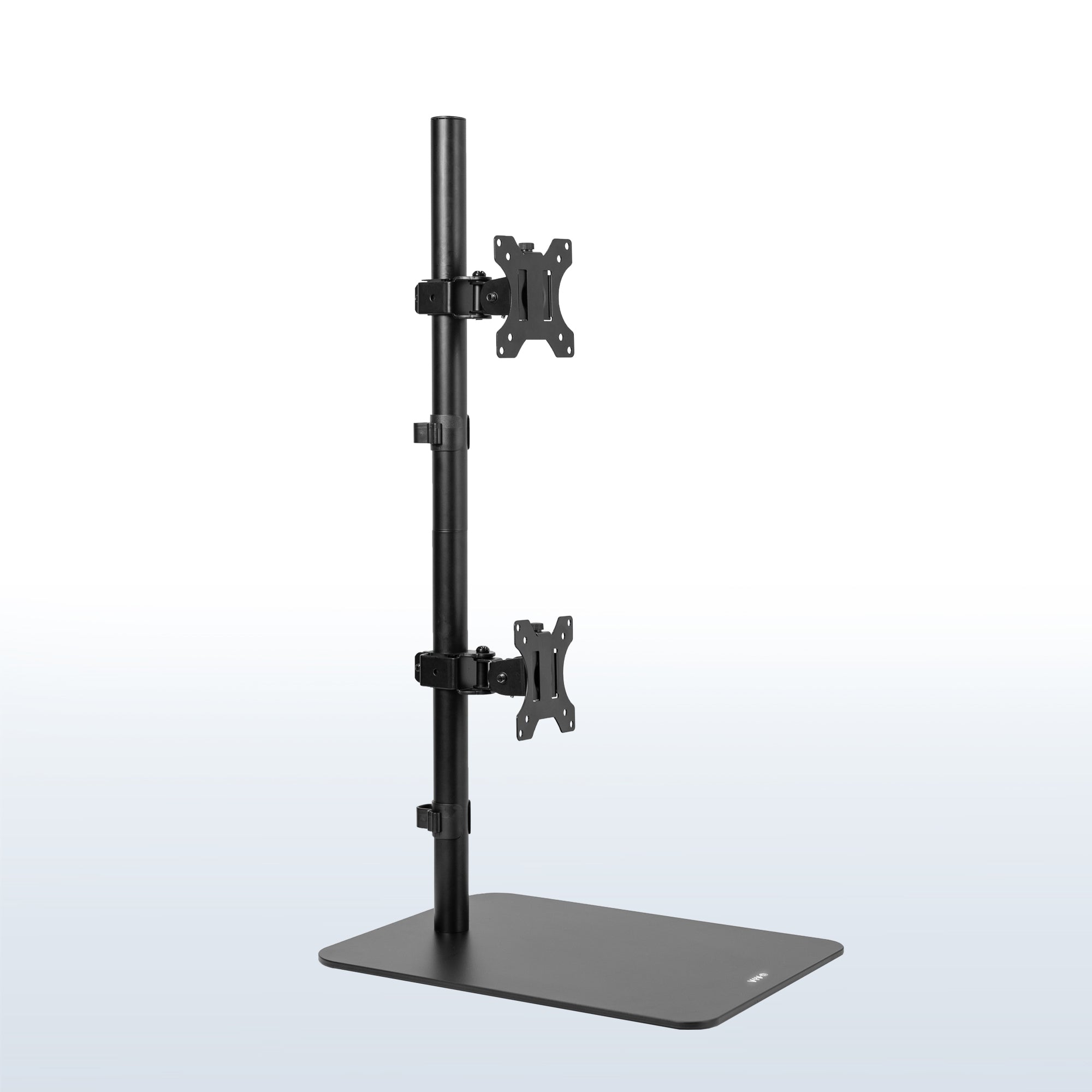
If the monitor does not rotate, use a VESA-compatible arm. Check the monitor’s weight and mounting pattern before buying an arm.
Change display settings
On Windows, open Display Settings and select Portrait orientation. On macOS, open Displays in System Settings and choose the rotation option if your monitor supports it.
You may need to select the correct display first. If the image appears sideways, do not panic. The orientation setting usually fixes it in a few clicks.
Adjust brightness and text size
A vertical monitor can show more content, but small text can still cause strain. Increase scaling when needed. Keep brightness close to the room’s light level.
Avoid placing the screen opposite a bright window. Reflections can make your eyes work harder.
Keep your neck neutral
Do not place the vertical screen far to one side if you use it for hours. Turn your chair or move the monitor closer when it becomes your main display.
Use the 20-20-20 habit as a simple reminder. Every 20 minutes, look at something about 20 feet away for at least 20 seconds.
Best Monitor Size and Resolution for Portrait Mode
A 24-inch monitor is often a practical starting point for portrait use. It provides a tall reading area without taking up too much desk space.
A 27-inch monitor shows more content, but it may feel very tall when rotated. You need enough desk height and viewing distance. A 32-inch display can be uncomfortable in portrait mode for many users.
Resolution also matters. Full HD can work well on a 24-inch screen. A 1440p display may provide sharper text on a larger panel. A 4K monitor offers high detail, but your computer must support the resolution comfortably.
Look for these features:
• IPS or another panel with wide viewing angles
• Adjustable height
• VESA mounting support
• A slim bezel
• A refresh rate of at least 60 Hz
• Automatic or simple rotation support
• A stand with good stability
• A screen with low glare
You do not need the most expensive monitor. A reliable stand and clear text often matter more than a very high refresh rate for office work.
Drawbacks of Using a Vertical Monitor
The answer to why use a vertical monitor should include its limits. Portrait mode is not perfect for every workflow.
The most common drawback is poor performance with wide content. Large spreadsheets may require more sideways movement. Video editing tools can feel cramped because their timelines spread across the screen.
Some websites and applications may not scale well. A few programs may display large empty areas or awkward menus. Certain games also do not support portrait mode properly.
A vertical monitor can also create neck strain if placed badly. Users may turn their head too far or look up at a tall screen. This is a setup problem, but it is still important.
Portrait mode may feel unusual at first. Give yourself several days to adjust before deciding. If the screen still feels awkward after careful positioning, landscape mode may be the better choice.
Common Vertical Monitor Workflows
Writing and editing
Place your draft on the vertical display. Keep notes, research, or communication tools on the horizontal screen. This layout creates a natural reading flow.
Programming
Use the portrait screen for code and the horizontal screen for documentation, testing tools, or a browser. More visible lines can make debugging less tiring.
Streaming
A streamer can place live chat, alerts, and moderation tools on a vertical monitor. The main display remains focused on the game or broadcast software.
Office work
Use the vertical display for email, calendars, policies, or team chat. Keep the active project on the main screen.
Research and studying
A vertical screen works well for papers, online courses, and reference pages. You can take notes on the second display without constantly changing windows.
Mistakes to Avoid
Buying a vertical monitor without checking the stand is a common mistake. Some stands do not rotate, even when the screen looks suitable. Check the product details for pivot adjustment or VESA support.
Another mistake is choosing a screen that is too large. A 32-inch display may look impressive, but its height can be difficult to manage in portrait mode.
Do not place the monitor too far away. The extra height can make text look smaller from a distance. Adjust scaling before moving the screen farther back.
Avoid using portrait mode for every task. Let the content guide the orientation. A flexible setup is usually better than forcing one screen position all day.
Finally, do not ignore color and viewing angles. If the screen looks dim or changes color when you move your head, reading may become tiring.
Is a Vertical Monitor Worth It?
A vertical monitor is worth it when your work includes long pages, code, messages, or documents. It can improve comfort and reduce scrolling when you set it up correctly.
It may not be worth buying if you mainly play games, edit videos, work with wide spreadsheets, or use large design tools. In those cases, a horizontal display may provide more useful space.
Before buying, test portrait mode with your current monitor if possible. Many operating systems let you rotate the display even if the stand does not. You can place the monitor safely on a stable surface for a short trial.
Think about your most common tasks, not the appearance of a popular desk setup. The right monitor orientation should make work feel calmer and more natural.
Frequently Asked Questions About Why Use a Vertical Monitor
Why use a vertical monitor for coding?
A vertical monitor shows more lines of code at once. This can reduce scrolling and make it easier to follow long files, logs, and documentation.
Is a vertical monitor better for your eyes?
A vertical monitor is not automatically better for your eyes. It may feel more comfortable for reading, but brightness, glare, viewing distance, posture, and regular breaks matter more.
Can any monitor be used vertically?
Many monitors can be used vertically if they have a rotating stand or VESA mounting support. Check the manufacturer’s specifications before rotating the display.
What size monitor is best for portrait mode?
A 24-inch or 27-inch monitor is often a practical choice. Larger screens can work, but they may be too tall for a small desk or short viewing distance.
Is a vertical monitor good for gaming?
It can be useful for games that support portrait orientation, but most modern games are designed for landscape screens. A vertical monitor is often better as a second display for chat, guides, or streaming tools.
Does a vertical monitor save desk space?
It can save horizontal desk space because the screen is narrower from left to right. You still need enough depth, height, and stability to use it safely.
Can I use one vertical monitor as my only display?
Yes, especially for writing, coding, reading, and communication. However, a horizontal monitor may be more comfortable for wide tools, movies, games, and large spreadsheets.
Conclusion
A vertical monitor can make text-heavy work easier by showing more content, reducing scrolling, and using desk space well. It is especially useful for coding, writing, research, email, chat, and long documents.
The best setup often pairs a vertical monitor with a horizontal display. Choose a suitable size, adjust the height, keep the screen at a comfortable distance, and match the orientation to your daily tasks.
Try portrait mode before making a purchase if you can. If it improves your workflow, explore monitor arms, better scaling, and a balanced two-screen setup. Share your preferred monitor layout or explore more workspace guides to build a setup that works for you.