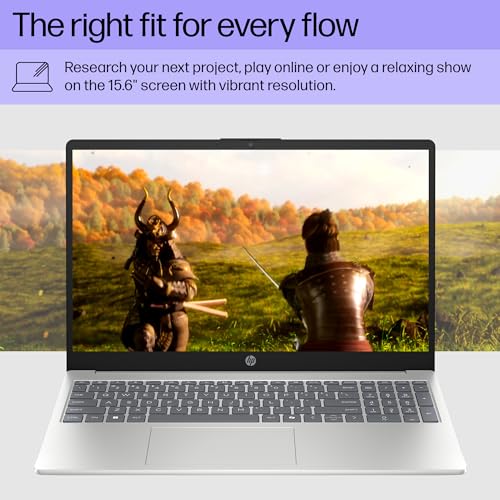
The HP 15 is worth considering for everyday work, school, browsing, and multitasking, with practical hardware and a large touchscreen.
If your current laptop feels cramped for spreadsheets, online classes, video calls, and everyday browsing, a 15.6-inch model can make daily computing more comfortable. A larger display and full-size keyboard are especially useful when working from a home office or handling documents for school.
This HP 15 configuration targets buyers who want a straightforward Windows laptop rather than a specialized gaming or creator machine. Its combination of a touchscreen, 16GB of memory, 512GB solid-state storage, and an Intel Core i5 processor makes it a practical fit for common productivity needs.

Is HP 15 15.6-inch Laptop Good?
Yes, this HP 15 configuration is a sensible choice for everyday productivity, schoolwork, remote work, web browsing, streaming, and general home use. The combination of an Intel Core i5-1334U processor, 16GB RAM, 512GB SSD, and a 15.6-inch Full HD touchscreen gives it a well-rounded specification set for buyers who value practicality over specialized performance.
The strongest points are the generous memory, responsive SSD storage, touchscreen interface, built-in numeric keypad, and useful wireless connectivity. The main limitation is that integrated graphics make it better suited to everyday computing and lighter graphical workloads than demanding modern gaming or professional GPU-heavy applications.

My First Impression of the HP 15 15.6-inch Laptop
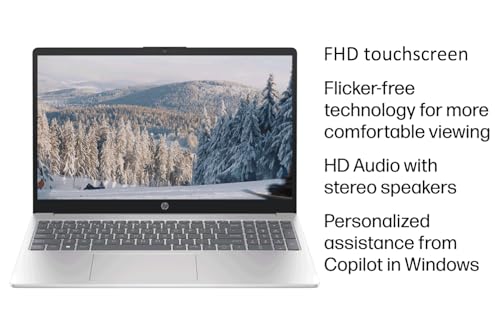
The overall design follows the familiar practical HP laptop formula: a conventional clamshell body, a roomy 15.6-inch display, and a keyboard layout that includes a numeric keypad. That makes the machine particularly convenient for people who regularly work with numbers, documents, or spreadsheets.
Setup should be familiar to anyone who has used a recent Windows PC. After completing the initial Windows setup, connecting to Wi-Fi, installing updates, and signing into your preferred services, the laptop is ready for normal productivity tasks without requiring a complicated workflow.
What Makes It Stand Out / Key Features
- 15.6-inch Full HD Touchscreen: The 15.6-inch Full HD touchscreen provides a spacious 1920 x 1080 workspace and adds touch input for compatible Windows applications.
- Intel Core i5-1334U Processor: The Intel Core i5-1334U provides a balanced foundation for everyday productivity, web browsing, office applications, video calls, and multitasking.
- 16GB RAM: The 16GB memory configuration gives Windows and everyday applications more room for multitasking, making it useful when several browser tabs and programs are open at once.
- 512GB SSD: The 512GB solid-state drive provides useful space for documents, applications, photos, and other everyday files while supporting responsive storage performance.
- Windows 11 Pro: Windows 11 Pro provides the familiar Microsoft desktop environment along with features intended for productivity and professional use.
- Numeric Keypad: The integrated numeric keypad is convenient for spreadsheet work, accounting tasks, data entry, and other situations where frequent number input is required.
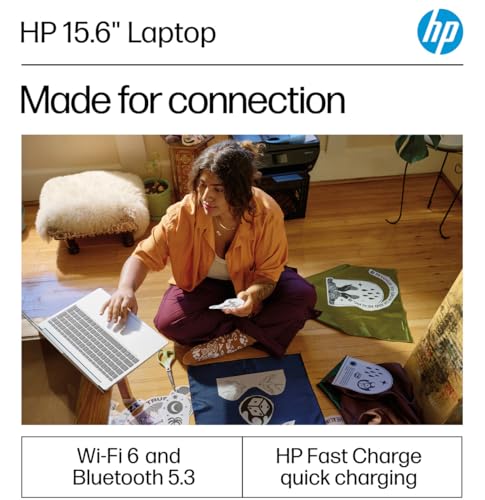
- Wi-Fi 6 and Bluetooth: Wi-Fi 6 and Bluetooth support provide modern wireless connectivity for compatible networks and peripherals such as mice, keyboards, headphones, and other devices.
- HP Fast Charge: HP Fast Charge is designed to reduce charging time, which can be useful when the laptop needs to be topped up between work or study sessions.

✅ What I Like
- ✔ The 15.6-inch Full HD touchscreen provides a comfortable workspace for documents, browsing, streaming, and other everyday tasks.
- ✔ The 16GB RAM configuration is well suited to multitasking with multiple applications and browser tabs.
- ✔ The 512GB SSD offers a useful balance of storage capacity and responsive everyday performance.
- ✔ The built-in numeric keypad is a practical advantage for spreadsheets, budgeting, accounting, and data-entry work.
- ✔ Windows 11 Pro makes the laptop a reasonable fit for users who want a familiar Windows environment for productivity.
- ✔ Wi-Fi 6 and Bluetooth support provide useful connectivity for modern home-office networks and wireless accessories.
⚠️ What Could Be Better
- ✖ Integrated graphics are aimed at everyday computing rather than demanding modern gaming or intensive GPU-accelerated creative work.
- ✖ The 15.6-inch format provides a large working area but is less compact for frequent travel than smaller 13- or 14-inch laptops.
- ✖ Buyers should verify the exact configuration and seller details before ordering because upgraded or bundled configurations can vary between listings.
My Recommendation
I would consider this HP 15 a strong match for buyers who want a conventional 15.6-inch Windows laptop with enough memory and storage for everyday work. Students, home-office users, small-business users, and families can all benefit from the combination of a large touchscreen, numeric keypad, and capable mainstream processor.
I would look elsewhere if your priority is high-end gaming, professional 3D work, or sustained GPU-intensive editing. For those workloads, a laptop with a dedicated graphics processor would be a more appropriate starting point.
| Best For | Why It Fits |
|---|---|
| College and school students | The large Full HD touchscreen, 16GB RAM, and SSD storage suit research, documents, online classes, presentations, and everyday school applications. |
| Remote and home-office workers | The roomy screen, numeric keypad, Windows 11 Pro, webcam, and wireless connectivity support common office and video-conferencing tasks. |
| Spreadsheet and data-entry users | The numeric keypad and larger display make entering numbers and working with spreadsheets more convenient. |
| Everyday home users | The hardware is appropriate for browsing, email, streaming, documents, video calls, and general household computing. |

Alternative Products You Can Consider
| Product | Best For | Key Difference |
|---|---|---|
| HP 15 15.6-inch | Everyday productivity and home use | Large 15.6-inch touchscreen format with a numeric keypad and practical mainstream hardware. |
| Acer Aspire 5 | Mainstream productivity buyers | A broad laptop family with multiple configurations, making model-by-model comparison important. |
| HP ProBook 450 | Business and professional users | More strongly positioned toward business computing than the general-purpose HP 15. |

Final Verdict: Which Should You Buy?
The HP 15 15.6-inch configuration is a practical choice when the goal is a dependable everyday Windows laptop rather than a specialized performance machine. Its 16GB RAM, 512GB SSD, Full HD touchscreen, numeric keypad, and Core i5 processor create a useful balance for school, office work, browsing, streaming, and household tasks.
Buyers who need a large screen and comfortable everyday productivity features should give it serious consideration. However, people focused on demanding gaming, professional graphics, or maximum portability may be better served by a laptop with dedicated graphics or a smaller business-oriented design.