The Logitech G305 Lightspeed is my best gaming mouse for MacBook for its reliable wireless play and strong value.
A MacBook can handle plenty of games, but its trackpad can feel cramped when you need quick, precise aim. A good mouse also makes everyday work easier, from editing to browsing. The right pick depends on your MacBook’s ports, your grip, and whether you want a cable-free desk. I compared wireless, wired, USB-C, and budget options below, including one slim mouse that suits casual play more than serious gaming.
See the differences between my top picks at a glance.
| Mouse | Connection | MacBook note | Best fit | Standout | Check price |
|---|---|---|---|---|---|
| Logitech G305 Lightspeed – Black | Wireless USB receiver | May need USB-A adapter | Most players | Wireless value | View on Amazon |
| HXMJ USB-C RGB – Black | Wired USB-C | Direct USB-C connection | Simple plug-in use | No receiver needed | View on Amazon |
| Logitech G502 HERO | Wired USB | May need USB-A adapter | Feature-focused play | Many controls | View on Amazon |
| Razer Basilisk V3 | Wired USB | May need USB-A adapter | Custom controls | Scroll options | View on Amazon |
| Logitech G309 Lightspeed | Wireless receiver / Bluetooth | Receiver may need adapter | Flexible wireless play | Two connection modes | View on Amazon |
| Redragon M612 | Wired USB | May need USB-A adapter | Budget customization | Remappable keys | View on Amazon |
| Logitech G305 Lightspeed – White | Wireless USB receiver | May need USB-A adapter | Wireless value | White finish | View on Amazon |
| BENGOO RGB Wired Mouse | Wired USB | May need USB-A adapter | Entry-level gaming | RGB lighting | View on Amazon |
| HXMJ USB-C RGB – White | Wired USB-C | Direct USB-C connection | Basic wired gaming | Listed 7200 DPI | View on Amazon |
| HOTLIFE Slim Wireless Mouse | Bluetooth | No USB receiver listed in title | Casual use | Slim, rechargeable design | View on Amazon |
Logitech G305 Lightspeed Wireless Gaming Mouse – Black

The G305 is my leading pick for players who want a dependable wireless mouse without paying for a long list of extras. It uses Logitech’s Lightspeed USB receiver, so it does not pair with a MacBook through Bluetooth. The receiver uses USB-A, which means many newer MacBook owners will need a USB-C adapter or hub. Its compact shape suits travel and smaller desks.
The mouse uses one AA battery, so you do not need to remember a charging cable. Logitech lists its HERO sensor with sensitivity settings up to 12,000 DPI, though a higher number does not automatically make a mouse better. The G305 has six programmable buttons, which gives you useful options without an overly busy layout. I would choose it for a mix of gaming, school, and daily work.
Pros:
- Wireless design keeps the desk clear.
- USB receiver provides a direct gaming connection.
- AA battery is easy to replace on the go.
- Six programmable buttons add useful control.
- Compact body packs well beside a MacBook.
Cons:
- The USB-A receiver may require a MacBook adapter.
- It uses a replaceable battery rather than built-in USB charging.
- The compact shape may feel small in a large hand.
What Amazon Buyers Are Saying
Amazon reviews can change over time, and I cannot verify a live review tally or quote here. When you check the current listing, look for repeated comments about receiver connection, battery life, and how the small shape feels in hand. Also check recent reports about the exact model and color, since listings can group options together.
My Recommendation
I recommend the black G305 to MacBook owners who want wireless performance and do not mind using a small USB-C adapter. It offers a strong mix of useful controls, compact size, and simple battery replacement. It is not the right fit if you want Bluetooth or USB-C built into the mouse.
HXMJ RGB LED USB-C Gaming Mouse – Black
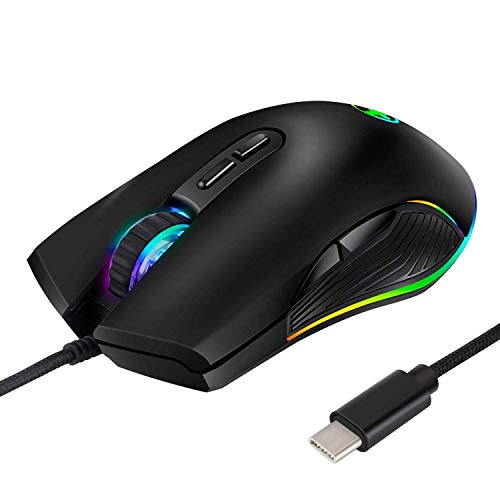
This HXMJ mouse stands out because its product title specifies a wired USB-C connection. That can save you from carrying a USB-A adapter with a newer MacBook. A wired mouse also avoids pairing steps and battery charging. For a simple desk setup, those practical details can matter more than wireless features.
The listing describes an RGB gaming mouse made for computers with a Type-C port. As with any lesser-known accessory, I would check the current listing for clear details on button programming and macOS support before buying. RGB lights may add style, but they do not improve aim or comfort by themselves. This is a basic pick for someone who wants a direct cable and a familiar mouse shape.
Pros:
- USB-C connection can plug into compatible MacBooks directly.
- No wireless receiver to misplace.
- No battery to charge or replace.
- RGB lighting gives the mouse a gaming look.
- Wired use keeps setup simple for a fixed desk.
Cons:
- The cable can limit movement and add desk clutter.
- Brand-specific software support for macOS should be checked first.
- Available product details may be less extensive than those for major brands.
What Amazon Buyers Are Saying
I cannot confirm the current review mix on this Amazon listing, so I will not present unverified buyer claims as fact. Read recent reviews for notes on USB-C fit, cursor behavior on macOS, and whether the lighting or buttons work as expected. A few repeated comments about cable quality or missed clicks deserve more weight than one isolated review.
My Recommendation
Choose this HXMJ model if you want a low-fuss USB-C gaming mouse and prefer a wired connection. Its strongest MacBook benefit is the listed connector type. I would compare the seller’s current information and return terms before choosing it over an established brand with clearer software support.
Logitech G502 HERO Wired Gaming Mouse

The G502 HERO is a wired mouse built for players who want more controls close at hand. Its sculpted body includes thumb support, and the mouse has multiple buttons that you can assign through Logitech software. Logitech lists its HERO sensor with sensitivity up to 25,600 DPI. For everyday play, the ability to set a comfortable pointer speed matters more than chasing the highest number.
The cable means you do not need to charge it or replace a battery. It also means you may need a USB-A-to-USB-C adapter for a MacBook with only USB-C ports. The G502 is larger and more feature-heavy than a small travel mouse, so it suits a desk better than a slim laptop sleeve. I like it most for players who use extra commands in games or creative apps.
Pros:
- Many buttons support shortcuts and game commands.
- Wired connection avoids battery concerns.
- Thumb rest supports a relaxed hand position for many users.
- Sensor sensitivity can be adjusted to suit different games.
- Useful for gaming and shortcut-heavy desktop tasks.
Cons:
- USB-A connector may require an adapter or hub.
- The cable can snag or drag across a small desk.
- The larger shape may not suit small hands or travel.
What Amazon Buyers Are Saying
Amazon feedback changes, and I cannot confirm current buyer-review statistics for this listing. Before ordering, scan recent comments for comfort, button use, and cable behavior. Pay attention to whether reviewers discuss the same G502 version, and check if they use macOS software features you plan to rely on.
My Recommendation
The G502 HERO is a sensible choice if you want a wired gaming mouse with many controls and a supportive shape. It is less convenient for MacBook travel, but a good fit for a home desk with an adapter. I would skip it if you want a light, small, or cable-free mouse.
Razer Basilisk V3 Wired Gaming Mouse

The Basilisk V3 is a wired ergonomic mouse with a thumb rest and several programmable controls. It also has a scroll wheel with more than one scroll mode, which can help when you move between games and long documents. Razer lists its optical sensor at up to 26,000 DPI. The shape and many settings make this a desk-first choice, not a bare-bones travel mouse.
Its USB cable works with a MacBook through a suitable adapter if your model lacks USB-A. Razer’s configuration software and feature support can vary by operating system, so check current macOS compatibility before relying on custom profiles or lighting control. Basic pointer movement should work as a standard mouse, but advanced options may need software. I would buy it for comfort and customization, not just its RGB effects.
Pros:
- Ergonomic shape includes a thumb rest.
- Programmable buttons support game commands and shortcuts.
- Scroll modes suit both quick browsing and fine movement.
- Wired connection needs no charging.
- RGB lighting can suit a coordinated gaming setup.
Cons:
- USB-A connection may need a MacBook adapter.
- Cable makes it less convenient for travel.
- Some advanced settings may depend on software compatibility.
What Amazon Buyers Are Saying
I cannot verify live Amazon reviews or a current pattern of buyer comments for this product. Check recent feedback for reports on scroll feel, hand comfort, and software setup. If lighting and button changes matter to you, look for reviews from Mac users rather than assuming every Windows feature works the same way on macOS.
My Recommendation
I recommend the Basilisk V3 to MacBook owners who want a comfortable, feature-rich wired mouse for a fixed setup. It can be a strong gaming option, but the cable and software questions matter. Confirm macOS support for any advanced feature you plan to use before purchase.
Logitech G309 Lightspeed Wireless Gaming Mouse

The G309 gives you two ways to connect: Logitech Lightspeed through its USB receiver or Bluetooth. That flexibility helps when you switch between a gaming desk and a MacBook setup. Bluetooth can avoid using a receiver, while Lightspeed is a useful option when you prefer a dedicated wireless link. Check the current product details for battery and receiver requirements before you buy.
This model is a good fit if you want fewer cables but do not want to give up a receiver-based connection. Its shape is simpler than the G502 or Basilisk, so it may suit players who prefer a cleaner design. Like any wireless mouse, it still needs power, and the connection mode can affect how you use it. I would compare its cost with the G305 if you do not need Bluetooth.
Pros:
- Bluetooth can connect without using a USB receiver.
- Lightspeed receiver offers another wireless option.
- Flexible for switching between compatible devices.
- No cable to drag during play.
- More streamlined than mice with many side controls.
Cons:
- Lightspeed receiver may need a USB-C adapter.
- Wireless use still requires attention to battery or power needs.
- May cost more than a simpler wireless model.
What Amazon Buyers Are Saying
I cannot confirm the current Amazon review consensus for the G309. Look for recent buyer notes on Bluetooth pairing, receiver setup, and battery use. Also check whether comments refer to Mac use, since a review about Windows software may not answer questions about your MacBook.
My Recommendation
The G309 is a strong option for a MacBook owner who wants both Bluetooth and a receiver-based connection. That choice makes it more flexible than a receiver-only mouse. If you mainly play at one desk and want to spend less, the G305 may offer better value.
Redragon M612 Wired RGB Gaming Mouse

The Redragon M612 is a budget-minded wired mouse with RGB lighting and remappable keys. Its listing advertises sensitivity up to 8,000 DPI, which gives you a range of pointer settings to try. The mouse uses USB, so a newer MacBook may need a USB-A adapter. It can suit a first gaming setup if you want more controls than a plain office mouse provides.
Keep in mind that a listed DPI figure does not tell you how well a mouse fits your hand or tracks on your desk. You should also check the current product page for macOS software details before counting on advanced button changes. The cable avoids battery worries but takes up space and can pull during fast moves. For the price, its appeal is the mix of lighting and extra controls.
Pros:
- Remappable buttons can add useful game shortcuts.
- Wired power means no battery to manage.
- RGB lighting gives it a gaming look.
- Adjustable DPI lets you tune pointer speed.
- Useful feature set for a starter gaming desk.
Cons:
- USB-A connection may need a MacBook adapter.
- Its cable can limit movement.
- Advanced remapping support on macOS should be confirmed.
What Amazon Buyers Are Saying
I cannot validate current Amazon buyer comments for the M612, so check the recent listing reviews before deciding. Look for repeated details about button feel, sensor tracking, and software setup. For MacBook use, prioritize reviews that say which macOS version and connection method the buyer used.
My Recommendation
The M612 is worth considering if you want an affordable wired mouse with lighting and extra buttons. It is not my top choice for MacBook users who value easy plug-in support or polished software. Check adapter needs and macOS controls first, then compare its price with the Logitech options.
Logitech G305 Lightspeed Wireless Gaming Mouse – White

This white G305 has the same core design as the black version, with a light finish that pairs well with a pale desk or laptop setup. It connects through Logitech’s Lightspeed USB receiver, not Bluetooth. That receiver uses USB-A, so a USB-C adapter may be part of your MacBook kit. The white color is the key difference to consider when choosing between these listings.
The mouse runs on one AA battery and offers six programmable buttons. Its compact size makes it easy to carry, though some people with larger hands may prefer a wider body. Like the black version, the HERO sensor offers a range of sensitivity settings for different games. I would select the color you prefer and compare the current prices, rather than expect a performance difference.
Pros:
- Wireless design helps keep a small desk tidy.
- White finish suits a light-colored MacBook setup.
- AA battery is simple to swap when needed.
- Six programmable buttons support game shortcuts.
- Compact size is easy to pack.
Cons:
- USB-A receiver may require an adapter.
- No Bluetooth connection is listed for this model.
- Small shape may not suit every grip or hand size.
What Amazon Buyers Are Saying
I cannot confirm the latest review themes for this color listing. Check the live page for comments about battery use, receiver pairing, and whether the white surface stays clean in daily use. Confirm that reviews apply to the G305 itself, since color options can sometimes share a product page.
My Recommendation
Buy the white G305 if you like its finish and want the same compact, receiver-based experience as the black model. It is a capable wireless choice for gaming and everyday MacBook use, provided you have a way to connect the USB-A receiver. Compare both colors for price and availability before checkout.
BENGOO RGB Wired Gaming Mouse

The BENGOO is a wired gaming-style mouse with RGB backlighting and an ergonomic design. Its listing presents it as a mouse for PC gaming, so MacBook buyers should check the plug type and any software needs before ordering. If the connector is USB-A, you will need an adapter for a USB-C-only MacBook. Its main draw is an entry-level price and a gaming look.
This is a simpler choice than the Logitech and Razer models above. It may work for casual games and general pointer use, but do not assume that every button or lighting control has Mac software. A wired connection keeps the mouse powered without charging. I would focus on fit, cable length, and return options rather than lighting when judging its value.
Pros:
- RGB backlighting adds visual flair.
- Wired design avoids battery charging.
- Ergonomic styling may feel familiar to many users.
- Can serve for everyday tasks as well as casual play.
- Simple setup may suit a first gaming mouse.
Cons:
- MacBook may need an adapter, depending on the connector.
- Advanced software and button support on macOS are not clear from the title.
- A cable is less convenient for travel than Bluetooth.
What Amazon Buyers Are Saying
I cannot verify current buyer review patterns for this listing. Read recent reviews for clear details about connector type, durability, and use with Mac computers. If reviewers mention software, check whether they tested it on macOS or another system.
My Recommendation
The BENGOO is a basic option for a buyer who wants a low-cost wired mouse with lighting. It is not my first recommendation for serious gaming or a MacBook setup that needs reliable software controls. Confirm the connection and macOS support before treating it as a plug-and-play gaming upgrade.
HXMJ USB-C RGB Gaming Mouse – White

This white HXMJ mouse is a wired model listed with a USB-C port and up to 7,200 DPI. A direct USB-C plug can be handy if your MacBook has a USB-C port and you do not want another adapter. The white finish may suit a light desk or laptop. The product title also calls out RGB backlighting and an ergonomic shape.
Before buying, check the current listing for the exact button count, software details, and supported operating systems. A DPI number tells you how quickly the pointer can move, not whether tracking feels smooth or precise. The wired design means no battery to manage, but you will have a cable on the desk. This mouse makes the most sense for basic gaming and everyday work.
Pros:
- USB-C connector can suit newer MacBooks directly.
- Listed sensitivity reaches 7,200 DPI.
- Wired connection avoids charging needs.
- White color works with a light setup.
- RGB lighting gives a gaming-style look.
Cons:
- The cable can restrict movement.
- Advanced macOS button settings need confirmation.
- Limited brand information may make support harder to assess.
What Amazon Buyers Are Saying
I cannot check the live Amazon feedback for this listing, so I will not claim a buyer consensus. Review recent comments for USB-C fit, sensor feel, and lighting control. Look for detailed reports from MacBook users, not just short ratings with no setup information.
My Recommendation
This HXMJ option is worth a look if direct USB-C connection and a white finish matter to you. Its listed 7,200 DPI gives you a wide range to test, but comfort and tracking matter more in real play. I would buy it only after checking current support details and return terms.
HOTLIFE Slim Wireless Bluetooth Mouse

The HOTLIFE is the odd one out in this list. Its title describes a slim, rechargeable Bluetooth mouse with silent clicks, not a purpose-built gaming mouse. Bluetooth can pair with a MacBook without a USB receiver, which keeps the setup tidy. Its low-profile shape also makes it easy to slip into a bag.
That slim build may work well for travel and everyday browsing, but it is not the shape I would pick first for long gaming sessions. The listing does not make gaming-focused controls or performance a central feature. I would treat it as a general MacBook mouse that can handle casual games, rather than a serious tool for fast competitive play. Check the current page for charging details and system support.
Pros:
- Bluetooth connection avoids a USB receiver.
- Rechargeable design avoids disposable batteries.
- Slim body is easy to pack with a MacBook.
- Silent-click design may suit shared spaces.
- Useful for general work and casual games.
Cons:
- Not designed around gaming-specific controls.
- Slim shape may feel less supportive during long sessions.
- Bluetooth can be less suitable than a gaming receiver for some players.
What Amazon Buyers Are Saying
I cannot confirm current Amazon reviews for this mouse. Check the latest comments for Bluetooth pairing, battery charging, and the feel of the flat shape. Since this is a general mouse, focus on MacBook connection and comfort rather than expecting gaming performance claims.
My Recommendation
The HOTLIFE makes sense if you mainly need a portable Bluetooth mouse and only play casually. I would not choose it as my main gaming mouse for MacBook if aim, extra buttons, or long-session comfort matter. For those needs, consider the G305 or G309 instead.
How to Choose the Best Gaming Mouse for MacBook
Choosing the best gaming mouse for MacBook takes more than comparing DPI numbers. First check how the mouse connects. Then consider how you hold it, what games you play, and which features will work on macOS. A good match should feel comfortable and fit your ports without adding extra steps every time you sit down to play.
1. Match the connection to your MacBook ports
Many newer MacBooks use USB-C ports, while several gaming mice still use a USB-A cable or receiver. A small adapter or hub can solve that, but it adds one more item to carry and connect. If you want to avoid an adapter, look for a mouse with a USB-C cable or Bluetooth. A receiver-based wireless mouse can still be a good choice if you already use a hub.
Think about where you will play, too. Bluetooth can make a tidy travel setup, while a dedicated USB receiver may suit a gaming desk. A wired model needs no battery but puts a cable beside your laptop. Check the product page for the exact connector and connection modes, since model names alone do not always make them clear.
2. Pick a shape and control layout that fit your hand
A mouse can have an impressive sensor and still feel wrong in your hand. Small models like the G305 are easy to carry, but a larger mouse with a thumb rest may feel better at a desk. If possible, compare the mouse’s shape and size with one you already like. Pay attention to where the buttons sit and whether your thumb rests on them by accident.
Extra buttons help when you use them for real tasks. They can hold game actions, shortcuts, or common commands, but they may also add weight and complexity. If you play games that use only a few controls, a simple layout may be easier to learn. If you want to change button assignments, confirm that the mouse’s software supports the macOS features you need.
3. Judge gaming features by use, not by big numbers
DPI measures how far the pointer moves when you move the mouse. A high maximum DPI is not a promise of better aim. Many players lower sensitivity to gain more control, then adjust it for each game. Look for adjustable settings and a sensor that tracks well on your desk, rather than choosing by the biggest number on the box.
Also weigh battery needs, cable drag, lighting, and price. RGB can look good, but it should not take priority over comfort and a connection that works with your MacBook. Wireless models need power, while wired models need a cable path. Compare the complete setup cost, including any adapter, and check current product details and return terms before ordering.
Final Verdict: Which Should You Buy?
The Logitech G305 Lightspeed is my best gaming mouse for MacBook for most players. It combines wireless play, useful controls, and a compact body, though its USB-A receiver may need an adapter.
Choose the G309 for Bluetooth flexibility, or a USB-C HXMJ model for a direct wired connection. Match the mouse to your ports, grip, and games for a setup that feels right.
FAQs Of best gaming mouse for MacBook
Do gaming mice work with MacBook?
Yes. Most USB and Bluetooth mice work for basic pointer use on a MacBook. Some advanced buttons, lighting, or profile settings may need software that supports macOS.
Do I need an adapter to connect a gaming mouse to a MacBook?
You may need one if the mouse has a USB-A cable or receiver and your MacBook has only USB-C ports. A USB-C mouse or Bluetooth model can avoid that adapter.
Is Bluetooth or a USB receiver better for MacBook gaming?
Both can work. Bluetooth keeps your ports free, while a dedicated receiver gives you another wireless connection option. Choose based on the mouse, game, and setup you prefer.
Is a high DPI mouse better for MacBook gaming?
Not by itself. DPI changes pointer speed, but comfort, tracking, and settings that suit your game matter more. Many players use a lower sensitivity for steadier aim.
Can I use a wired gaming mouse with a MacBook?
Yes. A wired mouse works if its connector fits your MacBook or you use a compatible adapter. Check macOS support if you need special button or lighting controls.