The Razer Basilisk V3 is my top pick for large hands, thanks to its roomy shape and useful controls.
If your fingers hang over a small mouse or your palm cramps after a long match, the right shape can make a real difference. A larger mouse may give your hand more support and help you keep a relaxed grip. I compared wired and wireless picks, plus a few lower-cost options, to help you find a gaming mouse that suits your hand, play style, and budget.
See the differences between my top picks at a glance.
| Mouse | Connection | Best for | Large-hand fit | Link |
|---|---|---|---|---|
| Razer Basilisk V3 | Wired | Best overall | Ergonomic, right-handed | View on Amazon |
| Redragon Large Wireless | Wireless / wired | Big-hand wireless value | Made for larger hands | View on Amazon |
| Logitech G502 Hero | Wired | Extra controls | Large, right-handed shape | View on Amazon |
| Logitech G305 Lightspeed | Wireless | Compact wireless play | Less roomy than the top picks | View on Amazon |
| Corsair IRONCLAW Wireless SE | Wireless | Large-hand wireless | Large ergonomic build | View on Amazon |
| E-YOOSO Large Wireless | Wireless | Budget big-hand use | Large-hand design | View on Amazon |
| Razer Basilisk V3 X HyperSpeed | Wireless | Wireless custom controls | Right-handed ergonomic form | View on Amazon |
| Redragon M612 | Wired | Budget wired controls | Contoured, right-handed | View on Amazon |
| SteelSeries QcK XXL | Desk accessory | More mouse space | Not a mouse | View on Amazon |
| Razer DeathAdder Essential | Wired | Simple ergonomic play | Full-size, right-handed form | View on Amazon |
Razer Basilisk V3 Customizable RGB Wired Mouse

The Razer Basilisk V3 is my best overall pick for large hands. Its right-handed shape gives the palm a more natural place to rest than a small, flat mouse. The thumb rest also helps keep your hand from dragging on the desk. Its wired connection means you do not need to track battery life or recharge it.
This model suits players who want a mix of aim, comfort, and extra controls. Razer lists customizable buttons, RGB lighting, and a scroll wheel with multiple modes among its key features. You can set up controls through Razer’s software, though setup takes time if you have never used it. The shape favors right-handed users and may not suit left-handed play.
Pros:
- Roomy, contoured shape offers a good fit for many larger right hands.
- Thumb rest can help keep your thumb in a relaxed position.
- Programmable controls let you set up game-specific actions.
- Scroll wheel modes suit both quick scrolling and more controlled movement.
- Wired use avoids battery charging and wireless pairing.
- RGB lighting lets you match the mouse to a gaming setup.
Cons:
- The cable can catch on the desk or mouse pad.
- Its shape and extra controls may feel bulky to claw or fingertip users.
- Razer’s software adds setup steps for people who want a simple plug-in mouse.
What Amazon Buyers Are Saying
When reading buyer feedback, look for comments about the thumb rest, button layout, and fit over long sessions. Those details matter more to a large-handed player than RGB alone. Check recent reviews for reports about software setup and cable feel, since personal preferences differ. I would not assume every buyer will find the shape comfortable; hand size and grip style both affect fit.
My Recommendation
I recommend the Basilisk V3 to right-handed players who want a full-featured wired mouse with a supportive shape. It is my strongest all-around choice here, but it is not the best fit for someone who wants a small, light mouse or a wireless desk. The ratings below reflect its use as a large-hand gaming mouse, not a lab test.
| Category | Rating |
|---|---|
| Large-hand comfort | 4.5/5 |
| Controls and features | 4.5/5 |
| Ease of use | 4/5 |
| Value | 4.5/5 |
| Overall rating | 4.5/5 |
Redragon Large Wireless Gaming Mouse

This Redragon mouse is a direct option for shoppers who want a larger wireless design. Its product listing describes three connection modes: 2.4 GHz wireless, Bluetooth, and wired use. That gives you more ways to connect it to compatible devices. The listing also calls out two side buttons and several lighting modes.
The large-hand focus is the key reason to consider this model. Its rechargeable design may suit people who prefer not to replace disposable batteries, though you will still need to recharge it. The multiple connection types offer flexibility for gaming and everyday work. Before buying, check the current listing for exact compatibility, included receiver details, and software needs.
Pros:
- Designed and marketed for larger hands.
- Three connection modes offer useful setup choices.
- Rechargeable design avoids routine battery replacement.
- Two side buttons add quick access to extra actions.
- Backlit modes provide lighting choices.
- Can be used wired if you prefer a direct connection.
Cons:
- Wireless battery life depends on settings and use, so check current product details.
- Three connection options may take more setup than a basic wired mouse.
- Less established software and support may matter to some buyers.
What Amazon Buyers Are Saying
For this type of mouse, useful review details include how well the shape fits a large palm, how easy it is to switch between connection modes, and how often users need to recharge it. Read recent comments for reports on pairing and button feel. Buyer experiences can vary by computer, game, and hand size, so look for reviews from people with similar needs. Verify current feedback on the listing before purchase.
My Recommendation
This Redragon is worth a look if you want a large wireless gaming mouse with flexible connections and a rechargeable design. I would choose it over a small travel mouse for long sessions, but I would confirm the exact setup details before relying on it for competitive play. It earns a good value rating when its price is lower than established premium options.
| Category | Rating |
|---|---|
| Large-hand comfort | 4.5/5 |
| Connection flexibility | 4.5/5 |
| Ease of setup | 3.5/5 |
| Value | 4/5 |
| Overall rating | 4/5 |
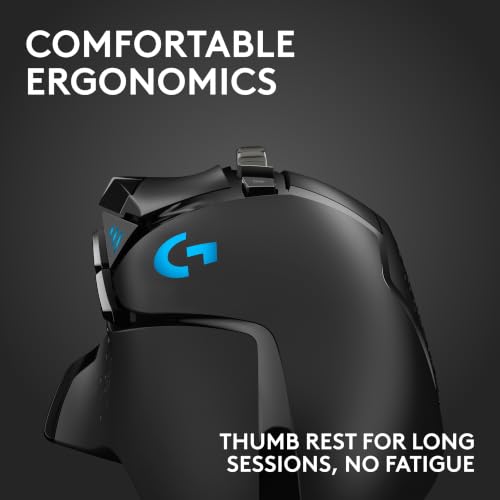
Logitech G502 Hero Wired Gaming Mouse

The G502 Hero is a strong pick for players who want many controls in a familiar wired design. Its molded, right-handed shape has a thumb rest and a set of extra buttons. Logitech’s product information highlights a HERO sensor and adjustable weight options. This can make the mouse appealing to players who like to tune how it feels.
For a large hand, the G502’s broad shape and thumb area can feel more supportive than a small, plain mouse. Its button count also suits games that use frequent commands, as well as work shortcuts. The wired cable keeps the mouse ready without a charge, but it can add drag if it rubs against the desk. Consider whether you want a feature-rich mouse or a lighter, simpler one.
Pros:
- Contoured right-handed form gives the thumb a defined resting area.
- Extra buttons support game commands and desktop shortcuts.
- Adjustable weights let users change the feel of the mouse.
- Wired connection removes battery worries.
- Sensor and button settings can be adjusted with Logitech software.
- Useful for players who prefer a mouse with many functions.
Cons:
- Extra buttons and shape can feel crowded to some users.
- The cable may tug or catch without good desk routing.
- It is not the best choice if you want a very light, minimalist mouse.
What Amazon Buyers Are Saying
Look through recent reviews for details on the fit, scroll wheel, buttons, and software. Buyers of multi-button mice often focus on whether the extra controls feel easy to reach and whether the mouse feels too heavy. Those are personal fit questions, not guarantees. If you have large hands, reviews that mention palm grip and long sessions can help you judge the shape.
My Recommendation
I recommend the G502 Hero if you want a well-equipped wired mouse and can make use of its extra controls. It is a dependable shape to consider for larger right hands, though the button-rich body will not suit everyone. Its mix of custom settings and no-charge wired use makes it a strong alternative to the Basilisk V3.
| Category | Rating |
|---|---|
| Large-hand comfort | 4/5 |
| Button options | 5/5 |
| Customization | 4.5/5 |
| Value | 4.5/5 |
| Overall rating | 4.5/5 |
Logitech G305 Lightspeed Wireless Mouse

The Logitech G305 Lightspeed is a compact wireless gaming mouse, so it is not my first choice for someone who needs a roomy palm rest. It earns a place here because some large-handed players prefer a smaller shell for a fingertip or claw grip. Its wireless connection keeps the desk clear of a cable. Logitech lists a HERO sensor and Lightspeed wireless technology for this model.
Think about grip before you choose it. If your whole palm rests on the mouse, the G305 may feel short or narrow compared with the larger options in this guide. If you move the mouse with your fingers, its compact form could feel easier to control. It uses a replaceable battery, so factor that into your running costs and routine.
Pros:
- Wireless design keeps the desk free of a mouse cable.
- Compact size is easy to pack and carry.
- Can work well for fingertip or claw grips, depending on hand size.
- Logitech software supports settings and button customization.
- Simple shape avoids the busy layout of many-button gaming mice.
- Good option for users who value portability over palm support.
Cons:
- Its compact body may not support a large palm well.
- Uses a replaceable battery rather than a built-in rechargeable battery.
- It has fewer comfort features than larger ergonomic picks.
What Amazon Buyers Are Saying
Review the comments with your grip style in mind. Feedback about wireless performance and battery use can help, but fit reports matter most for this guide. Look for notes from buyers who use a claw or fingertip grip, since those users may find the compact body more suitable. A palm-grip user with large hands may have a very different experience.
My Recommendation
The G305 is a capable wireless option, but I would not call it the best gaming mouse for large hands if you want full palm support. Choose it if you prefer compact gear and use a claw or fingertip grip. For a relaxed palm grip, I would pick the Basilisk, G502, or a mouse built for larger hands instead.
| Category | Rating |
|---|---|
| Large-hand comfort | 3/5 |
| Wireless convenience | 4.5/5 |
| Portability | 5/5 |
| Value | 4/5 |
| Overall rating | 3.5/5 |
Corsair IRONCLAW Wireless SE

The Corsair IRONCLAW Wireless SE is a wireless choice for players who want a larger ergonomic shell. The IRONCLAW line is known for a right-handed shape aimed at a fuller grip, which makes it a natural model to compare for big hands. Its wireless setup can help keep a gaming desk tidy. Check the current listing for the exact connection, battery, and feature details for this SE version.
A larger body can help your palm rest more fully, but size alone does not ensure a good fit. Pay attention to the mouse’s height, thumb area, and button reach when you compare it with your current device. The wireless design may be convenient for everyday gaming, but you will need to manage its power. Corsair’s software can offer setup options; confirm which features work with this specific version.
Pros:
- Large ergonomic shape is a strong match for many big-hand users.
- Wireless design reduces cable clutter.
- Right-handed contour can support a palm-style grip.
- Well suited to users who want more body than a compact mouse offers.
- Corsair software may provide setup and customization tools.
- A useful option to compare with other full-size wireless mice.
Cons:
- Right-handed shape will not suit left-handed users.
- Wireless use means you must keep track of charging or power needs.
- Confirm the exact SE model features before purchase, as versions can differ.
What Amazon Buyers Are Saying
For this mouse, focus on buyer notes about hand fit, weight, and wireless use. Large-handed players may value comments that explain whether the palm sits fully on the shell and whether the side buttons feel easy to reach. Check reviews for the exact SE model rather than assuming every IRONCLAW version has the same features. Personal grip style can change how the shape feels.
My Recommendation
I would put the IRONCLAW Wireless SE on the shortlist for a buyer who wants a full-size wireless mouse. Its large ergonomic design matches the goal of this guide better than a compact option. Check the exact listing details and current buyer feedback before you buy, especially if battery type or software support matters to you.
| Category | Rating |
|---|---|
| Large-hand comfort | 4.5/5 |
| Wireless convenience | 4/5 |
| Fit and shape | 4.5/5 |
| Value | 4/5 |
| Overall rating | 4.25/5 |
E-YOOSO Large Wireless Mouse for Big Hands

The E-YOOSO is a budget wireless mouse that is marketed for big hands. Its product title lists six buttons and five DPI levels, with a stated maximum of 4,800 DPI. DPI controls how far the pointer moves when you move the mouse; a higher setting does not automatically make a mouse better. This model may appeal to buyers who want a large everyday shape without a premium gaming price.
It is a simpler option than the feature-heavy Razer and Logitech picks. The wireless design keeps a cable off the desk, and its listed buttons can cover common tasks. Before you choose it for fast-paced games, check whether its response and software options match your needs. It can also serve as a general-use mouse for browsing, office tasks, and casual play.
Pros:
- Designed and marketed for larger hands.
- Wireless setup keeps the desk clear.
- Six-button layout adds useful controls.
- Five DPI levels let you adjust pointer speed.
- Listed maximum of 4,800 DPI suits many everyday uses.
- Potentially appealing to buyers seeking a lower-cost large mouse.
Cons:
- Its listed features are more basic than those of premium gaming mice.
- Check current details for battery type and software support.
- A stated DPI maximum alone does not show sensor quality or game performance.
What Amazon Buyers Are Saying
Read buyer feedback for comments on the mouse’s actual size, button feel, and wireless reliability. Those details can tell you more than the DPI number alone. Check recent reviews to see whether owners use it for gaming or mainly for everyday computer tasks. Feedback may differ based on hand size, surface, and the games people play.
My Recommendation
The E-YOOSO is a sensible low-cost option if your main goal is a larger wireless mouse for casual gaming and daily use. I would not choose it based on the DPI figure alone. Compare its current price and support details with the Redragon large wireless model before making a final choice.
| Category | Rating |
|---|---|
| Large-hand comfort | 4/5 |
| Basic features | 4/5 |
| Gaming customization | 3/5 |
| Budget value | 4/5 |
| Overall rating | 3.75/5 |
Razer Basilisk V3 X HyperSpeed Wireless

The Basilisk V3 X HyperSpeed brings the familiar Basilisk-style right-handed shape to a wireless model. It is a good option if you want a thumb rest and a clean desk without the cable of the wired V3. Razer describes it as customizable, so you can adjust supported controls to your needs. Check the product listing for the current details on connections, power, and software.
For large hands, this mouse is worth a look because its contour can offer more support than a small symmetrical shell. The shape is still a personal matter, so compare its palm area with your current mouse before you order. Wireless freedom works well for a tidy setup, but it requires you to plan for power. It is best for right-handed players who want a balance of comfort and customization.
Pros:
- Wireless design gives your hand room to move without a cable.
- Right-handed ergonomic shape includes a thumb-rest style contour.
- Customizable controls can suit different games and tasks.
- Familiar Basilisk form may appeal to users who like the wired V3.
- Good match for players who want a full-featured wireless option.
- Works well in a desk setup where cable clutter is a concern.
Cons:
- Not shaped for left-handed users.
- You need to monitor its power needs during regular use.
- Software setup may be more than some buyers want.
What Amazon Buyers Are Saying
Check recent reviews for comments on shape, wireless use, and the control layout. For a large-hand fit, look for buyers who describe their grip and how much of the palm rests on the mouse. Reviewers may have different views on size, so one person’s perfect fit may feel small or large to you. Also confirm the exact model when comparing it with the wired Basilisk V3.
My Recommendation
I recommend the Basilisk V3 X if you want an ergonomic wireless mouse with programmable controls. It is a strong alternative to the wired V3 for right-handed users who value freedom from a cable. Choose the wired model if you want to avoid battery management or if you prefer its specific feature set.
| Category | Rating |
|---|---|
| Large-hand comfort | 4.25/5 |
| Wireless use | 4/5 |
| Customization | 4/5 |
| Value | 4/5 |
| Overall rating | 4/5 |
Redragon M612 Wired RGB Gaming Mouse

The Redragon M612 is a wired gaming mouse with RGB lighting and remappable keys. Its product title lists a maximum sensitivity of 8,000 DPI. That number describes pointer speed, not overall accuracy or comfort. The M612 is a practical budget pick for players who want more controls than a basic office mouse provides.
Its contoured shape may suit a large right hand better than a small, flat design, though you should compare its size with your grip. Wired use makes it simple to connect and keeps battery worries out of the setup. Extra keys can help in games that use many commands, but they can take time to learn. The cable is the main trade-off for a lower-cost mouse with gaming features.
Pros:
- Remappable keys let you set controls for games and common tasks.
- Wired connection does not need charging or battery replacement.
- RGB lighting provides a visual setup option.
- Listed 8,000 DPI maximum offers a broad pointer-speed range.
- Contoured form is more supportive than many small flat mice.
- Good entry-level choice for players who want extra controls.
Cons:
- The cable can limit free movement or add desk clutter.
- Large hands may still find it smaller than dedicated big-hand models.
- DPI alone does not confirm sensor quality or comfort.
What Amazon Buyers Are Saying
When you scan reviews, focus on the shape, cable, and ease of setting up the extra keys. Buyers may use the mouse for different games, so check whether comments match your own needs. Recent notes about software and button mapping can help you judge the setup process. If hand fit is your main concern, seek descriptions of palm size and grip style.
My Recommendation
The M612 is a good low-cost wired pick for someone who wants RGB and remappable controls. It can fit a larger hand better than a compact mouse, but it is not a sure fit for every palm. I would compare its dimensions and shape with the Basilisk V3 or G502 Hero before choosing it for long sessions.
| Category | Rating |
|---|---|
| Large-hand comfort | 3.75/5 |
| Controls | 4/5 |
| Ease of use | 4/5 |
| Budget value | 4.5/5 |
| Overall rating | 4/5 |
SteelSeries QcK XXL Gaming Mouse Pad

The SteelSeries QcK XXL is a mouse pad, not a gaming mouse, so it cannot replace any of the mice in this roundup. I included it because large-handed players often use broad arm movements and need enough space to move. A wide pad can give your mouse room without forcing you to lift it as often. The black design is simple and can suit many desk setups.
Check the current listing for the exact size and material details before you buy. The right pad size depends on your desk, mouse sensitivity, and play style. A large pad may help if your mouse keeps reaching the edge during a match, but it can take up much of your desk. Treat it as a useful add-on rather than a solution to a poorly fitting mouse.
Pros:
- Gives your mouse a broad movement area.
- May suit players who use low sensitivity and wide swipes.
- Can help reduce the chance of running out of desk space mid-game.
- Black finish works with many gaming setups.
- Useful with wired and wireless gaming mice.
- Can serve as a desk surface for keyboard and mouse, depending on fit.
Cons:
- It is an accessory, not a mouse.
- Large size may not fit smaller desks.
- Does not improve the shape or comfort of the mouse itself.
What Amazon Buyers Are Saying
For a mouse pad, buyer feedback often helps most when it covers desk fit, surface feel, and how the pad sits during use. Check recent reviews for comments on the exact size listed and whether it works with your desk. A pad that feels smooth to one player may feel too fast or too slow to another. Compare the measurements with your available space before ordering.
My Recommendation
The QcK XXL is worth considering if your current mouse pad feels cramped. It can support broad movement, but it does not count as a large gaming mouse and will not fix hand strain caused by a poor mouse shape. Measure your desk and pair it with a mouse that fits your grip.
| Category | Rating |
|---|---|
| Movement space | 5/5 |
| Large-hand usefulness | 4/5 |
| Desk fit | 3/5 |
| Value as an accessory | 4/5 |
| Overall rating | 4/5 |
Razer DeathAdder Essential Wired Mouse

The DeathAdder Essential is a wired ergonomic mouse with a simple, right-handed shape. It is a good option for players who want a familiar palm-friendly design without a long list of extra controls. Its full-size form may suit many larger hands better than a compact mouse. Razer’s product listing highlights an optical sensor and programmable buttons.
This model keeps setup simple: connect the cable and use it, or adjust supported settings through Razer’s software. It does not offer the same depth of features as the Basilisk V3, but that can be a plus if you want fewer controls to manage. The wired connection also removes the need to charge it. Its best fit is a player who values an ergonomic shape and straightforward use.
Pros:
- Full-size ergonomic design can suit larger right hands.
- Simple button layout is easy to learn.
- Wired connection keeps the mouse ready to use.
- Programmable buttons add some room for customization.
- Razer software can support setup changes.
- Good pick for buyers who do not need many extra controls.
Cons:
- Wired cable can create clutter or drag.
- Has fewer advanced controls than the Basilisk V3.
- Right-handed shape will not suit left-handed users.
What Amazon Buyers Are Saying
Check recent reviews for comments on the shape, button feel, and cable. For a large hand, look for buyers who explain their grip and say whether the mouse feels full-size in use. Reviews can also show how people feel about its simpler feature set. Be sure to compare comments about this Essential model with other DeathAdder versions, since features can vary.
My Recommendation
I recommend the DeathAdder Essential for buyers who want a simple wired gaming mouse with an ergonomic shape. It is a more basic choice than the Basilisk V3, but it may be a better value if you do not need advanced controls. Check the fit first if your hands are especially large or you use a fingertip grip.
| Category | Rating |
|---|---|
| Large-hand comfort | 4/5 |
| Ease of use | 4.5/5 |
| Feature range | 3.5/5 |
| Value | 4/5 |
| Overall rating | 4/5 |
How to Choose the Best Gaming Mouse for Large Hands
The best gaming mouse for large hands should fit your grip first. A high DPI number or bright lighting cannot make a small shell feel comfortable. Think about how your palm, fingers, and thumb rest on the mouse, then compare size, connection, buttons, and price.
1. Match the shape to your hand and grip
Start by thinking about how you hold a mouse. With a palm grip, most of your palm rests on the shell, so you may want a longer, higher body with room for your fingers. A claw grip arches the fingers and uses less palm contact, while a fingertip grip keeps the palm off the mouse. Some large-handed players still prefer a small mouse for fingertip play, so “large hands” alone does not decide the right size.
Look for a mouse that lets your index and middle fingers rest on the main buttons without reaching too far. A thumb rest can help if you like a right-handed shape. Check the product’s listed dimensions when available, then compare them with a mouse you already own. If you can test a mouse in a store, hold it as you would during a game and notice any strain or awkward reach.
2. Choose the controls and connection you will use
Extra buttons help if your games use many commands or if you want shortcuts for work. They can also feel crowded if you prefer a simple layout. Think about the games you play: a role-playing or strategy game may benefit from more mapped controls, while a simple shooter may call for a clean design. DPI means how fast the pointer moves across the screen. It is useful to adjust, but a larger DPI number does not prove better aim.
A wired gaming mouse is easy to keep ready and does not need charging, though its cable can get in the way. A wireless mouse gives you a clear desk and more freedom to move, but you should check its connection type and power needs. Some mice support more than one way to connect. Confirm that the listed modes work with your device, and check whether you need to install software to change buttons or settings.
3. Balance build, comfort, and price
Choose features that solve a real problem for you. A thumb rest, a wider shell, and a comfortable shape matter more than lighting if your hand gets tired. If you want a mouse you can tailor, check which buttons you can program and what software it needs. For wireless models, read the product details about charging or batteries. For wired models, consider how you will route the cable across your desk.
Think about total value, not just the price on the page. A lower-cost mouse may be a smart choice for casual gaming, while a premium model may make sense if you will use its controls every day. Read current buyer feedback for details on fit and setup, but compare reviews from people who use a similar grip. A large mouse pad can give you more movement space, but it cannot make an ill-fitting mouse comfortable.
Final Verdict: Which Should You Buy?
The Razer Basilisk V3 is my best overall pick for large hands because it pairs a supportive right-handed shape with useful controls. Choose the G502 Hero for more buttons, or the Basilisk V3 X if you want wireless use.
The best gaming mouse for large hands is the one that fits your grip and feels easy to control. Compare shape, connection, and current product details before you buy.
FAQs Of best gaming mouse for large hands
What is the best gaming mouse for large hands?
The Razer Basilisk V3 is my top overall pick for its contoured right-handed shape and useful controls. The best fit still depends on your grip and hand size.
How do I know if a gaming mouse is too small for my hand?
If your fingers hang over the buttons, your palm lacks support, or you feel strain while gripping it, the mouse may be too small or the wrong shape.
Is a wireless gaming mouse good for large hands?
Yes. Hand fit depends on the mouse’s shape and size, not whether it has a cable. Check the dimensions and power needs before you buy.
Should I choose a palm, claw, or fingertip grip?
Choose the grip that feels natural and lets you control the mouse without strain. Palm grips often suit larger shells, while some players with big hands still prefer a small mouse for fingertip use.
Does a higher DPI make a gaming mouse better?
No. DPI sets pointer speed. A high maximum does not prove better comfort, control, or sensor quality, so consider the full mouse and its fit.