The ENDGAME GEAR XM2we is my top pick for claw grip, thanks to its compact shape, low weight, and wireless design.
If your fingers arch over the mouse and your palm rests lightly on its rear, the wrong shape can make long play sessions feel tiring. A good claw-grip mouse should feel easy to hold, quick to move, and steady when you click. I compared the mice below for shape, control, connection, and value. I also included three grip-tape options, since a better surface can help if your current mouse feels slippery.
See the key differences at a glance. The grip tapes are accessories, not standalone mice.
| Product | Type | Shape or use | Connection | Best for | Link |
|---|---|---|---|---|---|
| ENDGAME GEAR XM2we | Gaming mouse | Compact, claw-friendly shell | Wireless | Claw grip first | View on Amazon |
| Razer Viper V3 HyperSpeed | Gaming mouse | Symmetric, low-profile style | Wireless | Flexible aim and play | View on Amazon |
| ATTACK SHARK X11 SE | Gaming mouse | Lightweight wireless style | Wireless | Budget wireless users | View on Amazon |
| Redragon M612 | Gaming mouse | Contoured, feature-rich body | Wired | Value and extra controls | View on Amazon |
| Razer Basilisk V3 | Gaming mouse | Large ergonomic shape | Wired | Buttons and wheel features | View on Amazon |
| Redragon M810 PRO | Gaming mouse | Feature-focused body | Wireless | Wireless value seekers | View on Amazon |
| Redragon M908 | Gaming mouse | Large MMO shell | Wired | Many side commands | View on Amazon |
| TALONGAMES grip tape | Mouse accessory | Cut-to-fit grip surface | Not applicable | More side grip | View on Amazon |
| Pulsar Supergrip tape | Mouse accessory | Grip tape for G Pro X Superlight | Not applicable | Added grip on a compatible mouse | View on Amazon |
ENDGAME GEAR XM2we Lightweight Wireless Gaming Mouse

The XM2we stands out because its shape suits a curled-finger hold. Its rear gives the palm a small point of contact, while the front leaves room for the fingers to arch. That can make quick lifts and short aim corrections feel natural. The white finish also gives the mouse a clean, simple look.
This is a wireless mouse with five buttons, so it keeps the layout focused rather than crowded. Its light build helps reduce effort when you make rapid moves across a large pad. That makes it a strong fit for players who value control over extra buttons. Check the current listing for the exact included items and software details before ordering.
Pros:
- Shape is well suited to a claw grip.
- Wireless design keeps the desk clear.
- Light build helps with fast, repeated movements.
- Five-button layout stays simple and easy to learn.
- Compact profile can suit users who dislike large palm-fill mice.
Cons:
- Few buttons compared with MMO-focused mice.
- Its shape may feel too small for users who want full palm support.
- Wireless buyers should keep charging and battery habits in mind.
What Amazon Buyers Are Saying
Buyer feedback can change over time, so I would check the current listing for recent comments. When comparing reviews, focus on reports about shell comfort, wireless reliability, button feel, and fit for your hand size. Those details matter more than broad claims that a mouse is “perfect.” Reviews can also reveal whether the shape works for people with a grip like yours.
My Recommendation
I recommend the XM2we as the strongest claw-grip pick in this group. Its focused shape, low weight, and wireless setup suit players who want quick control without a crowded button layout. It is less suited to users who need a large body or many thumb buttons. Overall rating: 4.6/5.
| Category | Rating |
|---|---|
| Claw-grip fit | 4.8/5 |
| Movement and control | 4.6/5 |
| Feature set | 4.2/5 |
| Everyday value | 4.5/5 |
| Overall Rating | 4.6/5 |
Razer Viper V3 HyperSpeed Wireless Gaming Mouse

The Viper V3 HyperSpeed offers a wireless option from a major gaming brand. Its design has a low-profile, balanced feel that can suit claw grip, especially if you prefer to keep your palm lifted. The listed weight is 82 grams, so it is not the lightest choice here. Still, some players prefer a little more mass because it can feel steady during controlled aim.
The mouse is made for PC gaming and uses a wireless connection. Its simple shape avoids the deep thumb shelf found on larger ergonomic models. That gives claw-grip players room to adjust their hand position. Check the current Amazon page for the power setup and included accessories, as package details can vary by listing or seller.
Pros:
- Wireless design helps keep the play area tidy.
- Low-profile body can work for a lifted-palm claw grip.
- 82-gram listed weight offers a clear middle ground.
- Known gaming brand with a broad PC gaming focus.
- Symmetric style can suit more than one hand position.
Cons:
- Heavier than many ultra-light gaming mice.
- May not provide enough palm support for relaxed palm grip.
- Power and accessory details should be checked on the live listing.
What Amazon Buyers Are Saying
For a useful review check, look for recent notes about tracking, wireless response, comfort, and power use. Those are the main day-to-day points to compare for any wireless gaming mouse. I would not rely on a single rating alone. Hand size and grip style can change how the same shell feels.
My Recommendation
The Viper V3 HyperSpeed is a sound option if you want wireless play and a less sculpted shape. It is not my first choice for players who want the lightest mouse possible, but it can suit users who like a steadier feel. Overall rating: 4.3/5.
| Category | Rating |
|---|---|
| Claw-grip fit | 4.3/5 |
| Movement and control | 4.4/5 |
| Feature set | 4.3/5 |
| Everyday value | 4.1/5 |
| Overall Rating | 4.3/5 |
ATTACK SHARK X11 SE Wireless Gaming Mouse
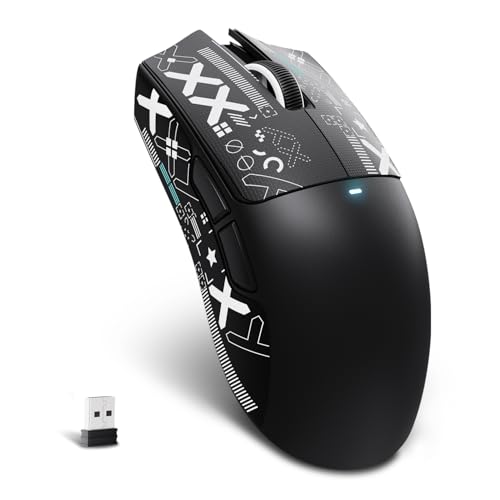
The X11 SE is listed as an ultra-light wireless gaming mouse. That mix can appeal to claw-grip players who want to move fast without a cable pulling at the shell. The product name also notes a black finish and sticker. Since this is a specific SE bundle, confirm its current contents before checkout.
A lightweight mouse can feel quick, but weight alone does not make a good fit. The shell must also suit your hand and finger placement. This model may be worth a look for shoppers who want to try a wireless mouse without starting with a high-priced flagship. Compare its dimensions and current feature list with your existing mouse first.
Pros:
- Wireless setup gives more freedom on the desk.
- Ultra-light positioning suits quick movement.
- May be a lower-cost way to explore a lightweight mouse.
- Black color works with many gaming setups.
- Sticker is noted in the product title as part of the offer.
Cons:
- Product details and bundle contents need close checking.
- Brand and model may have less broad support than major lines.
- Light weight cannot make up for a poor shape match.
What Amazon Buyers Are Saying
Check current buyer comments for long-term use, button consistency, connection behavior, and what arrives in the box. On newer or less familiar models, those reports can be more useful than a short product description. Review photos may also help confirm the actual finish and included parts. Do not assume every seller offers the same bundle.
My Recommendation
The X11 SE is a possible value pick for someone who wants a wireless, light mouse and is willing to verify the details. I would compare its size and return policy before buying, since shape decides comfort more than the feature list does. Overall rating: 4.0/5.
| Category | Rating |
|---|---|
| Claw-grip fit | 4.0/5 |
| Movement and control | 4.1/5 |
| Feature set | 4.0/5 |
| Everyday value | 4.1/5 |
| Overall Rating | 4.0/5 |
Redragon M612 Wired RGB Gaming Mouse

The M612 is a wired RGB gaming mouse with remapping keys and an advertised maximum of 8,000 DPI. DPI is a measure of how far the pointer moves when you move the mouse; higher is not always better. Many players set a lower value for steady aim. The wired connection also means you do not need to charge the mouse.
This model puts more focus on features than on a bare, ultra-light shell. Its contoured body may feel more secure if you like the mouse to fill your hand. For a claw grip, pay close attention to the rear height and side shape. Extra controls can help in games and work, but only if your fingers can reach them without changing your grip.
Pros:
- Wired connection needs no battery charging.
- Advertised 8,000 DPI gives room to adjust pointer speed.
- Remapping keys offer added control options.
- RGB lighting adds a customizable visual touch.
- Feature-rich design can offer strong value for a budget setup.
Cons:
- Cable may drag or catch if your desk is crowded.
- Extra weight and controls may not suit fast claw play.
- Contoured fit may not work for every hand size.
What Amazon Buyers Are Saying
When you read current buyer reviews, look for practical details on cable feel, button setup, lighting controls, and comfort over time. It also helps to see whether people find the shape easy to hold during games. Do not treat the listed DPI ceiling as a measure of accuracy. A good sensor setting is the one you can control well.
My Recommendation
I would choose the M612 for a budget gamer who wants wired reliability, remapping, and lighting in one mouse. It is not the best match for someone seeking a very light claw-grip mouse, but it offers useful features for mixed gaming and daily use. Overall rating: 4.0/5.
| Category | Rating |
|---|---|
| Claw-grip fit | 3.8/5 |
| Movement and control | 4.0/5 |
| Feature set | 4.4/5 |
| Everyday value | 4.2/5 |
| Overall Rating | 4.0/5 |
Razer Basilisk V3 Customizable RGB Mouse
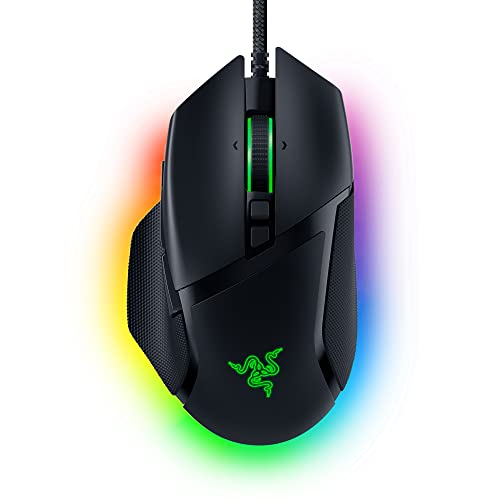
The Basilisk V3 is a wired ergonomic mouse with customizable RGB lighting. Its larger, right-handed shape puts comfort and extra controls ahead of a small, neutral shell. That makes it less of a pure claw-grip specialist than the XM2we. Still, some claw users like a raised rear that gives the palm a firm point of contact.
The Basilisk line is known for its feature-rich wheel and programmable controls. These can help in games with many actions, as well as in everyday apps. The trade-off is size: a broad body can limit quick finger adjustments for small hands. If possible, compare its shape with a mouse you already know before you buy.
Pros:
- Ergonomic right-handed design supports a relaxed hold.
- Wired setup avoids battery management.
- Programmable controls add options for games and daily tasks.
- RGB lighting can be customized to match a setup.
- Feature set suits users who want more than a basic mouse.
Cons:
- Larger shape may feel awkward for small hands or tight claw grip.
- Wired cable can get in the way without good desk routing.
- Its comfort-first design is not ideal for every fast shooter player.
What Amazon Buyers Are Saying
Look at current comments about the wheel, software setup, side controls, and shell size. Those points will help you decide whether the Basilisk’s many features fit your habits. For claw grip, give extra weight to comments from buyers with a similar hand size. Comfort is personal, so one glowing review cannot settle the fit question.
My Recommendation
The Basilisk V3 makes sense if you want a comfortable, feature-heavy mouse and do not mind a larger body. I would not pick it as the first choice for a compact claw grip, but it can be a good all-around tool for mixed use. Overall rating: 4.2/5.
| Category | Rating |
|---|---|
| Claw-grip fit | 3.8/5 |
| Movement and control | 4.3/5 |
| Feature set | 4.7/5 |
| Everyday value | 4.1/5 |
| Overall Rating | 4.2/5 |
Redragon M810 PRO Wireless RGB Gaming Mouse

The M810 PRO pairs a wireless connection with RGB lighting and remappable controls. Its listed sensor range goes up to 10,000 DPI. That is more than most players need, but it gives room to set a personal pointer speed. For claw grip, the key question is whether its body feels quick and easy to lift.
This mouse may suit a player who wants wireless freedom without paying for a barebones design. The added controls can help with game commands or shortcuts. However, extra buttons do not matter if they crowd your thumb or force your hand to shift. Check the current listing for connection modes, battery details, and included parts before purchase.
Pros:
- Wireless design reduces cable clutter.
- Advertised 10,000 DPI range allows pointer-speed changes.
- Remappable controls add useful shortcuts.
- RGB lighting gives a personal setup option.
- Feature mix can appeal to budget-minded wireless buyers.
Cons:
- More controls can make the shell feel busy.
- Wireless use means you must plan for charging or power.
- Its shape and weight may not suit players who want an ultra-light mouse.
What Amazon Buyers Are Saying
Read recent comments for details on battery life, wireless behavior, button feel, and setup. These are the areas where day-to-day use matters most. Reviews can also help you see if buyers found the controls easy to reach. Check dates and model names, since feedback for a different version may not apply.
My Recommendation
The M810 PRO is worth a look if you want wireless play and a broad set of features at a value price. It is not the most focused option for competitive claw grip, yet it may work well for players who use extra buttons. Overall rating: 4.0/5.
| Category | Rating |
|---|---|
| Claw-grip fit | 3.8/5 |
| Movement and control | 4.0/5 |
| Feature set | 4.4/5 |
| Everyday value | 4.1/5 |
| Overall Rating | 4.0/5 |
Redragon M908 Wired MMO Gaming Mouse

The M908 is a wired MMO mouse with many remappable controls and an advertised maximum of 12,400 DPI. Its large button layout is built for games where you need quick access to many actions. That makes it a different kind of pick from a small, light FPS mouse. Players who use a claw grip can still consider it, but hand size and thumb reach matter a lot.
The extra buttons can reduce the need to reach for the keyboard. They can also take time to learn and may feel crowded if your thumb is small. The M908 is best viewed as a command center for MMO play, not a simple esports mouse. If fast flicks are your main goal, compare its size and weight with lighter models first.
Pros:
- Many side controls suit MMO skills and macros.
- Wired connection does not need charging.
- Advertised 12,400 DPI offers a broad adjustment range.
- Remapping lets you tailor controls to your games.
- Useful for players who want a high number of commands close at hand.
Cons:
- Large button layout may feel crowded in a claw grip.
- Not the best choice for a light, simple FPS setup.
- Wired cable and larger shell can limit quick movement for some users.
What Amazon Buyers Are Saying
Check current reviews for comments about the side-button layout, software, cable, and comfort. A buyer who plays MMOs may judge the mouse very differently from an FPS player. Look for notes about whether the buttons are easy to tell apart by touch. That is key if you plan to use them during a fast fight.
My Recommendation
I recommend the M908 to MMO players who want many commands on the mouse. For a claw-grip player focused on quick aim, its large design is a compromise. Choose it for the controls, not for a lightweight feel. Overall rating: 3.9/5.
| Category | Rating |
|---|---|
| Claw-grip fit | 3.4/5 |
| Movement and control | 3.8/5 |
| Feature set | 4.7/5 |
| Everyday value | 4.1/5 |
| Overall Rating | 3.9/5 |
Grip tape note: The next two products do not include a mouse. They are add-ons for a compatible mouse that already feels close to right but slips in your hand. Check fit and placement before you buy.
TALONGAMES Anti-Slip Mouse Grip Tape

This TALONGAMES tape is an accessory, not a gaming mouse. Its listing names compatibility with several Logitech PRO X Superlight models and describes it as cut-to-fit. The listed thickness is 0.5 mm, which keeps the added layer thin. Grip tape can help if sweat or a smooth shell makes your fingers slide during play.
For claw grip, the sides and main click areas are often the spots that need more hold. A thin tape layer can add texture without changing the shape as much as a thick cover might. Take care when cutting and applying it, since a poor fit can lift at the edges. Confirm your mouse model against the product page before ordering.
Pros:
- Designed to add grip to compatible mouse surfaces.
- Thin 0.5 mm layer has a low profile.
- Cut-to-fit design allows some placement choice.
- May help reduce slipping from palm sweat.
- Can refresh the feel of a mouse you already own.
Cons:
- Does not include a mouse.
- Compatibility is limited; check the exact model list.
- Cutting and placement take care and may not be reversible without residue.
What Amazon Buyers Are Saying
Look at current buyer feedback for grip feel, adhesive hold, ease of trimming, and removal. Pay close attention to comments from owners of the same mouse model. A tape can feel different based on skin, climate, and how much pressure you use. I would also check whether buyers mention any edge lift after repeated use.
My Recommendation
This is a practical add-on if your compatible mouse fits well but feels slick. It cannot fix a shell that is too large or too small, and it is not a mouse replacement. Overall rating: 4.0/5 as an accessory.
| Category | Rating |
|---|---|
| Grip improvement potential | 4.2/5 |
| Ease of fit | 3.8/5 |
| Compatibility clarity | 4.0/5 |
| Accessory value | 4.0/5 |
| Overall Rating | 4.0/5 |
Pulsar Supergrip Tape for G Pro X Superlight

Pulsar Supergrip is another mouse accessory, made for the G Pro X Superlight according to its product name. It adds a textured layer where your fingers touch the shell. This can help claw-grip users hold the mouse with less effort, especially when their hands get warm. It does not change the mouse’s sensor, buttons, or shape.
Fit is the main thing to check here. A model-specific tape can be easier to place than a sheet that you cut yourself, but it still needs careful application. Clean and dry the mouse surface before fitting any grip material. If your mouse is not the listed model, do not assume the pieces will line up.
Pros:
- Made for the G Pro X Superlight, per the product title.
- Adds surface texture where fingers contact the mouse.
- May help a mouse feel more secure during quick lifts.
- Can improve grip without changing the mouse itself.
- Useful for owners who like their mouse shape but want more hold.
Cons:
- It is an accessory, not a complete gaming mouse.
- Compatibility is narrow and should be confirmed.
- Added texture may feel rough to users who prefer a smooth shell.
What Amazon Buyers Are Saying
Check recent listing reviews for notes on texture, fit, adhesive, and long-term wear. Buyers’ comfort with grip tape varies, so look for specific comments rather than broad praise. If possible, compare feedback from users who play with a similar claw grip. The exact fit is more important than the brand name alone.
My Recommendation
I recommend this tape to G Pro X Superlight owners who want more surface grip without changing mice. Skip it if your main issue is the mouse’s size or shape. Overall rating: 4.0/5 as an accessory.
| Category | Rating |
|---|---|
| Grip improvement potential | 4.2/5 |
| Ease of fit | 4.0/5 |
| Compatibility clarity | 4.2/5 |
| Accessory value | 3.8/5 |
| Overall Rating | 4.0/5 |
How to Choose the Best Gaming Mouse for Claw Grip
The best gaming mouse for claw grip should let your fingers stay curled without strain. It should also move in a way that matches your games and desk space. Use these checks to narrow the options before you buy.
1. Match the shell to your hand and finger curl
Claw grip is not one fixed hand pose. Some players keep the palm high and use the fingertips to steer. Others rest the back of the palm on the mouse and curl only their fingers. A compact shape often makes quick finger movement easier, while a taller rear can give more palm contact. Neither style is right for everyone.
Measure your hand from wrist crease to fingertip, then compare that size with the mouse dimensions on the product page. If you can, try a similar shell in a store. Check whether your ring and little fingers have room, and whether your thumb can reach the side buttons without a stretch. Shape should come before brand or lighting.
2. Balance weight, cable, and control needs
Low weight can make repeated lifts and quick direction changes feel easier. Yet a heavier mouse may feel calmer to some players. Try to match the weight to your aim style, rather than choosing the lowest number by default. A wireless mouse removes cable drag, while a wired model avoids charging and can cost less.
Also think about the games you play. A simple five-button mouse can be a good fit for shooters. An MMO mouse adds many commands, but those buttons can crowd your grip. DPI is only pointer speed, not a score for accuracy. Start with a setting you can control, then adjust it in small steps.
3. Check build, software, and total value
Look at button layout, scroll wheel feel, software support, and the seller’s return terms. These details shape daily use more than a long feature list. For a wireless mouse, confirm how it charges or takes power. For a grip-tape accessory, confirm the exact mouse model and think about whether you want a textured surface.
Read recent reviews for repeated, specific notes. A few comments about poor fit may matter more than a high score from buyers with a different grip. Check whether the listing matches the model you want, especially when the title includes a version name or bundle. The best value is the mouse that fits well and works with your games, not the one with the most numbers.
Final Verdict: Which Should You Buy?
The ENDGAME GEAR XM2we is my top choice for claw grip because its compact shape, light build, and wireless design support quick control. The Viper V3 HyperSpeed is a strong alternative if you prefer a different feel and want wireless play.
For the best gaming mouse for claw grip, start with shape and hand fit, then weigh features and price. A mouse that feels natural in your hand is the one most likely to serve you well.
FAQs Of best gaming mouse for claw grip
What is the best gaming mouse for claw grip?
The ENDGAME GEAR XM2we is my top pick in this group. Its compact shape and light wireless design suit a curled-finger hold.
Is a lightweight mouse better for claw grip?
Not always. A lighter mouse can make quick moves easier, but comfort and control matter more than weight alone.
Can I use a large MMO mouse with a claw grip?
Yes, if its size and side buttons fit your hand. A large MMO mouse may feel crowded during fast aim play.
Does higher DPI make a gaming mouse more accurate?
No. DPI changes pointer speed. Good aim depends on a setting you can control, along with practice and a suitable mouse shape.
Can grip tape improve claw-grip control?
Grip tape can help if your mouse feels slippery, but it cannot fix a shell that does not fit your hand.