The Logitech G502 Hero is my top pick for Geometry Dash, thanks to its wired connection, comfortable shape, and useful controls.
A missed click can end a great Geometry Dash run, so your mouse should feel steady and easy to control. You do not need a mouse with a huge list of features to play well. You need a clear, reliable click, a shape that suits your hand, and a cord or wireless link that does not get in your way. I compared ten options, from simple wired mice to models with extra buttons, to help you find the right fit for your setup and budget.
See how my top picks compare at a glance.
| Mouse | Connection | Best for | Useful feature | Link |
|---|---|---|---|---|
| Logitech G502 Hero | Wired | Best overall | Weight tuning and extra buttons | View on Amazon |
| Razer Basilisk V3 | Wired | Comfort and tuning | Custom controls and scroll wheel | View on Amazon |
| Redragon M612 | Wired | Budget features | DPI settings and remappable keys | View on Amazon |
| Redragon M602 | Wired | Low-cost extra controls | Nine buttons listed | View on Amazon |
| Logitech G305 Lightspeed | Wireless | Cord-free play | Lightspeed wireless connection | View on Amazon |
| BENGOO wired mouse | Wired | Basic play on a budget | RGB lighting | View on Amazon |
| Redragon M901K | Wired | Many side buttons | Macro controls and weight set | View on Amazon |
| UtechSmart Venus Pro | Wired listing | Macro-heavy games | Many programmable controls | View on Amazon |
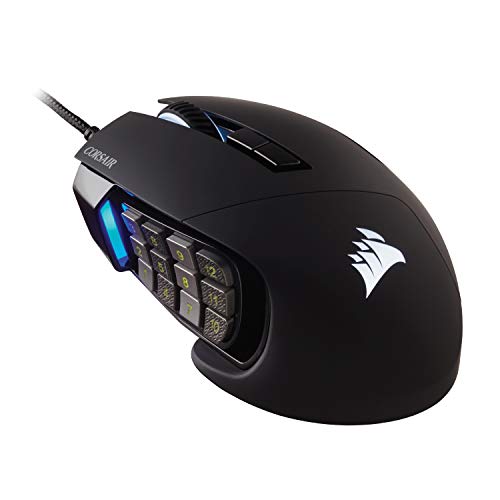
| Corsair Scimitar RGB Elite | Wired | Side-button access | Adjustable side-button panel | View on Amazon |
| Razer DeathAdder Essential | Wired | Simple, familiar grip | Five-button layout | View on Amazon |
Logitech G502 Hero

The G502 Hero is a strong all-around wired pick if you want a mouse that can handle more than Geometry Dash. Its familiar shape fills the hand, and its main buttons are easy to reach. A wired link also means you do not need to charge it or swap a battery. For a game built around repeated, well-timed clicks, simple access to the main button matters more than a long feature list.
This mouse has extra controls and adjustable weights, so you can set it up to suit your desk and grip. Those extras are not required for Geometry Dash, but they can help if you use the mouse for other games or daily work. The G502 Hero is larger and heavier than a basic mouse, so it may not suit players who want a very light feel. I see it as a capable desktop pick, not a special tool that will make hard levels easy.
Pros:
- Wired connection avoids battery upkeep.
- Comfortable shape suits many palm grips.
- Extra buttons offer useful control options.
- Weight tuning lets you adjust the feel.
- Works well as a general-purpose gaming mouse.
- Easy to use without advanced setup.
Cons:
- Heavier than a simple, compact mouse.
- Extra controls may feel unnecessary for Geometry Dash.
- The cable can catch or drag if your desk is crowded.
What Amazon Buyers Are Saying
Buyer comments can change over time, so check recent verified reviews before you order. For this model, focus on feedback about hand fit, button feel, cable handling, and how well the extra controls work for your setup. Those points matter more for Geometry Dash than lighting or a high maximum DPI number. If reviews mention fit issues, compare the mouse size with one you already like.
My Recommendation
I recommend the G502 Hero if you want one dependable mouse for Geometry Dash and other PC tasks. Its feature set is broad, though its size and weight make it less ideal for players who prize a light mouse above all else. My overall rating is 4.5 out of 5.
| Category | Rating |
|---|---|
| Click control | 4.5/5 |
| Comfort and fit | 4.5/5 |
| Useful features | 4.5/5 |
| Value for Geometry Dash | 4/5 |
| Overall Rating | 4.5/5 |
Razer Basilisk V3

The Basilisk V3 is a wired mouse with a right-hand shape and many ways to set up its controls. Its scroll wheel can switch between controlled steps and a freer spin, a feature that helps with general computer use. For Geometry Dash, the key benefit is a comfortable main click, not a special scroll mode. Its cable keeps the mouse ready without battery changes.
Razer’s software lets you change settings and assign supported buttons. That can be useful if you play other games or want shortcuts at your desk. The Basilisk V3 is not a small, plain mouse, and its many options can take time to set up. If you prefer a simple device, you may pay for controls you never use. Check the shape and size against your grip before buying.
Pros:
- Wired design needs no charging.
- Ergonomic right-hand shape offers a defined grip.
- Programmable controls can serve other games.
- Scroll wheel modes add everyday flexibility.
- Lighting options let you personalize its look.
- Useful as both a gaming and desktop mouse.
Cons:
- Its extra features may be more than Geometry Dash needs.
- Right-hand shape may not suit left-handed players.
- Software setup adds steps if you only want basic clicking.
What Amazon Buyers Are Saying
Read current buyer reviews for comments on the shape, scroll wheel, software, and button response. These are the main things that can affect daily use, and they vary with hand size and personal taste. I would not use lighting or a listed DPI ceiling as proof that a mouse will improve your Geometry Dash timing. Look for recent reviews that describe long-term use and your type of grip.
My Recommendation
The Basilisk V3 is worth a look if you want a comfortable wired mouse with controls you can tune. It is less compelling if you only need a basic clicker for Geometry Dash. I rate it 4.5 out of 5 for its comfort and versatility, with a small deduction for complexity.
| Category | Rating |
|---|---|
| Click control | 4.5/5 |
| Comfort and fit | 4.5/5 |
| Useful features | 5/5 |
| Value for Geometry Dash | 4/5 |
| Overall Rating | 4.5/5 |
Redragon M612

Check the M612 price on Amazon
The Redragon M612 offers a wired setup, RGB lighting, and several controls at a budget-friendly level. The listing calls out an 8,000 DPI optical sensor and remapping keys. DPI means how far the pointer moves when you move the mouse; for Geometry Dash, you can use a modest setting that feels easy to control. The high maximum is not a score or timing advantage by itself.
This model can make sense if you want more buttons than a basic office mouse without spending much. Its cord keeps it powered, while its software features can let you change supported controls. For a game that mainly asks for accurate clicks, take time to decide whether those extras help you. If the shape suits your hand and the main button feels comfortable, the M612 can be a practical starter mouse.
Pros:
- Wired connection keeps it ready to use.
- Listed DPI range gives room to tune pointer speed.
- Remappable keys allow some control changes.
- RGB lighting adds a gaming look.
- Extra buttons can help with other PC games.
- Budget-focused option with more features than a basic mouse.
Cons:
- Extra buttons may not help with Geometry Dash.
- Software features may take time to learn.
- Fit and weight are personal, so check the shape before you buy.
What Amazon Buyers Are Saying
Check recent Amazon reviews for practical notes about button feel, software setup, and fit. These details matter more than the sensor’s maximum DPI for a rhythm platform game. Pay attention to whether buyers can use the side controls without changing their grip. Review feedback varies, so compare several recent comments rather than relying on one report.
My Recommendation
I recommend the M612 to players who want a budget wired mouse with extra options. It is not necessary to spend more for Geometry Dash alone, but the M612 may suit someone who also plays games that use more buttons. I give it 4 out of 5.
| Category | Rating |
|---|---|
| Click control | 4/5 |
| Comfort and fit | 4/5 |
| Useful features | 4.5/5 |
| Value for Geometry Dash | 4.5/5 |
| Overall Rating | 4/5 |
Redragon M602

The Redragon M602 is a wired gaming mouse with an ergonomic design, RGB lighting, and a listed 7,200 DPI setting range. Its product details also list nine buttons and software support. The extra controls give you room to set shortcuts, though the main left button remains the one most Geometry Dash players will use. A wired connection also removes battery concerns.
This mouse suits players who want a low-cost device for games and everyday computer use. Its button count can be helpful in games with many commands, but it can also feel busy if you prefer a clean layout. Look at the body shape and think about how your fingers rest on the main buttons. The best mouse is one you can use for a long session without changing your grip.
Pros:
- Wired design does not need a battery.
- Listed 7,200 DPI settings allow pointer adjustment.
- Nine listed buttons support added shortcuts.
- RGB lighting gives it a gaming style.
- Software support allows setup changes.
- Can serve as an everyday PC mouse.
Cons:
- Many buttons are not useful for basic Geometry Dash play.
- RGB and software can add setup steps.
- Its size and shape may not fit every hand.
What Amazon Buyers Are Saying
Before buying, sort recent Amazon feedback for comments on comfort, button placement, and long-term use. The most useful reviews explain the buyer’s hand size and grip, since those details affect fit. Also look for notes about setup if you plan to use the software. Individual reports can differ, so treat them as clues, not a promise about your own experience.
My Recommendation
The M602 is a fair value choice if you want a wired mouse with added controls and lighting. For Geometry Dash, those features are extras rather than must-haves. I rate it 3.9 out of 5 because its value is strongest when you also use the additional buttons.
| Category | Rating |
|---|---|
| Click control | 4/5 |
| Comfort and fit | 4/5 |
| Useful features | 4/5 |
| Value for Geometry Dash | 4/5 |
| Overall Rating | 3.9/5 |
Logitech G305 Lightspeed

Check the G305 price on Amazon
The Logitech G305 Lightspeed is a wireless gaming mouse for players who want to keep a cable off the desk. Its wireless link can help keep the play area tidy and avoid cord drag. It uses a replaceable AA battery, so you do not need to plug it in to charge. Remember that wireless does not mean maintenance-free: you will still need to keep a spare battery or replace one when needed.
The simple shape and button layout make the G305 easier to understand than many macro-heavy mice. That is a good fit for Geometry Dash, where a clear main click matters more than a large set of side controls. Wireless can be a real benefit if your mouse cable catches on the desk edge. If you prefer never to think about batteries, a wired pick may suit you better.
Pros:
- Wireless design keeps the desk clear.
- Lightspeed link removes the mouse cable from your play area.
- Simple controls suit games built around basic clicks.
- Replaceable battery avoids a built-in battery lifespan concern.
- Compact body is easy to move and store.
- Useful for a laptop or a small desk setup.
Cons:
- Requires a battery and occasional replacement.
- Wireless receiver needs an available USB port.
- Small shape may not suit larger hands or every grip.
What Amazon Buyers Are Saying
Check fresh buyer reviews for battery life reports, wireless reliability, and hand fit. Battery use can vary with settings and use, so do not assume every buyer will get the same result. Look for notes on receiver placement if your computer sits far from the mouse. For Geometry Dash, also consider whether the mouse feels steady during repeated clicks.
My Recommendation
I recommend the G305 if you want freedom from cable drag and are comfortable using a replaceable battery. It is a strong alternative to wired picks, though it is not my top choice for players who want a no-upkeep setup. My rating is 4.4 out of 5.
| Category | Rating |
|---|---|
| Click control | 4.5/5 |
| Comfort and fit | 4/5 |
| Wireless convenience | 4.5/5 |
| Value for Geometry Dash | 4.5/5 |
| Overall Rating | 4.4/5 |
BENGOO Wired RGB Mouse

See the BENGOO price on Amazon
The BENGOO wired mouse is a basic option for someone who wants a gaming-style look without spending on a high-end model. It has RGB backlighting and an ergonomic design, according to its product name. The cord means you can use it without charging or changing a battery. For Geometry Dash, a consistent click and a comfortable fit are the main things to check.
This mouse may work well as a first gaming mouse or a spare for another computer. It is less feature-rich than premium picks, so do not expect extra controls to change your play. Check the current listing for exact model details, since product pages and bundles can change. A simple wired mouse can be a sensible choice if it feels good in your hand and its buttons respond as you expect.
Pros:
- Wired setup avoids battery upkeep.
- RGB backlighting gives it a gaming look.
- Ergonomic design is intended for a comfortable hold.
- Simple layout is easy to learn.
- Can work as a spare or entry-level mouse.
- Does not require wireless pairing.
Cons:
- Product information may vary by listing or bundle.
- Fewer advanced features than higher-priced gaming mice.
- Fit and button feel should be checked against current reviews.
What Amazon Buyers Are Saying
Because product listings and included features can change, read the newest verified reviews and confirm the exact item being sold. Look for buyer notes on basic use, fit, and whether the lighting and buttons work as expected. Avoid relying on old comments if the listing has changed. This kind of feedback is most useful when it describes normal daily use rather than only first impressions.
My Recommendation
The BENGOO can be a reasonable low-cost choice if you want a simple wired mouse with RGB lighting. I would compare its current price and recent feedback with the Redragon budget picks before choosing. My overall rating is 3.6 out of 5.
| Category | Rating |
|---|---|
| Click control | 3.8/5 |
| Comfort and fit | 3.8/5 |
| Useful features | 3.5/5 |
| Value for Geometry Dash | 3.5/5 |
| Overall Rating | 3.6/5 |
Redragon M901K MMO Mouse

Check the M901K price on Amazon
The Redragon M901K is an MMO-style mouse with a large set of side buttons. Its listing describes 19 programmable buttons, a DPI range up to 12,400, and a set of small weights. These features are made for games with many commands. Geometry Dash asks for far less, so the extra controls are not a reason to buy this model on their own.
This mouse may suit you if you play MMO or strategy games as well as Geometry Dash. Its weight set can help you find a feel you like, but the side-button grid takes space and may need practice. Make sure your thumb can rest without pressing a button by mistake. If you want a plain, light-feeling mouse, a simpler model is likely a better fit.
Pros:
- Many programmable buttons support command-heavy games.
- Listed DPI range offers pointer-speed choices.
- Weight set lets you change the feel.
- Wired design avoids charging.
- RGB lighting adds visual flair.
- Can serve multiple gaming genres.
Cons:
- Side-button grid is excessive for Geometry Dash.
- More controls can take time to configure.
- May feel bulky compared with a simple mouse.
What Amazon Buyers Are Saying
Review the latest buyer feedback for side-button comfort, software setup, and how the mouse feels after longer sessions. For an MMO mouse, thumb placement is especially important. Check whether buyers describe easy access to the buttons or accidental presses. These reports can help you decide if the large control panel fits your hand and your other games.
My Recommendation
The M901K is worth considering if you want one mouse for Geometry Dash and MMO play. It is too feature-heavy for someone who only needs a reliable left click. My rating is 4 out of 5 for a multi-game setup, but lower for Geometry Dash alone.
| Category | Rating |
|---|---|
| Click control | 4/5 |
| Comfort and fit | 3.8/5 |
| Useful features | 4.5/5 |
| Value for Geometry Dash | 3.5/5 |
| Overall Rating | 4/5 |
UtechSmart Venus Pro

The Venus Pro listing provided for this review describes a wired MMO mouse with RGB lighting and a 16,400 DPI maximum. MMO mice often place many buttons under the thumb, so they can work well for games with many commands. Geometry Dash uses a simpler control style. The Venus Pro may still appeal if you prefer a larger mouse body or already use extra buttons in other games.
Before buying, confirm the connection type and exact version on the current Amazon page. Product names can be reused, and the provided title calls this model wired. Its high DPI figure is not a must-have for a side-scrolling platform game. Focus on hand fit, the feel of the main click, and whether the extra buttons get in the way of your grip.
Pros:
- Wired version does not need battery charging.
- Many controls suit games with multiple commands.
- Listed DPI ceiling offers range for pointer setup.
- RGB lighting creates a gaming look.
- Can fill a multi-game role for MMO players.
- Extra buttons can be assigned for other tasks where supported.
Cons:
- Button-heavy design is not needed for Geometry Dash.
- Confirm the exact model and connection on the current listing.
- May be too large or complex for players who prefer a basic mouse.
What Amazon Buyers Are Saying
Check current reviews for clear comments about the exact model, button layout, and setup process. As this is a macro-style mouse, look for feedback from buyers who use the side controls often. Confirm that the reviews match the version you plan to order. A review of a different version may not describe the same connection or features.
My Recommendation
I would choose the Venus Pro only if you also want an MMO-style mouse for other games. It can handle ordinary pointing and clicking, but its added controls do not make it a better Geometry Dash tool by themselves. I rate it 3.8 out of 5 for this use.
| Category | Rating |
|---|---|
| Click control | 4/5 |
| Comfort and fit | 3.8/5 |
| Useful features | 4/5 |
| Value for Geometry Dash | 3.5/5 |
| Overall Rating | 3.8/5 |
Corsair Scimitar RGB Elite
Check the Scimitar price on Amazon
The Corsair Scimitar RGB Elite is a wired MMO and MOBA mouse built around a set of side buttons. Its adjustable side panel lets you move the buttons to better match your thumb position. That feature is useful when you rely on many commands, but it is not central to Geometry Dash. The main advantage here is a wired connection and a shape designed for longer gaming sessions.
This mouse is a better match for people who play several genres and want side-button access in other games. The extra controls can make the body feel busy if all you need is a single click. Take time to set the side panel and learn its button layout before a long play session. Also confirm the current product page matches the Scimitar version and included features you expect.
Pros:
- Wired link avoids battery upkeep.
- Adjustable side panel can help set thumb reach.
- Many side buttons suit MMO and MOBA play.
- RGB lighting offers a custom look.
- Useful as a multi-genre gaming mouse.
- Control layout can be tailored to the user.
Cons:
- Side buttons add little for Geometry Dash alone.
- Needs setup time to make the panel feel natural.
- May feel complex compared with a basic wired mouse.
What Amazon Buyers Are Saying
Look through recent Amazon feedback for notes about the adjustable side panel, thumb comfort, and software. These points can vary based on hand size and how you hold the mouse. Check comments from buyers who use the side buttons often, not only those who like the lighting. Confirm the product version on the page because listing details can change.
My Recommendation
The Scimitar RGB Elite makes sense if you want a side-button mouse for other games too. For Geometry Dash alone, it is more mouse than most players need. I rate it 4 out of 5 for versatility, with a lower value score for this specific game.
| Category | Rating |
|---|---|
| Click control | 4/5 |
| Comfort and fit | 4/5 |
| Useful features | 4.5/5 |
| Value for Geometry Dash | 3.5/5 |
| Overall Rating | 4/5 |
Razer DeathAdder Essential

Check the DeathAdder price on Amazon
The DeathAdder Essential keeps things simple with a wired connection and a familiar ergonomic shape. It has five buttons, which is enough for common gaming and desktop tasks without adding a large side-button grid. For Geometry Dash, this simple layout can feel natural: your hand can stay focused on the main click. Its design also makes it a useful pick for players who do not need advanced controls.
A straightforward mouse can be a smart choice if you want fewer settings to manage. You can focus on pointer speed and hand comfort instead of spending time on profiles. The right-hand shape may not suit left-handed players, and the mouse still needs to fit your hand size. If you want wireless play or many programmable controls, another pick on this list may serve you better.
Pros:
- Simple five-button layout is easy to learn.
- Wired design needs no battery.
- Ergonomic shape offers a familiar grip.
- Useful for both gaming and everyday tasks.
- Fewer extra controls keep setup simple.
- Good fit for players who want direct, basic use.
Cons:
- Right-hand shape may not work for left-handed users.
- No wireless option in this wired model.
- Fewer extra controls than feature-heavy gaming mice.
What Amazon Buyers Are Saying
Recent buyer feedback can help you judge hand fit, click feel, and long-term use. Check whether reviewers describe the same version and share a similar grip style. For this mouse, comments about the shape are more useful than comments about advanced features it does not aim to offer. Compare several reviews to see whether the basic design fits your needs.
My Recommendation
The DeathAdder Essential is a solid choice if you want a comfortable, no-fuss wired mouse. It is a strong match for Geometry Dash players who value a simple layout over extra buttons. I give it 4.4 out of 5 for practical use and straightforward setup.
| Category | Rating |
|---|---|
| Click control | 4.5/5 |
| Comfort and fit | 4.5/5 |
| Useful features | 4/5 |
| Value for Geometry Dash | 4.5/5 |
| Overall Rating | 4.4/5 |
How to Choose the Best Gaming Mouse for Geometry Dash
The best gaming mouse for Geometry Dash should feel natural when you click again and again. You do not need a high DPI number or a dozen side buttons to beat a level. Start with the feel of the main button, then think about shape, connection, and how the mouse fits your full setup.
1. Prioritize a steady, comfortable click
Geometry Dash rewards timing, so choose a mouse whose main button feels easy to press and release. A button that feels too stiff or too soft can tire your finger during a long practice session. If you can, try the mouse in person before you buy. If you cannot, look for reviews that describe the click feel, not just the sensor number or lighting.
Also think about how you rest your hand. Some players use a palm grip, with most of the hand on the mouse. Others use a claw or fingertip grip. A large, high-sided shape may feel good for one grip and awkward for another. Comfort matters because tension can make steady play harder.
2. Pick wired or wireless based on your desk
A wired mouse is ready whenever your computer is on. You do not need to charge it or change a battery. The tradeoff is the cord, which may drag or catch if your desk is cramped. A cable holder or more open desk space can help keep the cord out of your way.
A wireless mouse offers a clear desk and freedom to move. It also needs a battery or charging plan, and its receiver needs a suitable USB port. For many Geometry Dash players, either connection can work well. Choose the one that feels less distracting in your own setup rather than assuming one type will make you play better.
3. Pay for features you will use
DPI controls pointer speed. Geometry Dash does not call for extreme pointer speed, so a very high DPI maximum should not decide your purchase. Set a speed that lets you reach the play area without making small movements hard to control. Extra buttons can be useful in other games, but they are optional for this one.
Think about the full value of the mouse. If you also play MMO games, a model with side buttons may earn its place. If you mainly play Geometry Dash, a simple mouse can be easier to use and cost less. Check the current product listing for the exact model and features, then compare those details with recent buyer feedback about fit and daily use.
Final Verdict: Which Should You Buy?
The Logitech G502 Hero is my top pick for a balanced, wired setup with a comfortable shape and useful extras. Choose the DeathAdder Essential for a simpler layout, or the Logitech G305 if you want wireless freedom.
The best gaming mouse for Geometry Dash is the one that feels steady in your hand and fits your desk. Compare shape, click feel, and price before you buy.
FAQs Of best gaming mouse for Geometry Dash
What is the best gaming mouse for Geometry Dash?
I recommend the Logitech G502 Hero as the best overall pick for its wired connection, comfortable shape, and flexible controls.
Do I need a high-DPI mouse to play Geometry Dash?
No. DPI changes pointer speed, but it does not make your clicks more accurate by itself. Choose a setting that feels easy to control.
Is a wired or wireless mouse better for Geometry Dash?
Both can work well. Wired mice do not need batteries, while wireless mice avoid cable drag. Choose the option that suits your desk and habits.
Are extra buttons useful for Geometry Dash?
Most players only need the main click. Extra buttons can help in other games, but they are not required for Geometry Dash.
Can I use a regular mouse for Geometry Dash?
Yes. A regular mouse can work if its main button feels comfortable and responds well for your play style.