The Logitech Lift is my best ergonomic mouse for wrist pain for its relaxed grip, steady control, and useful wireless options.
If your wrist feels sore after hours of clicking, a standard flat mouse may be part of the problem. A vertical mouse can help keep your hand in a more natural handshake position, though no mouse can promise pain relief. I compared shape, connection options, ease of use, and value across these picks. I also included two wrist-rest mouse pads for shoppers who want a desk accessory, not another mouse.
See the differences between my top picks at a glance.
| Product | Type | Connection or key detail | Best fit | Link |
|---|---|---|---|---|
| ProtoArc EM11 NL | Vertical mouse | Rechargeable wireless | Multi-device use | View on Amazon |
| Logitech Lift, Graphite | Vertical mouse | Bluetooth or Logi Bolt | Small to medium hands | View on Amazon |
| Lekvey Vertical Mouse | Vertical mouse | Rechargeable wireless | Budget buyers | View on Amazon |
| TECKNET Bluetooth Vertical | Vertical mouse | Bluetooth, 2.4 GHz, 3 devices | Switching between devices | View on Amazon |
| Anker 2.4G Vertical Mouse | Vertical mouse | 2.4 GHz USB receiver | Simple wireless setup | View on Amazon |
| memzuoix Vertical Mouse | Vertical mouse | 2.4 GHz; 800–1600 DPI | Large right hand | View on Amazon |
| JYWYBF Gel Mouse Pad | Wrist-rest pad | Gel cushion | Added desk support | View on Amazon |
| Logitech Lift, Rose | Vertical mouse | Bluetooth or Logi Bolt | Small to medium hands | View on Amazon |
| TECKNET 2.4G Vertical | Vertical mouse | 2.4 GHz; up to 4800 DPI | Wireless basics | View on Amazon |
| Amazon Basics Gel Mouse Pad | Wrist-rest pad | Gel cushion; non-slip base | Simple desk support | View on Amazon |
ProtoArc EM11 NL Wireless Vertical Mouse

The ProtoArc EM11 NL is a rechargeable vertical mouse for people who want a more upright grip without moving to a trackball. Its tall shape encourages the hand to rest at an angle rather than palm-down. That change can feel odd at first, so expect a short adjustment period. This model suits shoppers who want wireless use and a cleaner desk.
Check the current listing for the exact pairing modes and included accessories before you buy. Wireless features can vary by model or bundle. The key question is whether its size and angle feel natural in your hand. If you spend long hours at a computer, comfort and easy control matter more than a long list of specs.
Pros:
- Upright shape can reduce the need to turn the palm downward.
- Rechargeable design means you do not need to keep spare mouse batteries.
- Wireless use helps keep the work area clear.
- Traditional mouse movement feels familiar after the adjustment period.
- A practical option for users who want to try a vertical shape.
Cons:
- A vertical grip can feel unfamiliar for several days.
- May not suit very small or very large hands equally well.
- Rechargeable models need charging, so they can run out of power mid-task.
What Amazon Buyers Are Saying
I cannot verify the live Amazon review feed here, so I will not invent customer quotes or review trends. Before you order, read recent reviews for comments on hand size, connection stability, charging, and the learning curve. Pay close attention to reports from buyers who use a similar computer and work pattern to yours.
My Recommendation
The EM11 NL is worth considering if you want a rechargeable vertical mouse and prefer a straightforward pointer over a trackball. I would compare its size with your hand and confirm the listed connection options first. It is a sensible midrange choice, but it is not a medical device and cannot guarantee wrist-pain relief.
| Category | Rating |
|---|---|
| Grip and comfort potential | 4/5 |
| Ease of adjustment | 3.5/5 |
| Wireless convenience | 4/5 |
| Overall value | 4/5 |
| Overall rating | 4/5 |
Logitech Lift Vertical Ergonomic Mouse, Graphite

The Logitech Lift is my strongest all-around pick for shoppers who want a polished vertical mouse from a known brand. Its angled body places the hand in a handshake-like pose, and Logitech lists it for small to medium hands. It supports Bluetooth and Logi Bolt wireless connections. Its shape and familiar button layout make it a relatively approachable move from a standard mouse.
The Lift also offers a scroll wheel and programmable controls through Logitech software on supported systems. These features can help tailor common tasks, though you do not need to use the software to point and click. The graphite version keeps a low-key look that fits most desks. Before buying, check your hand size and computer compatibility, especially if you plan to use its extra functions.
Pros:
- Comfort-focused vertical angle encourages a less palm-down grip.
- Bluetooth and Logi Bolt provide two wireless connection paths.
- Designed with small to medium hands in mind.
- Extra buttons can reduce repeated menu clicks when configured.
- Logitech software offers added control on supported computers.
Cons:
- Its shape may feel too small for large hands.
- It costs more than basic vertical mice.
- Some advanced controls depend on compatible software and setup.
What Amazon Buyers Are Saying
I cannot check current Amazon reviews in real time, so I will not present unverified buyer opinions as facts. Look for recent feedback about the mouse’s size, Bluetooth pairing, button feel, and software setup. A useful review should explain the buyer’s hand size and daily use, not just say that the mouse feels good.
My Recommendation
If you want the best ergonomic mouse for wrist pain for a small or medium right hand, the Lift is my top recommendation. It has a thoughtful shape and flexible wireless connections, but it is still important to adjust your desk setup and take breaks. I rate it highly for comfort potential and usability, not as a treatment for pain.
| Category | Rating |
|---|---|
| Grip and comfort potential | 4.5/5 |
| Connection options | 4.5/5 |
| Ease of use | 4.5/5 |
| Overall value | 4/5 |
| Overall rating | 4.5/5 |
Lekvey Rechargeable Vertical Mouse

The Lekvey is a budget-minded vertical mouse with a rechargeable wireless design. Its raised body changes the angle of the palm, while its familiar mouse controls keep the basic learning curve manageable. It may suit people who want to try an ergonomic shape without paying a premium. The best fit depends on whether the body supports your fingers without making them stretch.
A vertical mouse does not remove every source of strain. You still need room to move it, a relaxed grip, and a desk height that lets your forearm rest comfortably. The Lekvey can be a useful first step if you want to test a different hand position. Check the listing for current charging details and compatibility before placing an order.
Pros:
- Vertical shape offers an alternative to a flat mouse.
- Rechargeable design avoids disposable batteries.
- Wireless operation keeps a cable off the desk.
- Often a lower-cost way to explore an ergonomic mouse style.
- Standard pointer movement does not require learning trackball control.
Cons:
- It takes time to adapt to the angled grip.
- Fit may be less comfortable if your hand is outside its size range.
- Wireless use means you need to keep it charged.
What Amazon Buyers Are Saying
I cannot confirm current Amazon buyer comments, so I will not claim that reviewers share a particular experience. Read the latest reviews for notes on hand fit, battery life, charging, and how long it took to get used to the shape. Look for repeat issues across several recent reviews rather than relying on one short rating.
My Recommendation
The Lekvey is a practical low-cost trial for someone curious about a vertical mouse. I would choose it if price matters more than premium software or multiple connection choices. It can change how you hold the mouse, but no product can promise to stop wrist pain on its own.
| Category | Rating |
|---|---|
| Grip and comfort potential | 4/5 |
| Setup simplicity | 4/5 |
| Charging convenience | 3.5/5 |
| Budget value | 4/5 |
| Overall rating | 4/5 |
TECKNET Bluetooth Vertical Mouse

This TECKNET vertical mouse stands out for its listed three-device support and Bluetooth plus 2.4 GHz wireless options. That can be handy if you move between a laptop, desktop, or tablet. Its 4800 DPI figure describes pointer sensitivity, not comfort or accuracy by itself. Many users will prefer to test a slower setting first for steady control.
The upright shape aims to offer a different wrist and palm position from a regular mouse. For people with wrist discomfort, fit still matters more than a high sensitivity number. Check how the device switches between connections and whether your operating system supports the features you want. If you only use one computer, a simpler mouse may offer better value.
Pros:
- Supports the convenience of switching among three devices, as listed.
- Bluetooth and 2.4 GHz give wireless connection options.
- Vertical shape can encourage a more relaxed palm angle.
- Adjustable sensitivity can help match pointer speed to screen size.
- Useful for a desk shared by more than one computer.
Cons:
- Multiple connection modes add setup steps.
- High DPI does not automatically make the mouse more comfortable.
- Some users may need time to adapt to vertical control.
What Amazon Buyers Are Saying
I cannot access live Amazon reviews here, so I will not make up a buyer consensus. Check current comments for reports on device switching, pairing, size, and the feel of the buttons. Reviews that name the devices used can help you judge whether the connection features match your own setup.
My Recommendation
This TECKNET is a good fit if you want one vertical mouse for several devices and value connection choice. It may be more mouse than you need for a single computer. Confirm compatibility and hand fit, then consider whether its multi-device feature will see daily use.
| Category | Rating |
|---|---|
| Grip and comfort potential | 4/5 |
| Device flexibility | 4.5/5 |
| Ease of setup | 3.5/5 |
| Overall value | 4/5 |
| Overall rating | 4/5 |
Anker 2.4G Wireless Vertical Mouse

The Anker 2.4G vertical mouse is a simple option for right-handed users who prefer a USB receiver. It avoids Bluetooth pairing and works through its wireless receiver, which is a familiar setup for many desktop users. The vertical body gives the hand a more upright resting angle than a flat mouse. Its straightforward design may appeal to shoppers who do not need extra device connections.
This is an older and well-known style, but check the product page for supported operating systems and current package details. A USB receiver may need an adapter on a newer laptop with only USB-C ports. The mouse also needs enough desk space for normal movement. As with any vertical model, give your hand time to adjust and stop if use makes symptoms worse.
Pros:
- Simple 2.4 GHz receiver connection.
- Vertical grip offers a change from a flat mouse posture.
- Right-hand shape is clear in the product description.
- No need to pair over Bluetooth.
- Can suit a basic home or office desktop setup.
Cons:
- Receiver-based setup may need an adapter on some laptops.
- Not designed for left-handed use.
- It does not provide the multi-device flexibility of some newer models.
What Amazon Buyers Are Saying
I cannot check the current review page, so I will not attribute specific claims to Amazon customers. When reading reviews, focus on how well the receiver works with your computer, whether the mouse fits your hand, and how it holds up over time. Also check that the listing still includes the receiver and accessories you expect.
My Recommendation
The Anker is worth a look if you want a basic right-hand vertical mouse and use a computer with a compatible USB port. I would not pick it for Bluetooth or multi-device use. It keeps the idea simple, but check the exact listing details because ports and computer needs have changed over time.
| Category | Rating |
|---|---|
| Grip and comfort potential | 4/5 |
| Connection simplicity | 4/5 |
| Modern connection options | 3/5 |
| Overall value | 3.5/5 |
| Overall rating | 3.5/5 |
memzuoix Large Vertical Wireless Mouse

This memzuoix mouse is listed as a large, right-hand vertical model. That size label is useful for shoppers who find compact mice cramped, though hand dimensions vary, so compare the shape with your own grip. The 2.4 GHz wireless connection uses a receiver, and the listed DPI steps are 800, 1200, and 1600. These settings let you change pointer speed without needing a very high sensitivity level.
The pink finish gives this option a more noticeable look than black office gear. The product description names laptop, Mac, PC, and desktop use, but check the current listing for details about ports and operating-system support. A receiver-based mouse can be easy to set up, yet it may not suit a device without a matching port. Its right-hand design also rules it out for left-handed users.
Pros:
- Large size may suit users who want more room for their palm.
- Vertical shape offers an alternative hand position.
- Three listed DPI settings give basic pointer-speed choice.
- 2.4 GHz wireless avoids a cable across the desk.
- Distinct pink color is easy to spot in a workspace.
Cons:
- Right-hand design will not suit left-handed users.
- Large body may feel too big for smaller hands.
- Receiver-based connection may need a port adapter.
What Amazon Buyers Are Saying
I cannot see current Amazon reviews for this listing, so I will not claim a shared buyer experience. Check the newest reviews for clear comments on the mouse’s real size, receiver setup, pointer control, and finish. Because hand fit is personal, reviews from people with similar hand size are more useful than broad praise.
My Recommendation
Consider this model if you have a larger right hand and want a basic vertical mouse with simple sensitivity choices. Its listed size is a key reason to shortlist it. Confirm the connection requirements and return terms, since fit is hard to judge from a product photo alone.
| Category | Rating |
|---|---|
| Large-hand fit potential | 4/5 |
| Pointer speed choice | 3.5/5 |
| Setup simplicity | 3.5/5 |
| Overall value | 3.5/5 |
| Overall rating | 3.5/5 |
JYWYBF Gel Wrist-Rest Mouse Pad

This product is a mouse pad with a gel wrist rest, not a mouse. It may add a cushioned place for your wrist to rest between movements. The light pink surface can add color to a home or office desk. If you already own a mouse that fits your hand, a pad may be a lower-cost accessory to test.
A wrist rest should support the heel of your hand when you pause, not force your wrist into a bent position while you move. Keep the mouse close and use a light touch. A soft cushion cannot fix a poor desk height or replace a better mouse if the mouse itself feels awkward. Check its size and surface before buying to make sure it suits your desk and mouse movement.
Pros:
- Gel cushion offers a soft resting surface.
- Can pair with a mouse you already own.
- May help define a comfortable area for the hand to rest between tasks.
- Light pink finish gives the desk a softer look.
- Simple accessory that does not require software or charging.
Cons:
- It is not a mouse and does not change the mouse’s shape.
- A wrist rest may not suit every hand or desk height.
- It cannot promise pain relief or correct poor posture by itself.
What Amazon Buyers Are Saying
I cannot verify this listing’s current Amazon reviews, so I will not invent a buyer consensus. Check recent reviews for pad size, cushion feel, surface grip, and how easily it moves on your desk. Look for feedback on whether the rest sits at a comfortable height with a mouse like yours.
My Recommendation
This pad may be useful if you want a cushioned rest and already like your mouse. I would not buy it as a substitute for an ergonomic mouse if your current mouse forces an uncomfortable grip. Try it only if its height lets your hand stay relaxed rather than raised or sharply bent.
| Category | Rating |
|---|---|
| Cushioned rest | 4/5 |
| Desk compatibility | 3.5/5 |
| Ease of use | 4.5/5 |
| Value as an accessory | 3.5/5 |
| Overall rating | 3.5/5 |
Logitech Lift Vertical Ergonomic Mouse, Rose

The rose version of the Logitech Lift offers the same core design as the graphite model in a different color. Its vertical shape is intended to support a more upright hand position, and Logitech lists this mouse for small to medium hands. It supports Bluetooth and Logi Bolt wireless connections. Choose this version if the color suits your desk, but compare its fit and features in the same way you would any mouse.
The Lift’s extra controls and scroll wheel can help with daily work, while supported software lets you customize some functions. You can also use its basic pointer features without changing every setting. The rose color may look more at home in a bright or personal workspace. Check the current product listing for included accessories and computer support before ordering.
Pros:
- Vertical form encourages a less palm-down grip.
- Bluetooth and Logi Bolt offer connection flexibility.
- Designed for small to medium hands.
- Customizable controls can suit repeated work tasks.
- Rose color adds a softer style option.
Cons:
- The size may not fit larger hands well.
- It costs more than basic wireless vertical mice.
- Some custom functions require supported software.
What Amazon Buyers Are Saying
I cannot check live Amazon buyer feedback, so I will not state unverified review trends. Read current reviews for comments about hand size, pairing, button feel, and the color shown in the listing. Review dates matter, since product bundles and computer setups can change.
My Recommendation
The rose Lift is a strong option if you like the Lift’s shape and want this finish. It offers the same main benefits as the graphite version, so choose based on price, appearance, and availability. For a small or medium right hand, it remains one of my top choices in this guide.
| Category | Rating |
|---|---|
| Grip and comfort potential | 4.5/5 |
| Connection options | 4.5/5 |
| Ease of use | 4.5/5 |
| Overall value | 4/5 |
| Overall rating | 4.5/5 |
TECKNET 2.4G Vertical Wireless Mouse

This TECKNET model is a 2.4 GHz vertical mouse with a listed sensitivity of up to 4800 DPI. It uses a wireless receiver rather than the Bluetooth and multi-device setup of the other TECKNET in this guide. The upright body may appeal to people who want a more angled grip. Its high DPI figure offers pointer-speed range, but you can still choose a slower setting for better control.
The product title mentions carpal tunnel, but a mouse cannot diagnose, treat, or prevent a medical condition. Think of it as a shape option, not a health device. Check whether your computer has a compatible port for the receiver and whether the mouse suits your hand size. It may work best for someone who wants basic wireless use without switching between several devices.
Pros:
- Vertical design changes the angle of the hand.
- 2.4 GHz receiver offers a simple wireless connection.
- Listed DPI range gives options for pointer speed.
- No Bluetooth pairing steps are needed.
- May suit a single-computer desk setup.
Cons:
- Receiver connection may need an adapter on some laptops.
- High DPI is not a measure of comfort or build quality.
- Right-hand vertical designs may not fit every user.
What Amazon Buyers Are Saying
I cannot view this product’s current Amazon feedback, so I will not claim a common customer experience. Check recent reviews for receiver reliability, comfort over longer work sessions, and whether the DPI controls are easy to use. Compare the latest listing details with your computer ports before you buy.
My Recommendation
This TECKNET makes sense if you want a receiver-based vertical mouse and do not need Bluetooth. It is less flexible than a multi-device model, but its simple connection may be enough for a desktop. I would focus on hand fit and the actual price rather than the large DPI number.
| Category | Rating |
|---|---|
| Grip and comfort potential | 4/5 |
| Basic wireless use | 4/5 |
| Connection flexibility | 3/5 |
| Overall value | 3.5/5 |
| Overall rating | 3.5/5 |
Amazon Basics Gel Mouse Pad with Wrist Support
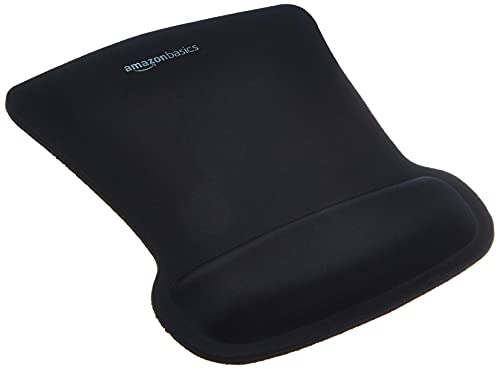
This Amazon Basics product is a gel-filled mouse pad with wrist support, not an ergonomic mouse. Its listed size is 10.1 by 8.1 inches, and the base uses a non-slip grip. It gives you a defined surface for mouse movement and a cushion for resting your hand. The black finish is plain and easy to pair with most office gear.
Use a wrist rest with care. Rest your hand on it while you pause, and avoid pressing your wrist into the cushion as you move the mouse. A pad can add comfort for some users, but it will not change how your mouse fits or moves. If your current mouse causes you to twist your arm or reach, fix that issue first.
Pros:
- Gel-filled support gives a soft place to rest the wrist between movements.
- Non-slip base helps keep the pad in place.
- Listed dimensions make it easier to judge desk fit.
- Black color suits a plain work setup.
- Can be used with a mouse you already own.
Cons:
- It is an accessory, not a mouse.
- The wrist rest may feel too high or soft for some users.
- It does not correct an awkward mouse grip or desk position.
What Amazon Buyers Are Saying
I cannot access live Amazon reviews for this item, so I will not report unverified buyer patterns. Read recent feedback for comments on cushion height, surface movement, size, and long-term wear. A review that explains the desk and mouse used can help you judge whether the pad may fit your setup.
My Recommendation
This is a reasonable basic pad if you want a gel rest and its size fits your desk. It may be a useful add-on, but it is not my answer to choosing the best ergonomic mouse for wrist pain. Pair it with a mouse that fits, and keep the wrist neutral while you work.
| Category | Rating |
|---|---|
| Wrist-rest function | 4/5 |
| Desk stability | 4/5 |
| Ease of use | 4.5/5 |
| Value as an accessory | 4/5 |
| Overall rating | 4/5 |
How to Choose the Best Ergonomic Mouse for Wrist Pain
The best ergonomic mouse for wrist pain is the one that lets you work with a relaxed hand and a straight wrist. A vertical mouse may help change your grip, but shape alone cannot fix every cause of discomfort. Match the mouse to your hand, computer, and desk. Then give yourself time to adjust.
1. Match the Shape to Your Hand and Grip
Start with hand size. A mouse that is too small can make your fingers curl tight, while one that is too large can make buttons hard to reach. Some brands list a suggested hand size, but try to compare those measurements with your own hand when possible. Check whether the mouse is made for a right or left hand; many vertical models in this guide are right-handed.
Think about the angle, too. Vertical mice place the palm more upright, while a standard mouse keeps it closer to palm-down. A vertical design may feel more natural to some people, but it can take days to learn. Keep your grip light and your wrist straight. If a new mouse makes pain worse, stop using it and reassess.
2. Choose the Connection and Controls You Will Use
Bluetooth can be useful if you want to connect without using a USB receiver. A 2.4 GHz mouse often relies on a small receiver, so check that your computer has a matching port or that you have the right adapter. If you move between computers, a model with multi-device support may save time. If you use one desktop, a basic receiver can be enough.
Do not buy based on DPI alone. DPI is a measure of pointer sensitivity; it does not tell you how comfortable the mouse feels or how well it is built. Look for simple sensitivity controls and buttons that you can reach without shifting your grip. Check whether any extra functions need software and whether that software supports your computer.
3. Consider Desk Setup, Breaks, and Overall Value
Your mouse works as part of a whole desk setup. Keep it close to your body so you do not reach out to the side. Set your chair and desk so your shoulders can relax and your forearm can rest. OSHA workstation guidance also stresses keeping frequently used items close and arranging a computer workstation to support a comfortable position. A mouse pad with a wrist rest may help some people, but it should not force the wrist to bend.
Take short breaks and change tasks when you can. Repeated clicking for hours can tire the hand, even with an ergonomic mouse. Compare the price with the features you will use, not just the number of buttons or the highest sensitivity setting. If wrist pain persists, worsens, or includes numbness or weakness, speak with a health professional. A mouse review cannot replace medical advice.
Final Verdict: Which Should You Buy?
For most small to medium right hands, I recommend the Logitech Lift. It pairs a relaxed vertical shape with Bluetooth and Logi Bolt options. The ProtoArc EM11 NL is a strong alternative if you want rechargeable wireless use.
The best ergonomic mouse for wrist pain should fit your hand and your desk habits. Check the connection, adjust your setup, and take breaks; no mouse can promise pain relief.
FAQs Of best ergonomic mouse for wrist pain
Can an ergonomic mouse help with wrist pain?
It may help you use a more relaxed hand position, but results vary. A mouse cannot diagnose or treat a medical condition, and desk setup and work habits matter too.
Is a vertical mouse better for wrist pain?
A vertical mouse can place your hand in a more upright position. Some people like that grip, while others prefer a standard mouse. Fit and comfort are personal.
How long does it take to get used to a vertical mouse?
Many users need an adjustment period that can last several days or longer. Start with short work sessions and return to your old mouse if the new shape causes discomfort.
Should I use a wrist-rest mouse pad with an ergonomic mouse?
You can try one if it feels comfortable, but it should not bend or press your wrist while you move. Rest your hand on the cushion during pauses.
What should I look for when buying a mouse for wrist pain?
Check hand fit, shape, grip comfort, connection type, and button reach. Choose a mouse that lets your wrist stay straight and your arm stay close to your body.