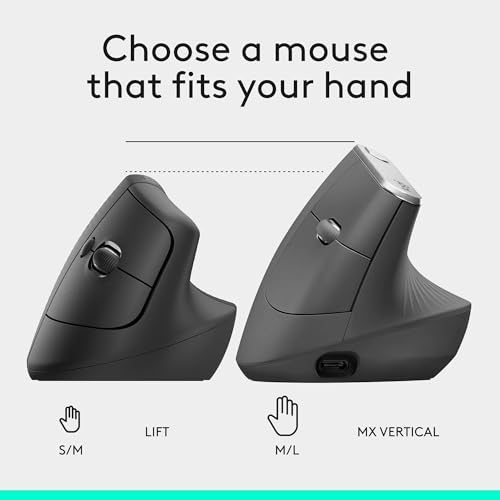
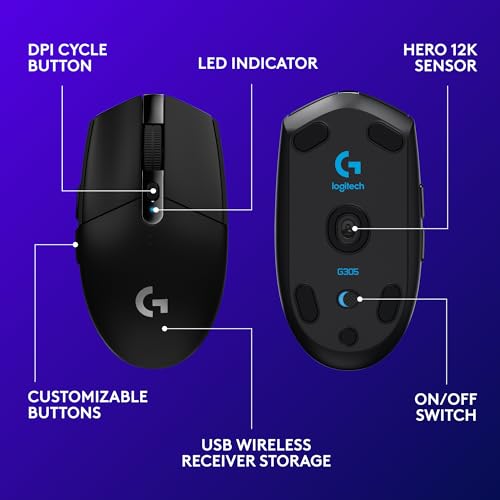
The Logitech Lift is my top pick for medium hands, thanks to its relaxed vertical grip and useful everyday controls.
If your wrist feels tense after hours at a desk, a standard flat mouse may not feel right. A vertical ergonomic mouse can help your hand rest in a more natural position, but the wrong size can cause new strain. Medium hands need a mouse that supports the palm without making the fingers reach too far. I compared these options by hand fit, connection type, useful features, and practical value so you can find the best ergonomic mouse for medium hands without guessing.
See the differences between my top picks at a glance.
| Mouse | Style / connection | Hand fit | Best for | Link |
|---|---|---|---|---|
| Logitech Lift | Vertical / wireless | Small to medium | Comfort and features | View on Amazon |
| ProtoArc EM11 NL | Vertical / wireless | Check dimensions | Rechargeable use | View on Amazon |
| Anker 2.4G Vertical | Vertical / USB receiver | Check dimensions | Simple wireless use | View on Amazon |
| Luhaso 57° | Vertical / wireless | Small to medium | A stated size range | View on Amazon |
| TECKNET Vertical | Vertical / Bluetooth, 3-device | Check dimensions | Multi-device work | View on Amazon |
| SANWA Wired | Vertical / wired | Small to medium | No battery charging | View on Amazon |
| PHILIPS SPK7628 | Ergonomic / wireless | Check dimensions | Three DPI choices | View on Amazon |
| memzuoix Vertical | Vertical / 2.4 GHz | Listed as large | DPI choice and color | View on Amazon |
| SABLUTE MAM3 | Ergonomic / wireless | Small to medium | Compact hand fit | View on Amazon |
| SANWA Large-Hand Mouse | Ergonomic / wireless | Large | Broad palm support | View on Amazon |
Logitech Lift Vertical Mouse

The Logitech Lift is a vertical mouse made for a more upright hand position. Logitech lists it for small to medium hands, which makes it a strong match for this guide. Its shape supports the hand while the thumb rests along the side. It also offers wireless connection options and a scroll wheel for daily work.
The Lift suits office tasks, browsing, and long stretches of computer use. Its vertical angle may feel unusual at first, so give yourself time to adjust before judging it. The shape is not a medical fix, and comfort depends on your grip and desk setup. Still, the stated hand range and familiar brand support make it an easy first mouse to consider.
Pros:
- Designed for small to medium hands.
- Upright form can reduce the need to turn the palm flat.
- Wireless design avoids a cable across the desk.
- Thumb rest offers a clear place to position the hand.
- Good fit for general office and home use.
Cons:
- Vertical grip takes time to learn.
- Not intended for left-handed use in this version.
- Costs more than many basic vertical mice.
What Amazon Buyers Are Saying
When checking buyer feedback, focus on comments about palm size, the learning period, and long-session comfort. Those are the most useful points for a vertical mouse like this. Review experiences can vary with hand size and grip, so compare recent comments with the fit details rather than relying on a single rating.
My Recommendation
I recommend the Lift as the best ergonomic mouse for medium hands if you want a known small-to-medium fit and a polished daily-work design. Its price may be higher than a basic model, but the hand-size guidance makes the choice less uncertain. Overall rating: 4.6/5.
| Category | Rating |
|---|---|
| Medium-hand fit | 4.7/5 |
| Comfort design | 4.7/5 |
| Everyday usefulness | 4.6/5 |
| Value | 4.2/5 |
| Overall Rating | 4.6/5 |
ProtoArc EM11 NL Wireless Mouse

The ProtoArc EM11 NL is a rechargeable wireless vertical mouse. Its listed design focuses on an upright grip and a cordless setup. That can help keep the desktop clear and remove the need to replace disposable batteries. The product name does not state a precise hand-size range, so check its dimensions and current listing details before you buy.
This model may suit a medium hand if its body length and thumb area match your reach. The best way to judge that is to compare the listed measurements with a mouse you already find comfortable. Rechargeability is useful for people who prefer a built-in power source, though it means charging is part of ownership. Treat the vertical shape as a change in posture, not a promise to stop pain.
Pros:
- Vertical form encourages an upright hand position.
- Rechargeable design avoids routine battery replacement.
- Wireless setup keeps the work surface less cluttered.
- Suitable for laptop or desktop use where a wireless mouse is preferred.
- Useful option for buyers comparing value-focused vertical designs.
Cons:
- Product title does not specify a hand-size range.
- Rechargeable models need charging when power runs low.
- Vertical shape may take a few days to feel natural.
What Amazon Buyers Are Saying
For this model, look closely at recent buyer notes about charging, connection stability, and whether the mouse suits their hand size. These details tell you more than broad statements about comfort. I cannot confirm a live, stable review consensus, so check current verified-purchase feedback and the seller’s exact feature list before ordering.
My Recommendation
The EM11 NL is worth considering if you want a rechargeable vertical mouse and can confirm that its dimensions fit your medium hand. I would not buy it on the word “ergonomic” alone; hand measurements matter most. Overall rating: 4.1/5.
| Category | Rating |
|---|---|
| Medium-hand fit | 3.8/5 |
| Comfort design | 4.2/5 |
| Power convenience | 4.3/5 |
| Value | 4.1/5 |
| Overall Rating | 4.1/5 |
Anker 2.4G Wireless Ergonomic Mouse

Anker’s 2.4G ergonomic mouse uses a vertical, right-hand shape and a USB receiver. It is a straightforward choice for someone who wants wireless control without a Bluetooth setup. The raised body changes how the palm and fingers rest compared with a flat mouse. The product name does not give a hand-size range, so measure before treating it as a medium-hand match.
A 2.4 GHz receiver can be handy when you want a direct link to a computer that has a USB port. It is less useful if your laptop has no matching port and you do not have an adapter. This mouse is best viewed as a simple, focused device rather than a multi-device workstation tool. Check the current listing for supported systems and included items.
Pros:
- Vertical shape offers an alternative to a flat mouse.
- Wireless connection avoids a dragging cable.
- USB receiver setup is simple for compatible computers.
- Right-hand contour gives the thumb a defined resting area.
- Long-running product line gives shoppers feedback to review.
Cons:
- Right-hand design does not suit left-handed users.
- USB receiver may need an adapter on some laptops.
- Hand-size fit should be checked before purchase.
What Amazon Buyers Are Saying
Look for buyer comments about receiver setup, pointer movement, and how the shape fits their palm. For older or long-listed products, confirm the exact version and included receiver in the current offer. Experiences differ, and a good report from a large-handed buyer may not predict comfort for a medium hand.
My Recommendation
I would shortlist this Anker mouse if you want a simple 2.4 GHz vertical option and your computer supports a USB receiver. Its main drawback for this guide is the lack of a clear medium-hand size claim in the title. Overall rating: 4.0/5.
| Category | Rating |
|---|---|
| Medium-hand fit | 3.8/5 |
| Grip design | 4.2/5 |
| Setup simplicity | 4.2/5 |
| Value | 4.1/5 |
| Overall Rating | 4.0/5 |
Luhaso 57° Vertical Wireless Mouse

The Luhaso mouse states a 57-degree angle and a small-to-medium hand range in its product name. That makes it one of the more directly targeted options for this search. Its vertical shape aims to let the hand rest at an angle rather than flat on the desk. It is wireless, so it can suit a desk where you want fewer cables.
The stated fit range is helpful, but hand length and palm width still vary from person to person. Compare the listing dimensions with your current mouse before choosing. A 57-degree tilt may feel less extreme than some upright designs, though personal comfort varies. Check the latest listing for battery, connection, and operating-system details, since those can depend on the exact version.
Pros:
- Product title clearly names small and medium hands.
- 57-degree angle offers a defined vertical-style grip.
- Wireless design supports a tidy desktop.
- Potentially useful for people who find steep vertical mice awkward.
- Easy to compare against other size-targeted options.
Cons:
- Less established brand recognition than major mouse makers.
- Angle and shape may still need an adjustment period.
- Verify battery and connection details on the current listing.
What Amazon Buyers Are Saying
Read recent buyer feedback for notes on the listed hand range, button feel, and how quickly users adjust to the angle. Give the most weight to comments from people with similar hand dimensions. I do not assume every review reflects the same product version, so check the date and listing details as well.
My Recommendation
This Luhaso is a promising pick if your priority is a mouse explicitly aimed at small-to-medium hands. Its fit claim is useful, but I would still compare measurements and confirm the current feature list. Overall rating: 4.1/5.
| Category | Rating |
|---|---|
| Medium-hand fit | 4.4/5 |
| Grip angle choice | 4.1/5 |
| Wireless use | 4.0/5 |
| Value | 4.0/5 |
| Overall Rating | 4.1/5 |
TECKNET 3-Device Vertical Mouse

The TECKNET vertical mouse is listed with Bluetooth, three-device support, and a maximum sensitivity of 4800 DPI. DPI means how far the pointer moves when you move the mouse; a higher setting can make it cross the screen with less hand travel. Multi-device support can help people who switch between a work computer and a personal device. The product title does not specify a hand-size range.
This mouse may be a good fit for a multi-screen or multi-computer routine, as long as its dimensions match your hand. Its several connection options add flexibility, but the switching process should be clear in the current instructions. Some people prefer a lower pointer speed for careful work, so adjustable sensitivity is more useful than simply chasing the largest number. Check compatibility before relying on it across devices.
Pros:
- Listed support for up to three devices.
- Bluetooth offers a wireless option without a USB receiver.
- 4800 DPI listing gives a broad sensitivity ceiling.
- Vertical shape suits shoppers seeking an angled grip.
- Multi-device design can reduce the need for separate mice.
Cons:
- No hand-size range appears in the product title.
- More features can mean more setup steps.
- High maximum DPI does not guarantee better control for every user.
What Amazon Buyers Are Saying
Check current buyer comments for pairing, device switching, and pointer control. Those points matter most for a mouse advertised for several devices. Reviewers may use different computers and operating systems, so confirm that the specific devices you own are supported before placing an order.
My Recommendation
I recommend considering the TECKNET if you switch among devices and want a vertical shape with adjustable pointer speed. It is less certain as a medium-hand pick until you confirm its body size. Overall rating: 4.2/5.
| Category | Rating |
|---|---|
| Medium-hand fit | 3.8/5 |
| Device flexibility | 4.6/5 |
| Pointer adjustment | 4.4/5 |
| Value | 4.1/5 |
| Overall Rating | 4.2/5 |
SANWA Wired Vertical Mouse

This SANWA wired mouse is described as a vertical model for small and medium hands. That size target makes it a practical choice for shoppers who want a fit clue before checking measurements. A cable powers the connection, so there is no need to charge the mouse or replace its batteries. The vertical body changes the position of the hand compared with a flat design.
A wired mouse can be a sensible option for a fixed workstation or a computer where wireless pairing is not wanted. The trade-off is cable movement across the desk. Since the mouse is size-targeted, compare its shape with your hand and grip style before buying. A comfortable mouse should let you reach the main buttons without stretching your fingers.
Pros:
- Product title states a small-to-medium hand range.
- Wired power means no battery charging.
- Vertical profile offers an alternative hand position.
- Direct cable connection avoids wireless pairing steps.
- Works well for a stable desk setup where cable use is acceptable.
Cons:
- Cable can limit movement and add desk clutter.
- Not as easy to carry as a compact wireless mouse.
- Vertical grip may take time to learn.
What Amazon Buyers Are Saying
Look through current buyer notes for hand-size fit, cable length, and button reach. These details can help you decide whether the mouse will work at your desk. Review feedback can change over time, so check the current offer and recent comments rather than assuming older reports describe every version.
My Recommendation
The SANWA wired model is a solid shortlist choice if you have small-to-medium hands and prefer a mouse that does not need charging. Skip it if a free-moving wireless setup matters more. Overall rating: 4.2/5.
| Category | Rating |
|---|---|
| Medium-hand fit | 4.4/5 |
| Power reliability | 4.6/5 |
| Desk convenience | 3.8/5 |
| Value | 4.2/5 |
| Overall Rating | 4.2/5 |
PHILIPS SPK7628 Ergonomic Mouse

The PHILIPS SPK7628 is described as an ergonomic wireless mouse with three adjustable DPI settings. The title does not confirm whether it uses a vertical grip, so review its product images and details before comparing it with vertical models. Three sensitivity choices can help you set a speed that feels comfortable for your screen and work. Its wireless design is useful for a desk without a mouse cable.
Medium-hand fit depends on the shape and dimensions, not only on the word “ergonomic.” Check the body length and width, then consider whether your fingers can reach the buttons without strain. The DPI settings may help you tune pointer movement, but fewer settings can also keep adjustment simple. Confirm the included connection method and system support on the active listing.
Pros:
- Wireless design keeps the desk free of a mouse cable.
- Three listed DPI settings allow basic pointer-speed choice.
- Ergonomic shape may suit buyers who dislike a standard flat mouse.
- Simple setting range may be easy to manage.
- Useful alternative if you do not need a high-feature gaming mouse.
Cons:
- Product title does not state a hand-size range.
- Vertical grip is not confirmed by the title.
- Only three DPI settings may not suit users who want fine control.
What Amazon Buyers Are Saying
Before buying, read recent comments about the mouse’s shape, wireless connection, and the feel of its DPI changes. Make sure reviews refer to the same SPK7628 version. For medium hands, buyer notes about palm size can add context, but product dimensions remain the better way to check fit.
My Recommendation
I would consider the PHILIPS if you want a basic ergonomic wireless mouse and its shape matches your grip. It is not my first pick for a vertical mouse search because the listing title does not confirm a vertical design or medium-hand fit. Overall rating: 3.9/5.
| Category | Rating |
|---|---|
| Medium-hand fit | 3.7/5 |
| Pointer adjustment | 4.0/5 |
| Wireless convenience | 4.1/5 |
| Value | 3.9/5 |
| Overall Rating | 3.9/5 |
memzuoix Wireless Vertical Mouse

The memzuoix mouse is a wireless, right-hand vertical model with a 2.4 GHz connection. Its listing title names three DPI levels: 800, 1200, and 1600. The title also calls this version large, which is important for medium-hand shoppers to note. A pink color option may appeal to buyers who want something other than a plain black mouse.
Because this version is labeled large, I would not assume it will fit a medium hand well. Compare the dimensions with your palm and finger reach before ordering. The DPI range provides three simple speed choices for common desktop work. Confirm which receiver and other items are included, as well as compatibility with your computer.
Pros:
- Vertical design gives the hand a different resting angle.
- Three stated DPI levels make speed selection simple.
- 2.4 GHz wireless connection avoids a cable.
- Right-hand shape provides a thumb-side contour.
- Color choice can suit a coordinated workspace.
Cons:
- Listing identifies this model as large, which may not suit medium hands.
- Right-hand shape does not suit left-handed users.
- 2.4 GHz receiver may require an adapter on some computers.
What Amazon Buyers Are Saying
Check buyer feedback for comments about the large fit, pointer speed, and receiver setup. For this specific version, fit is the key question for a medium hand. Do not rely on reviews for a different size or color without checking that the product details match your selected listing.
My Recommendation
I would choose this memzuoix model only if you prefer a larger mouse or have verified that its dimensions fit your hand. It offers a clear DPI range, but its stated large size makes it a less direct medium-hand pick. Overall rating: 3.7/5.
| Category | Rating |
|---|---|
| Medium-hand fit | 3.2/5 |
| DPI choices | 4.0/5 |
| Wireless convenience | 4.0/5 |
| Value | 3.8/5 |
| Overall Rating | 3.7/5 |
SABLUTE MAM3 Ergonomic Mouse

The SABLUTE MAM3 is listed as a wireless ergonomic mouse for small and medium hands. That makes it a direct contender for shoppers who want a size-specific option. Its wireless setup can keep a desk free of a long mouse cable. Check the product images and measurements to learn whether its body is vertical or shaped in another ergonomic style.
The MAM3 may suit someone who wants a compact fit without moving to a very small travel mouse. Size labels are useful, but they do not account for every palm shape or grip. Check how far your fingers need to reach and whether the thumb area supports your hand. Also confirm the current connection method and power details before you buy.
Pros:
- Product name targets small and medium hands.
- Wireless use keeps the work area tidy.
- Ergonomic shape offers an alternative to a basic flat mouse.
- Potentially useful for smaller desks and laptop setups.
- Hand-size claim helps narrow the shopping list.
Cons:
- Title does not state exact dimensions or grip angle.
- Wireless models need a power source and may need charging or batteries.
- Less familiar brand means checking current listing details is important.
What Amazon Buyers Are Saying
Review comments to prioritize include hand fit, button reach, and wireless reliability. Compare those notes with your own hand size, since buyers may use very different grips. Check that feedback matches the MAM3 listing and current version before treating it as a guide.
My Recommendation
The SABLUTE MAM3 is worth a look if a small-to-medium fit matters more than a known brand name. I would verify the measurements and shape before choosing it over the Logitech Lift or SANWA size-targeted model. Overall rating: 4.0/5.
| Category | Rating |
|---|---|
| Medium-hand fit | 4.3/5 |
| Wireless convenience | 4.0/5 |
| Grip design | 3.9/5 |
| Value | 3.9/5 |
| Overall Rating | 4.0/5 |
SANWA Wireless Mouse for Large Hands
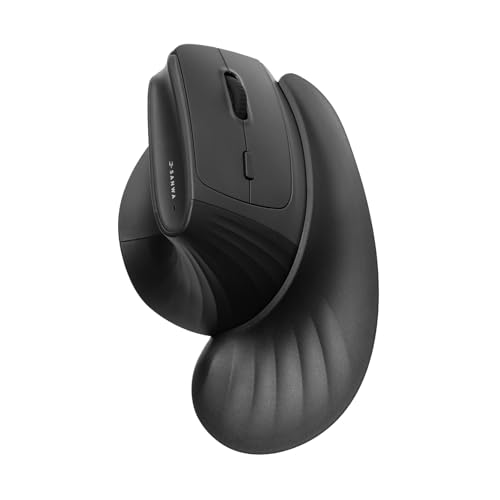
This SANWA wireless ergonomic mouse is listed for large hands and includes a wrist rest in its product name. It is not the most obvious match for medium hands, but some people prefer a larger body that supports more of the palm. Its wireless design can keep the desk clear of a cable. Check the size details closely before buying.
A mouse that feels roomy to one person may force another to stretch. If your hand is medium-sized, compare the stated dimensions with your current mouse and test how far your fingers reach. The wrist rest may affect how the mouse sits beside your keyboard, so consider your desk space too. Confirm whether the rest is built in or supplied as a separate part on the current listing.
Pros:
- Wireless design supports a cable-free work area.
- Large-hand shape may suit users who want more palm support.
- Wrist-rest feature is included in the product description.
- Ergonomic contour offers an alternative to a flat mouse.
- Could work for medium hands that prefer a larger grip after checking measurements.
Cons:
- Designed for large hands, so medium-hand fit is uncertain.
- Wrist rest may take up extra desk space.
- May feel bulky if you use a fingertip grip.
What Amazon Buyers Are Saying
Look for buyer comments that discuss hand size and whether the wrist rest fits their desk. Those details matter more than general comfort claims for this large-hand model. If reviews mention different versions, compare the selected item carefully before making a decision.
My Recommendation
I would pass on this SANWA model unless your medium hand is near the larger end or you know you like oversized mice. The wrist-rest feature may appeal to some users, but the large-hand label is a clear caution. Overall rating: 3.6/5.
| Category | Rating |
|---|---|
| Medium-hand fit | 3.2/5 |
| Palm support | 4.2/5 |
| Desk convenience | 3.7/5 |
| Value | 3.7/5 |
| Overall Rating | 3.6/5 |
How to Choose the Best Ergonomic Mouse for Medium Hands
To find the best ergonomic mouse for medium hands, focus on how the mouse fits your hand in real use. The word “ergonomic” alone does not tell you if your fingers can reach the buttons or if the palm feels supported. Compare the shape, size, connection, and controls before you buy.
1. Match the Mouse Size to Your Hand
Measure from the base of your palm to the tip of your middle finger, then compare that length with the mouse dimensions. Also consider palm width and how you hold a mouse. A medium hand can use a compact mouse with a relaxed palm grip, while another may need a longer body. The Logitech Lift, Luhaso 57°, SANWA wired model, and SABLUTE MAM3 name small-to-medium hands in their product titles. That makes their stated fit easier to assess, though measurements still matter.
Pay attention to button reach. Your index and middle fingers should rest on the main buttons without stretching. The thumb should have a stable place on the side. If the mouse is too large, your fingers may sit too far forward; if it is too small, your palm may feel unsupported.
2. Choose the Grip Angle and Shape You Can Use
A vertical mouse turns the hand away from the flat, palm-down position. Some users like this posture, while others find it awkward at first. A model with a gentler angle may feel more familiar than a steep upright design. If possible, try a similar shape in a store or buy from a seller with a clear return policy.
Look at the thumb rest, palm curve, and button placement. These details can matter more than a long feature list. Also consider whether you use a palm, claw, or fingertip grip. A mouse that fits your normal grip is often easier to control than one that forces you to change how you hold it.
3. Compare Connection, Power, and Pointer Control
Choose wired, Bluetooth, or a USB receiver based on your computer and work habits. Wired mice do not need charging, but their cable can catch on the desk. Bluetooth can save a USB port, while a 2.4 GHz receiver may offer a simple plug-in setup. Multi-device support can help if you switch between computers, but it is not needed by everyone.
DPI affects pointer speed. A higher setting moves the pointer farther with the same hand movement, but it is not always better. Look for simple adjustments that let you find a steady speed for your screen. Before buying, confirm the exact features, dimensions, and system support on the current product page. Listing details and offers can change.
Final Verdict: Which Should You Buy?
The Logitech Lift is my top choice for the best ergonomic mouse for medium hands. Its small-to-medium fit, vertical shape, and everyday design make it the safest starting point in this group.
If you want a lower-cost style or a wired setup, compare the SANWA small-to-medium model and Luhaso 57° mouse. Measure your hand, check current details, and choose the shape you can use with ease.
FAQs Of best ergonomic mouse for medium hands
Is a vertical mouse good for medium hands?
It can be, if the mouse supports your palm and your fingers reach the buttons without stretching. Check the maker’s size range and measurements.
How do I know if an ergonomic mouse is too large?
If your fingers reach too far to click or your thumb cannot rest comfortably, the mouse may be too large. Compare its dimensions with a mouse that fits you.
Which mouse in this list is designed for small to medium hands?
The Logitech Lift, Luhaso 57°, SANWA wired vertical mouse, and SABLUTE MAM3 state a small-to-medium hand fit in their product names or descriptions.
Should I choose a wired or wireless ergonomic mouse?
Choose wired if you want to avoid charging and do not mind a cable. Choose wireless for a cleaner desk, and check whether it uses Bluetooth or a USB receiver.
Does a vertical mouse stop wrist pain?
No mouse can promise to stop pain. A different grip may feel better for some people, but take breaks and seek medical advice for ongoing discomfort.