The Logitech Lift is my best ergonomic mouse for work pick for its vertical shape, familiar controls, and flexible wireless use.
A long workday can leave your hand feeling tired after hours of small mouse movements. A different shape may help you hold your wrist and forearm in a more relaxed position, though no mouse can fix a poor desk setup or suit every hand. These picks include vertical mice, a trackball, and a standard-shaped ergonomic option, so you can compare the feel and connection style that fit your work.
See the differences between my top picks at a glance.
| Mouse | Shape / connection | Best fit | Quick note | Shop |
|---|---|---|---|---|
| Logitech Lift | Vertical / wireless | Daily office work | Premium, right-hand model listed | View on Amazon |
| ProtoArc EM11 NL | Vertical / wireless, rechargeable | Multi-device desks | Check device pairing needs | View on Amazon |
| TECKNET 3-Device | Vertical / Bluetooth and 2.4G | Switching between devices | Listed with 4800 DPI | View on Amazon |
| Nulea M501 | Thumb trackball / wireless | Small desk areas | Cursor moves with the ball | View on Amazon |
| Anker 2.4G Vertical | Vertical / 2.4G wireless | Trying a vertical mouse | Uses a USB receiver | View on Amazon |
| Lekvey Vertical | Vertical / rechargeable wireless | Cable-free desk setups | Right-hand vertical design | View on Amazon |
| Anker USB Wired Vertical | Vertical / wired USB | Simple, fixed desk setup | No wireless pairing needed | View on Amazon |
| TECKNET 2.4G Mouse | Ergonomic shape / 2.4G wireless | Traditional mouse users | Listed with up to 2600 DPI | View on Amazon |
| memzuoix Vertical | Vertical / 2.4G wireless | Large right-hand fit | Listed with three DPI steps | View on Amazon |
| Uineer Vertical | Vertical / Bluetooth and 2.4G | Flexible wireless setup | Three connection modes listed | View on Amazon |
Logitech Lift Vertical Ergonomic Wireless Mouse

The Logitech Lift is the most balanced pick in this group for a work desk. Its vertical form changes how your hand rests, while its familiar mouse controls keep the learning curve manageable. The graphite model shown here suits a low-key office setup. Its wireless design also keeps a cable from crossing your workspace.
A vertical mouse will feel different at first, so give your hand time to adjust. The Lift makes most sense for someone who wants a more upright grip but still wants a conventional pointer and buttons. Before buying, check the listing for hand size and handedness, since this product page is for a right-hand model. Also confirm the connection options match your computer.
Pros:
- Vertical shape offers an alternative to a flat mouse grip.
- Wireless use helps keep the desk clear.
- Familiar pointer-and-button layout suits everyday office tasks.
- Graphite finish blends easily with most work gear.
- Strong all-around choice for routine work and browsing.
Cons:
- It takes time to get used to a vertical grip.
- The listed model is not the right choice for left-handed users.
- It costs more than many basic vertical mice.
What Amazon Buyers Are Saying
Buyer opinions can change as listings gather new reviews, so I avoid treating any one comment as a guarantee. When checking current Amazon reviews, look for repeated notes about comfort after a full workday, fit for your hand size, and ease of switching from a regular mouse. Also scan recent comments for connection or setup issues that match your computer.
My Recommendation
I recommend the Lift to a right-handed office worker who wants a polished, upright mouse for daily use and is willing to allow for an adjustment period. It is my top pick as the best ergonomic mouse for work when broad usability matters more than finding the lowest price. Overall rating: 4.5/5.
ProtoArc EM11 NL Wireless Vertical Mouse

The ProtoArc EM11 NL is a rechargeable wireless vertical mouse for people who want to move away from a flat design. It keeps the desk free of a permanent mouse cable and uses a vertical body to change the hand position. Its black finish looks at home beside a laptop or desktop setup. It is a practical option for everyday tasks such as email, documents, and web browsing.
Before choosing it, review the current product page for the exact connection modes and device limits. Those details matter if you plan to move between a work laptop and a home computer. Rechargeable mice also suit users who prefer not to replace disposable batteries, though you still need to keep the mouse charged. Like other vertical models, it may feel unusual for the first few days.
Pros:
- Vertical body provides a different grip from a standard mouse.
- Rechargeable design avoids routine disposable-battery changes.
- Wireless format makes it easier to arrange a clean desk.
- Black color works with common office equipment.
- Suitable for a general work and home-computing role.
Cons:
- Vertical controls can take practice to use smoothly.
- Charging is still part of regular upkeep.
- Check the listing carefully for your required pairing method.
What Amazon Buyers Are Saying
Amazon review feedback is best judged by recurring details in recent, verified-purchase comments. For this mouse, focus on reported hand fit, how easy the transition feels, and whether charging and wireless pairing work well in your setup. I would not rely on a single comfort review, because hand size and desk habits vary.
My Recommendation
The EM11 NL is worth considering if you want a rechargeable vertical mouse and the exact connection features on the current listing fit your devices. It is a sensible midrange-style alternative, but compare its dimensions with your hand before ordering. Overall rating: 4/5.
TECKNET 3-Device Vertical Ergonomic Mouse

This TECKNET vertical mouse stands out for its listed three-device support and mix of Bluetooth and 2.4 GHz wireless. That can help if you work across more than one compatible computer. The product title also lists 4800 DPI, which describes a range of cursor sensitivity settings. A vertical body gives it a different hand position from a basic flat mouse.
For work, the device-switch feature may be more useful than a high maximum DPI number. Check which wireless modes the listing supports and whether your computers can use them. A high DPI setting can make the cursor move faster, but it does not make every task easier; many people prefer a lower setting for careful work. Check the mouse size and controls before purchase, too.
Pros:
- Listed support for three devices may suit a multi-computer desk.
- Bluetooth and 2.4 GHz options add connection flexibility.
- Vertical design offers an alternative hand posture.
- Listed 4800 DPI provides multiple cursor-speed choices.
- Useful for office users who switch between devices.
Cons:
- Switching connections can add setup steps.
- High DPI is not a benefit for every work style.
- Hand fit and button layout should be checked before purchase.
What Amazon Buyers Are Saying
To judge current buyer feedback, look for repeated comments about switching between devices, wireless stability, and comfort during long sessions. Give more weight to reviews that describe a similar computer setup and hand size. I cannot responsibly claim a fixed pattern for all buyers without checking the live review page, which may change over time.
My Recommendation
This is a strong candidate if you need one vertical mouse for several compatible devices. Confirm the precise pairing process and your computer’s Bluetooth support before you buy. Overall rating: 4/5.
Nulea M501 Wireless Trackball Mouse

The Nulea M501 takes a different route from a vertical mouse. It uses a thumb-controlled trackball, so you move the cursor with the ball instead of sliding the whole mouse across the desk. This can be handy when desk space is tight or when you want to keep the mouse in one place. The listing notes four DPI levels for cursor-speed adjustment.
A trackball has a learning curve of its own. Your thumb does more cursor work, and the feel differs from a standard mouse, so it may take practice to gain accuracy. It can work well for general office tasks once familiar, but users who make broad sweeping movements may prefer a regular mouse. Check the button layout and hand fit before choosing it.
Pros:
- Needs little desk space because the mouse itself stays put.
- Thumb control moves the cursor without sliding the device.
- Four listed DPI levels offer cursor-speed choices.
- Wireless design avoids a cable across the desk.
- A useful alternative for users who do not want a vertical mouse.
Cons:
- Trackball control takes practice for many first-time users.
- Thumb movement may not suit every hand or work habit.
- The ball and surrounding area need occasional cleaning.
What Amazon Buyers Are Saying
When reading Amazon comments for a trackball, look for notes on learning time, cursor precision, thumb comfort, and cleaning. Reviews from long-term users can be more useful than first-day impressions because trackball control takes practice. Check recent comments for any issue that appears repeatedly rather than relying on one report.
My Recommendation
I would choose the M501 for a compact desk or for someone curious about thumb trackball control. It is less suitable if you want a mouse that feels familiar right away. Overall rating: 4/5.
Anker 2.4G Wireless Vertical Mouse

Anker’s 2.4G vertical mouse is a straightforward way to try an upright grip. It connects through a USB receiver, which can be convenient for computers with a compatible USB port. The right-hand shape makes the intended fit clear. Its simple wireless approach avoids the need to pair over Bluetooth.
This model is worth a look if you want a basic vertical mouse without a more complex multi-device setup. Remember that a USB receiver uses a port, so check your laptop before ordering. The shape may feel odd at first, as it changes the way you guide the pointer. Take short breaks while you adjust and do not expect a new mouse alone to solve pain or strain.
Pros:
- Vertical grip differs from a flat mouse shape.
- 2.4 GHz wireless uses a USB receiver.
- Simple connection style can be easy to understand.
- Right-hand design is stated in the listing.
- A practical entry point for trying vertical control.
Cons:
- The USB receiver occupies a port.
- It is not designed for left-handed use.
- Users need time to adjust to the angled grip.
What Amazon Buyers Are Saying
Before ordering, review current buyer comments for receiver setup, hand comfort, and how the shape feels after several days. Compare feedback from people with a similar hand size and computer setup. I recommend checking recent reviews rather than assuming older comments describe the current product or listing.
My Recommendation
This Anker is a reasonable pick for a right-handed user who wants a simple 2.4 GHz vertical mouse. Choose it only if you have a free compatible USB port and do not need Bluetooth. Overall rating: 3.8/5.
Lekvey Rechargeable Vertical Wireless Mouse

The Lekvey is a rechargeable vertical wireless mouse with a comfort-focused grip. Its upright shape is meant for users who want an alternative to a standard low-profile mouse. It also keeps a cable from dragging across the desk during use. For day-to-day work, it can handle common tasks such as browsing, documents, and email.
Its best fit depends on your hand and on how much you value the vertical angle. Rechargeable convenience is useful, but the mouse still needs charging when power runs low. Check the current listing for the exact size, connection method, and operating system support you need. If you switch between several work devices, make sure the connection options suit that routine.
Pros:
- Vertical shape offers an upright grip.
- Rechargeable design avoids replacing disposable batteries.
- Wireless use can make a desk feel less cluttered.
- Useful for everyday office tasks.
- Comfort-grip focus may appeal to extended computer users.
Cons:
- Charging is needed from time to time.
- Vertical shape can take a while to feel natural.
- Check the current listing for fit and connection details.
What Amazon Buyers Are Saying
For current Amazon feedback, watch for repeated comments on charge life, pairing, hand fit, and the time needed to adjust. Those details matter more than broad claims that a mouse is comfortable for everyone. A buyer with a different hand size or daily workload may have a very different experience.
My Recommendation
The Lekvey is a solid option if you want a rechargeable wireless vertical mouse and its size matches your hand. I would compare its current price and connection details with the ProtoArc and Logitech models before making a final choice. Overall rating: 3.9/5.
Anker USB Wired Vertical Mouse
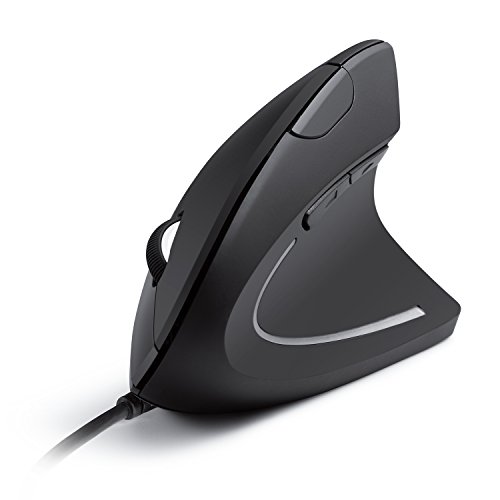
This wired Anker vertical mouse keeps things simple: plug it into a compatible USB port and use it without wireless pairing. The upright shape provides a different grip from a regular mouse. A wired connection also means you do not need to manage a wireless receiver or charge the mouse. It can suit a fixed desktop setup where the cable will not get in the way.
The cable is the main trade-off. It can limit where you place the mouse and may add clutter if your desk is already crowded. Before buying, check the cable reach and USB port access for your workspace. The vertical grip still needs an adjustment period, so take time to learn its feel during normal work rather than expecting instant comfort.
Pros:
- Wired USB connection avoids wireless pairing.
- No battery charging is needed for normal use.
- Vertical form gives a different hand position.
- Useful for a fixed desktop or shared workstation.
- Simple setup can suit users who prefer plug-and-play gear.
Cons:
- The cable can restrict movement and placement.
- A compatible USB port is required.
- The angled shape takes practice for new users.
What Amazon Buyers Are Saying
Read current reviews for comments on cable length, USB setup, and how well the shape fits the user’s hand. For wired products, buyers may also mention whether the cable suits their desk layout. Compare several recent reviews instead of making a decision based on one person’s comfort report.
My Recommendation
I recommend this Anker model for people who prefer a no-charge, wired setup and do not mind a cable. It is less flexible than a wireless mouse, but its direct connection keeps setup simple. Overall rating: 3.8/5.
TECKNET 2.4G Ergonomic Wireless Mouse

Not every ergonomic mouse needs a vertical body. This TECKNET model has a more familiar mouse shape, which may feel easier for users who do not want a major change in grip. It connects wirelessly through 2.4 GHz, and its listed sensitivity reaches 2600 DPI. The purple finish adds color to a home office or personal workstation.
This is a good style to consider if you want wireless convenience but prefer a traditional mouse layout. A listed DPI figure tells you about cursor speed options, not comfort or accuracy by itself. Check whether the mouse uses a receiver and whether your device has a suitable port. Also review its dimensions to see if the shape fits your hand.
Pros:
- Familiar shape may be easier to adopt than a vertical design.
- Wireless connection reduces cable clutter.
- Listed sensitivity goes up to 2600 DPI.
- Purple finish offers a distinct color choice.
- Suitable for everyday office and home use.
Cons:
- It does not provide the upright grip of a vertical mouse.
- Check the receiver and port needs before purchase.
- The shape may not suit users who want a trackball or angled grip.
What Amazon Buyers Are Saying
Check recent Amazon comments for notes on wireless connection, hand size, cursor feel, and the finish. Look for buyers who describe similar work tasks, such as document editing or long browsing sessions. Since preferences vary, treat comfort comments as personal experience rather than a promise that the same shape will suit you.
My Recommendation
Choose this TECKNET if you want a standard-feeling wireless mouse with an ergonomic focus, rather than a vertical or trackball model. It is a practical budget-style option when a familiar shape matters most. Overall rating: 3.8/5.
memzuoix Large Vertical Wireless Mouse

This memzuoix mouse is listed as a large, right-hand vertical model, so it may be worth a look for users who find smaller mice cramped. Its wireless 2.4 GHz connection keeps the desk free of a fixed cable. The pink color gives it a more playful look than the black and graphite options in this guide. The listing names three DPI settings: 800, 1200, and 1600.
Fit should be the first thing to check. A large mouse can feel bulky if your hand is small, while a compact model can force a larger hand into a tight grip. The three listed sensitivity steps cover basic cursor-speed changes, but they do not replace careful positioning or a suitable desk height. Confirm that the right-hand layout and receiver setup work for you.
Pros:
- Large sizing may suit users who want more room for their hand.
- Vertical design offers an upright grip.
- Wireless 2.4 GHz connection avoids a fixed cable.
- Three listed DPI options make basic speed changes simple.
- Pink finish gives the desk a bright accent.
Cons:
- Large sizing may not suit smaller hands.
- Right-hand shape will not fit left-handed users.
- Check the USB receiver requirement before ordering.
What Amazon Buyers Are Saying
For this model, review current buyer notes about hand size, the feel of the large body, and receiver setup. Color and comfort are personal choices, so look for useful details rather than broad praise or complaints. Confirm that reviewers discuss the same size and version shown on the listing.
My Recommendation
This is a reasonable choice for a right-handed user who specifically wants a larger vertical mouse and likes the pink finish. I would skip it if you have small hands or want Bluetooth. Overall rating: 3.7/5.
Uineer 3-Mode Ergonomic Vertical Mouse

The Uineer vertical mouse lists three wireless modes: Bluetooth 5.0, Bluetooth 4.0, and 2.4 GHz. That range may help users who work with different computers or want to avoid relying on one connection type. Its vertical shape gives it a place among the upright-grip options in this round-up. The main appeal is connection choice, not a promise that one grip works for everyone.
Before you buy, check how the mouse changes between modes and whether each computer supports the chosen connection. Bluetooth can save a USB port, while 2.4 GHz may suit a computer with a compatible receiver setup. Pairing options do add a little complexity. As with every vertical mouse, allow time to learn the shape and check the dimensions against your hand.
Pros:
- Three listed connection modes offer setup flexibility.
- Bluetooth and 2.4 GHz can suit different computers.
- Vertical design differs from a flat mouse grip.
- Bluetooth use may leave a USB port free.
- Useful for users with mixed work and personal devices.
Cons:
- Multiple modes can make setup less simple.
- Compatibility depends on the computer and operating system.
- The upright grip may take time to learn.
What Amazon Buyers Are Saying
Check the latest Amazon reviews for pairing steps, switching between modes, and how the mouse behaves with the computers you use. Also look for comments about the size and how long it took to adjust. These details can help you tell whether its extra connection choices will be useful or just add steps.
My Recommendation
The Uineer is worth considering if you want several wireless connection choices in a vertical mouse. It may be more than you need for one computer, so compare the setup details and price with simpler options. Overall rating: 3.9/5.
How to Choose the Best Ergonomic Mouse for Work
The best ergonomic mouse for work is the one that fits your hand, desk, and daily tasks. A vertical mouse changes the grip angle. A trackball keeps the device in place. A traditional ergonomic mouse feels more familiar. Think about how you work before you choose a shape or pay extra for features.
1. Match the mouse shape to your hand and work style
Check the listed size and handedness first. A large right-hand vertical mouse may suit a large right hand, but feel too bulky for a small hand. If you want to keep your current movement style, try a traditional ergonomic shape. If you have little room to move a mouse, consider a trackball. No shape is best for everyone, so use fit and comfort as your guide.
Think about your work, too. A vertical mouse may suit long office sessions if you like its upright grip. A trackball can work on a small desk because it stays in one spot. For precise work, such as selecting small items on screen, check whether the mouse offers adjustable cursor speed. A DPI number is only one part of control; your own comfort and accuracy matter more.
2. Pick a connection and power setup that fits your desk
Wired USB mice are easy to connect and do not need charging, but the cable can limit placement. A 2.4 GHz mouse often uses a USB receiver, so make sure your computer has a suitable port. Bluetooth can avoid a receiver, but the computer must support it. Multi-mode mice can work across different setups, though you may need to learn how to switch between connections.
Also decide whether you prefer rechargeable power or a battery-based design. Rechargeable models need charging at some point. A wired model removes that concern but ties the mouse to its cable. For a laptop that moves between rooms, wireless may be easier. For a fixed office desk, a cable may be no trouble.
3. Compare useful features, quality, and total value
Do not pay extra for a feature you will not use. If you work on one computer, three-device support may add little value. If you switch between a laptop and desktop, it may save time. Consider comfort-related details, button layout, cursor settings, charging, and how easy the mouse is to set up. Check the current listing for the exact features, since product versions can change.
Read recent reviews with care. Look for repeated comments about the same issue, such as fit, pairing, charging, or long-term use. One very positive or negative review cannot speak for every hand or computer. Compare the mouse price with the features you will use and the return policy. A comfortable fit is more valuable than a long feature list that does not match your work.
Final Verdict: Which Should You Buy?
The Logitech Lift is my top choice for most right-handed office users who want a well-rounded vertical mouse. The TECKNET 3-Device suits multi-device setups, while the Nulea M501 makes sense when desk space is tight.
The best ergonomic mouse for work depends on your hand, habits, and computer. Compare the shape, connection, and current product details before you buy, then give a new grip time to feel familiar.
FAQs Of best ergonomic mouse for work
Is a vertical mouse good for all-day office work?
A vertical mouse can suit long work sessions, but comfort depends on hand fit and personal preference. Try the grip gradually and adjust your desk setup as needed.
How long does it take to get used to an ergonomic mouse?
It varies by person and mouse type. A vertical mouse or trackball may take several days of regular use to feel familiar.
Should I choose a vertical mouse or a trackball?
Choose a vertical mouse if you want an upright grip and normal mouse movement. Choose a trackball if you want to move the cursor while keeping the device in one place.
Does a higher DPI make a mouse more comfortable?
No. DPI changes cursor speed. Comfort depends more on the mouse shape, fit, grip, and your desk position.
What should I check before buying a wireless ergonomic mouse?
Check the connection type, computer compatibility, receiver needs, power method, hand size, and handedness. Read recent reviews for repeated setup or fit concerns.