For most Rust players, I’d choose the Razer Basilisk V3 for its precise sensor, useful controls, and dependable wired connection.
A missed click in a tense Rust fight can cost you gear, time, and a long trip home. A good mouse cannot win every fight, but it can make aiming feel more controlled and keep useful commands close at hand. I compared these picks for comfort, button layout, connection type, and value. My top choice suits many players, while the other options fit different budgets and play styles.
See the differences between my top picks at a glance.
| Mouse or accessory | Connection | Useful feature | Best fit | Link |
|---|---|---|---|---|
| Razer Basilisk V3 | Wired | Custom controls | Best overall | View on Amazon |
| Logitech G305 Lightspeed, Black | Wireless | LIGHTSPEED connection | Wireless value | View on Amazon |
| Redragon M612 | Wired | Remappable keys | Budget controls | View on Amazon |
| Redragon M602 | Wired | Nine programmable buttons | Many commands | View on Amazon |
| BENGOO RGB Wired Mouse | Wired | Ergonomic shape | Low-cost starter | View on Amazon |
| Razer DeathAdder Essential | Wired | Classic ergonomic shape | Simple FPS play | View on Amazon |
| Redragon M908 | Wired | 12 side buttons | Macro-heavy play | View on Amazon |
| Redragon M901K | Wired | 12 side buttons, weights | Adjustable MMO style | View on Amazon |
| Logitech G305 Lightspeed, White | Wireless | LIGHTSPEED connection | Wireless alternative | View on Amazon |
| Mcapirivo Rustic Wood Desk Mat | Not a mouse | Large play surface | Desk accessory | View on Amazon |
Razer Basilisk V3

The Basilisk V3 is my best gaming mouse for Rust for players who want a comfortable, feature-rich wired model. Its ergonomic right-handed shape and programmable controls give you room to set up useful actions. Razer lists an optical sensor with a maximum sensitivity of 26,000 DPI, though most players will use a much lower setting.
In Rust, steady aim matters more than a high DPI number. I like that this mouse gives players extra controls without forcing them to use a full MMO layout. It also avoids battery checks and wireless charging. Its shape and extra features do add size and complexity, so it may not suit every hand or grip.
Pros:
- Ergonomic right-handed shape suits many palm and claw grips
- Wired connection needs no battery charging
- Programmable controls can keep chosen actions within reach
- High maximum sensor setting gives room to adjust
- RGB lighting can be customized
- Useful all-around pick for games beyond Rust
Cons:
- Wired cable may drag or catch on a cluttered desk
- Extra controls can feel unnecessary to players who prefer a simple mouse
- Right-handed shape is not designed for left-hand use
What Amazon Buyers Are Saying
Buyer opinions can change over time, so check the latest reviews for current trends. The features that tend to draw attention are the comfortable shape, the programmable controls, and the lighting. Before buying, look closely at comments about fit and the wired setup, since comfort and cable feel depend on the player and desk.
My Recommendation
I recommend the Basilisk V3 to a right-handed Rust player who wants flexible controls and does not mind a cable. It is my strongest all-round choice here, though a lighter, simpler mouse may suit some aim-focused players better. Overall rating: 4.6/5.
Logitech G305 Lightspeed Wireless

The Logitech G305 is a simple wireless gaming mouse for players who want to clear a cable from their desk. Logitech’s LIGHTSPEED connection is made for gaming, and the HERO sensor offers adjustable sensitivity. The mouse has six programmable buttons, which provide a few useful options without crowding the shell.
That balance works well for Rust if you want to keep a small number of commands close by. You can adjust sensitivity to match your aim style, then keep the same setup across sessions. The G305 uses a replaceable AA battery, so it does not need a charging cable, but you will need to replace the battery when it runs low. Its compact shape is worth checking against your hand size before you buy.
Pros:
- Wireless design keeps the desk clear of a mouse cable
- LIGHTSPEED connection is intended for responsive gaming
- HERO sensor supports adjustable sensitivity
- Six programmable buttons offer useful basic customization
- Replaceable battery avoids waiting for a charge
- Simple design suits gaming and daily computer use
Cons:
- Requires a replaceable AA battery
- Compact shape may not feel ideal in larger hands
- Fewer side controls than MMO-style mice
What Amazon Buyers Are Saying
Check current Amazon reviews for the latest buyer experience, as ratings and comments can change. People looking at this model often compare its wireless freedom, shape, and battery setup. Review the most recent feedback on hand fit and battery life, and confirm the included items in the current listing before ordering.
My Recommendation
I would choose the black G305 for a player who values wireless freedom and a clean, simple layout. It makes sense for Rust, but the battery-powered design and compact body are not for everyone. Overall rating: 4.4/5.
Redragon M612 Wired Gaming Mouse

The Redragon M612 is a wired RGB mouse with remappable keys and an advertised maximum of 8,000 DPI. That gives budget-focused players several ways to tune the mouse without paying for a wireless model. The extra controls may help you place selected commands within reach during a busy Rust session.
I would treat the DPI ceiling as flexibility, not a promise of better aim. A consistent, comfortable setting matters more than chasing a large number. The M612 may suit players who want a feature-rich starter mouse, but its wired design and feature set can feel less refined than premium options. Check the current listing for exact software and system details before purchase.
Pros:
- Remappable keys allow a personalized control layout
- Wired connection avoids battery concerns
- Advertised 8,000 DPI range offers sensitivity choices
- RGB lighting adds a customizable look
- Extra controls can help keep selected actions accessible
- Good option for shoppers seeking features at a lower tier
Cons:
- Cable limits movement compared with wireless models
- More buttons may take time to learn
- Maximum DPI alone does not guarantee more accurate aim
What Amazon Buyers Are Saying
Amazon feedback changes, and I cannot verify a live set of buyer comments here. Before ordering, scan recent reviews for notes about button feel, software setup, and comfort during longer sessions. Those details are more useful than a focus on RGB or the highest DPI figure.
My Recommendation
The M612 is worth considering if you want wired reliability, customizable controls, and a budget-friendly feature list. I would choose it over a basic office mouse for gaming, but players who prize a clean, light setup may prefer a simpler shape. Overall rating: 4.1/5.
Redragon M602 Ergonomic Gaming Mouse

The Redragon M602 is a wired ergonomic mouse with nine programmable buttons and an advertised sensitivity range up to 7,200 DPI. That many buttons can help players place a few often-used actions near the thumb. It also has RGB lighting and software support listed for customization.
For Rust, those controls can be helpful if you use them with care. Keep essential actions easy to reach, and avoid assigning too many commands until the layout feels natural. The M602 is a practical pick for someone who wants a fuller button set at a modest price. Its size and right-handed shape deserve a close look if you use a fingertip grip or have smaller hands.
Pros:
- Nine programmable buttons allow several custom commands
- Ergonomic right-handed shape may suit longer play sessions
- Wired power means no battery changes
- Adjustable DPI supports different sensitivity preferences
- RGB lighting can personalize a gaming setup
- Useful for players who want more controls than a basic mouse offers
Cons:
- Button-heavy layout can take time to master
- Wired cable may affect desk movement
- Large ergonomic shells may not suit every grip or hand size
What Amazon Buyers Are Saying
Current buyer views can vary, so use the latest Amazon reviews to check details before you buy. Look for comments on button access, hand comfort, and the setup process. These are the points most likely to affect your day-to-day experience with a mouse that offers many programmable controls.
My Recommendation
I recommend the M602 to players who want several accessible commands and prefer a wired mouse. It is less suited to a minimalist FPS setup, but its control options and adjustable sensitivity make it a flexible budget choice. Overall rating: 4.0/5.
BENGOO RGB Wired Gaming Mouse

The BENGOO is a basic wired gaming mouse for shoppers who want an affordable step up from a standard office mouse. Its listing highlights RGB backlighting and an ergonomic design. It keeps the setup simple: plug in the cable, set your preferred sensitivity if supported by the current model, and start playing.
This mouse can work as an entry-level choice for Rust, especially if you are not sure how much you want to spend. A comfortable shape and steady connection matter more than decorative lighting in a fight. Before buying, review the current product page for exact button, sensor, and compatibility details, since the supplied listing name does not confirm every specification. It is best for casual use rather than shoppers seeking advanced tuning.
Pros:
- Wired design avoids battery upkeep
- RGB backlighting gives the setup a gaming look
- Ergonomic form is designed for a familiar mouse hold
- Simple approach can suit a first gaming mouse
- Can serve for everyday computer use as well as games
Cons:
- Listing details should be checked for exact sensor and button features
- Fewer verified customization details than feature-focused models
- Cable may limit free movement on a small desk
What Amazon Buyers Are Saying
Reviews can change, and I cannot confirm the latest buyer feedback for this listing. Check recent comments for clear details on build feel, tracking, and long-term reliability. For this lower-cost option, those points are more useful than relying on the product photos alone.
My Recommendation
I see the BENGOO as a basic starter option, not my first choice for a player who wants precise control settings or many programmable commands. It can make sense if the price is the main concern and the current listing meets your needs. Overall rating: 3.6/5.
Razer DeathAdder Essential

The DeathAdder Essential is a wired, right-handed mouse with a well-known ergonomic shape and a straightforward button layout. It suits players who want a familiar gaming mouse without a large bank of side buttons. Razer lists a 6,400 DPI optical sensor and five programmable buttons for this model.
That simple layout can be a plus in Rust, where a mouse should feel easy to control rather than packed with distractions. You can set the sensitivity to a level that works with your pad and arm movement. The wired connection keeps the mouse ready without battery care. If you want wireless freedom or many macro buttons, another pick on this list will fit better.
Pros:
- Recognizable ergonomic right-handed shape
- Five programmable buttons keep the layout fairly simple
- Wired connection requires no charging
- Adjustable sensitivity supports personal aim settings
- Good fit for players who prefer a classic FPS-style mouse
- Less crowded controls than MMO models
Cons:
- Not designed for left-handed use
- Wired cable can be a drawback for some desk setups
- Fewer side controls than mice made for macro-heavy play
What Amazon Buyers Are Saying
Look at the newest Amazon feedback for current impressions. Buyers evaluating this style of mouse often focus on shape, button feel, and the value of a simple wired design. Your grip and hand size will have a large role in whether the shape feels right, so check user photos and fit comments when available.
My Recommendation
I recommend the DeathAdder Essential to a player who wants a simple, comfortable wired mouse from a known gaming brand. It is a strong alternative to the Basilisk V3 if you do not need as many controls. Overall rating: 4.3/5.
Redragon M908 MMO Gaming Mouse

The Redragon M908 is a wired MMO-style mouse with 12 side buttons and a listed maximum of 12,400 DPI. Its many controls give you room to map actions and macros, which may suit players who use several commands often. The button grid is its main draw, not a must-have for every Rust player.
In a fast fight, extra buttons help only if you can find the right one without looking. I suggest setting up a few key actions first, then adding more only when the layout feels natural. The M908 may suit a player who also enjoys MMOs or other games with many commands. If your main goal is simple aim, a less crowded mouse may be easier to use.
Pros:
- 12 side buttons offer many mapping options
- Wired connection avoids charging breaks
- High listed DPI ceiling gives sensitivity choices
- Macro support can help with repeatable actions where allowed
- RGB lighting can match other gaming gear
- Useful beyond Rust for games with many commands
Cons:
- Side-button grid can be hard to learn
- Extra controls may distract players who want a simple FPS mouse
- Wired connection may add cable drag
What Amazon Buyers Are Saying
Buyer experiences may shift, so read the latest reviews before making a choice. Focus on comments about side-button reach, software, and how the mouse feels over long sessions. The large button grid is a key reason to choose this model, but it is also the feature most worth checking for comfort.
My Recommendation
I would choose the M908 only if you know you will use its many controls. It offers a lot of flexibility, but a simpler model is a safer fit for a player focused on aim alone. Overall rating: 4.0/5.
Redragon M901K MMO Gaming Mouse

The Redragon M901K is an MMO-style wired mouse with 12 side buttons, 19 programmable buttons, and an advertised maximum of 12,400 DPI. Its listing also describes eight adjustable weights, so you can tune the feel rather than accept one fixed weight. These features make it a flexible choice for players who like to customize their gear.
That flexibility comes with a learning curve. For Rust, try a small set of commands first and see whether the side buttons stay easy to tell apart under pressure. The adjustable weights may help you find a feel that suits your movement, though no one weight works for every player. Choose this model for its control options, not because more buttons or more DPI automatically improve aim.
Pros:
- 12 side buttons and 19 programmable controls allow extensive setup
- Adjustable weights let you change the mouse feel
- Wired connection does not need battery charging
- High listed DPI range supports varied settings
- RGB lighting adds visual customization
- Can work across games with different command needs
Cons:
- Large number of buttons can take time to learn
- Weight tuning adds setup steps
- Wired design may not suit a cable-free desk
What Amazon Buyers Are Saying
Check recent Amazon comments for up-to-date buyer views, especially on the side-button layout, weight tuning, and software. Experiences can vary with grip and hand size. Since these features define the M901K, confirm that the current package and listing details match what you want before buying.
My Recommendation
The M901K makes sense for a player who enjoys building a custom layout and will use its extra controls. For most Rust players, it is more mouse than they need, but the weight options and button range add value for multi-game use. Overall rating: 4.1/5.
Logitech G305 Lightspeed Wireless, White

This white G305 has the same core appeal as the black version: LIGHTSPEED wireless, a HERO sensor, adjustable sensitivity, and six programmable buttons. The main difference in this listing is the color. That makes it a simple way to match a light-colored setup without giving up the G305’s uncluttered layout.
For Rust, a wireless link can make broad mouse movement feel less restricted by a cord. The replaceable AA battery is a trade-off, so keep a spare ready if you do not want an interrupted session. Its compact shape may be easy to place on a smaller desk, but fit is personal. Check whether the white finish and current price suit your needs before choosing between the two colors.
Pros:
- Wireless design reduces cable clutter
- LIGHTSPEED connection targets gaming use
- HERO sensor offers sensitivity adjustment
- Six programmable buttons give basic control options
- White finish works well in a light-themed setup
- Replaceable battery avoids charging downtime
Cons:
- Needs a replaceable AA battery
- Compact shape may not suit every hand
- Fewer side controls than MMO-style alternatives
What Amazon Buyers Are Saying
For current buyer trends, read recent reviews on the Amazon listing. Look for notes on the wireless connection, battery use, and fit rather than assuming the white version feels different from the black one. The color is the obvious variation, while hand comfort remains personal.
My Recommendation
I recommend this version if you want the G305’s wireless setup in white. It offers the same practical strengths as the black model, so choose based on color and current price. Overall rating: 4.4/5.
Mcapirivo Rustic Wood Desk Mat

This Mcapirivo product is a desk mat, not a gaming mouse. The listed size is 31.5 by 15.7 inches, and the design uses a rustic wood pattern. A broad surface can give your mouse and keyboard one shared place, which may help keep your setup more organized.
A mouse pad can affect how much room you have for wide aim movements in Rust. Make sure the listed dimensions fit your desk and leave space for other gear. The mat does not add buttons, change sensor performance, or replace a mouse; it is an accessory for the surface beneath it. I include it as a useful add-on, not as a contender for the best gaming mouse.
Pros:
- Large listed surface gives mouse and keyboard shared space
- 31.5-by-15.7-inch size is clearly stated in the product name
- Rustic wood pattern adds a distinct desk style
- Can help keep a mouse in a consistent play area
- Useful accessory for players who need more pad space
Cons:
- It is a desk mat, not a mouse
- Measure your desk to confirm the dimensions fit
- Pattern and surface feel may not suit every setup or preference
What Amazon Buyers Are Saying
Read the newest Amazon reviews to check current feedback about the print, size, and surface. I cannot confirm live review patterns here, so compare buyer photos with the listing images. In particular, verify the real-world color and whether the mat covers enough of your desk.
My Recommendation
I would consider this mat if you want a wide, rustic-style surface for your mouse and keyboard. It may complement a gaming setup, but it cannot replace a mouse and should be judged as a desk accessory. Overall rating: 3.8/5 as an accessory.
How to Choose the Best Gaming Mouse for Rust
The best gaming mouse for Rust should feel natural in your hand and let you aim with control. Do not shop by DPI or button count alone. Think about your grip, desk space, and the actions you want close to your thumb. A mouse that fits your habits can be more useful than a model with a long list of features.
1. Match the Shape to Your Grip
Start with comfort. A mouse that feels too large or too small can make long sessions tiring and can change how you move your hand. Right-handed ergonomic mice, such as the Basilisk V3 and DeathAdder Essential, suit players who like a shaped shell. Compact models such as the G305 may feel better to some players, but check the dimensions and return terms before buying.
Think about how you hold the mouse. A palm grip rests much of your hand on the shell. A claw grip arches your fingers, while a fingertip grip uses mostly your fingers. Shape and size affect each grip in a different way. If possible, compare the mouse with one you already find comfortable.
2. Choose Controls That Help, Not Distract
Rust has many actions, so side buttons can be useful for commands you use often. But extra buttons only help when you can reach and identify them without looking away. A simple mouse with a few programmable controls may suit a player who wants a clean layout. MMO-style models, such as the Redragon M908 and M901K, make more sense if you already use many commands in other games.
Set up one or two useful actions first, then practice before adding more. Keep important movement and aim actions easy to reach. Also check the game and software rules before using macros, since automated actions may not be allowed in every setting. Treat a high DPI number as an option, not proof of better aim; a stable setting you can control is more important.
3. Weigh Connection, Surface, and Total Value
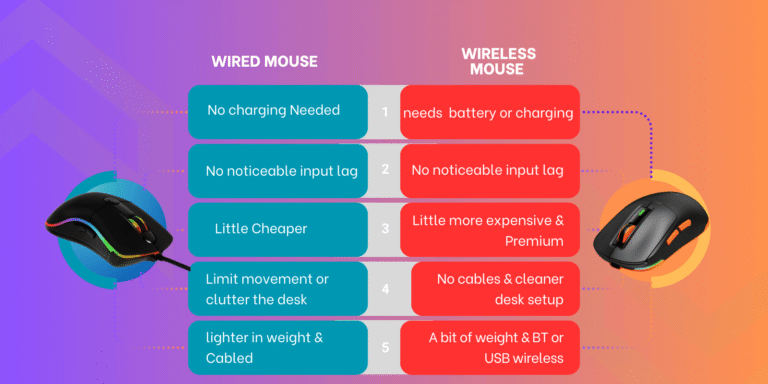
A wired mouse does not need a battery, but its cable can catch on nearby items. A wireless mouse gives you a cleaner desk and freer movement, but check its battery type and plan for replacements or charging. The Logitech G305 uses a replaceable AA battery, while the wired Razer and Redragon picks avoid battery care.
Your mouse pad matters too. A surface with enough room can support broad movements, especially if you use a lower sensitivity. Measure the desk before buying a large mat such as the Mcapirivo. Finally, compare the features you will really use with the price. A sound fit, steady tracking, and sensible controls usually matter more than extra lighting or a very high sensitivity ceiling.
Final Verdict: Which Should You Buy?
For most players, I’d pick the Razer Basilisk V3 as the best gaming mouse for Rust because it pairs a comfortable shape with useful controls and a wired connection. Choose the Logitech G305 if you want wireless freedom, or the DeathAdder Essential for a simpler ergonomic mouse.
Pick a mouse that fits your hand, aim style, and budget. The right Rust gaming mouse should feel easy to control through long sessions, not just look impressive on a product page.
FAQs Of best gaming mouse for Rust
What is the best gaming mouse for Rust?
For most players, the Razer Basilisk V3 is my top pick for its ergonomic shape, programmable controls, and wired connection.
Is a wired or wireless mouse better for Rust?
Both can work well. Wired mice avoid battery care, while wireless models reduce cable clutter and allow freer movement.
How many mouse buttons do I need for Rust?
A few programmable buttons can help with chosen actions. You do not need a large MMO button grid unless you know you will use it.
Does a higher DPI make aiming better in Rust?
No. DPI changes cursor sensitivity, but a higher number does not guarantee better aim. Use a setting you can control consistently.
Is the Logitech G305 good for Rust?
Yes. It offers wireless play, adjustable sensitivity, and six programmable buttons. Keep in mind that it uses a replaceable AA battery.