The Logitech G305 is my top pick for reliable gaming without required software or a cable.
A gaming mouse should work when you plug in its receiver or cable—not after you install an app, make an account, and hunt through menus. That matters on shared PCs, work computers, and clean gaming setups. It also helps when a mouse’s basic buttons and sensitivity controls work right out of the box. My picks below include models that offer useful default controls, plus feature-rich mice that work at a basic level without software but need an app for deeper changes. Check the notes before you buy, since “no software required” does not always mean “every feature works without software.”
See the main differences between my picks at a glance.
| Mouse | Connection | Use without software | Best fit | Link |
|---|---|---|---|---|
| Logitech G305 | Wireless, USB receiver | Basic tracking and onboard DPI button | Simple wireless gaming | View on Amazon |
| Logitech G502 HERO | Wired USB | Basic controls; advanced setup is optional | Buttons and adjustable weight | View on Amazon |
| Redragon M602 | Wired USB | Basic mouse use; app offers extra setup | Budget buttons and grip | View on Amazon |
| Razer Basilisk V3 | Wired USB | Basic pointing; software unlocks deeper changes | Scroll and extra controls | View on Amazon |
| Redragon M612 | Wired USB | Basic use; remapping is an extra feature | Low-cost wired play | View on Amazon |
| Logitech G305 White | Wireless, USB receiver | Basic tracking and onboard DPI button | Cable-free play, light color | View on Amazon |
| Logitech G502 LIGHTSPEED | Wireless, USB receiver | Basic play; app supports extra setup | Wireless feature-rich gaming | View on Amazon |
| NSYCA G11 | Bluetooth, 2.4 GHz, USB-C | Basic use; verify controls before relying on them | Multiple device connection options | View on Amazon |
| Redragon M908 | Wired USB | Basic use; MMO setup benefits from software | Many side buttons | View on Amazon |
| Razer DeathAdder Essential | Wired USB | Basic pointing; app is optional for extra controls | Simple ergonomic gaming | View on Amazon |
Logitech G305 Lightspeed Wireless Gaming Mouse

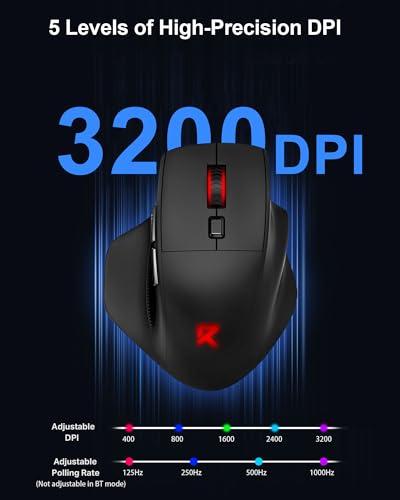
The G305 is my leading choice for a gaming mouse without software because its core job is simple. Plug in the small USB receiver, turn on the mouse, and you can start playing. Its top button lets you cycle through sensitivity levels without opening a desktop app. That gives you a useful way to adjust pointer speed on a shared or locked-down PC.
This is a compact, wireless mouse with six buttons and Logitech’s LIGHTSPEED receiver connection. The G HUB app can help with deeper settings, but you do not need it for basic mouse use. Keep in mind that wireless play still needs power, and this model uses a replaceable AA battery. The shape is plain and practical, which suits users who want function over a busy design.
Pros:
- Works for basic gaming without a software setup.
- Wireless receiver keeps a cable off the desk.
- Top button gives quick access to sensitivity changes.
- Compact body suits small desks and travel.
- Six buttons cover common game and desktop actions.
Cons:
- Uses a replaceable battery rather than built-in charging.
- Small shape may not suit large hands or palm grip.
- More detailed button setup needs Logitech software.
What Amazon Buyers Are Saying
Buyer feedback can change over time, so check the latest reviews and listing details before ordering. When comparing comments, look for notes on fit, battery use, and receiver connection. Those points matter more to daily use than RGB effects or extra software features. Also check recent comments for any pattern around durability or wireless dropouts.
My Recommendation
I recommend the G305 for players who want a familiar, simple wireless setup and a physical sensitivity button. It is not the best fit if you need a large shell, rechargeable power, or many side controls. For a straight-forward plug-in-and-play option, it offers a useful balance. My rating reflects its easy basic use, not the need for optional app settings.
| Category | Rating |
|---|---|
| Software-free basics | 4.5/5 |
| Wireless convenience | 4.5/5 |
| Comfort and fit | 4/5 |
| Value | 4.5/5 |
| Overall Rating | 4.5/5 |
Logitech G502 HERO Wired Gaming Mouse

The wired G502 HERO suits players who want more buttons than a basic two-side-button mouse offers. Its controls can help with common actions in shooters, strategy games, and everyday tasks. The cable also removes the need to charge or replace a battery. You can plug it in and use its standard mouse functions without first setting up Logitech G HUB.
Logitech lists adjustable weights and multiple programmable buttons among this model’s features. Those extras are useful only if they match your hand and play style. Without software, expect to use the mouse’s standard behavior rather than assume every button has your preferred command. The G502 HERO is also a larger, more complex design than a lightweight FPS mouse, so check its shape before buying.
Pros:
- Wired connection needs no battery or wireless receiver.
- Extra buttons offer room for shortcuts and game actions.
- Adjustable weights let you change the feel of the mouse.
- Scroll wheel controls add another useful input option.
- Basic pointer use does not depend on an app installation.
Cons:
- Many advanced button changes require Logitech software.
- Its larger body may feel bulky for small hands.
- The cable can drag or catch if the desk is crowded.
What Amazon Buyers Are Saying
Review comments are most helpful when they describe the mouse’s size, weight, and button layout. Those details can explain why the same shape feels great to one person and crowded to another. Check recent buyer notes for cable handling and long-term button feel as well. I would not assume that all users customize the mouse in the same way.
My Recommendation
Choose the G502 HERO if you want a wired mouse with plenty of physical controls and do not mind its fuller shape. It is not my first choice for someone who wants the lightest, simplest mouse. The extra features are appealing, but software-free buyers should be happy with the factory controls. I rate it highly for hardware flexibility, with a small deduction for its size and app-based customization.
| Category | Rating |
|---|---|
| Software-free basics | 4/5 |
| Button options | 4.5/5 |
| Wired reliability | 4.5/5 |
| Ease of fit | 3.5/5 |
| Overall Rating | 4/5 |
Redragon M602 Gaming Mouse

The Redragon M602 is a wired option for shoppers who want several controls at a lower cost than many premium gaming mice. Its listing highlights an ergonomic shape, RGB lighting, adjustable DPI, and nine programmable buttons. It connects by USB, so you avoid batteries and wireless pairing. Its standard pointer functions should suit general use even if you do not install its configuration software.
The key distinction is between using the mouse and personalizing it. You can plug it in for basic movement and clicking, but the included software is intended for deeper button setup. That matters if your goal is zero software on every computer. Consider the M602 if you value physical controls and a modest price, but do not buy it expecting every feature to be easy to change without an app.
Pros:
- Wired USB setup avoids charging and pairing.
- Several physical buttons can support game shortcuts.
- Adjustable DPI gives more than one pointer-speed option.
- RGB lighting adds a visible gaming look.
- Ergonomic styling may suit users who prefer a fuller grip.
Cons:
- Programmable button features rely on software for setup.
- RGB lighting may not suit a plain, distraction-free desk.
- The shape and size may not work for every hand.
What Amazon Buyers Are Saying
Check recent buyer reviews for practical reports on fit, lighting, and button feel. Look for comments that make clear whether the reviewer used the included software, since that can affect their experience. Also compare feedback about the cable and long-term use rather than relying on star ratings alone. I cannot verify current review patterns, so treat fresh buyer comments as the best guide to recent units.
My Recommendation
The M602 can make sense if you want a budget wired mouse with extra buttons and do not mind leaving advanced changes alone. It is not the strongest match for a strict no-install policy if you need custom button commands. For simple gaming, its wired design and physical controls are appealing. I rate it as a value pick, with a clear warning that its software features are not the same as software-free features.
| Category | Rating |
|---|---|
| Software-free basics | 3.5/5 |
| Button selection | 4/5 |
| Wired convenience | 4.5/5 |
| Value | 4/5 |
| Overall Rating | 3.8/5 |
Razer Basilisk V3 Wired Gaming Mouse

The Basilisk V3 is a feature-rich wired mouse for players who like a shaped grip and a range of controls. Its design includes a thumb rest and a scroll wheel with extra modes. Those physical features remain useful even if you do not install Razer Synapse. For basic use, connect the USB cable and start with the factory setup.
Razer markets this model as customizable, but that does not mean every customization is available without software. Synapse is the route for detailed button changes and lighting settings. If you want a mouse that never needs an app for any setup, its feature set may be more than you need. If you want a comfortable wired mouse with useful built-in controls, it is a strong candidate to compare in person.
Pros:
- Wired connection avoids charging or replacing a battery.
- Thumb rest supports a relaxed right-hand grip.
- Scroll wheel gives more control than a basic wheel.
- Extra buttons offer more input choices.
- Basic use does not require a Synapse account or setup.
Cons:
- Deeper customization depends on Razer Synapse.
- Its right-handed shape may not suit left-handed users.
- The feature-rich design may feel complex for a basic setup.
What Amazon Buyers Are Saying
When reading current reviews, focus on the shape, scroll wheel, and comfort over long sessions. These are personal fit points, so one person’s praise may not predict your experience. Check comments about Synapse if you plan to use lighting or custom button settings. The listed features do not replace checking recent buyer reports for the exact version sold.
My Recommendation
I recommend the Basilisk V3 if you want a comfortable, wired mouse with extra physical controls and are content with its default setup. It is less suitable if you want a simple ambidextrous shape or need custom commands without installing an app. For shoppers who value scroll control and a thumb rest, the hardware has clear appeal. My score reflects its strong physical design and its software caveat.
| Category | Rating |
|---|---|
| Software-free basics | 3.5/5 |
| Physical controls | 4.5/5 |
| Ergonomic design | 4/5 |
| Ease of setup | 4/5 |
| Overall Rating | 4/5 |
Redragon M612 Wired Gaming Mouse

The M612 is a wired gaming mouse with RGB lighting, extra buttons, and a listed maximum sensitivity of 8,000 DPI. It can serve as a regular plug-and-play mouse for movement and clicks. Its listing also calls out remapping keys, which are best treated as optional features that may need configuration. That makes it more useful for someone who wants extra hardware, even if they do not plan to customize every control.
A high DPI number does not automatically make a mouse better. The useful question is whether the sensitivity steps feel right for your screen and games. You can start with the default behavior, then decide whether you want to use software for remapping. Its wired connection is simple, but the cable needs space and can affect how freely you move the mouse.
Pros:
- USB connection is easy to set up on a compatible computer.
- Multiple physical buttons offer extra shortcuts.
- Listed DPI adjustment gives options for pointer speed.
- RGB lighting adds a bright gaming style.
- No battery or wireless pairing is needed.
Cons:
- Custom remapping may require the maker’s software.
- RGB effects may need software for detailed changes.
- The wired design can limit desk movement.
What Amazon Buyers Are Saying
Read current reviews with attention to button placement and how easy it is to reach the side controls. Reviewers may use different hand sizes and grips, so compare those details with your own needs. It is also worth checking recent notes about the software and lighting, especially if those features matter to you. I would avoid treating a high DPI claim as proof of better aim or game performance.
My Recommendation
The M612 is worth considering as a budget wired model if you like extra buttons and do not need to remap them right away. It is not an ideal pick for a strict software-free setup if your gaming depends on custom commands. The basic mouse functions are the main reason to choose it without an app. I give it a good value score, with a lower score for customization without software.
| Category | Rating |
|---|---|
| Software-free basics | 3.5/5 |
| Button options | 4/5 |
| Wired setup | 4.5/5 |
| Everyday value | 4/5 |
| Overall Rating | 3.8/5 |
Logitech G305 Lightspeed Wireless Mouse, White

This white G305 has the same core appeal as the black version: a small wireless body, a USB receiver, and a physical DPI button. It is a practical choice if you want a clean-looking desk and basic play without extra setup. Logitech G HUB can support more detailed changes, but the mouse can handle everyday pointing without it. The white finish is the main difference to consider between the two color options.
The compact shell can work well for a fingertip or claw grip, but it may feel small in a full palm grip. Its wireless design clears the cable from your desk, while its replaceable battery means you need to plan for power. The receiver also needs a free USB port. Check your computer’s ports and your preferred hand position before ordering.
Pros:
- Wireless use keeps the desk free of a mouse cable.
- Physical DPI button supports quick sensitivity changes.
- Basic use does not depend on Logitech G HUB.
- White color gives an alternative to a black setup.
- Compact shape is easy to carry with a laptop.
Cons:
- Replaceable battery adds a recurring task.
- Small size may not suit large hands.
- Advanced setup still calls for Logitech software.
What Amazon Buyers Are Saying
For this color version, compare current reviews for both fit and finish. Look for comments about whether the light color stays clean in the buyer’s setting, but treat those reports as personal experience. Battery life and grip comfort are also useful points to check. Confirm the exact color and model in the listing before you place an order.
My Recommendation
Pick the white G305 if you like the G305’s simple wireless design and want a light-colored mouse. It offers the same practical software-free basics as the black version, so color and price can guide your choice. I would not recommend it to anyone who wants a larger shell or built-in charging. It is one of my best picks for a gaming mouse without software when basic function matters most.
| Category | Rating |
|---|---|
| Software-free basics | 4.5/5 |
| Wireless convenience | 4.5/5 |
| Compact use | 4/5 |
| Style and value | 4.5/5 |
| Overall Rating | 4.5/5 |
Logitech G502 LIGHTSPEED Wireless Mouse

The G502 LIGHTSPEED brings the familiar G502 style to a wireless setup. Its USB receiver helps you avoid a cable across the desk, and the mouse offers several physical buttons for games and shortcuts. You can use it for basic movement and clicks without starting with Logitech G HUB. The app matters more if you want to change button behavior or save custom settings.
This model is a more involved purchase than the G305. It has a larger design and more controls, so it suits users who want those features and are comfortable with the shape. Wireless convenience also means you need to keep track of charging and receiver storage. If you want the simplest possible mouse, its extra features may add cost without adding value for you.
Pros:
- Wireless connection leaves more room for mouse movement.
- Many physical controls give you more ways to interact.
- Basic use does not require software installation.
- Scroll wheel adds another control beyond standard clicks.
- Suitable for users who want a familiar G502-style layout without a cable.
Cons:
- Advanced button changes and lighting options require software.
- Wireless use requires charging and receiver care.
- The larger shape may not fit small hands or every grip style.
What Amazon Buyers Are Saying
Recent reviews can help you judge the fit, wireless connection, and battery routine. Look for comments from buyers who describe their hand size and games, since the shape is a personal choice. If you plan to use custom buttons, check whether reviewers discuss the software setup. Also confirm the listing includes the model and accessories you expect.
My Recommendation
I recommend the G502 LIGHTSPEED if you want a wireless mouse with many physical controls and do not mind app-based personalization. For strict software-free use, it is not as straightforward as the G305. Its hardware still works for basic play, but you pay for features that may go unused. I rate it as a strong wireless option, not my top pick for the simplest setup.
| Category | Rating |
|---|---|
| Software-free basics | 4/5 |
| Wireless flexibility | 4.5/5 |
| Physical features | 4.5/5 |
| Simple setup | 3.5/5 |
| Overall Rating | 4/5 |
NSYCA G11 Tri-Mode Wireless Gaming Mouse
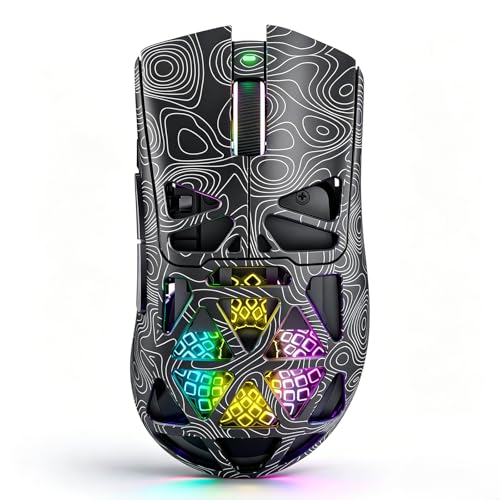
The NSYCA G11 listing describes a lightweight wireless mouse with Bluetooth, 2.4 GHz wireless, and USB-C connection options. It also lists RGB lighting, programmable buttons, and a 22,000 DPI figure. Those are listing claims, not proof that each feature works exactly as you expect without software. The different connection modes may be useful if you switch between devices, but check compatibility before buying.
For software-free gaming, focus on the default behavior and physical controls. The listed programmable buttons may need an app to change their actions, and advanced lighting settings may also rely on software. I would confirm how the DPI button works out of the box and whether the wireless receiver is included in the package. This is the pick in the list where checking the seller’s current details is especially important.
Pros:
- Multiple listed connection modes offer device flexibility.
- USB-C gives a wired connection option.
- Wireless modes can help reduce desk cable clutter.
- The listing includes a high DPI ceiling for users who want broad sensitivity options.
- RGB and extra buttons provide more features than a basic office mouse.
Cons:
- Confirm out-of-box controls before relying on it without software.
- Programmable features may need an app for changes.
- Connection and compatibility details should be checked for your device.
What Amazon Buyers Are Saying
Because listings and user reports can change, check the latest reviews for Bluetooth pairing, receiver use, and software setup. Give more weight to comments that state the device used and connection mode. Look for clear reports on battery charging and default DPI controls. I do not assume that the advertised specifications alone describe the full real-world experience.
My Recommendation
The G11 is worth a look if you want several connection choices and are willing to confirm the details before purchase. It is not my safest recommendation for a no-software buyer because the default button behavior is less clear. If you want a dependable, simple choice, the G305 is easier to assess. Rate this one by its current listing, return terms, and recent detailed buyer reports.
| Category | Rating |
|---|---|
| Software-free confidence | 3/5 |
| Connection options | 4.5/5 |
| Listed feature range | 4/5 |
| Ease of verification | 3/5 |
| Overall Rating | 3.5/5 |
Redragon M908 Wired MMO Gaming Mouse

The Redragon M908 is built for players who want many buttons close to the thumb. Its listing describes an MMO mouse with a 12,400 DPI figure and remappable keys. That button grid can help with games that use many commands, but it also takes time to learn. For basic movement and clicking, connect the wired mouse and use its default setup.
The M908 makes the most sense when you plan to map actions to its side buttons. That kind of setup typically depends on the maker’s software, so it is not the best choice if you want a completely untouched plug-and-play experience. The cable avoids battery concerns, though it needs enough slack for your desk. Check photos closely to make sure the side-button layout suits your thumb.
Pros:
- Large set of side controls suits games with many commands.
- Wired USB connection avoids charging or wireless pairing.
- Listed DPI range offers sensitivity choices.
- Buttons can provide shortcuts for desktop tasks as well as games.
- RGB adds a visible gaming style.
Cons:
- Custom MMO button mapping is best handled through software.
- The side-button grid can feel crowded for new users.
- Its feature-heavy shape may be too much for simple FPS play.
What Amazon Buyers Are Saying
Use recent buyer reviews to judge how easy the side grid feels to reach and learn. Look for comments from MMO players, since their needs differ from those of FPS players. Check whether buyers describe software setup, button response, and comfort over long sessions. Those details matter more than the raw button count alone.
My Recommendation
Choose the M908 if you play MMOs and want a large set of thumb buttons. Avoid it if you want the best gaming mouse without software for simple, everyday play. The mouse’s main appeal is customization, and software helps bring that appeal to life. It earns a solid score for MMO hardware, but only a fair score for strict software-free use.
| Category | Rating |
|---|---|
| Basic use without software | 3.5/5 |
| MMO button layout | 4.5/5 |
| Wired convenience | 4/5 |
| Ease for new users | 3/5 |
| Overall Rating | 3.8/5 |
Razer DeathAdder Essential Wired Gaming Mouse

The DeathAdder Essential is a wired mouse with a familiar right-handed ergonomic shape. It offers a simpler design than mice with a large side-button grid. You can connect it by USB and use its core pointer functions without opening Razer Synapse. This makes it a reasonable option for people who want a straightforward mouse from a well-known gaming line.
Synapse can support extra customization, but you can skip it if you are happy with the default behavior. The shape matters most here, so check whether you prefer a raised palm rest and a right-handed shell. A wired connection keeps power simple but leaves a cable on the desk. It has fewer special controls than the Basilisk V3, which may be a benefit if you want less to manage.
Pros:
- Simple wired setup needs no battery or pairing.
- Ergonomic right-hand shape suits users who like a fuller palm grip.
- Basic mouse use does not require Razer Synapse.
- Fewer controls make the layout easy to understand.
- Works for general computer use as well as gaming.
Cons:
- Right-handed shape is not ideal for left-handed users.
- Detailed button changes may require software.
- Wired cable can limit movement compared with wireless options.
What Amazon Buyers Are Saying
Read recent comments for shape, comfort, and button feel. Those are the details most likely to affect whether this simple design suits your hand. If you plan to use Synapse, check current feedback on setup and the specific settings you want. Compare the exact model name in the listing, since similar products can have different features.
My Recommendation
The DeathAdder Essential is a sensible pick if you want a basic wired gaming mouse with a comfortable right-hand shape. It has fewer features to configure than the Basilisk V3, which helps keep the setup simple. It is not a good fit for left-handed users or anyone who wants wireless play. I rate it as an uncomplicated everyday choice, especially when found at a fair price.
| Category | Rating |
|---|---|
| Software-free basics | 4/5 |
| Simple setup | 4.5/5 |
| Ergonomic shape | 4/5 |
| Feature range | 3.5/5 |
| Overall Rating | 4/5 |
How to Choose the Best Gaming Mouse Without Software
The best gaming mouse without software should work well with its default settings. Start with what you need on day one. Then check whether the mouse keeps those settings when you move it to another computer. A long feature list is not useful if the best parts only work after an app install.
1. Check What Works at Default Settings
Look for a physical DPI button if you want to change pointer speed without opening software. Check whether the mouse’s extra buttons have useful default actions. Basic left and right clicks are not the full story if you rely on side buttons for games. If the listing says “programmable,” ask whether that means the buttons need an app before they do what you want.
Also separate basic use from full control. Many mice work as standard pointing devices as soon as you connect them. Yet lighting, macros, button remaps, and saved profiles may need software. If you cannot install apps on your PC, choose a model whose default controls already meet your needs.
2. Match the Shape and Connection to Your Setup
Shape affects comfort more than a high DPI number. A small mouse like the G305 may suit a compact grip, while a larger, sculpted body may feel better for a palm grip. Right-handed shapes can offer a thumb rest, but they do not suit every user. Check product photos and measurements, then compare them with a mouse you already like.
Choose wired if you want to avoid battery care and wireless pairing. Choose wireless if you want a clear desk and freedom from cable drag. A wireless model still needs power, and its receiver needs a port. For a shared computer, a USB receiver can be simple, but confirm you have the right port or adapter.
3. Pay for Features You Will Really Use
Extra buttons can help in games with many commands, but they can get in the way if you never use them. MMO mice like the M908 make the most sense for players who want a side grid. For simple shooters, a basic layout can be easier to learn. RGB lighting is a style choice; it does not improve aim or response by itself.
Compare the price with the features you can use without software. Do not pay more just for a high DPI ceiling if you prefer a lower setting. Read recent buyer reviews for hand fit, button feel, and connection issues. Favor clear reports from people with a similar setup, and check the return policy if the shape is unfamiliar.
Final Verdict: Which Should You Buy?
The Logitech G305 is my best gaming mouse without software for most people. It is wireless, simple to set up, and has a physical button for quick sensitivity changes. Choose the wired DeathAdder Essential for a simpler right-handed shape, or the G502 HERO if you want more physical controls.
Before you buy, check which features work at default settings and which need an app. The right gaming mouse without software should fit your hand, your PC, and the way you play.
FAQs Of best gaming mouse without software
Can I use a gaming mouse without installing its software?
Yes. Most mice work for basic movement and clicking when connected. Some advanced features, such as custom buttons or lighting, may need software.
Which gaming mouse works best without software?
The Logitech G305 is my top pick for simple wireless use. Its physical DPI button gives you a way to change sensitivity without an app.
Can I change DPI without gaming mouse software?
Yes, if the mouse has a physical DPI button or another built-in control. Check the product details to confirm how its default sensitivity settings work.
Do programmable buttons work without software?
They may have default actions, but custom button mapping often needs the maker’s software. Check the listing and manual if you need a specific command.
Is a wired or wireless mouse better for software-free gaming?
Both can work without software. Wired models avoid batteries, while wireless models reduce cable clutter but need power and a receiver or Bluetooth connection.