The MOJO Pro Performance Silent Gaming Mouse is my top pick for quiet clicks and gaming-focused controls.
If a loud mouse click breaks your focus, wakes someone nearby, or fills a quiet room, a silent gaming mouse can make play more comfortable. But “silent” does not always mean the same thing: some models are sold with quiet clicks, while many popular gaming mice are not. I compared the options below by their listed features and how well they fit a quiet setup. I also call out where a mouse offers gaming tools but does not claim silent switches, so you can choose with clear expectations.
See the differences between my top picks at a glance.
| Mouse | Connection | Quiet-use fit | Listed gaming features | Best for | Link |
|---|---|---|---|---|---|
| MOJO Pro Silent, 12,000 DPI | Wired | Marketed as silent | 9 buttons, sniper key, 1,000 Hz | Quiet wired play | View on Amazon |
| MOJO Pro Silent, force adjustable | Wired | Marketed as silent | 9 buttons, 12,000 DPI, 1,000 Hz | Click-force control | View on Amazon |
| Logitech G502 HERO | Wired | Not listed as silent | Gaming sensor, programmable controls | Feature-rich wired play | View on Amazon |
| Razer Basilisk V3 | Wired | Not listed as silent | Custom controls, RGB lighting | Ergonomic RGB setups | View on Amazon |
| Logitech G305 LIGHTSPEED | Wireless | Not listed as silent | LIGHTSPEED wireless gaming | Compact wireless play | View on Amazon |
| INPHIC A9 V2 Explorer | Wireless | Listed as silent | 12,800 DPI | Quiet wireless use | View on Amazon |
| Logitech G502 X PLUS | Wireless | Not listed as silent | RGB lighting, gaming controls | Wireless feature seekers | View on Amazon |
| Logitech G PRO X2 SUPERSTRIKE | Wireless | Not listed as silent | Wireless gaming design | Competitive-play shoppers | View on Amazon |
| Redragon M908 MMO | Wired | Not listed as silent | 12,400 DPI, remapping keys | MMO shortcuts | View on Amazon |
| MOJO Silent Vertical | Wired | Marketed as silent | Joystick buttons, 1,000–10,000 DPI | Vertical grip fans | View on Amazon |
MOJO Pro Performance Silent Gaming Mouse, 12,000 DPI

This MOJO model is my leading pick for a quiet gaming desk because its listing calls it a silent mouse. It uses a wired connection, which means you do not need to manage a wireless link or charge a battery. The product title lists nine programmable buttons and a dedicated sniper key. It also lists up to 12,000 DPI and a 1,000 Hz polling rate.
Those controls may suit players who want extra commands close at hand. The sniper key can be useful in games where a quick sensitivity change helps with careful aiming, but you should check how the software lets you set it up. DPI is the mouse’s tracking sensitivity; a higher number is not automatically better. I would start low and raise it until the cursor feels right.
Pros:
- Marketed specifically as a silent gaming mouse.
- Nine programmable buttons offer room for custom commands.
- A listed sniper key can support quick aim adjustments.
- Wired use avoids battery charging.
- Listed 1,000 Hz polling rate suits responsive gaming setups.
Cons:
- The cable may limit desk movement compared with wireless mice.
- Nine buttons can feel crowded if you prefer a simple layout.
- Confirm software support and system compatibility before buying.
What Amazon Buyers Are Saying
I can’t verify the live Amazon review mix for this listing, so I won’t assign specific praise or complaints to its buyers. Check recent verified-purchase reviews for comments on click volume, button feel, software setup, and long-term reliability. Those details matter more than a “silent” label alone.
My Recommendation
This is the best starting point if you want a mouse explicitly marketed as silent but still want gaming controls. It looks strongest for players who will use the side buttons and sniper key. I’d confirm the current listing details before purchase, especially if quiet clicks are essential.
| Category | Rating |
|---|---|
| Quiet-use fit | 4.5/5 |
| Gaming controls | 4.5/5 |
| Setup simplicity | 3.5/5 |
| Value for money | 4/5 |
| Overall Rating | 4.2/5 |
MOJO Pro Silent Mouse with Adjustable Force

This wired MOJO Pro version stands out because its title includes force adjustment. That feature may appeal if you want to change how firm a click feels, though the listing should explain its range and setup. It also lists nine programmable buttons, 12,000 DPI, and a 1,000 Hz rate. The product is marketed as silent, making it one of the more direct matches for this roundup.
Its button count gives you options for game commands, shortcuts, or daily work. The same feature can take time to learn, so I would map only the actions you use often. Since this is wired, you can play while connected without relying on a battery. It is a practical option for a fixed gaming station where cable routing is not a problem.
Pros:
- Listed as a silent gaming mouse.
- Adjustable force is a distinct feature for click-feel preferences.
- Nine programmable buttons can reduce keyboard reaching.
- 12,000 DPI gives a broad sensitivity range to test.
- Wired operation keeps charging out of the routine.
Cons:
- Force adjustment may require software or setup; check the listing.
- A wired design is less convenient for travel or uncluttered desks.
- Its many controls may be unnecessary for casual games.
What Amazon Buyers Are Saying
I can’t confirm current Amazon review themes for this exact listing. Before you buy, scan recent reviews for details about how force adjustment works, whether the clicks stay quiet over time, and how easy the software is to use. Avoid relying on old comments if the product or listing has changed.
My Recommendation
Choose this model over a basic quiet mouse if click force is a feature you specifically want to explore. The listed controls are useful for players who customize their setup. For a simple plug-in mouse, the extra adjustment may not add enough value.
| Category | Rating |
|---|---|
| Quiet-use fit | 4.5/5 |
| Click customization | 4/5 |
| Gaming controls | 4.5/5 |
| Value for money | 4/5 |
| Overall Rating | 4.2/5 |
Logitech G502 HERO Wired Gaming Mouse

The G502 HERO is a well-known wired gaming mouse, but its supplied product title does not call it silent. I include it as a feature-rich alternative for shoppers who value gaming controls more than quiet clicks. Its HERO sensor and programmable controls are part of the model’s gaming focus. The wired link also keeps the mouse ready without a battery.
This model may fit players who want a familiar, full-size shape and several ways to tailor their controls. Yet the key question for a quiet room is the sound of its main buttons. Do not assume a gaming mouse is quiet just because it has a high-performance sensor. If low noise is your top need, compare its click sound in a return-friendly setting before you commit.
Pros:
- Wired connection avoids battery upkeep.
- Designed as a dedicated gaming mouse.
- Programmable controls can support custom game commands.
- Known model name makes it easy to compare accessories and setup guides.
- Good alternative if gaming features matter more than silent switches.
Cons:
- The supplied title does not identify it as a silent mouse.
- Wired use adds cable drag and desk-management needs.
- Its extra controls may not suit players who want a minimal mouse.
What Amazon Buyers Are Saying
I can’t verify the current review pattern on Amazon, and I won’t present unconfirmed buyer comments as fact. Read recent reviews with a focus on click noise, comfort over long sessions, and whether the software works well with your computer. For a quiet setup, sound reports should guide your decision.
My Recommendation
The G502 HERO is worth considering as a gaming mouse, not as a confirmed silent mouse. Buy it if its control layout fits your games and you can accept some click noise. If silence is the deciding factor, start with a model whose listing clearly uses that claim.
| Category | Rating |
|---|---|
| Quiet-use fit | 2.5/5 |
| Gaming controls | 4.5/5 |
| Wired convenience | 4/5 |
| Value for money | 4/5 |
| Overall Rating | 3.7/5 |
Razer Basilisk V3 Wired Gaming Mouse

The Basilisk V3 pairs a wired connection with customizable RGB lighting and gaming controls. Its listing does not describe it as a silent mouse, so I would not choose it on the promise of quiet clicks. It may still suit players who want an ergonomic gaming shape and a visual match for an RGB setup. The wired connection also means no charging break during play.
Think about the shape before buying, since hand size and grip style affect comfort. The mouse’s customization can be useful, but extra options are only helpful if you plan to use them. If your main goal is a quiet gaming mouse, ask whether you can test the click sound or return it if it is louder than you like. That check matters more than the lighting.
Pros:
- Customizable RGB lighting suits a coordinated gaming desk.
- Wired use removes battery charging from the equation.
- Gaming-focused controls offer more setup options than a basic office mouse.
- Ergonomic design may suit players who prefer a shaped grip.
- Useful alternative when lighting and customization rank highly.
Cons:
- The listing does not market it as silent.
- RGB and extra controls may add little value to a quiet-first setup.
- Wired cable management can take space on a compact desk.
What Amazon Buyers Are Saying
I can’t confirm live buyer feedback for this listing. Check current reviews for comfort notes, software setup, and reports about the sound of the clicks. A review that discusses noise in a quiet room is more useful for this choice than a general comment about gaming performance.
My Recommendation
I recommend the Basilisk V3 to players who want RGB and a customizable wired mouse. I would not call it the best silent gaming mouse without verified quiet-click performance. Treat it as a feature-focused alternative, and check its sound before keeping it.
| Category | Rating |
|---|---|
| Quiet-use fit | 2.5/5 |
| Customization | 4.5/5 |
| Wired gaming use | 4/5 |
| Value for money | 3.5/5 |
| Overall Rating | 3.7/5 |
Logitech G305 LIGHTSPEED Wireless Mouse

The G305 LIGHTSPEED is a wireless gaming mouse for shoppers who want to cut the cable from their desk. Its product title does not say that the clicks are silent. That makes it a useful comparison point, but not a clear quiet-click pick. The compact style may work well for travel or a smaller desk, depending on your hand and grip.
Wireless freedom can make low-sound play more comfortable by removing cable movement, but it does not make the buttons quieter. Check the current package details for what comes in the box and how the mouse is powered. If you play for long periods, consider whether you prefer wireless convenience or a wired mouse that does not need battery care. The right choice depends on your routine.
Pros:
- Wireless design keeps the desk free of a mouse cable.
- LIGHTSPEED branding identifies it as a gaming-focused wireless model.
- Compact form can be easier to pack than a large mouse.
- Good fit for users who value wireless use over silent-click claims.
- Useful contrast when comparing quiet and standard gaming mice.
Cons:
- The product title does not list silent switches.
- Wireless use brings power management into the decision.
- Compact size may not suit every hand or grip.
What Amazon Buyers Are Saying
I can’t verify current Amazon reviews for this product. Read recent feedback for notes on wireless setup, comfort, and click sound. Since it is not listed as silent, pay close attention to sound reports if you plan to use it in a shared room.
My Recommendation
Choose the G305 if wireless gaming matters more than a silent label. It may be a practical compact option, but I would not buy it expecting quiet buttons. For a quieter setup, compare it directly with the two MOJO Pro models or the INPHIC A9 V2.
| Category | Rating |
|---|---|
| Quiet-use fit | 2.5/5 |
| Wireless convenience | 4.5/5 |
| Gaming suitability | 4/5 |
| Value for money | 4/5 |
| Overall Rating | 3.7/5 |
INPHIC A9 V2 Explorer Silent Wireless Mouse

The INPHIC A9 V2 Explorer is one of the few wireless options in this group whose title calls it a silent mouse. It also lists 12,800 DPI, which gives you a wide sensitivity range to adjust. A wireless design can help keep your play area tidy. Before buying, check the listing for details on connection modes, charging, and software.
This mouse could suit someone who wants quiet use without a cable across the desk. Still, DPI alone does not tell you how accurate or comfortable a mouse feels. I would check recent buyer feedback and the return terms, then test the click sound in your own room. Those practical checks help confirm whether its silent label meets your needs.
Pros:
- The product title identifies it as a silent mouse.
- Wireless use removes the mouse cable from the desk.
- Listed 12,800 DPI allows sensitivity adjustment.
- Gaming wording suggests it targets more than basic office use.
- May fit users seeking a quiet wireless option.
Cons:
- Confirm connection and charging details on the current listing.
- A high DPI figure does not guarantee a better feel or aim.
- Wireless devices need power management.
What Amazon Buyers Are Saying
I can’t verify the live Amazon review themes for this newer listing. Check current reviews for click noise, battery life, wireless stability, and how well the mouse fits different hands. These are the points that matter most when judging a quiet wireless mouse.
My Recommendation
The A9 V2 is a promising option if you want both wireless use and a product listing that says “silent.” I would still confirm the click sound and connection details before treating it as a sure fit. It is a better quiet-first candidate than standard gaming mice that make no silence claim.
| Category | Rating |
|---|---|
| Quiet-use fit | 4/5 |
| Wireless convenience | 4/5 |
| Sensitivity options | 4/5 |
| Value for money | 4/5 |
| Overall Rating | 4/5 |
Logitech G502 X PLUS Wireless Gaming Mouse

The G502 X PLUS offers wireless gaming and RGB lighting in a premium-style product line. The provided title does not claim silent clicks, so I would not make it a first choice for a noise-sensitive room. It may interest players who want a wireless mouse with lighting and gaming controls. Check the listing for the exact features and included accessories before ordering.
Wireless use makes it easier to move the mouse without managing a cable, but the mouse still makes physical contact noise. RGB lighting is a visual feature, not a sign of quieter switches. If you like this model, compare its cost with the wired G502 HERO and ask whether its wireless features are worth the difference to you. For a quiet desk, listen to it first if possible.
Pros:
- Wireless design supports a less cluttered setup.
- RGB lighting adds visual customization.
- Gaming-focused layout can suit players who want extra controls.
- Useful option for users already interested in the G502 family.
- No mouse cable to drag across the pad.
Cons:
- The title does not describe it as silent.
- Wireless use means you must plan for power and charging.
- Lighting may be unnecessary if you want a simple, quiet setup.
What Amazon Buyers Are Saying
I can’t confirm live Amazon review patterns for this listing. Look for recent notes about comfort, wireless performance, battery use, and click sound. Make sure review details match the exact G502 X PLUS version, as similar model names can cause confusion.
My Recommendation
This is a better fit for shoppers who value wireless gaming and RGB than for shoppers who need quiet clicks. It may be worth the added cost if you will use those features. For the best silent gaming mouse, I would start with products that clearly carry a silent label.
| Category | Rating |
|---|---|
| Quiet-use fit | 2.5/5 |
| Wireless convenience | 4.5/5 |
| Feature set | 4.5/5 |
| Value for money | 3.5/5 |
| Overall Rating | 3.8/5 |
Logitech G PRO X2 SUPERSTRIKE Wireless Mouse

The G PRO X2 SUPERSTRIKE is listed as a wireless gaming mouse in a black-and-white finish. Its supplied title does not say “silent,” so I cannot recommend it as a quiet-click model based on the listing alone. It may draw interest from players looking for a wireless option in Logitech’s PRO range. Check the current product page for its full details before you compare it with older mice.
For a competitive setup, fit and reliable control matter, but click sound still matters in a shared room. Do not assume a premium or newer model will be quieter without evidence. I would compare its weight, shape, battery details, and switch description with your needs. If silence is the main goal, ask the seller or test it under the conditions where you plan to play.
Pros:
- Wireless form avoids a mouse cable.
- Gaming-focused product line may appeal to competitive players.
- Black-and-white finish offers a distinct look.
- Potential option for shoppers seeking a current wireless model.
- Easy to compare against other wireless gaming mice.
Cons:
- The supplied title does not claim silent switches.
- Power needs and charging should be checked before purchase.
- Details such as weight and included accessories need confirmation on the listing.
What Amazon Buyers Are Saying
I can’t verify current buyer reviews for this product. Since product details and review history can change, check the live listing for recent verified feedback. Focus on real use reports about sound, shape, wireless performance, and any setup needs.
My Recommendation
I would consider this model for a wireless gaming setup, but not as a proven silent mouse. Wait for clear information about click noise if a quiet room is your priority. Its rating here reflects that uncertainty, not a claim that the mouse performs poorly.
| Category | Rating |
|---|---|
| Quiet-use fit | 2.5/5 |
| Wireless suitability | 4/5 |
| Gaming potential | 4/5 |
| Value for money | 3.5/5 |
| Overall Rating | 3.5/5 |
Redragon M908 MMO Wired Gaming Mouse

The Redragon M908 is a wired MMO mouse with remapping keys and a listed 12,400 DPI. Its many controls can help players keep game actions close to the thumb. The product title does not market it as silent, so it is not a direct match for a quiet-click search. I include it for MMO players who might otherwise be tempted by its large control set.
A mouse with many side buttons takes practice. You need to place your thumb with care so you do not press the wrong command during play. The wired design is simple in one way: you do not need to keep a wireless battery charged. But if your goal is silent gaming, verify the sound of the main buttons before choosing this model.
Pros:
- Remapping keys offer many options for MMO commands.
- Listed 12,400 DPI allows sensitivity changes.
- Wired operation avoids wireless power upkeep.
- Can suit games that use many hotkeys.
- A feature-heavy choice for players who prioritize controls.
Cons:
- Not listed as a silent mouse.
- The side-button grid may take time to learn.
- Wired use adds cable management to the desk.
What Amazon Buyers Are Saying
I can’t verify the current Amazon review mix. Read recent comments for reports about side-button comfort, software setup, and click sound. For MMO use, also look for notes on whether the button layout feels easy to learn.
My Recommendation
The M908 makes sense if you want many commands under your thumb. I would skip it if quiet clicks are more important than MMO controls. It is a capable category alternative, but its listing does not support calling it the best silent gaming mouse.
| Category | Rating |
|---|---|
| Quiet-use fit | 2.5/5 |
| MMO controls | 4.5/5 |
| Wired gaming use | 4/5 |
| Value for money | 4/5 |
| Overall Rating | 3.7/5 |
MOJO Silent Vertical Gaming Mouse
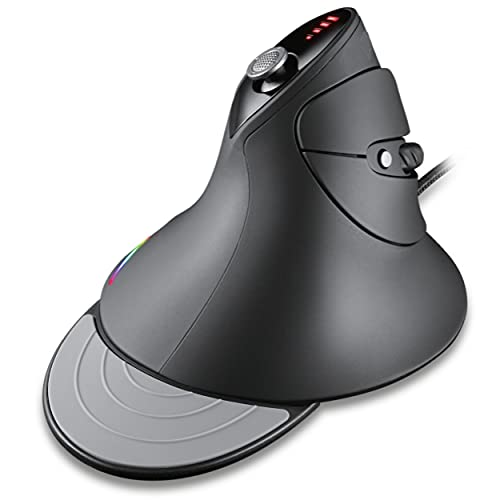
This MOJO mouse combines a vertical shape with a silent label and gaming features. Its title lists four directional joystick buttons, custom software, macros, and adjustable DPI from 1,000 to 10,000. A vertical mouse holds the hand in a different position from a standard flat mouse. That shape is personal, so it is best for shoppers who already know they like this style or can return it if it feels wrong.
The joystick controls and macros may help with custom game actions, though they can take time to set up. The listed DPI range gives you room to tune cursor speed for different tasks. Its wired connection avoids battery charging, but the unusual grip may not suit every game or hand. I would choose it for its vertical form first and its quiet claim second.
Pros:
- Marketed as a silent gaming mouse.
- Vertical design offers an alternative to a flat mouse shape.
- Four directional joystick buttons add control options.
- Adjustable 1,000–10,000 DPI is listed.
- Wired connection does not need battery charging.
Cons:
- Vertical grip may feel unfamiliar at first.
- Joystick and macro setup may take time.
- Its shape may not suit every game or grip style.
What Amazon Buyers Are Saying
I can’t confirm the current Amazon review themes for this listing. Check recent feedback for comments on how long the vertical grip takes to learn, how useful the joystick feels, and whether the clicks are quiet in practice. Those points can help you decide if the unusual design fits your habits.
My Recommendation
This is a good niche choice if you want a vertical mouse and need a product marketed as silent. It is not my first pick for every player because the grip is so different. Try it if that shape appeals to you, and check the return policy before you buy.
| Category | Rating |
|---|---|
| Quiet-use fit | 4/5 |
| Vertical comfort potential | 4/5 |
| Gaming controls | 4/5 |
| Ease of adjustment | 3/5 |
| Overall Rating | 3.8/5 |
How to Choose the Best Silent Gaming Mouse
The best silent gaming mouse should match your room, grip, and games. Start with the click sound, then check the controls and connection type. A high DPI number or a long feature list does not prove that a mouse is quiet or comfortable. Use the product details as a guide, then check current reviews and return terms before you order.
1. Check the Click Noise, Not Just the Label
Look for a clear silent or quiet-click claim in the product title and description. That is a useful first filter, but it is not a promise that every sound will disappear. The mouse wheel, side buttons, and movement on your pad can still make noise. If silence matters a lot, look for recent comments about click sound or test the mouse in a quiet room while you can still return it.
Also think about who shares your space. A small drop in click noise may be enough for late-night play, while a very quiet room may make every button sound stand out. The two MOJO Pro models and the INPHIC A9 V2 are the most direct candidates here because their supplied names use a silent claim. The other models may offer strong gaming features, but their provided titles do not make that claim.
2. Match the Shape and Buttons to Your Games
Comfort depends on your hand size, grip, and how long you play. A standard mouse shape is familiar to many players, while a vertical model feels very different. If you are curious about the MOJO Silent Vertical, check its return policy and allow time to adjust. A comfortable shape matters more than a feature that looks good on a spec sheet.
Then count the controls you will truly use. A sniper key may help in a game with careful aiming. A grid of side buttons may suit MMO play, while a basic layout may feel better for casual games. Programmable buttons can save time, but they also need setup. Pick a mouse with enough controls for your games, not the most controls on the page.
3. Choose Wired or Wireless for Your Routine
A wired mouse is ready when it is plugged in and does not need battery charging. The trade-off is a cable that may drag or need routing. A wireless mouse gives you a cleaner desk and more room to move, but you must manage its power and check its connection details. Wireless does not mean silent; it only changes how the mouse connects to your computer.
Compare the full value, not one number. DPI shows how sensitive the pointer can be, but a larger DPI figure does not guarantee better aim. A listed polling rate can help you compare gaming features, but your comfort and click sound still matter. Review current product details, software support, warranty terms, and return rules. These checks help you avoid paying for features you will not use.
Final Verdict: Which Should You Buy?
The MOJO Pro Performance Silent Gaming Mouse is my top pick for its silent positioning, nine buttons, sniper key, and listed 1,000 Hz rate. Choose the force-adjustable MOJO if click-force control is important, or the INPHIC A9 V2 if you want wireless use.
The best silent gaming mouse is the one that feels right and stays quiet in your room. Check current specs, recent reviews, and return terms before you buy.
FAQs Of best silent gaming mouse
What is the best silent gaming mouse in this roundup?
The MOJO Pro Performance Silent Gaming Mouse is my top pick. Its listing calls it silent and includes gaming controls such as nine buttons and a sniper key.
Are silent gaming mice completely noiseless?
No. A silent label usually refers to quieter clicks, not every sound. The wheel, side buttons, and mouse movement can still make noise.
Is a wireless gaming mouse quieter than a wired one?
Not by default. Wireless removes the cable, but it does not guarantee quieter buttons. Check the product’s click claims and recent reviews.
Does a higher DPI make a gaming mouse better?
Not on its own. DPI changes pointer sensitivity. Comfort, control, click sound, and a setting that suits your play matter more.
Can I use a silent gaming mouse for everyday work?
Yes. A quiet mouse can work for gaming, browsing, and office tasks. Check that its shape and button layout feel comfortable for your daily use.