The Corsair Scimitar RGB Elite is my top pick for MMO players who want a precise, flexible 12-button side panel.
When a game asks you to juggle spells, items, and commands, reaching for the keyboard can break your flow. A mouse with 12 side buttons puts more actions under your thumb, which can make long raids and busy action bars easier to manage. I compared ten wired and wireless options, from simple budget picks to feature-rich MMO mice, with comfort, button layout, connection type, and value in mind.
See the differences between my top picks at a glance.
| Mouse | Connection | Standout detail | Best fit | Check price |
|---|---|---|---|---|
| Corsair Scimitar RGB Elite | Wired | 12-button MMO layout | Dedicated MMO play | View on Amazon |
| Redragon M908 Impact | Wired | 12 side buttons; 18 macro shortcuts | Value-focused MMO play | View on Amazon |
| UtechSmart Venus Pro | Wired | 16400 DPI listed | Button-heavy MMO setup | View on Amazon |
| Redragon M913 | Wireless | 16000 DPI listed | Cable-free MMO play | View on Amazon |
| Redragon M901K | Wired | 12 side buttons; weight tuning | Adjustable feel | View on Amazon |
| AFUNTA C12 | Wired | 12 programmable buttons | Basic macro control | View on Amazon |
| Redragon M901P-KS | Wireless | 12 side buttons; rechargeable | Wireless MMO use | View on Amazon |
| Redragon M921 | Wired | RGB and remapping keys | Wired macro control | View on Amazon |
| Redragon M901P-WS | Wireless | White finish; 12 side buttons | Wireless white setup | View on Amazon |
| Redragon M908 White | Wired | 12 side buttons; 12400 DPI listed | White MMO setup | View on Amazon |
A 12-button side grid can turn a mouse into a small command center. But button count alone does not make a good gaming mouse. The shape, placement, software, connection, and your own hand size matter just as much. Below, I look at each option using the product details available, and I separate confirmed listing features from points you should check on the current Amazon page before buying.
Corsair Scimitar RGB Elite
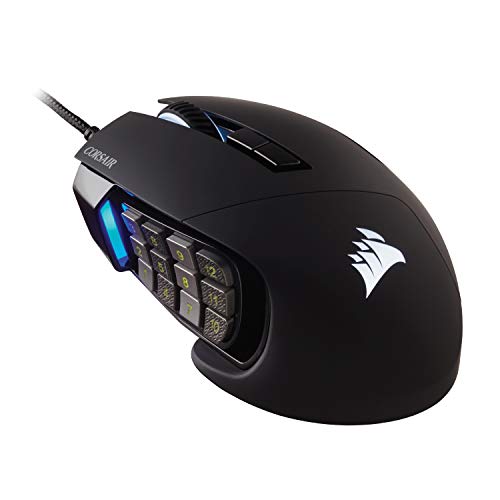
The Scimitar RGB Elite is a wired MMO and MOBA mouse built around a dense side-button layout. Its product name identifies it as a gaming mouse for PC, and its 12-button panel suits games with many hotkeys. A wired link also means you do not need to plan a play session around battery charge. For players who use side buttons every minute, that focused design is the main draw.
I would shortlist this model if you want a purpose-built MMO mouse from a familiar gaming brand. The 12-button panel can hold skills, consumables, or push-to-talk commands, depending on your setup. Before buying, check the current listing for software support, hand-size notes, and exact dimensions. These details can shape comfort more than a high DPI figure.
Pros:
- 12-button side panel fits MMO and MOBA hotkeys.
- Wired connection removes battery upkeep.
- Designed for gaming rather than general office use.
- Can reduce trips from mouse to keyboard during play.
- Useful for players who keep many commands close at hand.
Cons:
- The cable may bother players who prefer a wireless desk.
- A full side grid can take time to learn.
- Check the listing for current software and fit details before purchase.
What Amazon Buyers Are Saying
I cannot confirm current Amazon review themes from the product details provided, so I will not invent buyer quotes or ratings. Read recent verified reviews for comments on side-button feel, comfort over long sessions, and software setup. Those points are especially useful for a mouse with a compact 12-key grid.
My Recommendation
This is my first choice for a player who wants a dedicated wired MMO mouse and plans to use all 12 side buttons. Its product focus is clear, though buyers should confirm software and fit details on the live listing. I rate it 4.5/5 for its focused layout and practical wired design.
| Category | Rating |
|---|---|
| Button Layout | 4.7/5 |
| Connection Convenience | 4.2/5 |
| MMO Suitability | 4.7/5 |
| Value | 4.3/5 |
| Overall Rating | 4.5/5 |
Redragon M908 Impact

The M908 Impact is a wired MMO mouse with 12 side buttons and programmable controls. Its listed maximum sensitivity is 12,400 DPI, and the product description also names RGB lighting and macro shortcuts. That mix gives it broad appeal for players who want many commands without moving to a wireless model. It is one of the clearest matches for the search for a gaming mouse with 12 side buttons.
The large button count is most useful when you assign each key a job and stick with the layout. You might place core skills on the first few buttons and less-used actions farther along the grid. DPI settings can adjust pointer speed, but they do not replace a comfortable fit or a good sensor feel. Check the seller listing for software compatibility and what comes in the box.
Pros:
- 12 side buttons suit games with many commands.
- Programmable controls offer room for custom bindings.
- Listed 12,400 DPI range gives several sensitivity options.
- Wired design does not need charging.
- RGB lighting lets it match a gaming setup.
Cons:
- Some players may find a 12-key grid hard to use at first.
- A wired mouse adds a cable to the desk.
- Confirm software support for your operating system before buying.
What Amazon Buyers Are Saying
I do not have access to verified, current Amazon review data for this listing, so I cannot report buyer trends as fact. Check recent reviews for repeated notes about button spacing, software, and long-session comfort. A single review may reflect one user’s grip or setup, so look for patterns across several reviews.
My Recommendation
The M908 is a sensible wired pick if your priority is a 12-button side panel and programmable controls. It offers a compelling feature set on paper, but I would confirm the listing’s current price and support details first. I rate it 4.4/5 as a versatile MMO option.
| Category | Rating |
|---|---|
| Button Layout | 4.6/5 |
| Listed Features | 4.5/5 |
| Wired Reliability | 4.4/5 |
| Value | 4.5/5 |
| Overall Rating | 4.4/5 |
UtechSmart Venus Pro

The Venus Pro listing describes a wired MMO gaming mouse with RGB lighting and a maximum 16,400 DPI figure. Its button-heavy design aims to keep game commands close to the thumb. That can help in games where you cycle through skills or use many items. The wired connection keeps the setup simple, with no battery to charge.
DPI is only one part of how a mouse feels. A very high setting can make the pointer move too far for precise work, so use a setting that suits your screen and play style. The Venus Pro may suit players who want several sensitivity levels and a broad set of MMO controls. Review the current listing for the exact button count and software details before treating it as a fit for your needs.
Pros:
- Wired connection avoids battery charging.
- Listing states a maximum 16,400 DPI.
- RGB lighting adds visual customization.
- Button-rich layout targets MMO play.
- Can keep many game commands within thumb reach.
Cons:
- The high DPI ceiling may be unnecessary for many players.
- Check the current listing to confirm the exact side-button layout.
- Its cable may not suit a clean, wireless desk setup.
What Amazon Buyers Are Saying
I cannot verify live Amazon buyer feedback for this product from the supplied information. Check current verified reviews for notes on the side keys, build feel, and ease of setting up custom commands. Look for repeated feedback, not one-off claims.
My Recommendation
The Venus Pro deserves a look if you want a wired MMO mouse with a high listed DPI ceiling and RGB. Its key limitation for this roundup is that you should confirm the exact side-button count on the current listing. I rate it 4.0/5 as a feature-focused wired option.
| Category | Rating |
|---|---|
| Button Use | 4.1/5 |
| Sensitivity Options | 4.4/5 |
| Connection Convenience | 4.2/5 |
| Value | 4.0/5 |
| Overall Rating | 4.0/5 |
Redragon M913 Wireless

The M913 is a wireless RGB MMO mouse with a listed maximum of 16,000 DPI and remappable keys. The key appeal is freedom from a fixed cable while keeping a layout made for MMO commands. That can make the desk feel less crowded, especially if the mouse cable often catches on other gear. Its button panel is meant for players who want quick access to many actions.
Wireless use does add one task: keep an eye on battery life and charging needs. The listing details supplied here do not state battery runtime, so check the current product page before you buy. Also confirm how the mouse connects and whether the included receiver or cable suits your setup. If you value a cleaner desk, the M913 is worth comparing with wired options.
Pros:
- Wireless design reduces cable clutter.
- RGB lighting provides a visual accent.
- Remappable keys can match your game controls.
- Listed maximum sensitivity is 16,000 DPI.
- MMO focus supports command-heavy play.
Cons:
- Wireless mice need charging or battery care.
- Check the current listing for runtime and connection details.
- A 16,000 DPI ceiling may matter less than comfort and control.
What Amazon Buyers Are Saying
I cannot confirm current Amazon customer review patterns for this listing. To assess real-world use, read recent reviews that discuss wireless stability, battery life, and how easy it is to reach the side buttons. Those details are more helpful than judging the mouse by its DPI number alone.
My Recommendation
Choose the M913 if you want wireless freedom with MMO-style controls and remappable keys. Confirm battery and connection details before ordering, since those are central to wireless use. I rate it 4.1/5 for its flexible feature mix.
| Category | Rating |
|---|---|
| Wireless Convenience | 4.4/5 |
| Button Flexibility | 4.3/5 |
| Battery Information | 3.7/5 |
| Value | 4.0/5 |
| Overall Rating | 4.1/5 |
Redragon M901K with Weight Tuning

The M901K is listed as a wired MMO mouse with 12 side buttons, 19 programmable buttons, RGB, and a maximum 12,400 DPI. Its product description also lists eight removable weights, each at 2.4 grams. That gives buyers a way to change the mouse’s feel instead of accepting one fixed weight. It is a strong match for players who like to tune their gear.
The side keys offer space for macros and game commands, while the adjustable weights let you try different balances. Start with a simple button setup, then add more bindings as the layout becomes familiar. Extra features add choices, but they can also mean more setup work. Check the listing for the included software and the exact way the weight system works.
Pros:
- 12 side buttons support a large set of hotkeys.
- Product listing names 19 programmable buttons.
- Eight listed weights let you adjust the feel.
- Wired connection removes battery concerns.
- RGB and DPI controls add setup options.
Cons:
- Weight tuning can take time to set up.
- The dense button panel may not suit every thumb or grip.
- Wired use means the cable stays on the desk.
What Amazon Buyers Are Saying
I cannot verify current Amazon review content for this specific listing. Check recent reviews for useful detail on the weight system, side-button reach, and software setup. If buyers mention the same comfort issue more than once, consider whether it may affect your hand size or grip.
My Recommendation
The M901K stands out for players who want both a 12-button side panel and the ability to tune mouse weight. It may be more mouse than a casual player needs, but the options can be useful for dedicated MMO play. I rate it 4.3/5 for its broad control and adjustment features.
| Category | Rating |
|---|---|
| Side-Button Use | 4.5/5 |
| Weight Adjustment | 4.4/5 |
| Setup Simplicity | 3.8/5 |
| Value | 4.3/5 |
| Overall Rating | 4.3/5 |
AFUNTA C12 12-Button Mouse
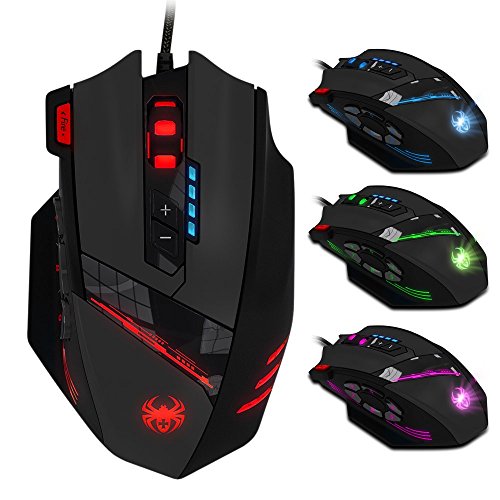
The AFUNTA C12 listing names 12 programmable buttons, laser tracking, and up to 8,000 DPI. It also describes four-level speed switching. Those basics may appeal to a buyer who wants a button-rich mouse without chasing a very high sensitivity ceiling. The C12 is a wired model, so it does not need a battery.
Its main draw is simple: assign useful actions to the extra buttons and keep them close to your thumb. The four speed levels may help you switch pointer speed for different tasks, though many players prefer one steady setting. Because the listing gives fewer details than some newer mice, check compatibility, software, and physical size before you order. A comfortable shape matters more than a long feature list.
Pros:
- 12 programmable buttons suit command-heavy games.
- Four listed speed levels give basic sensitivity choices.
- Wired connection needs no charging.
- Laser tracking is specified in the product name.
- 8,000 DPI is ample for many everyday gaming setups.
Cons:
- Its listed DPI ceiling is lower than several options here.
- Check the current listing for software and operating-system support.
- Fewer supplied details make it important to review size and fit.
What Amazon Buyers Are Saying
I cannot confirm current buyer feedback for the AFUNTA C12. Read recent verified reviews for comments on button programming, tracking, and long-term use. Give extra weight to reviews that explain the user’s computer, game, and hand size.
My Recommendation
The C12 is a basic option for shoppers who want 12 programmable buttons and do not need a very high DPI number. I would confirm current support and product details before choosing it over a better-documented mouse. I rate it 3.8/5 as a budget-minded, feature-led pick.
| Category | Rating |
|---|---|
| Programmable Buttons | 4.2/5 |
| Sensitivity Range | 3.8/5 |
| Ease of Use | 3.8/5 |
| Value | 4.0/5 |
| Overall Rating | 3.8/5 |
Redragon M901P-KS Wireless

The M901P-KS is a rechargeable wireless MMO mouse with 12 side buttons and 16 programmable buttons, according to its product title. It lists a maximum of 16,000 DPI, RGB lighting, and up to 70 hours of use. Those claims make it one of the more feature-rich wireless choices in this group. The side panel offers the command access MMO players often want.
Wireless play can help keep a desk clear, while a rechargeable design avoids buying disposable batteries. Battery life can vary with settings and use, so treat the listed 70-hour figure as a stated maximum rather than a promise for every session. Check the listing for connection modes, charging details, and software support. Also make sure the mouse shape feels right for your grip.
Pros:
- 12 side buttons offer a full MMO command grid.
- Product title lists 16 programmable buttons overall.
- Rechargeable wireless design reduces cable clutter.
- Listed runtime reaches up to 70 hours.
- RGB and 16,000 DPI add configuration choices.
Cons:
- Battery life depends on use and settings.
- Wireless mice need charging from time to time.
- Confirm the connection modes and included accessories on the listing.
What Amazon Buyers Are Saying
I cannot confirm the current Amazon review pattern for this model. Check recent reviews for reports on battery life, wireless connection, and the feel of the side keys. Those points can help you judge whether the stated features work well in your own kind of use.
My Recommendation
This is a strong candidate if you want a wireless 12-button gaming mouse with a rechargeable battery and many programmable controls. It combines useful MMO features, but the live listing should answer questions about connection and charging. I rate it 4.4/5 based on the feature set presented.
| Category | Rating |
|---|---|
| Wireless Features | 4.5/5 |
| Side-Button Layout | 4.5/5 |
| Battery Convenience | 4.2/5 |
| Value | 4.3/5 |
| Overall Rating | 4.4/5 |
Redragon M921 Wired MMO Mouse

The M921 is listed as a wired RGB MMO gaming mouse with remapping keys and 12,400 DPI. The product title does not state a 12-button side panel, so it is important to confirm its exact side-button count before buying it for that feature. Its remapping focus may still suit players who want to assign controls to mouse buttons. RGB adds a style option, but it does not affect gameplay.
This mouse is best treated as a comparison pick rather than an automatic 12-side-button choice. Check its current images and specifications for the number and layout of thumb keys. If the side panel matches your needs, compare its software and comfort with other Redragon models. If you need exactly 12 side buttons, do not rely on the word “MMO” alone.
Pros:
- Wired design avoids battery charging.
- Product title names remapping keys.
- RGB lighting offers a visual customization option.
- Listed 12,400 DPI gives multiple sensitivity possibilities.
- May suit players seeking programmable mouse controls.
Cons:
- The supplied product title does not confirm 12 side buttons.
- Check the current listing for its exact button layout.
- Wired connection may not suit a cable-free desk.
What Amazon Buyers Are Saying
I cannot verify recent Amazon buyer comments for this listing. Look for reviews that show or describe the button layout, and check whether users discuss software setup and comfort. Confirm the exact side-button count from the product page before relying on reviews alone.
My Recommendation
The M921 could be worth a look for remappable wired controls, but I would not call it a confirmed 12-side-button mouse based only on the details supplied. Verify the layout before purchase. I rate it 3.7/5 for this specific roundup because the key feature needs confirmation.
| Category | Rating |
|---|---|
| Remapping Potential | 4.0/5 |
| Wired Convenience | 4.2/5 |
| 12-Side-Button Certainty | 3.0/5 |
| Value | 3.8/5 |
| Overall Rating | 3.7/5 |
Redragon M901P-WS Wireless White

The M901P-WS is a white wireless MMO mouse with 12 side buttons, RGB, and a rechargeable design. Its product title lists 16 programmable buttons, 16,000 DPI, and up to 70 hours of use. The feature set resembles a full MMO control mouse, but the white finish gives it a distinct place in a light-colored setup. It suits players who want to avoid a cable without giving up a thumb grid.
The stated battery runtime can help with planning, but actual time may change with lighting and use. For a clean setup, check how the mouse charges and which connection options the current listing includes. White gear can also show dust or marks more clearly than darker gear, so consider how you care for your desk. Above all, confirm that the shape fits your hand.
Pros:
- 12 side buttons support many game commands.
- Wireless design keeps the desk less cluttered.
- Rechargeable battery avoids disposable cells.
- White finish suits a bright or matching setup.
- Listed 16 programmable buttons offer broad control.
Cons:
- White surfaces may need more frequent cleaning.
- Battery runtime varies with settings and use.
- Check connection and charging details before ordering.
What Amazon Buyers Are Saying
I cannot confirm current Amazon review themes for this white version. Read recent reviews for feedback on wireless use, battery life, and whether the side panel is easy to navigate. Also look for photos that show the finish after regular use, if available.
My Recommendation
Choose the M901P-WS if you want a white wireless mouse with a 12-button MMO layout. It appears to offer a useful mix of programmable keys and rechargeable power, but check current battery and connection details. I rate it 4.3/5 for its strong feature list and distinctive finish.
| Category | Rating |
|---|---|
| Side-Button Use | 4.5/5 |
| Wireless Convenience | 4.3/5 |
| Setup Match | 4.5/5 |
| Value | 4.1/5 |
| Overall Rating | 4.3/5 |
Redragon M908 Impact White

This white M908 Impact is a wired optical gaming mouse with 12 side buttons, an ergonomic design, and a listed maximum of 12,400 DPI. The title also names 18 programmable macro shortcuts. That gives it a clear MMO focus while offering a color choice for buyers who want a white mouse. Its wired link keeps charging out of the picture.
The 12-button grid can hold a range of commands, but it works best when each key has a clear role. The listed macro count gives extra room for custom actions, though you should check software support and setup steps on the current page. A wired model can be a good choice if you prefer a mouse that stays ready to use. Compare the shape with your grip and hand size before deciding.
Pros:
- 12 side buttons suit MMO hotkeys.
- Product title lists 18 programmable macro shortcuts.
- Wired connection needs no charging.
- White finish can match a light gaming setup.
- Listed 12,400 DPI offers sensitivity choices.
Cons:
- Wired use may add cable drag to some setups.
- White surfaces may show dirt more easily.
- Check software support and exact macro features on the listing.
What Amazon Buyers Are Saying
I cannot verify current Amazon buyer feedback for this specific listing. Check recent reviews for comments on the cable, comfort, side-button spacing, and white finish. Look for several similar reports before treating a single user’s experience as a general pattern.
My Recommendation
The white M908 is a good fit for players who want a wired 12-button mouse and a light color scheme. The listed macros and sensitivity range make it flexible, while the cable-free-from-battery design keeps upkeep simple. I rate it 4.3/5 as a capable MMO choice.
| Category | Rating |
|---|---|
| 12-Button Layout | 4.5/5 |
| Macro Features | 4.4/5 |
| Wired Convenience | 4.2/5 |
| Value | 4.2/5 |
| Overall Rating | 4.3/5 |
How to Choose the Best Gaming Mouse with 12 Side Buttons
The best gaming mouse with 12 side buttons should make commands easier to reach, not harder to press. Think about the games you play, the way you hold a mouse, and how much setup you want to do. Use these checks to narrow the field.
1. Test the Side-Button Layout
Look for a clear thumb grid with buttons you can tell apart by touch. If the keys sit too close together, you may hit the wrong spell in a tense moment. If they sit too far away, some may be hard to reach. A 12-button panel works best when your thumb can rest naturally and move across the keys without strain. If possible, compare product images and dimensions with a mouse you already find comfortable.
Also consider how you plan to assign the controls. You may use the front buttons for frequent actions and the rear buttons for less-used commands. A simple, repeatable layout makes the mouse easier to learn. Do not fill every key just because the mouse offers them.
2. Pick Wired or Wireless for Your Routine
A wired MMO mouse is ready without battery checks and can suit a desk where the cable does not get in the way. A wireless model offers a cleaner surface and more freedom to move, but it needs charging. Check the stated runtime, charge method, and connection details before you buy. If the product page does not list those facts clearly, do not assume them.
Think about the games you play and how long your sessions last. A mouse that runs out of power during a raid can be frustrating. If you go wireless, get into the habit of charging it when you are done. If you choose wired, consider whether a cable holder or a clear path across your desk would help.
3. Compare Software, Fit, and Real Value
Programmable buttons matter only if you can set them up in a way that works for your system and games. Check the maker’s software details, supported operating systems, and whether profiles can save your key maps. Make sure the product actually has the side-button count you want. Some gaming mice have many total buttons without offering 12 on the side.
Next, judge the shape and weight. A high DPI number does not mean a mouse will feel precise in your hand. Look for clear details on size, grip, and adjustable weight if those points matter to you. Finally, compare the price with the features you will use. Paying more for unused lighting or extra sensitivity may not improve your play.
Final Verdict: Which Should You Buy?
For a dedicated wired MMO setup, I recommend the Corsair Scimitar RGB Elite for its focused 12-button design. The Redragon M908 Impact is a strong alternative if you want a value-minded wired mouse with programmable controls.
If you prefer wireless play, consider the rechargeable Redragon M901P-KS and confirm its current battery and connection details. The best gaming mouse with 12 side buttons is the one that fits your hand and keeps your key commands easy to reach.
FAQs Of best gaming mouse with 12 side buttons
Is a 12-side-button mouse good for MMO games?
Yes. It can keep skills, items, and other commands close to your thumb. It may take practice to learn the layout.
Can I use a 12-button gaming mouse for everyday work?
Yes. You can map buttons to common tasks if the mouse software supports it. You do not have to use every button while browsing or working.
Should I choose a wired or wireless MMO mouse?
Choose wired if you want to avoid charging. Choose wireless if you value a clear desk and freedom from a cable, and check battery details first.
Does a higher DPI make a gaming mouse better?
Not by itself. DPI changes pointer speed, but comfort, tracking, and a setting that suits your play style matter more.
How can I avoid pressing the wrong side button?
Start with a few key bindings and learn their positions by touch. Add more commands once your thumb can find the first ones without looking.