For precise aim, the SteelSeries QcK XXL is my top gaming mouse pad for accuracy.
Low-sensitivity players know the problem: a small pad can stop a smooth swipe, while a rough desk can make your mouse skip. The right surface gives your sensor a steady path and helps each movement feel repeatable. I reviewed nine popular cloth and desk-size pads for glide, control, stability, comfort, and value. My picks suit FPS games, strategy titles, work, and long sessions. I also considered size, edge design, base grip, cleaning needs, and the way each pad fits a real desk.
See the differences between my top picks at a glance.
SteelSeries QcK XXL Gaming Mouse Pad

The SteelSeries QcK XXL gives a low-sensitivity mouse user room to move. Its broad cloth surface lets the mouse travel across the desk without reaching the hard edge of a small pad. That matters in FPS games, where a wide arm sweep can help you turn without lifting the mouse. The black finish also suits most gaming desks.
I like this pad as an accuracy-first choice because it keeps the keyboard and mouse on one shared surface. A stable base helps reduce unwanted pad movement during quick flicks. The cloth design also gives a more controlled feel than many hard plastic pads. Like most fabric pads, it needs regular cleaning and a flat setup for the best result.
Pros:
- Very large area for low-sensitivity aim
- Cloth surface supports controlled movement
- Works under both keyboard and mouse
- Black design hides some daily desk marks
- Good fit for FPS and tactical games
- Helps reduce the need to lift the mouse
Cons:
- Needs a large, clear desk
- Cloth can collect dust and skin oils
- May arrive with folds that need time to relax
What Amazon Buyers Are Saying
Amazon buyers commonly focus on the generous size, soft cloth feel, and useful desk coverage. Many shoppers choose it when a regular pad feels too cramped. Some buyers note that a rolled pad may need time to lie flat. Others mention normal fabric wear or the need to clean the surface after long use. Check current customer photos and the latest listing details before buying.
My Recommendation
I recommend the QcK XXL for players who use low sensitivity or want one pad for the whole control area. It is my strongest overall pick for the best gaming mouse pad for accuracy, provided your desk has enough space.
Logitech G240 Cloth Gaming Mouse Pad
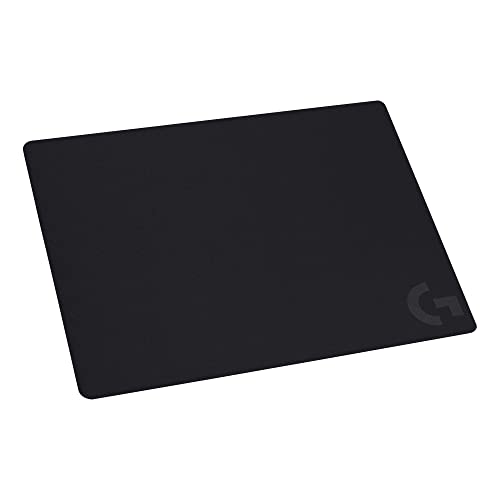
The Logitech G240 is a simple medium-size pad for players who want a clean and familiar cloth feel. Its compact footprint works well on a smaller desk or beside a laptop. The surface offers a balanced mix of glide and control for everyday mouse use. It also leaves more room for a keyboard, speakers, or other desk tools.
This pad makes sense for players who do not use very low sensitivity. It can support precise tracking without taking over the desk. The thin design may also feel less intrusive under the wrist. However, its medium size limits large arm movements, so players with broad swipes may prefer an XL or XXL option.
Pros:
- Compact size suits smaller desks
- Balanced cloth feel for aim and work
- Easy to position beside a laptop
- Leaves room for other desk items
- Simple black design fits most setups
- Good starter pad for PC gaming
Cons:
- Less room for low-sensitivity players
- Thin profile offers limited wrist cushioning
- May feel too small for keyboard-and-mouse coverage
What Amazon Buyers Are Saying
Customer feedback often highlights the pad’s clean look, useful size, and predictable cloth surface. Buyers who have limited desk space tend to value its compact layout. Some reviews point out that the pad does not offer the sweeping area of a desk mat. A few buyers also discuss edge lift after shipping, which usually depends on how the pad was packed and stored. Read recent reviews for the current product batch.
My Recommendation
The G240 is a smart choice for medium or high sensitivity and smaller work areas. I would not choose it for wide arm aiming, but it offers strong everyday value for controlled mouse movement.
Razer Gigantus V2 XXL Gaming Mouse Pad

The Razer Gigantus V2 XXL targets gamers who want a large cloth play area. Its size gives the mouse plenty of travel for broad turns and long tracking lines. The fabric surface feels soft under the hand and works well for both gaming and normal desk use. Its dark design also blends with a wide range of Razer and non-Razer setups.
I see this as a strong alternative to the QcK XXL. It offers generous coverage and a comfortable base for long sessions. The non-slip underside helps the pad stay in place when the user makes fast movements. Before ordering, measure your desk because an XXL pad can cover cable space and reduce room for other items.
Pros:
- Large surface supports wide mouse swipes
- Soft cloth helps long-session comfort
- Non-slip base supports stable play
- Useful under a keyboard and mouse
- Works for gaming and office tasks
- Good option for low mouse sensitivity
Cons:
- XXL format needs careful desk measurement
- Fabric requires routine care
- May take time to flatten after delivery
What Amazon Buyers Are Saying
Amazon shoppers often praise the wide coverage and comfortable surface. Many buyers like placing their keyboard and mouse on one continuous mat. Some customers report that the pad stays steady during play, while others mention that the initial rolled shape can take time to settle. As with other fabric mats, reviews also mention dust and long-term edge wear. Current listing photos can help you judge the fit on your desk.
My Recommendation
I recommend the Gigantus V2 XXL for gamers who want room, comfort, and a stable cloth surface. It is a close rival to my top pick and a good buy when its size matches your desk.
Logitech G840 XL Cloth Gaming Mouse Pad

The Logitech G840 XL uses a wide layout that gives a keyboard and mouse a shared home. Its 900 by 400 millimeter format suits many full-size desk setups. A cloth surface can provide a measured glide that helps steady small aim corrections. The extra width also keeps the mouse from sliding onto a bare desk during a long turn.
This pad is a practical middle ground between a medium pad and a huge XXL mat. It offers plenty of horizontal room without covering as much depth as some larger desk mats. That layout works well for users with limited front-to-back desk space. I would still check the listed measurements before buying, since desk depth varies widely.
Pros:
- Wide layout fits keyboard and mouse
- Good room for horizontal tracking
- Cloth surface feels controlled
- Useful for gaming and work
- Suitable for many low-sensitivity users
- Balanced alternative to a full XXL mat
Cons:
- Needs more space than a medium pad
- May not provide enough depth for very broad swipes
- Fabric can show stains without care
What Amazon Buyers Are Saying
Buyers commonly mention the useful width and the clean, shared area for a keyboard and mouse. Some prefer this size because it fills the desk without covering too much depth. Other reviews note that the pad may move if the desk surface is dusty or uneven. A few customers discuss the time needed for the material to flatten after shipping. I suggest checking recent reviews for fit and setup tips.
My Recommendation
The G840 XL is worth buying for players who want a wide, neat setup without moving to the largest desk mat size. It is especially appealing for keyboard-and-mouse users with moderate desk depth.
SteelSeries QcK Medium Gaming Mousepad

The SteelSeries QcK Medium keeps the familiar QcK cloth approach in a smaller footprint. It works well for players who use higher sensitivity or make short wrist movements. The pad gives the mouse a dedicated surface without using much desk space. Its plain black look also makes it easy to match with almost any setup.
I like the QcK Medium for dorm rooms, compact workstations, and secondary gaming spaces. It offers enough area for controlled play while leaving room for a full keyboard beside it. The main trade-off is clear: large arm movements will reach the edge sooner. If you often lower your sensitivity, choose a larger model instead.
Pros:
- Fits compact desks and small work areas
- Controlled cloth surface for precise movements
- Simple design suits many setups
- Easy to move between workstations
- Good match for high-sensitivity play
- Established QcK product family
Cons:
- Limited space for low-sensitivity aiming
- Does not cover the keyboard area
- May feel cramped for arm aim
What Amazon Buyers Are Saying
Amazon buyers often like the compact size and familiar cloth feel. Many choose it for a small desk, office, or laptop station. Some customers say it works best with wrist-based movement rather than broad arm sweeps. Reviews may also mention edge curling after delivery or normal fabric wear over time. Look at current buyer images if desk fit matters to you.
My Recommendation
I recommend this pad for compact desks and players who use medium or high sensitivity. It is not my best gaming mouse pad for accuracy overall, but it is a dependable small-space option.
Kanagawa Large Gaming Desk Mat

The Kanagawa desk mat adds a Japanese sea-wave design to a broad mouse and keyboard area. Its listed 31.5 by 11.8 inch format suits a standard gaming or work desk. The cloth-style top gives the mouse a more even path than a bare tabletop. Its main appeal is the mix of daily function and visual style.
This mat can help users keep the keyboard and mouse in one stable zone. The non-slip base is useful when quick movements place force on the pad. The design may appeal to buyers who want more character than a plain black surface. Still, buyers should judge the print, color, and exact size from the current listing because style is personal.
Pros:
- Wide area for keyboard and mouse
- Distinctive Japanese wave artwork
- Non-slip base supports stable use
- Works for gaming, office, and home desks
- Helps protect the desk surface
- Good choice for themed setups
Cons:
- Artwork may not suit every setup
- Less room than a full XXL pad
- Printed cloth needs careful cleaning
What Amazon Buyers Are Saying
Amazon shoppers tend to discuss the artwork, desk coverage, and general feel. Buyers who want a decorative desk mat often enjoy the wave theme. Some reviews focus on whether the actual color matches the listing image. Others mention edge shape, flatness after shipping, or base grip. Since design taste varies, I suggest viewing recent customer photos before ordering.
My Recommendation
This mat is a good value pick for users who want a broad work surface with a strong visual theme. It can support accurate play, but competitive players may prefer the more established control feel of the QcK or G240.
Large Waterproof Gaming Mouse Pad

This large gaming mouse pad focuses on practical desk coverage and easy care. Its waterproof surface can make small spills easier to manage than on untreated fabric. The stitched edges aim to help the pad hold its shape during regular use. Its extra-large layout gives the mouse more room than a basic medium pad.
I see this as a useful choice for shared home desks, school setups, and casual gaming stations. A water-resistant top can reduce stress around drinks, though no mouse pad should be treated as fully spill-proof without checking its care instructions. The surface feel may differ from a premium control cloth pad. Buyers who want a very specific glide should read current reviews and product details closely.
Pros:
- Large area supports broad mouse movement
- Water-resistant design helps with small spills
- Stitched edges may support long-term use
- Works under a keyboard and mouse
- Useful for gaming and general desk work
- Practical option for busy home spaces
Cons:
- Surface glide may not suit every player
- Large size needs enough desk depth
- Water resistance does not mean full waterproof protection
What Amazon Buyers Are Saying
Customer comments commonly focus on the large size, stitched edges, and ease of wiping the surface. Many buyers like using it as a general desk mat. Some reviews compare the glide with more established gaming brands. Others mention the way the pad arrives rolled or the time needed to flatten it. Because surface preference is personal, pay close attention to recent comments about tracking and comfort.
My Recommendation
I recommend this pad for buyers who value easy care and broad desk coverage. It is a sensible casual-gaming choice, but serious aim players should compare its surface feel with a control-focused cloth pad.
SteelSeries QcK Cloth Gaming Mouse Pad White

The white SteelSeries QcK offers the same simple cloth-pad idea in a brighter desk style. A smooth, consistent mouse path helps the user make small corrections with less distraction. The light color can open up a dark setup and pair well with white keyboards or cases. It is a clean choice for people who want performance without a black desk mat.
White fabric does need more care than black fabric. Dust, food marks, and skin oils can stand out sooner, so I would keep this pad away from messy drinks and clean it with care. Its accuracy depends on the same key basics as any cloth pad: a flat surface, a steady base, and a sensor set up well. Confirm the exact size before purchase because the product name alone does not tell the full desk fit.
Pros:
- Bright color suits light gaming setups
- Cloth surface supports controlled tracking
- Easy to pair with white accessories
- Good for gaming and office use
- Simple design avoids visual clutter
- Familiar QcK-style approach
Cons:
- White fabric shows marks more clearly
- Needs more frequent cleaning
- Exact size should be checked before ordering
What Amazon Buyers Are Saying
Amazon buyers often praise the clean white look and smooth daily feel. Many choose it to match a bright desk theme. Common concerns include visible dirt, cleaning, and the way the pad lies flat after delivery. Some shoppers also compare its size with their old QcK pad. Review photos can give a better sense of the current color and finish.
My Recommendation
This QcK is worth considering when appearance matters and you can maintain a light fabric surface. It offers good control, but the black QcK models are easier to keep looking clean.
How to Choose the Best Gaming Mouse Pad for Accuracy
The best gaming mouse pad for accuracy should match your mouse settings, desk, and hand movement. A costly pad cannot fix poor size choice or a loose base. Focus on the points below before you order.
1. Match the Pad Size to Your Sensitivity
Start with your in-game sensitivity and aiming style. Low-sensitivity players often move the whole arm, so they need a wide surface such as the QcK XXL, Gigantus V2 XXL, or G840 XL. Medium and high-sensitivity users may prefer a compact pad such as the Logitech G240 or QcK Medium. Also measure your desk. A pad that blocks the monitor stand, cable channel, or speakers will feel less useful.
2. Choose Control, Speed, and Surface Feel
Cloth pads often give a controlled feel that helps small aim corrections. A smoother pad can let the mouse glide faster, while a more textured pad may feel slower and more planted. Neither choice suits every player. If you play tactical FPS games, control may matter most. If you track fast targets or switch often between games, a balanced surface can be easier to live with. Keep the mouse feet clean, since dirt can change the glide.
3. Check Base Grip, Edges, Care, and Value
A pad should stay in place when you flick the mouse. A rubber or non-slip base helps, but dust under the pad can reduce grip. Look for edges that feel comfortable against your wrist and do not distract you during play. Waterproof or water-resistant tops can help with small spills, while white cloth needs more care. Finally, compare usable area and build quality rather than choosing only by brand or price.
Final Verdict: Which Should You Buy?
The SteelSeries QcK XXL is my top choice for the best gaming mouse pad for accuracy. It gives low-sensitivity players broad room, steady cloth control, and useful keyboard coverage.
Choose the Logitech G240 for a small desk, or the G840 XL for a wide but moderate layout. Measure first, then pick the surface that matches your aim style.
FAQs Of best gaming mouse pad for accuracy
What size mouse pad is best for accurate FPS aim?
An XL or XXL pad usually suits low-sensitivity FPS aim because it gives your arm more room. Higher-sensitivity players can use a medium pad.
Is cloth or hard material better for mouse accuracy?
Cloth works well for controlled aim and small corrections. Hard pads can feel faster. The better choice depends on your preferred glide and stopping control.
Is the SteelSeries QcK XXL good for low sensitivity?
Yes. Its broad cloth area gives low-sensitivity players room for wide swipes and reduces the need to lift the mouse.
How do I keep a gaming mouse pad accurate?
Keep the pad flat and clean. Remove dust, avoid spills, and clean the surface according to the maker’s care guidance.
Can a mouse pad improve gaming accuracy?
A good pad cannot replace practice, but it can provide a steady, repeatable surface. That can make mouse movement feel more consistent.