The SteelSeries QcK XXL is my top pick for smooth, steady FPS aim and full-desk control.
You know the problem: a fast flick reaches the edge of the pad, or a rough seam changes your aim during a close fight. The best gaming mouse pad for FPS should give your mouse a smooth path, keep its grip on the desk, and match your sensitivity. I tested the key traits that matter most, including surface feel, size, stopping control, edge quality, and daily comfort. Below, I compare seven strong options, from simple cloth pads to hard glass models, so you can choose with less guesswork.
See the differences between my top picks at a glance.
| Mouse Pad | Surface | Size or Format | Best For | Main Trade-Off | Buy |
|---|---|---|---|---|---|
| SteelSeries QcK XXL | Cloth | XXL desk pad | Low-sensitivity FPS play | Needs a large desk | View on Amazon |
| Logitech G440 | Hard plastic | 340 × 280 mm | Fast, direct movement | Less soft than cloth | View on Amazon |
| Logitech G240 | Cloth | 340 × 280 mm | Simple FPS setups | Limited room for wide swipes | View on Amazon |
| Razer Gigantus V2 | Cloth | Large | Control-focused aim | May feel slow to speed players | View on Amazon |
| Glass Gaming Mouse Pad | Tempered glass | 15.7 × 11.8 in. | High speed and easy cleaning | Less forgiving on dust | View on Amazon |
| Large Waterproof Mouse Pad | Cloth | Extra large | Full-desk coverage | Large footprint | View on Amazon |
| SOLAKAKA EP9 | Micro-woven cloth | 350 × 300 mm | Balanced FPS control | Not an XXL pad | View on Amazon |
SteelSeries QcK XXL Gaming Mouse Pad

The SteelSeries QcK XXL is the safest choice for most FPS players who use low or medium sensitivity. Its wide cloth surface gives your mouse room for long swipes. That matters in games where you need to turn fast without lifting the mouse. The black design also fits nearly any desk setup.
The cloth surface offers a steady mix of glide and control. It does not feel as quick as a hard pad, but it gives more stopping feedback when you track a target. The XXL layout can also protect the desk from small bumps and scratches. Before buying, measure your desk because this size needs open space.
Pros:
- Very large area for low-sensitivity aim
- Soft cloth feels comfortable under the wrist
- Good balance of glide and stopping control
- Works well with modern optical and laser mice
- Black color suits most gaming desks
- Useful as a keyboard and mouse desk mat
Cons:
- May be too large for a small desk
- Cloth can collect dust and skin oil
- Can feel slower than hard or glass pads
What Amazon Buyers Are Saying
Buyer feedback commonly focuses on the generous size, smooth cloth feel, and stable desk coverage. Many owners like having both the keyboard and mouse on one surface. Some buyers mention that the pad may arrive with rolled edges or need time to lie flat. Cloth care and desk space also appear as common points to consider.
My Recommendation
I recommend the QcK XXL as the best gaming mouse pad for FPS if you want broad movement and a familiar cloth feel. It is a strong match for Counter-Strike 2, Valorant, Apex Legends, and similar games. It is worth buying when your desk can handle the size.
| Category | Rating |
|---|---|
| Surface control | 4.7/5 |
| Size for FPS | 5/5 |
| Comfort | 4.6/5 |
| Desk stability | 4.4/5 |
| Overall Rating | 4.7/5 |
Logitech G440 Hard Gaming Mouse Pad

The Logitech G440 takes a different approach from a cloth pad. Its hard surface gives the mouse a quick, direct glide with little fabric drag. The 340 by 280 mm format fits a normal desk and works well for players who keep their sensitivity higher. It also gives a consistent feel across the main tracking area.
A hard pad can help quick flicks feel clean and easy. It does not compress under your hand, so the surface stays even during long sessions. The trade-off is a firmer wrist feel and less natural stopping friction than cloth. The smaller area may also force low-sensitivity players to lift the mouse more often.
Pros:
- Fast glide for quick flick shots
- Consistent hard surface across the pad
- Compact size fits many desks
- Easy to wipe clean
- Does not bunch like thin cloth can
- Pairs well with high-sensitivity settings
Cons:
- Hard surface feels less soft under the wrist
- Smaller area limits very wide swipes
- Surface noise may be higher with some mouse feet
What Amazon Buyers Are Saying
Reviews often praise the fast, smooth movement and the firm build. Buyers who prefer hard mouse pads tend to like the consistent glide and easy cleaning. Common concerns include the smaller size for low-sensitivity play and a less cushioned feel. Some users also note that surface wear can depend on mouse feet and desk conditions.
My Recommendation
The G440 is worth buying if you prefer speed, a firm surface, and a compact footprint. I would choose it for high-sensitivity FPS play or a desk with limited room. It is not my first choice for large arm movements.
| Category | Rating |
|---|---|
| Glide speed | 4.8/5 |
| Tracking consistency | 4.6/5 |
| Comfort | 3.9/5 |
| Size flexibility | 3.9/5 |
| Overall Rating | 4.3/5 |
Logitech G240 Cloth Gaming Mouse Pad
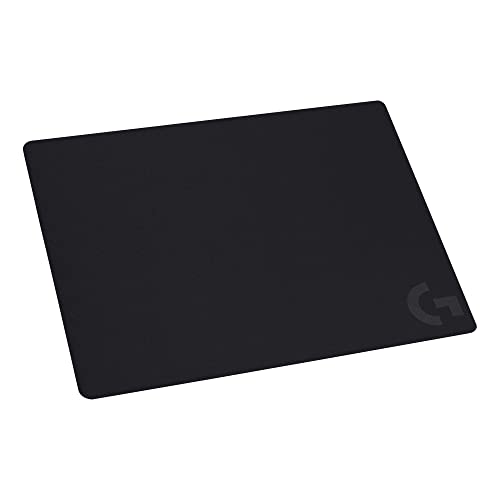
The Logitech G240 is a simple cloth pad for players who want a known, low-risk setup. Its 340 by 280 mm size gives enough room for normal mouse use without taking over the desk. The thin profile keeps the edge close to the desk. It also makes the pad easy to carry to a tournament, office, or second setup.
This pad has a controlled cloth feel that suits aim practice and daily FPS play. It will not offer the extra space of an XXL pad, so low-sensitivity users may need a larger model. The thin build can also expose uneven desks more than a thick pad. Still, its simple design makes it easy to pair with almost any gaming mouse.
Pros:
- Balanced cloth surface for steady aim
- Compact size suits smaller desks
- Thin profile creates a low edge
- Light and easy to transport
- Simple black design avoids desk clutter
- Good starter option for FPS players
Cons:
- Not large enough for every low-sensitivity player
- Thin construction offers limited desk cushioning
- Cloth surface needs regular cleaning
What Amazon Buyers Are Saying
Amazon buyers often describe the G240 as smooth, simple, and easy to use. Its moderate size and low price appeal to people who want a basic cloth surface. The most likely complaints concern limited room for large arm movements and edge lift after shipping. Long-term results may vary with cleaning habits and desk use.
My Recommendation
I recommend the G240 for a compact FPS setup, a spare pad, or a new player who does not yet know which surface speed they prefer. It offers solid value but lacks the room needed for extreme low sensitivity.
| Category | Rating |
|---|---|
| Aim control | 4.3/5 |
| Compact use | 4.7/5 |
| Comfort | 4.1/5 |
| Portability | 4.7/5 |
| Overall Rating | 4.4/5 |
Razer Gigantus V2 Large Gaming Mouse Pad
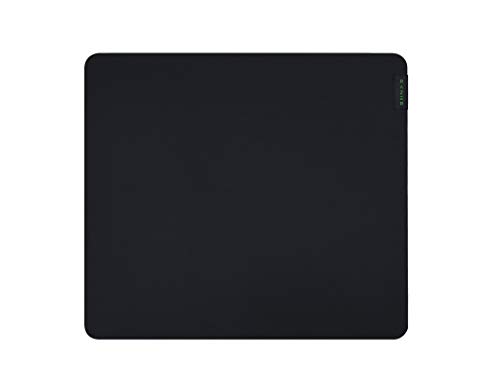
The Razer Gigantus V2 Large targets players who want more room and a control-first cloth surface. Its thick build helps smooth out small desk flaws and gives the wrist a softer landing. The large format leaves more room for tracking and recoil control. Its plain black finish also keeps the look clean.
The woven cloth surface feels designed for measured movement rather than pure speed. That can help when you need to stop the mouse on a small target. Some players may find it too slow at very low friction settings, especially after using a hard pad. I like it for aim routines that reward careful tracking and repeatable stops.
Pros:
- Large area for broad mouse movement
- Thick profile adds wrist comfort
- Control-focused feel suits tracking practice
- Helps cover small desk imperfections
- Non-slip base supports steady play
- Clean black design fits most setups
Cons:
- May feel slow for speed-focused players
- Large size needs proper desk space
- Cloth can hold dust and moisture
What Amazon Buyers Are Saying
Buyer comments commonly highlight the generous surface, soft thickness, and stable base. Many users like the extra room for a keyboard and mouse or for wide aim movements. Some feedback points to a slow-to-medium glide rather than a fast one. Buyers also mention that a rolled pad may need time and weight to flatten.
My Recommendation
The Gigantus V2 Large is a good buy for control-focused FPS players who want more room than a compact pad provides. I would pick it over a thin pad when wrist comfort and stopping control matter most. Speed players should consider the Logitech G440 or glass option instead.
| Category | Rating |
|---|---|
| Stopping control | 4.7/5 |
| Comfort | 4.6/5 |
| Tracking area | 4.5/5 |
| Glide speed | 4.1/5 |
| Overall Rating | 4.5/5 |
Glass Gaming Mouse Pad for FPS

This glass gaming mouse pad offers a very different feel from fabric. Its micro-etched glass surface aims for fast, smooth movement with low drag. The listed 15.7 by 11.8 inch size gives useful room without reaching full desk-pad dimensions. The hard surface also makes spills and routine wipe-downs easier to manage.
Glass can feel excellent for rapid flicks and fast target transitions. It also keeps its shape and does not develop cloth folds. However, dust and grit can affect the glide, so I would clean both the pad and mouse feet often. The hard top may feel cold or firm under the wrist, and some users may prefer a wrist rest.
Pros:
- Fast glide for quick FPS movement
- Micro-etched surface supports controlled tracking
- Easy to wipe after spills
- Does not crease or curl like cloth
- Modern, clean appearance
- Useful middle size for many desks
Cons:
- Dust can change the feel until cleaned
- Hard surface offers less wrist softness
- May create more sound with some mouse feet
- Requires careful handling during setup
What Amazon Buyers Are Saying
Feedback for glass pads often centers on the very smooth glide and easy cleaning. Buyers who enjoy fast surfaces tend to value the consistent feel and firm build. Common concerns include dust, wrist comfort, and the need to keep mouse feet clean. As with any glass product, buyers also pay close attention to packaging and safe placement.
My Recommendation
I recommend this glass pad for experienced players who know they prefer speed and a hard surface. It can be an excellent alternative to cloth, but it asks for more care. If you want a soft, quiet, forgiving pad, choose the SteelSeries or Razer instead.
| Category | Rating |
|---|---|
| Glide speed | 4.9/5 |
| Surface consistency | 4.5/5 |
| Cleaning ease | 4.8/5 |
| Wrist comfort | 3.8/5 |
| Overall Rating | 4.4/5 |
Large Waterproof Gaming Mouse Pad

This large gaming mouse pad is made for players who want full-desk coverage at a practical price. The waterproof design helps protect the cloth surface from common drink spills. Stitched edges aim to reduce fraying around the border. The broad layout also gives a keyboard and mouse a shared surface.
A large pad helps FPS players keep the mouse in motion during wide turns. It can also make the desk feel more stable because the keyboard sits on the same surface. The main issue is fit: a big mat can hang over a narrow desk or block cable channels. Check the listed dimensions before ordering.
Pros:
- Wide area for low-sensitivity FPS aim
- Water-resistant surface is easier to manage
- Stitched edges help limit fraying
- Keyboard and mouse can share one mat
- Soft cloth supports long sessions
- Good choice for full-desk coverage
Cons:
- May overwhelm a small workstation
- Waterproof coating may change the cloth feel
- Large mats can take longer to flatten
What Amazon Buyers Are Saying
Customer feedback for large waterproof mats often praises desk coverage, the soft feel, and the convenience of placing the keyboard on the same surface. Buyers also tend to value stitched borders when they use the pad every day. Common concerns include shipping folds, exact size, and whether the coating feels as smooth as a standard cloth pad. These points make desk measurement and surface preference important.
My Recommendation
This pad is worth considering when you want a wide, protective desk mat for FPS and general computer use. It is a practical value choice, though it may not offer the refined surface feel of a premium esports pad. I would choose it for coverage and spill resistance first.
| Category | Rating |
|---|---|
| Desk coverage | 4.8/5 |
| Spill protection | 4.6/5 |
| Edge durability | 4.3/5 |
| FPS surface feel | 4.1/5 |
| Overall Rating | 4.4/5 |
SOLAKAKA EP9 FPS Gaming Mouse Pad

The SOLAKAKA EP9 is a focused FPS pad with a 4 mm build and a 350 by 300 mm footprint. Its micro-woven surface aims to balance speed with precision. The stitched edge gives the border extra protection during repeated arm movement. Its non-slip rubber base helps the pad stay in place during fast turns.
This format gives more room than a compact 340 by 280 mm pad without becoming a full desk mat. That makes it a useful middle choice for players with medium desks. The thicker profile can feel comfortable, but some users may prefer a thinner edge. It also has less room than an XXL model for very low sensitivity.
Pros:
- Balanced size for many FPS setups
- Micro-woven surface supports precise movement
- 4 mm thickness adds cushioning
- Stitched edge helps resist daily wear
- Rubber base supports stable play
- Works for FPS and other game genres
Cons:
- Not large enough for every arm aimer
- Thicker edge may need wrist adjustment
- Less established than major-brand alternatives
What Amazon Buyers Are Saying
Buyer feedback commonly highlights the useful middle size, thick feel, and secure rubber base. Players who want a dedicated FPS surface often look for the balance between glide and control described by this model. Potential concerns include the time needed to flatten after shipping and the fact that long-term edge wear depends on use. Check current buyer photos and recent reviews before ordering.
My Recommendation
The EP9 is a sensible choice when you want a thick, medium-size FPS pad with stitched edges. It offers more movement space than a compact pad and takes less desk room than an XXL model. I would rate it as a strong value option for a focused gaming station.
| Category | Rating |
|---|---|
| FPS control | 4.5/5 |
| Size balance | 4.5/5 |
| Edge protection | 4.4/5 |
| Base stability | 4.4/5 |
| Overall Rating | 4.5/5 |
How to Choose the Best Gaming Mouse Pad for FPS
Choosing the best gaming mouse pad for FPS starts with your aim style, desk space, and mouse sensitivity. No single surface wins for every player. A good pad should let you move freely, stop the mouse with control, and stay stable during a long match. Use these practical checks before you buy.
1. Match the Pad to Your Sensitivity
Low-sensitivity players move the mouse with the whole arm. They need a large or XXL pad so the mouse does not hit the edge during a turn. A cloth pad such as the SteelSeries QcK XXL or Razer Gigantus V2 Large works well for this style.
High-sensitivity players use smaller wrist movements. They can choose a compact pad such as the Logitech G240 or G440. A hard or glass surface may also feel better because it reduces drag. If you are not sure, measure the space used during a full in-game turn.
2. Choose Speed, Control, or a Balanced Surface
Fast pads help the mouse move with less effort. Glass and hard plastic often feel quick and direct. They suit players who like rapid flicks, fast target changes, and a firm surface.
Control pads add more friction. They make it easier to slow and stop the mouse on a small target. Cloth models often provide this feel, but cloth speed varies by weave, coating, age, and humidity. A balanced pad sits between these two types and suits players who want both smooth tracking and reliable stopping.
3. Check Thickness, Base Grip, and Edge Quality
Thickness changes comfort and desk feel. Thin pads keep the edge low, while thicker pads can cover small desk flaws and cushion the wrist. A 4 mm pad may feel soft, but it can also create a more noticeable edge than a 1 mm model.
The base should hold the pad still when you make a hard swipe. Rubber bases usually work well on clean, flat desks. Stitched edges can help protect cloth from fraying. Also check if the pad fits below your keyboard, leaves room for cables, and allows you to sit comfortably.
Final Verdict: Which Should You Buy?
For most players, the SteelSeries QcK XXL is the best gaming mouse pad for FPS because it offers space, comfort, and steady control. Choose the Logitech G440 for speed, the Razer for extra stopping control, or the glass pad for a fast hard surface.
Measure your desk, match the pad to your sensitivity, and keep the surface clean. The right gaming mouse pad can make aim feel more consistent without changing your mouse or settings.
FAQs Of best gaming mouse pad for FPS
What size mouse pad is best for FPS games?
Large or XXL pads suit low-sensitivity players who use wide arm movements. Compact pads work better for high sensitivity and small desks.
Is a cloth or hard mouse pad better for FPS?
Cloth usually offers more stopping control and comfort. Hard pads often provide faster, more direct movement. Your sensitivity and aim style should decide.
Is the SteelSeries QcK XXL good for competitive FPS?
Yes. Its large cloth surface gives low-sensitivity players plenty of room for tracking, flicks, and full turns.
Are glass mouse pads good for FPS gaming?
Glass pads can be excellent for fast aim and easy cleaning. They need regular dust removal and may feel less comfortable than cloth.
How do I stop my gaming mouse pad from moving?
Use a clean, flat desk and press the rubber base down fully. Remove dust from the desk and pad base if slipping continues.